
LIMAP
The documentations on brief tutorials and APIs are available here.
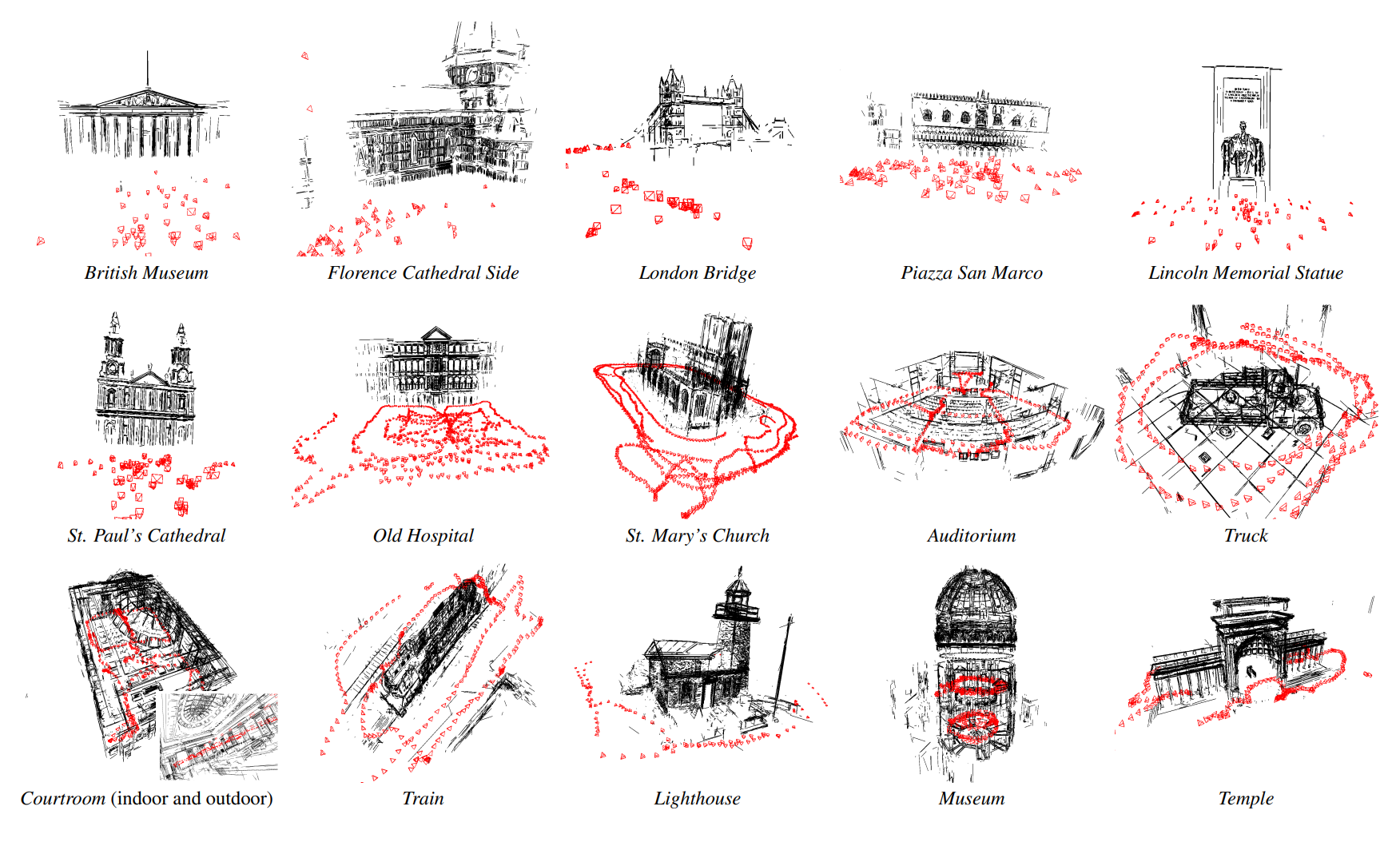
LIMAP is a toolbox for holistic 3D mapping, localization and structure from motion (SfM) with structured features. Alongside keypoints, it treats lines, vanishing points, planes, parametric primitives (spheres, cylinders, ellipsoids, cuboids, cones) and the wireframe connecting them as first-class citizens of the reconstruction, optimized jointly with the camera poses. It grew out of the highlight paper 3D Line Mapping Revisited at CVPR 2023 in Vancouver, Canada, with the SfM pipeline introduced and further improved in subsequent papers at ECCV 2024 and ECCV 2026 (please refer to the Citations section for details). Contributors to this project are from the Computer Vision and Geometry Group at ETH Zurich.
Three pipelines are provided:
- Visual mapping / triangulation — build a holistic 3D model from images whose camera poses are already known, for instance from an existing COLMAP reconstruction.
- Visual localization — estimate the camera pose of a query image with respect to an existing 3D model, using point and line correspondences jointly. Both calibrated and uncalibrated queries are supported.
- Holistic incremental SfM — recover the camera poses and the 3D model together from images alone, with nothing given as input. Calibrated and uncalibrated inputs are both supported.
[!NOTE] Starting from LIMAP 2.0.0, the toolbox is fully compatible with the COLMAP ecosystem (version 4.2.0 as of Sep 1, 2026): a reconstruction is written as a plain COLMAP model, with the line, group and wireframe structures alongside it under
structures/, so any output can be opened in COLMAP GUI and read withpycolmap. The unification runs deeper than the file format: the point side of the pipeline comes directly from COLMAP, consolidating with its scene types, database, estimators, correspondence graph, and various incremental mapper logic, with LIMAP adding the structures on top instead of maintaining a parallel implementation. Advances on the COLMAP side therefore carry over directly: multi-camera rig support, improved two-view geometry estimation, etc.
The line detectors, matchers, vanishing point estimators and plane detectors are abstracted behind registries to ensure flexibility to support recent advances and future development.

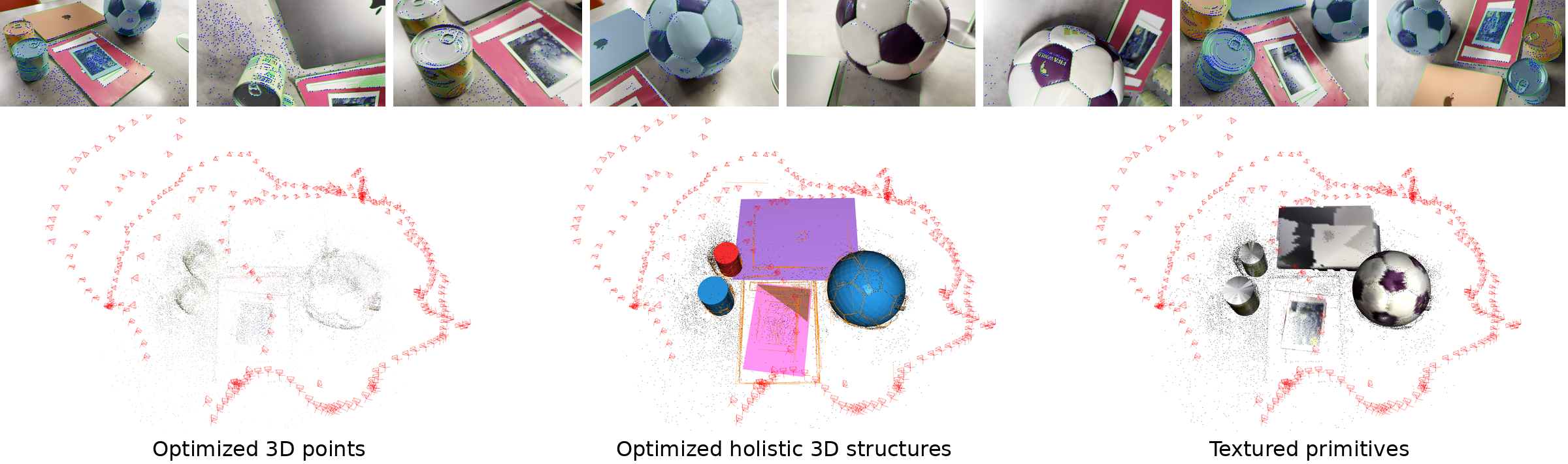
From multi-view images, LIMAP jointly optimizes the features, the camera poses and the structural constraints.
This yields a sparse 3D reconstruction with geometric primitives (planes, spheres, cylinders) beyond point clouds.
Installation
LIMAP has been tested on Linux, macOS and Windows.
Dependencies:
- Python 3.10/11/12/13
- CMake >= 3.17
- CUDA (for deep learning based detectors/matchers)
- System dependencies [Per-platform guide]
Note that one cannot visualize reconstructions on Python 3.13, as there are no published wheels available for open3d and our 3D viewer depends on it.
Starting from 2.0.0, each official release is published to PyPI as
pylimap, which installs the compiled core
library without building it:
python -m pip install pylimap
The distribution is named pylimap; the import name is still limap. A wheel
provides the Core only mode described below, so the extras and the
git-sourced detectors remain opt-in on top.
To build and install the LIMAP Python package from source:
python -m pip install -r requirements.txt   # git-sourced detectors and matchers
python -m pip install -Ive ".[all]"
To double check if the package is successfully installed:
python -c "import limap; print(limap.__version__)"
For faster incremental rebuilds during development (reuses the CMake build directory instead of rebuilding from scratch):
python -m pip install -Cbuild-dir=./pylimap_build --no-build-isolation -Ive .
Other install modes — library-only, and developer setup
Core only — the compiled library and its Python API, and nothing else:
python -m pip install -Ive .
This gives you the geometry types, reading and writing of reconstructions, and
the estimators and bundle adjustment, all operating on data you already have.
It does not let you reconstruct from images, which needs hloc, nor detect
2D lines, nor visualize anything. This is also the mode a published wheel
provides — the extras and the git-sourced detectors are always opt-in on top.
Developer — adds pytest and the pinned formatters on top of the full install:
python -m pip install -r requirements.txt
python -m pip install -Ive ".[all,dev]"
Extras, and what needs a separate install
| extra | contents |
|---|---|
viz |
matplotlib, seaborn, open3d — needed by limap.visualize |
line2d |
einops, scikit-image, pillow — support code for the 2D line detectors |
dev |
pytest, ruff, clang-format |
all |
viz + line2d |
- Running a reconstruction needs
hloc, which comes fromrequirements.txtrather than from the package metadata: it is not published on PyPI, so it cannot be declared as a dependency. Without it the package imports fine, but the point frontend will fail when it is first used. open3dpublishes no wheels for Python 3.13+, and all 3D visualization depends on it, sovisualize_holistic_recon.py,visualize_colmap_model.pyand the 3D helpers inlimap.visualizedo not run there. Thepxwplanarplane detector also depends on open3d, so it is skipped on 3.13 as well. Line and point reconstruction are unaffected — no pipeline touches open3d.- Several further methods (HAWP, TP-LSD, LBD, RoMa, Progressive-X) are not
installed by any of the above. Each is cloned and pip-installed separately.
See the per-method guides under
misc/install/, also linked from the detector and matcher lists further down.
Potential troubleshooting: conflicting Intel MKL installations
If bundle adjustment aborts with Intel MKL FATAL ERROR: Cannot load libmkl_avx2.so or libmkl_def.so, _limap.so is resolving to an inconsistent system MKL. Point the extension at a coherent one (${CONDA_PREFIX}/lib, or any directory holding a consistent MKL):
python -m pip install patchelf
LIMAP_SO=$(python -c 'import limap._limap as m; print(m.__file__)')
patchelf --set-rpath "${CONDA_PREFIX}/lib" "$LIMAP_SO"
ldd "$LIMAP_SO" | grep mkl   # none should resolve to /lib/x86_64-linux-gnu
Re-apply after rebuilding. Prefer this to putting the directory on LD_LIBRARY_PATH, which affects every program in the shell.
Quickstart
Example of Point-Line Triangulation
Download the test scene (100 images) with the following command.
bash scripts/quickstart.sh
Step 1: Undistort images to pinhole cameras
First, prepare the Hypersim scene by undistorting images and creating a COLMAP model:
python runners/hypersim/undistort_images.py \
    --data_dir data \
    --scene_id ai_001_001 \
    --output_dir outputs/quickstart \
    --max_image_dim 800
This creates:
outputs/quickstart/init_model/- Initial COLMAP modeloutputs/quickstart/undistorted/images/- Undistorted imagesoutputs/quickstart/undistorted/sparse/- Undistorted COLMAP model
Step 2: Run point-line triangulation
Then, run point-line triangulation on the undistorted images:
python -m limap.cli.automatic_point_line_triangulation \
    -m outputs/quickstart/undistorted/sparse \
    -i outputs/quickstart/undistorted/images \
    -o outputs/quickstart/triangulation
Visualization
To visualize the full reconstruction (points + lines):
python visualize_holistic_recon.py --input_dir outputs/quickstart/triangulation/final_model --cam_scale 0.1
To visualize points only (using pycolmap):
python visualize_colmap_model.py --input_dir outputs/quickstart/triangulation/final_model --cam_scale 0.1
Example of Hybrid Point-Line Localization
We provide an example of hybrid point-line localization on the Stairs scene of the 7Scenes dataset.
Prepare the dataset following the hloc 7Scenes pipeline (scene images together with the SIFT SfM models, DenseVLAD retrieval pairs, and rendered depth maps), laid out under a single datasets/7scenes root. Then run:
python runners/7scenes/localization.py --dataset datasets/7scenes -s stairs --skip_exists
Add --use_dense_depth to build the line map from rendered depth maps instead of triangulation, or --use_points_only for the point-only baseline. The runner prints the pose errors for point-only (hloc) versus hybrid point-line localization; an improved accuracy from adding lines is expected.
We also support localization without knowing the query intrinsics, by adding the --uncalibrated flag:
python runners/7scenes/localization.py --dataset datasets/7scenes -s stairs --skip_exists --uncalibrated
The focal length is then estimated jointly with the pose from the same point and line correspondences. Lines give a consistent improvement here, both on the pose and on the consistency of the recovered focal length across queries.
Example of Holistic Incremental SfM
The same test scene can be reconstructed from scratch (no input poses) with the holistic incremental mapper, which jointly optimizes points, lines, vanishing points, planes and the wireframe:
python experiments/benchmark_sfm.py \
    --dataset hypersim \
    --scenes ai_001_001 \
    --data_dir data \
    --output_dir outputs/quickstart_sfm
This writes outputs/quickstart_sfm/hypersim/ai_001_001/holistic/models/ and
prints relative pose AUC against the ground-truth poses. Add
--methods holistic pycolmap to run the COLMAP mapper alongside it on the
same features and matches.
We also support structure from motion without knowing the intrinsics, by adding the --uncalibrated flag:
python experiments/benchmark_sfm.py \
    --dataset hypersim \
    --scenes ai_001_001 \
    --data_dir data \
    --output_dir outputs/quickstart_sfm_uncalibrated \
    --uncalibrated
Nominal relative pose AUC over five runs on this quickstart scene:
| AUC@0.25 | AUC@0.5 | AUC@1 | AUC@3 | AUC@5 | |
|---|---|---|---|---|---|
| COLMAP, calibrated | 33.7 ± 1.5 | 69.2 ± 0.4 | 85.5 ± 0.3 | 93.1 ± 0.1 | 93.7 ± 0.1 |
| Holistic (ours), calibrated | 51.6 ± 2.4 | 81.5 ± 2.2 | 92.0 ± 2.4 | 97.6 ± 0.2 | 97.9 ± 0.1 |
| COLMAP, uncalibrated | 31.8 ± 1.4 | 65.4 ± 5.8 | 81.7 ± 7.6 | 89.8 ± 8.1 | 90.5 ± 8.2 |
| Holistic (ours), uncalibrated | 50.1 ± 3.4 | 80.7 ± 1.6 | 92.7 ± 1.4 | 97.6 ± 0.1 | 97.9 ± 0.0 |
Other datasets are selected with --dataset {hypersim,scannetpp,eth3d,7scenes,1dsfm},
each read directly from its own release via --data_dir.
Supported line detectors, matchers, VP and plane estimators
If you wish to use the methods with separate installation needed you need to install it yourself with the corresponding guides. This is to avoid potential issues at the LIMAP installation to ensure a quicker start.
Note: PR on integration of new features are very welcome.
The following line detectors are currently supported:
- LSD
- SOLD2
- HAWP (separate installation needed [Guide])
- TP-LSD (separate installation needed [Guide])
- DeepLSD
The following line descriptors/matchers are currently supported:
- LBD (separate installation needed [Guide])
- SOLD2
- LineTR
- L2D2
- Endpoint matching with SuperPoint + Nearest Neighbors
- Endpoint matching with SuperPoint + SuperGlue
- GlueStick
- Custom line matcher based on dense matcher RoMa (separate installation needed [Guide])
The following vanishing point estimators are currently supported:
- JLinkage
- Progressive-X (separation installation needed [Guide])
The following plane detectors are currently supported:
- PxwPlanar - monocular plane segmentation from a 4-head MoGe-2 backbone (planarity, metric depth, normals and mask) followed by GPU-accelerated region growing (ECCV 2026)
No separate installation is needed: pxwplanar is pulled in by requirements.txt and its weights download from Hugging Face on first use. It does require the MoGe fork that pxwplanar pins; another MoGe install in the same environment will shadow it and break metric prediction on CUDA.
Citations
If you use this code in your project, please consider citing the following paper:
@InProceedings{Liu_2023_LIMAP,
    author = {Liu, Shaohui and Yu, Yifan and Pautrat, Rémi and Pollefeys, Marc and Larsson, Viktor},
    title = {3D Line Mapping Revisited},
    booktitle = {Computer Vision and Pattern Recognition (CVPR)},
    year = {2023},
}
If you use the holistic incremental SfM pipeline, please consider additionally citing:
@InProceedings{Liu_2024_Robust,
    author = {Liu, Shaohui and Gao, Yidan and Zhang, Tianyi and Pautrat, Rémi and Schönberger, Johannes L. and Larsson, Viktor and Pollefeys, Marc},
    title = {Robust Incremental Structure-from-Motion with Hybrid Features},
    booktitle = {European Conference on Computer Vision (ECCV)},
    year = {2024},
}

@InProceedings{Liu_2026_Stable,
    author = {Liu, Shaohui and Pautrat, Rémi and Barath, Daniel and Hartley, Richard and Larsson, Viktor and Pollefeys, Marc},
    title = {Stable and Scalable Bundle Adjustment of Holistic 3D Structures},
    booktitle = {European Conference on Computer Vision (ECCV)},
    year = {2026},
}
Contributors
This project is mainly developed and maintained by Shaohui Liu, Yifan Yu, Rémi Pautrat, and Viktor Larsson. Issues and contributions are very welcome at any time.
1 maintainer

Metadata
1 maintainer
Release files for pylimap 2.0.0
For a detailed explanation of source distributions (sdists) and built distributions (wheels), please see the package formats documentation.
Built distributions (wheels)
Total release size: 393.4 MB
Release files / pylimap-2.0.0-cp313-cp313-win_amd64.whl
| Download URL | pylimap-2.0.0-cp313-cp313-win_amd64.whl |
|---|---|
| Size | 44.9 MB |
| Tags | CPython 3.13 Windows x86-64 |
|
SHA-256 checksum How to use checksums |
95370c9fef09c64af778c4fe3970b750238eb3e11e4ebd9bfbacce80ab3b6d77
|
|
BLAKE2b-256 checksum How to use checksums |
6b54e625606aab822f2fe84e52f3351b2d08e900a8552df7daf16a0e2261da2a
|
| Upload date | |
|
Uploaded using Trusted Publishing? What is trusted publishing? |
Yes |
| Uploaded via |
twine/6.1.0 CPython/3.13.13
|
Provenance
Provenance describes where a file came from. On PyPI, provenance is shared via attestations, which provide a verifiable record of the build or publishing details. View details, limitations and caveats.


PyPI Publish Attestation
PyPI verified that this artifact, at this checksum, originated from the publisher listed below.
Signed by GitHub Actions, verified by PyPI on Sep 4, 2026.
Transparency logRelease files / pylimap-2.0.0-cp313-cp313-manylinux_2_28_x86_64.whl
| Download URL | pylimap-2.0.0-cp313-cp313-manylinux_2_28_x86_64.whl |
|---|---|
| Size | 38.8 MB |
| Tags | CPython 3.13 Linux glibc 2.28+ x86-64 |
|
SHA-256 checksum How to use checksums |
a63533222ac1aa44f1da739384421d1e2dd964d0ed3beae04d20ae015d4a521e
|
|
BLAKE2b-256 checksum How to use checksums |
73560ebb7337a5255cd58088def5538aab58484646724d113d2c6f37e215d496
|
| Upload date | |
|
Uploaded using Trusted Publishing? What is trusted publishing? |
Yes |
| Uploaded via |
twine/6.1.0 CPython/3.13.13
|
Provenance
Provenance describes where a file came from. On PyPI, provenance is shared via attestations, which provide a verifiable record of the build or publishing details. View details, limitations and caveats.
PyPI Publish Attestation
PyPI verified that this artifact, at this checksum, originated from the publisher listed below.
Signed by GitHub Actions, verified by PyPI on Sep 4, 2026.
Transparency logRelease files / pylimap-2.0.0-cp313-cp313-macosx_14_0_arm64.whl
| Download URL | pylimap-2.0.0-cp313-cp313-macosx_14_0_arm64.whl |
|---|---|
| Size | 14.7 MB |
| Tags | CPython 3.13 macOS 14.0+ ARM64 |
|
SHA-256 checksum How to use checksums |
b84b0bb671f9bd97bb0f3ae7c31a259e7b151a76af030b17897440396df5b08c
|
|
BLAKE2b-256 checksum How to use checksums |
a477386e0b16d01711fd2cc0d57e941c72a4347ff2a87006e766439e8be7586d
|
| Upload date | |
|
Uploaded using Trusted Publishing? What is trusted publishing? |
Yes |
| Uploaded via |
twine/6.1.0 CPython/3.13.13
|
Provenance
Provenance describes where a file came from. On PyPI, provenance is shared via attestations, which provide a verifiable record of the build or publishing details. View details, limitations and caveats.
PyPI Publish Attestation
PyPI verified that this artifact, at this checksum, originated from the publisher listed below.
Signed by GitHub Actions, verified by PyPI on Sep 4, 2026.
Transparency logRelease files / pylimap-2.0.0-cp312-cp312-win_amd64.whl
| Download URL | pylimap-2.0.0-cp312-cp312-win_amd64.whl |
|---|---|
| Size | 44.9 MB |
| Tags | CPython 3.12 Windows x86-64 |
|
SHA-256 checksum How to use checksums |
9f254872d0b1bbd189b49a7c41f2954db6eaa05c084e5855b237a9ded8e5389d
|
|
BLAKE2b-256 checksum How to use checksums |
41af43f7947589a996bc846c816ab63e0ed1860908a3ddee958f636a3c67e753
|
| Upload date | |
|
Uploaded using Trusted Publishing? What is trusted publishing? |
Yes |
| Uploaded via |
twine/6.1.0 CPython/3.13.13
|
Provenance
Provenance describes where a file came from. On PyPI, provenance is shared via attestations, which provide a verifiable record of the build or publishing details. View details, limitations and caveats.
PyPI Publish Attestation
PyPI verified that this artifact, at this checksum, originated from the publisher listed below.
Signed by GitHub Actions, verified by PyPI on Sep 4, 2026.
Transparency logRelease files / pylimap-2.0.0-cp312-cp312-manylinux_2_28_x86_64.whl
| Download URL | pylimap-2.0.0-cp312-cp312-manylinux_2_28_x86_64.whl |
|---|---|
| Size | 38.8 MB |
| Tags | CPython 3.12 Linux glibc 2.28+ x86-64 |
|
SHA-256 checksum How to use checksums |
ad08dfbd1a1714dee44df769425fc819c2ae09a392dfbce2f2ada1b126e57772
|
|
BLAKE2b-256 checksum How to use checksums |
b82a2fb3b9fc14c5b311f44c7fbd61c426e046f0379b5cb4a9d66c6cb9ff93a3
|
| Upload date | |
|
Uploaded using Trusted Publishing? What is trusted publishing? |
Yes |
| Uploaded via |
twine/6.1.0 CPython/3.13.13
|
Provenance
Provenance describes where a file came from. On PyPI, provenance is shared via attestations, which provide a verifiable record of the build or publishing details. View details, limitations and caveats.
PyPI Publish Attestation
PyPI verified that this artifact, at this checksum, originated from the publisher listed below.
Signed by GitHub Actions, verified by PyPI on Sep 4, 2026.
Transparency logRelease files / pylimap-2.0.0-cp312-cp312-macosx_14_0_arm64.whl
| Download URL | pylimap-2.0.0-cp312-cp312-macosx_14_0_arm64.whl |
|---|---|
| Size | 14.7 MB |
| Tags | CPython 3.12 macOS 14.0+ ARM64 |
|
SHA-256 checksum How to use checksums |
44466d2fc8474b238b59732a278f94f5a6262c8d2064bf58c35aa0ef752dd7e4
|
|
BLAKE2b-256 checksum How to use checksums |
c9e9dae009aedd18f5f7fc6843712433f16350ce7edfd94e35fc0c6ab1bf4d82
|
| Upload date | |
|
Uploaded using Trusted Publishing? What is trusted publishing? |
Yes |
| Uploaded via |
twine/6.1.0 CPython/3.13.13
|
Provenance
Provenance describes where a file came from. On PyPI, provenance is shared via attestations, which provide a verifiable record of the build or publishing details. View details, limitations and caveats.
PyPI Publish Attestation
PyPI verified that this artifact, at this checksum, originated from the publisher listed below.
Signed by GitHub Actions, verified by PyPI on Sep 4, 2026.
Transparency logRelease files / pylimap-2.0.0-cp311-cp311-win_amd64.whl
| Download URL | pylimap-2.0.0-cp311-cp311-win_amd64.whl |
|---|---|
| Size | 44.9 MB |
| Tags | CPython 3.11 Windows x86-64 |
|
SHA-256 checksum How to use checksums |
b1692f6585f6181ac58bc4e7bd1f53ae9a650737360c9aa956d4fa7d32e1c768
|
|
BLAKE2b-256 checksum How to use checksums |
8de0b8eeaf1579523fdefde339aeb55004f11a378acfb0bbbfb717d7d62fbd75
|
| Upload date | |
|
Uploaded using Trusted Publishing? What is trusted publishing? |
Yes |
| Uploaded via |
twine/6.1.0 CPython/3.13.13
|
Provenance
Provenance describes where a file came from. On PyPI, provenance is shared via attestations, which provide a verifiable record of the build or publishing details. View details, limitations and caveats.
PyPI Publish Attestation
PyPI verified that this artifact, at this checksum, originated from the publisher listed below.
Signed by GitHub Actions, verified by PyPI on Sep 4, 2026.
Transparency logRelease files / pylimap-2.0.0-cp311-cp311-manylinux_2_28_x86_64.whl
| Download URL | pylimap-2.0.0-cp311-cp311-manylinux_2_28_x86_64.whl |
|---|---|
| Size | 38.8 MB |
| Tags | CPython 3.11 Linux glibc 2.28+ x86-64 |
|
SHA-256 checksum How to use checksums |
92e39f55839db1312b2dc8efb3c4cc2316c1b892e2a8c3ca6ad9e8a76b3b403b
|
|
BLAKE2b-256 checksum How to use checksums |
ff079d26d534013d43cbb6659ee18556959fdba9723aafbc7ad1c230db49ec9f
|
| Upload date | |
|
Uploaded using Trusted Publishing? What is trusted publishing? |
Yes |
| Uploaded via |
twine/6.1.0 CPython/3.13.13
|
Provenance
Provenance describes where a file came from. On PyPI, provenance is shared via attestations, which provide a verifiable record of the build or publishing details. View details, limitations and caveats.
PyPI Publish Attestation
PyPI verified that this artifact, at this checksum, originated from the publisher listed below.
Signed by GitHub Actions, verified by PyPI on Sep 4, 2026.
Transparency logRelease files / pylimap-2.0.0-cp311-cp311-macosx_14_0_arm64.whl
| Download URL | pylimap-2.0.0-cp311-cp311-macosx_14_0_arm64.whl |
|---|---|
| Size | 14.6 MB |
| Tags | CPython 3.11 macOS 14.0+ ARM64 |
|
SHA-256 checksum How to use checksums |
7ea9d283ca88bc130fdd08389a1264b1a03605b6bfdf03bd33ebe47cf5a572fd
|
|
BLAKE2b-256 checksum How to use checksums |
04d1c53429f2d337a11a329d1b92399d809c2af27970b0aa1dd88d7197e61498
|
| Upload date | |
|
Uploaded using Trusted Publishing? What is trusted publishing? |
Yes |
| Uploaded via |
twine/6.1.0 CPython/3.13.13
|
Provenance
Provenance describes where a file came from. On PyPI, provenance is shared via attestations, which provide a verifiable record of the build or publishing details. View details, limitations and caveats.
PyPI Publish Attestation
PyPI verified that this artifact, at this checksum, originated from the publisher listed below.
Signed by GitHub Actions, verified by PyPI on Sep 4, 2026.
Transparency logRelease files / pylimap-2.0.0-cp310-cp310-win_amd64.whl
| Download URL | pylimap-2.0.0-cp310-cp310-win_amd64.whl |
|---|---|
| Size | 44.9 MB |
| Tags | CPython 3.10 Windows x86-64 |
|
SHA-256 checksum How to use checksums |
90c3156f1a1ccb292821d33173ac892cf7e1192291d3bddf3b43d46b2efec15b
|
|
BLAKE2b-256 checksum How to use checksums |
17118646bee8e22692e4d4c2f94510e5637e5ed5c2925fc068e57d31640b9828
|
| Upload date | |
|
Uploaded using Trusted Publishing? What is trusted publishing? |
Yes |
| Uploaded via |
twine/6.1.0 CPython/3.13.13
|
Provenance
Provenance describes where a file came from. On PyPI, provenance is shared via attestations, which provide a verifiable record of the build or publishing details. View details, limitations and caveats.
PyPI Publish Attestation
PyPI verified that this artifact, at this checksum, originated from the publisher listed below.
Signed by GitHub Actions, verified by PyPI on Sep 4, 2026.
Transparency logRelease files / pylimap-2.0.0-cp310-cp310-manylinux_2_28_x86_64.whl
| Download URL | pylimap-2.0.0-cp310-cp310-manylinux_2_28_x86_64.whl |
|---|---|
| Size | 38.8 MB |
| Tags | CPython 3.10 Linux glibc 2.28+ x86-64 |
|
SHA-256 checksum How to use checksums |
12784ee384d7a3ce06fe5e523cce2bbb9f7729aecd8fe869e7fc0f8fa32a990d
|
|
BLAKE2b-256 checksum How to use checksums |
324ed4e433ffe26a8a7063bbaa5126a746b71fc2501f6d6ed852f196d7640ea7
|
| Upload date | |
|
Uploaded using Trusted Publishing? What is trusted publishing? |
Yes |
| Uploaded via |
twine/6.1.0 CPython/3.13.13
|
Provenance
Provenance describes where a file came from. On PyPI, provenance is shared via attestations, which provide a verifiable record of the build or publishing details. View details, limitations and caveats.
PyPI Publish Attestation
PyPI verified that this artifact, at this checksum, originated from the publisher listed below.
Signed by GitHub Actions, verified by PyPI on Sep 4, 2026.
Transparency logRelease files / pylimap-2.0.0-cp310-cp310-macosx_14_0_arm64.whl
| Download URL | pylimap-2.0.0-cp310-cp310-macosx_14_0_arm64.whl |
|---|---|
| Size | 14.6 MB |
| Tags | CPython 3.10 macOS 14.0+ ARM64 |
|
SHA-256 checksum How to use checksums |
f5006397714a63ebbf4e0ad577dde28caab92ee0a2553a61c8a29fbe15647a90
|
|
BLAKE2b-256 checksum How to use checksums |
4c24cf1034a366d49a4ed887e7f60eaf6ddc5edd524a80c46ab9544f5332ce3b
|
| Upload date | |
|
Uploaded using Trusted Publishing? What is trusted publishing? |
Yes |
| Uploaded via |
twine/6.1.0 CPython/3.13.13
|
Provenance
Provenance describes where a file came from. On PyPI, provenance is shared via attestations, which provide a verifiable record of the build or publishing details. View details, limitations and caveats.
PyPI Publish Attestation
PyPI verified that this artifact, at this checksum, originated from the publisher listed below.
Signed by GitHub Actions, verified by PyPI on Sep 4, 2026.
Transparency logSecurity for pylimap 2.0.0
Provenance
Provenance describes where a file came from. On PyPI, provenance is shared via attestations, which provide a verifiable record of the build or publishing details. View details, limitations and caveats.
Full provenance
All 12 files in this release have been uploaded with provenance metadata.
Attestation for pylimap-2.0.0-cp313-cp313-win_amd64.whl
PyPI Publish Attestation
PyPI verified that this artifact, at this checksum, originated from the publisher listed below.
Signed by GitHub Actions, verified by PyPI on Sep 4, 2026.
Transparency logA note on package security
PyPI is a repository for distributing packages, not a service for auditing them. While third-party security researchers and our staff do their best to detect and remove malicious packages, PyPI cannot guarantee the quality, security or suitability of any given package.














