
pylistmanager


Manage various kinds of lists saved as .csv files. So far the only type of
lists implemented are movie lists, managed by movielist. Other types of lists
are planned for the future.
Installation
pylistmanager requires Python 3 and has been tested with Python 3.5+. Test results with earlier versions of Python are welcome. You can install all the list managers contained in pylistmanager using pip.
pip3 install pylistmanager
movielist
movielist is a program to manage...movie lists. Movies and their metadata are
saved in a .csv file. movielist allows editing and printing that .csv file.
Features
- Ability to store the name, release year, rating, tags and date watched for
movies in a
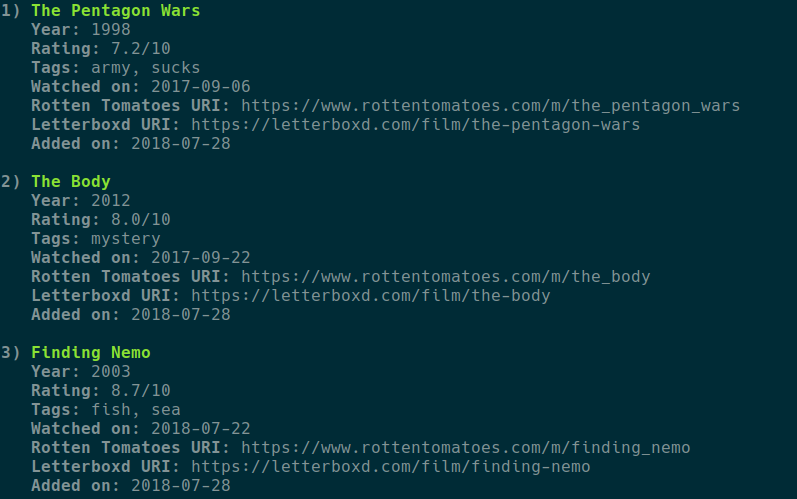
.csvfile. - Display list contents with pretty formatting.
- Add/edit/remove movie entries from a
.csvfile. - Display only movies matching certain tags.
- Import of movie lists from Letterboxd
.csvfiles. - Automatic generation of Letterboxd/Rotten Tomatoes URLs for each movie (experimental).
Usage
You can see the available commands by running
movielist -h
To list all movies contained in a file run
movielist list
The default file is XDG_DATA_HOME/pymovielist/movies.csv (usually
~/.local/share/pymovielist/movies.csv). You can specify a different file
using the -f option.
To add/edit/remove a movie run
movielist add
movielist edit
movielist remove
respectively. You will then be prompted to select a movie and/or enter the movie details.
To convert a Letterboxd format .csv file into the native .csv format run
movielist -f /path/to/letterboxd.csv convert
CAUTION: the file will be converted in-place, overwriting the previous contents.
License
Copyright © 2018 Sotiris Papatheodorou
This program is Free Software: You can use, study share and improve it at your
will. Specifically you can redistribute and/or modify it under the terms of the
GNU General Public License as
published by the Free Software Foundation, either version 3 of the License, or
(at your option) any later version.
1 maintainer

Metadata
1 maintainer
Release files for pylistmanager 0.3.3
For a detailed explanation of source distributions (sdists) and built distributions (wheels), please see the package formats documentation.
Source distribution (sdist)
| File | Size | Uploaded | Provenance | |
|---|---|---|---|---|
| pylistmanager-0.3.3.tar.gz | 11.4 kB | Without provenance | Details |
Built distribution (wheel)
| File | Interpreter | ABI | Platform | Reset |
|---|---|---|---|---|
| pylistmanager-0.3.3-py3-none-any.whl | Python 3 | none | any | Details |
Total release size: 37.0 kB
Release files / pylistmanager-0.3.3.tar.gz
| Download URL | pylistmanager-0.3.3.tar.gz |
|---|---|
| Size | 11.4 kB |
| Tags | Source |
|
SHA-256 checksum How to use checksums |
5fefb3049abcc1223a3ce9faa5cf8672a87e989fbd548d4afbfe5b7b22de01dd
|
|
BLAKE2b-256 checksum How to use checksums |
0dbaf83874fca6dc533c0236c780e784129d2f1e048a5dc735a33d81ac47dbc5
|
| Upload date | |
|
Uploaded using Trusted Publishing? What is trusted publishing? |
No |
| Uploaded via |
twine/1.13.0 pkginfo/1.4.2 requests/2.21.0 setuptools/41.2.0 requests-toolbelt/0.8.0 tqdm/4.28.1 CPython/3.7.3
|
Release files / pylistmanager-0.3.3-py3-none-any.whl
| Download URL | pylistmanager-0.3.3-py3-none-any.whl |
|---|---|
| Size | 25.6 kB |
| Tags | Python 3 |
|
SHA-256 checksum How to use checksums |
73201f177f17bedfc629d48c518d7013a666692c128eb0cd825db8f1530d5b31
|
|
BLAKE2b-256 checksum How to use checksums |
7450ee4154ba21793d6c2312db0d6b5a15480d6452f0466fd03459b2080c8045
|
| Upload date | |
|
Uploaded using Trusted Publishing? What is trusted publishing? |
No |
| Uploaded via |
twine/1.13.0 pkginfo/1.4.2 requests/2.21.0 setuptools/41.2.0 requests-toolbelt/0.8.0 tqdm/4.28.1 CPython/3.7.3
|
Security for pylistmanager 0.3.3
Provenance
Provenance describes where a file came from. On PyPI, provenance is shared via attestations, which provide a verifiable record of the build or publishing details. View details, limitations and caveats.
No provenance found
None of the files in this release were uploaded with provenance metadata.
A note on package security
PyPI is a repository for distributing packages, not a service for auditing them. While third-party security researchers and our staff do their best to detect and remove malicious packages, PyPI cannot guarantee the quality, security or suitability of any given package.














