
A Python framework for building modular, extensible LLM applications through composable Elements in a flow-based architecture. Pyllments enables developers to create both graphical and API-based LLM applications by connecting specialized Elements through a flexible port system, with built-in support for UI components and LLM integrations.

Project description
🚧pyllments🚧 [Construction In Progress]
Speedrun your Prototyping
uv pip install pyllments
Build Visual AI Workflows with Python
A batteries-included LLM workbench for helping you integrate complex LLM flows into your projects - built fully in and for Python.
- Rapid prototyping complex workflows
- GUI/Frontend generation(With Panel components)
- Simple API deployment(Using FastAPI + Optional serving with Uvicorn)
Pyllments is a Python library that empowers you to build rich, interactive applications powered by large language models. It provides a collection of modular Elements, each encapsulating its data, logic, and UI—that communicate through well-defined input and output ports. With simple flow-based programming, you can effortlessly compose, customize, and extend components to create everything from dynamic GUIs to scalable API-driven services.
It comes prepackaged with a set of parameterized application you can run immediately from the command line like so:
pyllments recipe run branch_chat --height 900 --width 700
Elements:
- Easily integrate into your own projects
- Have front end components associated with them, which allows you to build your own composable GUIs to interact with your flows
- Can individually or in a flow be served as an API (with limitless endpoints at any given part of the flow)
Chat App Example
With history, a custom system prompt, and an interface.
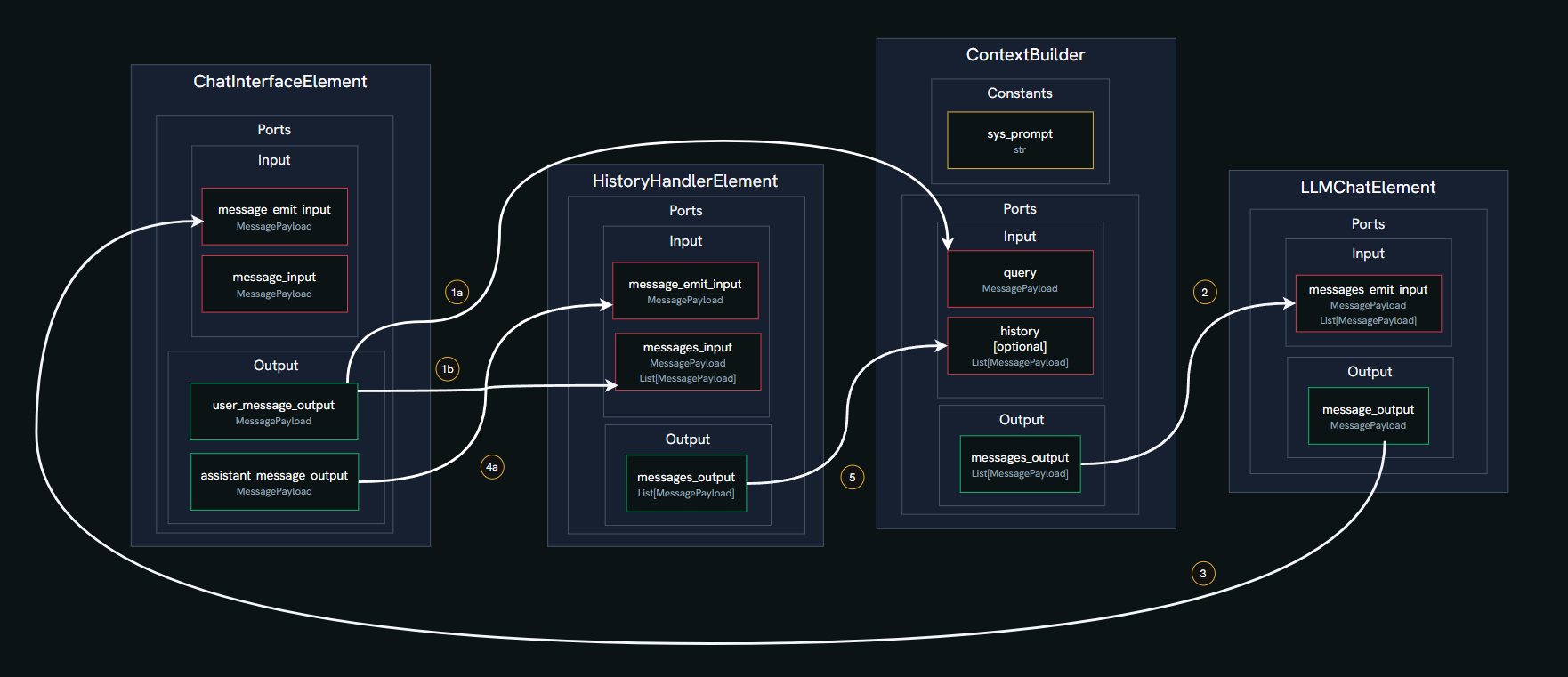
https://github.com/user-attachments/assets/1f9998bf-2dfe-49c6-aec7-0a918ee57246
In this example, we'll build a simple chat application using four core Elements from the Pyllments library. Elements are modular components that handle specific functions and connect via ports to form a data flow graph.
-
ChatInterfaceElement
Manages the chat GUI, including the input box for typing messages, a send button, and a feed to display the conversation. It emits user messages and renders incoming responses. -
HistoryHandlerElement
Maintains a running log of all messages (user and assistant) and tool responses. It can emit the current message history to be used as context for the LLM. -
ContextBuilderElement
Combines multiple inputs into a structured list of messages for the LLM. This includes a predefined system prompt (e.g., setting the AI's personality), the conversation history, and the latest user query. -
LLMChatElement
Connects to a Large Language Model (LLM) provider, sends the prepared message list, and generates a response. It also offers a selector to choose different models or providers.
Here's what happens step by step in the chat flow:
- User Input: You type a message in the
ChatInterfaceElementand click send. This creates aMessagePayloadwith your text and the role 'user'. - History Update: Your message is sent via a port to the
HistoryHandlerElement, which adds it to the conversation log. - Context Building: The
ContextBuilderElementreceives your message and constructs the full context. It combines:- A fixed system prompt (e.g., "You are Marvin, a Paranoid Android."),
- The message history from
HistoryHandlerElement(if available, up to a token limit), - Your latest query.
- LLM Request: This combined list is sent through a port to the
LLMChatElement, which forwards it to the selected LLM (like OpenAI's GPT-4o-mini). - Response Handling: The LLM's reply is packaged as a new
MessagePayloadwith the role 'assistant' and sent back to theChatInterfaceElementto be displayed in the chat feed. - History Update (Again): The assistant's response is also sent to the
HistoryHandlerElement, updating the log for the next interaction. - Cycle Repeats: The process loops for each new user message, building context anew each time.
chat_flow.py
from pyllments import flow
from pyllments.elements import ChatInterfaceElement, LLMChatElement, HistoryHandlerElement

# Instantiate the elements
chat_interface_el = ChatInterfaceElement()
llm_chat_el = LLMChatElement()
history_handler_el = HistoryHandlerElement(history_token_limit=3000)
context_builder_el = ContextBuilderElement(
    input_map={
        'system_prompt_constant': {
            'role': "system",
            'message': "You are Marvin, a Paranoid Android."
        },
        'history': {'ports': [history_handler_el.ports.message_history_output]},
        'query': {'ports': [chat_interface_el.ports.user_message_output]},
    },
    emit_order=['system_prompt_constant', '[history]', 'query']
)
# Connect the elements
chat_interface_el.ports.user_message_output > history_handler_el.ports.message_input
context_builder_el.ports.messages_output > llm_chat_el.ports.messages_input
llm_chat_el.ports.message_output > chat_interface_el.ports.message_emit_input
chat_interface_el.ports.assistant_message_output > history_handler_el.ports.message_emit_input

# Create the visual elements and wrap with @flow decorator to serve with pyllments
@flow
def interface():
    width = 950
    height = 800
    interface_view = chat_interface_el.create_interface_view(width=int(width*.75))
    model_selector_view = llm_chat_el.create_model_selector_view(
        models=config.custom_models,
        model=config.default_model
        )
    history_view = history_handler_el.create_context_view(width=int(width*.25))

    main_view = pn.Row(
        pn.Column(
            model_selector_view,
            pn.Spacer(height=10),
            interface_view,
        ),
        pn.Spacer(width=10),
        history_view,
        styles={'width': 'fit-content'},
        height=height
    )
    return main_view
CLI Command
pyllments serve chat_flow.py
For more in-depth material, check our Getting Started Tutorial
Elements are building blocks with a consistent interface
https://github.com/user-attachments/assets/771c3063-f7a9-4322-a7f4-0d47c7f50ffa
Elements can create and manage easily composable front-end components called Views
https://github.com/user-attachments/assets/8346a397-0308-4aa1-ac9b-5045b701c754
Using their Ports interface, Elements can be connected in endless permutations.
https://github.com/user-attachments/assets/1693a11a-ccdb-477b-868a-e93c0de3f52a
Attach API endpoints to any part of the flow
https://github.com/user-attachments/assets/13126317-859c-4eb9-9b11-4a24bc6d0f07
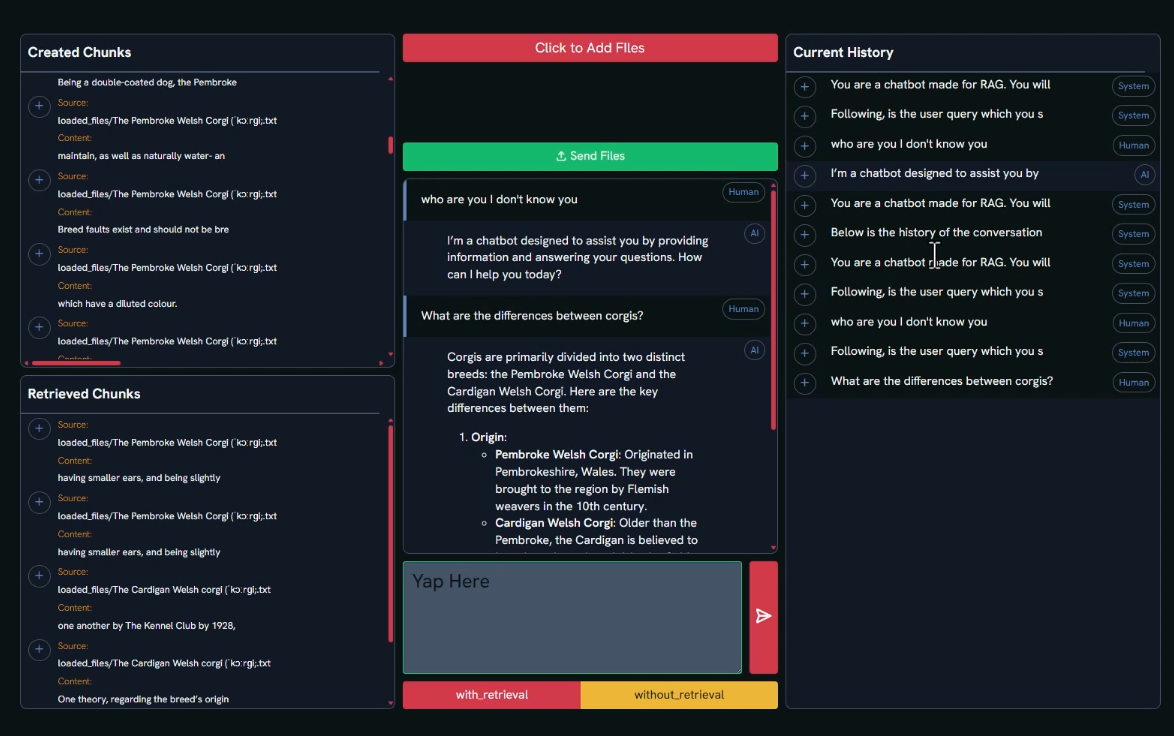
RAG Application Example
https://gist.github.com/DmitriyLeybel/8e8aa3cd10809f15a05b6b91451722af
Release history Release notifications | RSS feed


Download files
Download the file for your platform. If you're not sure which to choose, learn more about installing packages.
Source Distribution
Built Distribution
Filter files by name, interpreter, ABI, and platform.
If you're not sure about the file name format, learn more about wheel file names.
Copy a direct link to the current filters
File details
Details for the file pyllments-0.0.4a2.tar.gz.
File metadata
- Download URL: pyllments-0.0.4a2.tar.gz
- Upload date:
- Size: 1.2 MB
- Tags: Source
- Uploaded using Trusted Publishing? Yes
- Uploaded via: uv/0.7.9
File hashes
| Algorithm | Hash digest | |
|---|---|---|
| SHA256 |
926508ebda12a65079391399e08c16d4d622701bd9bcf5ab658d841e290bcfc2
|
|
| MD5 |
4b822b9572569384d70d6126b8e874c1
|
|
| BLAKE2b-256 |
89a80a6e6ed867da301b1fdca6eba6e973b4f2347f63b6588b31485a7a1a3eeb
|
File details
Details for the file pyllments-0.0.4a2-py3-none-any.whl.
File metadata
- Download URL: pyllments-0.0.4a2-py3-none-any.whl
- Upload date:
- Size: 997.5 kB
- Tags: Python 3
- Uploaded using Trusted Publishing? Yes
- Uploaded via: uv/0.7.9
File hashes
| Algorithm | Hash digest | |
|---|---|---|
| SHA256 |
f16616d32723868b2ffa48fdfc863b7fffe290f72bb32fe8730e3b190eab7d75
|
|
| MD5 |
94f39080fa23b9fb3f7f4536b4c7e86d
|
|
| BLAKE2b-256 |
e7dcb8ae642a9bf39e5d43e675eea1d57a32ff1f6d7a35ae6aad9a02176df516
|






