
PyLogGroup
pyloggroup is a lightweight Python package designed to improve logging readability by creating structured log groups for functions. This package is particularly useful for projects with nested or complex functions, where understanding the flow of function calls is essential.
With pyloggroup, you can use decorators to group log entries under specific names, allowing for a tree-like view of log output. This helps make logs more organized and easier to analyze, especially in debugging and monitoring scenarios.
Features
- Log Grouping: Easily group related logs for nested function calls.
- Tree Structure: Organizes log entries in a hierarchical structure.
- Simple Integration: Use decorators to seamlessly integrate with existing functions.
Installation
Install pyloggroup using pip:
pip install pyloggroup
Usage
To start using pyloggroup, import the decorator and add it to any function you wish to log. Ensure that the logger level is set to INFO or higher to see the log output.
Example
Here's an example showing how to use pyloggroup to create structured log groups for functions:
from pyloggroup import log_group
import logging

# Ensure the logger level is set to INFO
logging.getLogger(__name__).setLevel(logging.INFO)

@log_group("MainGroup")
def main_function():
    print("Inside main function")
    print("*"*20)
    logging.info("Inside main function")
    inner_function()

@log_group("InnerGroup")
def inner_function():
    print("Inside inner function")
    print("*"*20)
    logging.info("Inside inner function")
    innermost_function()

@log_group("InnermostGroup")
def innermost_function():
    print("Inside innermost function")
    print("*"*20)
    logging.info("Inside innermost function")
    print("Innermost function executed")

main_function()
When running the example, the logs will be grouped in a nested structure, providing a clear view of the sequence of function calls.
Output Example
When using pyloggroup, the log output will look something like this:
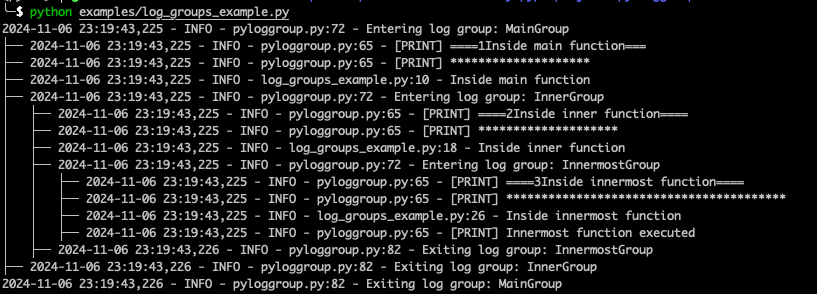
This structured format helps you understand the call hierarchy and follow the flow of your code more easily.
API Reference
Decorators
@log_group(group_name): This decorator logs the entry and exit points of a function, grouping the logs under the specifiedgroup_name. It can be applied to any function to create a hierarchical log group structure, helping you track the nested execution flow.
Configuration Options
pyloggroup can be customized by setting the logging level in your application. By default, it uses Python's logging library, which allows you to configure log levels, formats, and handlers.
Contributing
Contributions are welcome! If you'd like to improve or expand this package, feel free to submit a pull request on GitHub.
License
This project is licensed under the MIT License. See the LICENSE file for more details.
Contact
For questions or suggestions, please contact GirishCodeAlchemy.
1 maintainer

Metadata
1 maintainer
Release files for pyloggroup 0.1.0
For a detailed explanation of source distributions (sdists) and built distributions (wheels), please see the package formats documentation.
Source distribution (sdist)
| File | Size | Uploaded | |
|---|---|---|---|
| pyloggroup-0.1.0.tar.gz | 7.9 kB | Details |
Built distribution (wheel)
| File | Interpreter | ABI | Platform | Reset |
|---|---|---|---|---|
| pyloggroup-0.1.0-py3-none-any.whl | Python 3 | none | any | Details |
Total release size: 15.8 kB
Release files / pyloggroup-0.1.0.tar.gz
| Download URL | pyloggroup-0.1.0.tar.gz |
|---|---|
| Size | 7.9 kB |
| Tags | Source |
|
SHA-256 checksum How to use checksums |
d34a780a43c8e6545022232ecd9125459f493020f3864063797bd7ea34197375
|
|
BLAKE2b-256 checksum How to use checksums |
58344aee92da26d45e139838ea7679ad6149a066cdfa39d67479e2db2817e516
|
| Upload date | |
|
Uploaded using Trusted Publishing? What is trusted publishing? |
No |
| Uploaded via |
twine/5.1.1 CPython/3.10.15
|
Release files / pyloggroup-0.1.0-py3-none-any.whl
| Download URL | pyloggroup-0.1.0-py3-none-any.whl |
|---|---|
| Size | 7.9 kB |
| Tags | Python 3 |
|
SHA-256 checksum How to use checksums |
f06173d720640737be22fba407d4c896837162fe86f546a09e5eef093f8b61d6
|
|
BLAKE2b-256 checksum How to use checksums |
8da8b31e8c6b2c03b7dbfec30e90ad9d1f65e544d7a9f086c0e271d3124a562f
|
| Upload date | |
|
Uploaded using Trusted Publishing? What is trusted publishing? |
No |
| Uploaded via |
twine/5.1.1 CPython/3.10.15
|













