







📋 Table of Contents
📣 Overview
PyLogShield is a Python logging library for data professionals and developers who need reliable, secure logging with minimal setup. It extends Python's standard logging module with production-ready features: sensitive data masking, rate limiting, async logging, JSON formatting, context propagation, FastAPI middleware, and a rich CLI log viewer.
Your App  ──►  PyLogShield  ──►  Masking  ──►  Rate Limiter  ──►  Context  ──►  Handlers
                                                                              ├── Console / Rich
                                                                              ├── File / Rotating
                                                                              ├── JSON
                                                                              └── Async Queue
💡 Features
| Feature | Description |
|---|---|
| 🔒 Sensitive Data Masking | Masks passwords, tokens, API keys in strings, dicts, and exception args |
| 🚦 Rate Limiting | Suppresses duplicate messages within a configurable time window |
| 📄 JSON Formatting | Structured ISO 8601 JSON for ELK, Splunk, CloudWatch |
| 🔄 Log Rotation | Size-based rotation with configurable backup counts |
| ⚡ Async Logging | Non-blocking background queue with configurable max size |
| 🎨 Rich Console | Color-coded terminal output via the rich library |
| 🔍 CLI Log Viewer | Static and live-follow modes with level/keyword filtering |
| 🖥️ Interactive TUI | Full-screen viewer with live search, filters, export (CSV/JSON/HTML), and live-follow mode |
| 🧵 Context Propagation | Thread-safe and asyncio-safe structured field injection |
| 🌐 FastAPI Middleware | Auto-injects request_id, method, path, and client IP |
| 📊 Metrics | Per-level log counts and logs/second tracking |
| ☁️ Cloud Scrubbing | Strips AWS_, AZURE_, GCP_, GOOGLE_, TOKEN prefixed fields |
| 🏷️ Custom Log Levels | Register SECURITY, AUDIT, TRACE levels at runtime |
📌 Quick Start
Installation
pip install pylogshield

# FastAPI middleware support
pip install "pylogshield[fastapi]"
Basic Usage
from pylogshield import get_logger

logger = get_logger("my_app", log_level="INFO")

logger.info("Application started")
logger.warning("Low memory detected")
logger.error("Connection failed")

# Sensitive data is masked with mask=True
logger.info({"user": "john", "api_key": "sk-1234567890"}, mask=True)
# → {"user": "john", "api_key": "***"}
Production Setup
from pylogshield import get_logger, add_sensitive_fields
from pylogshield.context import log_context

add_sensitive_fields(["ssn", "credit_card"])

logger = get_logger(
    "production_app",
    log_level="INFO",
    enable_json=True,            # Structured JSON
    rotate_file=True,            # Auto-rotate log files
    rotate_max_bytes=10_000_000, # 10 MB per file
    rate_limit_seconds=0.5,      # Prevent log flooding
    use_queue=True,              # Non-blocking async logging
    queue_maxsize=50_000,        # Cap memory usage
    enable_metrics=True,         # Track log statistics
    enable_context=True,         # Structured context injection
)

with log_context(request_id="abc-123", user_id=42):
    logger.info("Processing payment", mask=True)
    # → {"message": "Processing payment", "request_id": "abc-123", "user_id": 42}
FastAPI Middleware
from fastapi import FastAPI
from pylogshield import get_logger
from pylogshield.middleware import PyLogShieldMiddleware

app = FastAPI()
logger = get_logger("api", enable_context=True, enable_json=True)
app.add_middleware(PyLogShieldMiddleware, logger=logger)

# Every log line automatically includes: request_id, http_method, http_path, client_ip
🖥️ Interactive TUI Viewer
Install the optional TUI extra and launch the full-screen interactive log viewer:
pip install "pylogshield[tui]"

pylogshield tui --file ~/.logs/myapp.log
pylogshield tui --file app.log --level ERROR        # start with ERROR+ filter
pylogshield tui --file app.log --follow             # start in live-follow mode
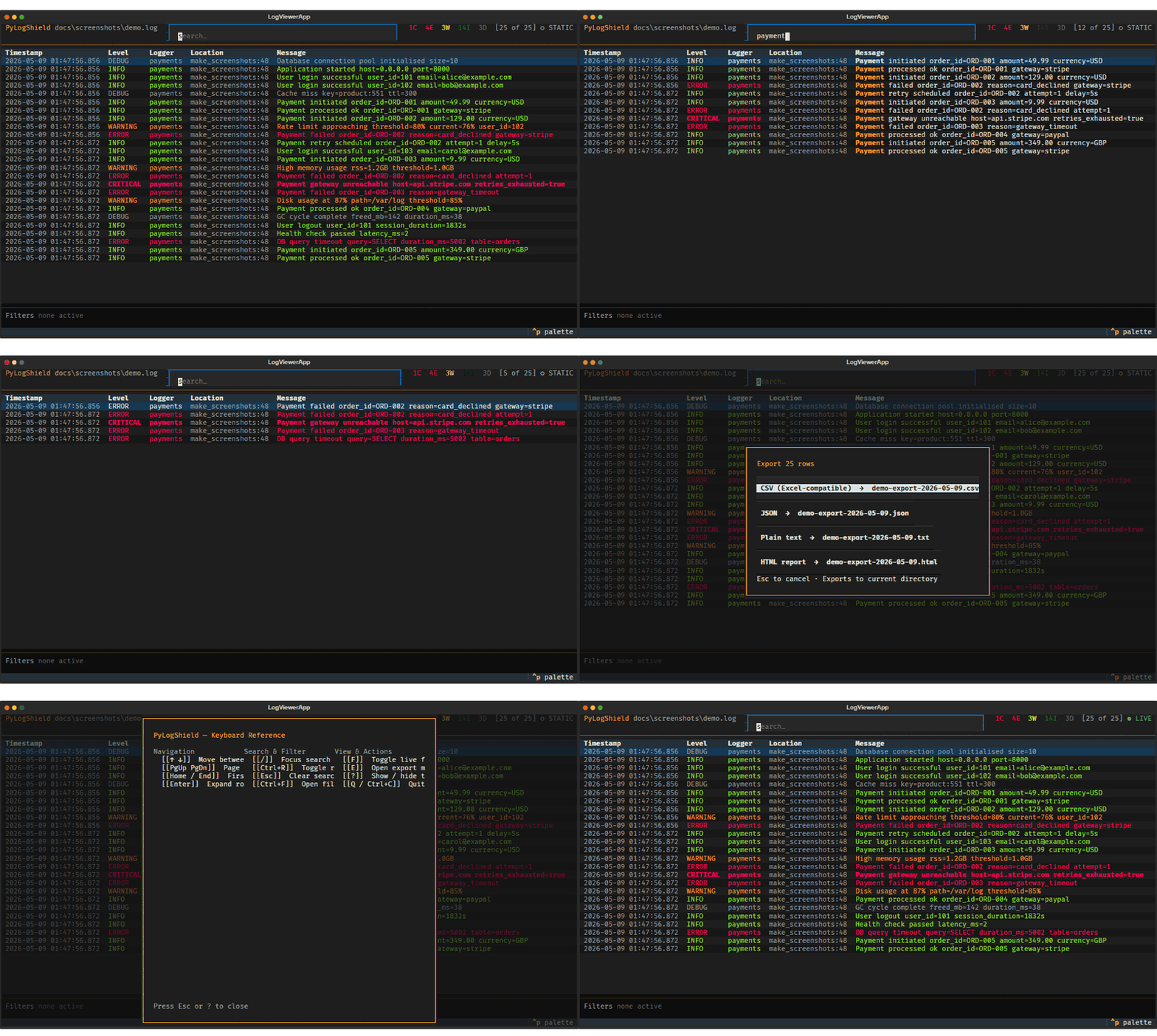
| Key | Action |
|---|---|
/ |
Focus search bar — filters rows as you type, highlights matches |
Ctrl+F |
Open filter panel — level toggles, time range, logger name |
F |
Toggle live-follow mode — auto-pauses when you scroll up |
E |
Export current filtered view to CSV, JSON, plain text, or HTML |
? |
Show keyboard reference |
Q |
Quit |
🖥️ Terminal Demo
Sensitive Data Masking — Before vs After
# Without mask=True
INFO  my_app  {"user": "john", "password": "hunter2", "token": "eyJhbGci..."}

# With mask=True  ✓
INFO  my_app  {"user": "john", "password": "***", "token": "***"}
JSON Output
{
  "timestamp": "2026-03-14T10:30:00.123+00:00",
  "host": "prod-server-01",
  "logger": "production_app",
  "level": "INFO",
  "message": "Processing payment",
  "request_id": "abc-123",
  "user_id": 42
}
CLI Log Viewer
╭──────────────────── Log Viewer ────────────────────╮
│ File:    /var/log/app/production.log               │
│ Limit:   200 lines                                 │
│ Level:   ERROR                                     │
│ Keyword: "timeout"                                 │
╰────────────────────────────────────────────────────╯

╭─────────────────────────────────────────────────────────────────╮
│ Timestamp                │ Level    │ Message                   │
├──────────────────────────┼──────────┼───────────────────────────┤
│ 2026-03-14T10:28:11.001  │ ERROR    │ DB timeout after 30s      │
│ 2026-03-14T10:29:54.332  │ ERROR    │ Connection timeout: redis  │
╰──────────────────────────┴──────────┴───────────────────────────╯
                          2 entries shown
# Follow live logs
pylogshield follow -f app.log -l ERROR -k "timeout"

# View last 50 lines
pylogshield view -f app.log -n 50 -l WARNING

# List log levels
pylogshield levels
⚠️ Security Notes
mask=Truemasks sensitive values in strings, dicts, and exception.args. Traceback source lines are not redacted — they reflect the literal source text. Avoid storing sensitive values in local variables inside functions that may raise logged exceptions.ContextFilterskips context keys that conflict with standardLogRecordfields (e.g.,msg,levelname) and emits awarnings.warn.PyLogShieldMiddlewaresanitizes the incomingX-Request-IDheader before injecting it into logs (truncated to 128 chars, non-alphanumeric characters stripped).
CI Pipeline
Every push to main and every pull request runs automatically via shared-workflows:
| Job | What it checks |
|---|---|
| Test | pytest on Python 3.9–3.12 x Ubuntu + Windows |
| Lint | ruff check + ruff format --check |
| Type Check | mypy src/ |
| Audit | pip-audit — all dependencies scanned for known CVEs |
| Coverage | pytest-cov — report posted to the Actions job summary |
👪 Contributing
All contributions are welcome! Fork the repo, make your changes, and open a pull request. You can also open an issue with the label enhancement.
Don't forget to ⭐ star the project!
📃 Full Docs · 🔧 Report a Bug
1 maintainer

Metadata
1 maintainer
Release files for pylogshield 0.4.1
For a detailed explanation of source distributions (sdists) and built distributions (wheels), please see the package formats documentation.
Source distribution (sdist)
| File | Size | Uploaded | |
|---|---|---|---|
| pylogshield-0.4.1.tar.gz | 3.4 MB | Details |
Built distribution (wheel)
| File | Interpreter | ABI | Platform | Reset |
|---|---|---|---|---|
| pylogshield-0.4.1-py3-none-any.whl | Python 3 | none | any | Details |
Total release size: 3.5 MB
Release files / pylogshield-0.4.1.tar.gz
| Download URL | pylogshield-0.4.1.tar.gz |
|---|---|
| Size | 3.4 MB |
| Tags | Source |
|
SHA-256 checksum How to use checksums |
b1edb36cc7affe655379535b980e9212c889c123507336942f3351b260f6a2d3
|
|
BLAKE2b-256 checksum How to use checksums |
769f41546d251f312ec6146e4a6a5caef0c552239223ab6109e67a8130389b06
|
| Upload date | |
|
Uploaded using Trusted Publishing? What is trusted publishing? |
No |
| Uploaded via |
twine/6.2.0 CPython/3.11.15
|
Release files / pylogshield-0.4.1-py3-none-any.whl
| Download URL | pylogshield-0.4.1-py3-none-any.whl |
|---|---|
| Size | 51.0 kB |
| Tags | Python 3 |
|
SHA-256 checksum How to use checksums |
b435f93e44501b2ce243d7a65c0e0f2c5e3852cc9bbe3c2e5c2ceb98f4215475
|
|
BLAKE2b-256 checksum How to use checksums |
f775f7103cc222a4d69181e66ab265d14cda5741c09a07e283eb8f1099b3f1e8
|
| Upload date | |
|
Uploaded using Trusted Publishing? What is trusted publishing? |
No |
| Uploaded via |
twine/6.2.0 CPython/3.11.15
|














