
PylonGUY
Your best friend for high-performance camera control for Basler cameras with high-speed recording capabilities and a DropletUI frontend.
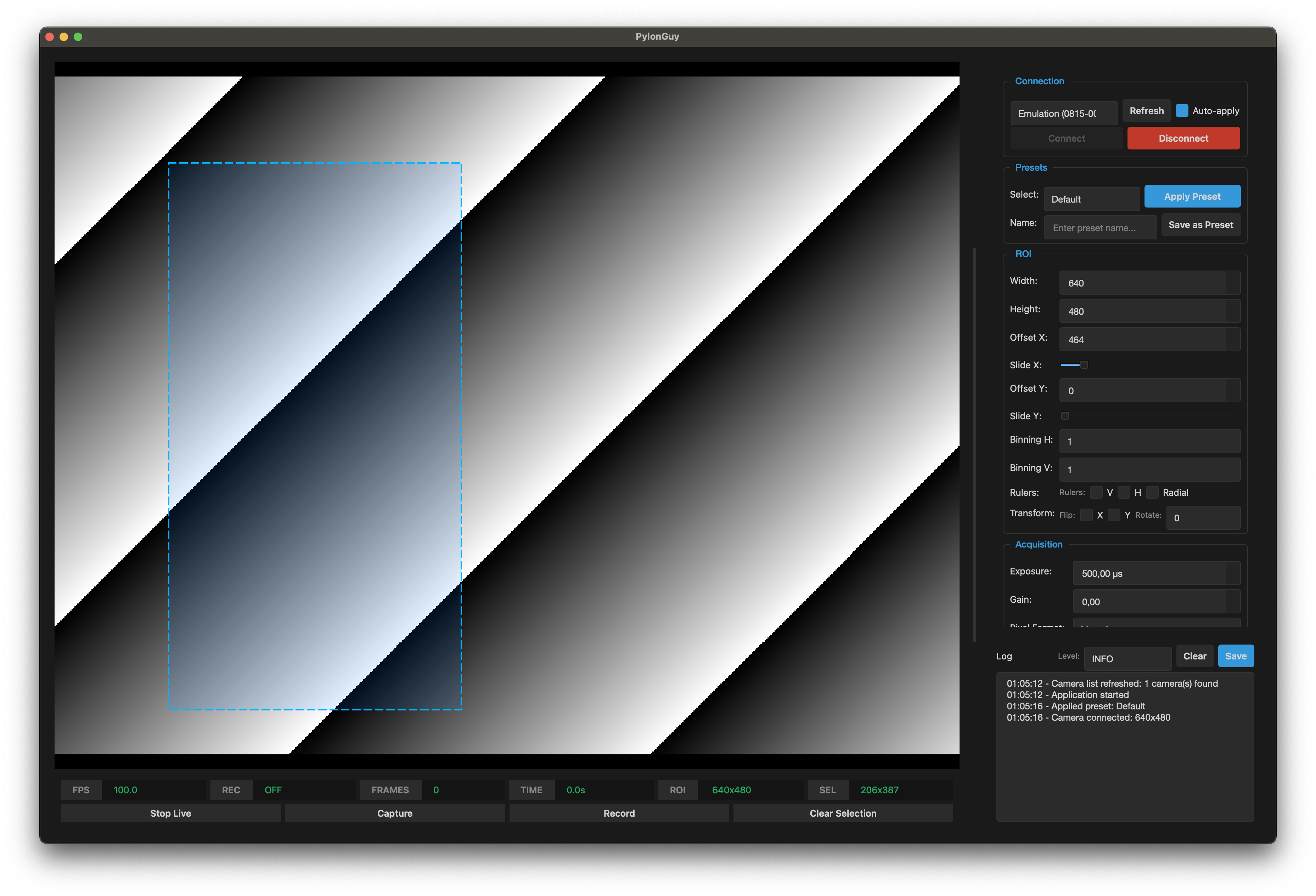
Features
- Real-time preview with adaptive grab strategy (lag-free at any FPS)
- Camera configuration with automatic adjustment to camera capabilities
- High-speed frame capture to raw frames with FFmpeg post-processing
- Configurable playback rate for slow-motion video
- Interactive ROI selection and offset controls
- Preset configurations (Default, HighSpeed, FullFrame, Microfluidics)
- Auto-apply presets on camera connection
- Waterfall mode for line-scan recording
Installation
From PyPI
pip install pylonguy
From source
git clone https://github.com/merv1n34k/pylonguy.git
cd pylonguy
pip install -e .
Requirements
- Python 3.12+
- ffmpeg in PATH (for video processing)
- Basler Pylon SDK (for camera communication)
Installing ffmpeg
# macOS
brew install ffmpeg

# Ubuntu/Debian
sudo apt install ffmpeg

# Windows
# Download from https://ffmpeg.org/download.html and add to PATH
Installing Pylon SDK
Download from Basler website. See pypylon known issues for platform-specific notes.
Usage
# Run the application
pylonguy

# Or with uv
uv run pylonguy
Presets
Camera presets are saved to presets.json in the current working directory. This allows you to maintain different presets for different projects by running the application from each project's folder.
How it works
The application separates capture from video encoding for maximum performance:
- Capture Phase: Frames stream from camera → memory buffer → raw files on disk
- Processing Phase: After recording stops, FFmpeg assembles raw frames into video
This allows you to specify any desired playback frame rate, e.g.:
- Camera captures at 1000 fps
- Video plays back at 24 fps
- Result: 1 second of capture = 41.7 seconds of slow-motion video
Waterfall Mode
Record single lines instead of full frames for:
- Maximum frame rates (minimal data transfer)
- Line-scan camera emulation
- Monitoring flow in microfluidic channels
Output format: .wtf (waterfall) files, convertible to PNG:
python -m pylonguy.wtf2png recording.wtf
License
Distributed under the MIT License. See LICENSE for more information.
1 maintainer

Metadata
1 maintainer
Release files for pylonguy 2.0.1
For a detailed explanation of source distributions (sdists) and built distributions (wheels), please see the package formats documentation.
Source distribution (sdist)
| File | Size | Uploaded | Provenance | |
|---|---|---|---|---|
| pylonguy-2.0.1.tar.gz | 1.6 MB | With provenance | Details |
Built distribution (wheel)
| File | Interpreter | ABI | Platform | Reset |
|---|---|---|---|---|
| pylonguy-2.0.1-py3-none-any.whl | Python 3 | none | any | Details |
Total release size: 1.7 MB
Release files / pylonguy-2.0.1.tar.gz
| Download URL | pylonguy-2.0.1.tar.gz |
|---|---|
| Size | 1.6 MB |
| Tags | Source |
|
SHA-256 checksum How to use checksums |
6da830a45c6733e892d2c8ed2d701bdb083dc7896e8d3eb38059f29867b1b62f
|
|
BLAKE2b-256 checksum How to use checksums |
25c6bedea4e5201609df96cff7ab9c223b47d6cbd9e4cf221094820098a6d18d
|
| Upload date | |
|
Uploaded using Trusted Publishing? What is trusted publishing? |
Yes |
| Uploaded via |
twine/6.1.0 CPython/3.13.12
|
Provenance
Provenance describes where a file came from. On PyPI, provenance is shared via attestations, which provide a verifiable record of the build or publishing details. View details, limitations and caveats.


PyPI Publish Attestation
PyPI verified that this artifact, at this checksum, originated from the publisher listed below.
Signed by GitHub Actions, verified by PyPI on Jun 10, 2026.
Transparency logRelease files / pylonguy-2.0.1-py3-none-any.whl
| Download URL | pylonguy-2.0.1-py3-none-any.whl |
|---|---|
| Size | 63.9 kB |
| Tags | Python 3 |
|
SHA-256 checksum How to use checksums |
55ddc1c319bfda9ea4c0685250d683ba8160532de47f313be6c5416eaf75aefe
|
|
BLAKE2b-256 checksum How to use checksums |
8352ead7f1fea0f6a5a968fa8fbba243b6828189b2f7ba4e5dc48eba97a82227
|
| Upload date | |
|
Uploaded using Trusted Publishing? What is trusted publishing? |
Yes |
| Uploaded via |
twine/6.1.0 CPython/3.13.12
|
Provenance
Provenance describes where a file came from. On PyPI, provenance is shared via attestations, which provide a verifiable record of the build or publishing details. View details, limitations and caveats.
PyPI Publish Attestation
PyPI verified that this artifact, at this checksum, originated from the publisher listed below.
Signed by GitHub Actions, verified by PyPI on Jun 10, 2026.
Transparency logSecurity for pylonguy 2.0.1
Provenance
Provenance describes where a file came from. On PyPI, provenance is shared via attestations, which provide a verifiable record of the build or publishing details. View details, limitations and caveats.
Full provenance
All 2 files in this release have been uploaded with provenance metadata.
Attestation for pylonguy-2.0.1.tar.gz
PyPI Publish Attestation
PyPI verified that this artifact, at this checksum, originated from the publisher listed below.
Signed by GitHub Actions, verified by PyPI on Jun 10, 2026.
Transparency logA note on package security
PyPI is a repository for distributing packages, not a service for auditing them. While third-party security researchers and our staff do their best to detect and remove malicious packages, PyPI cannot guarantee the quality, security or suitability of any given package.














