
Pylot
Pylot is a helper application for Capytaine and, in the future, other BEM solvers.
It helps to develop and maintain a library of hydrodynamic data for a single vessel spanning multiple drafts, grids, heel and trim.
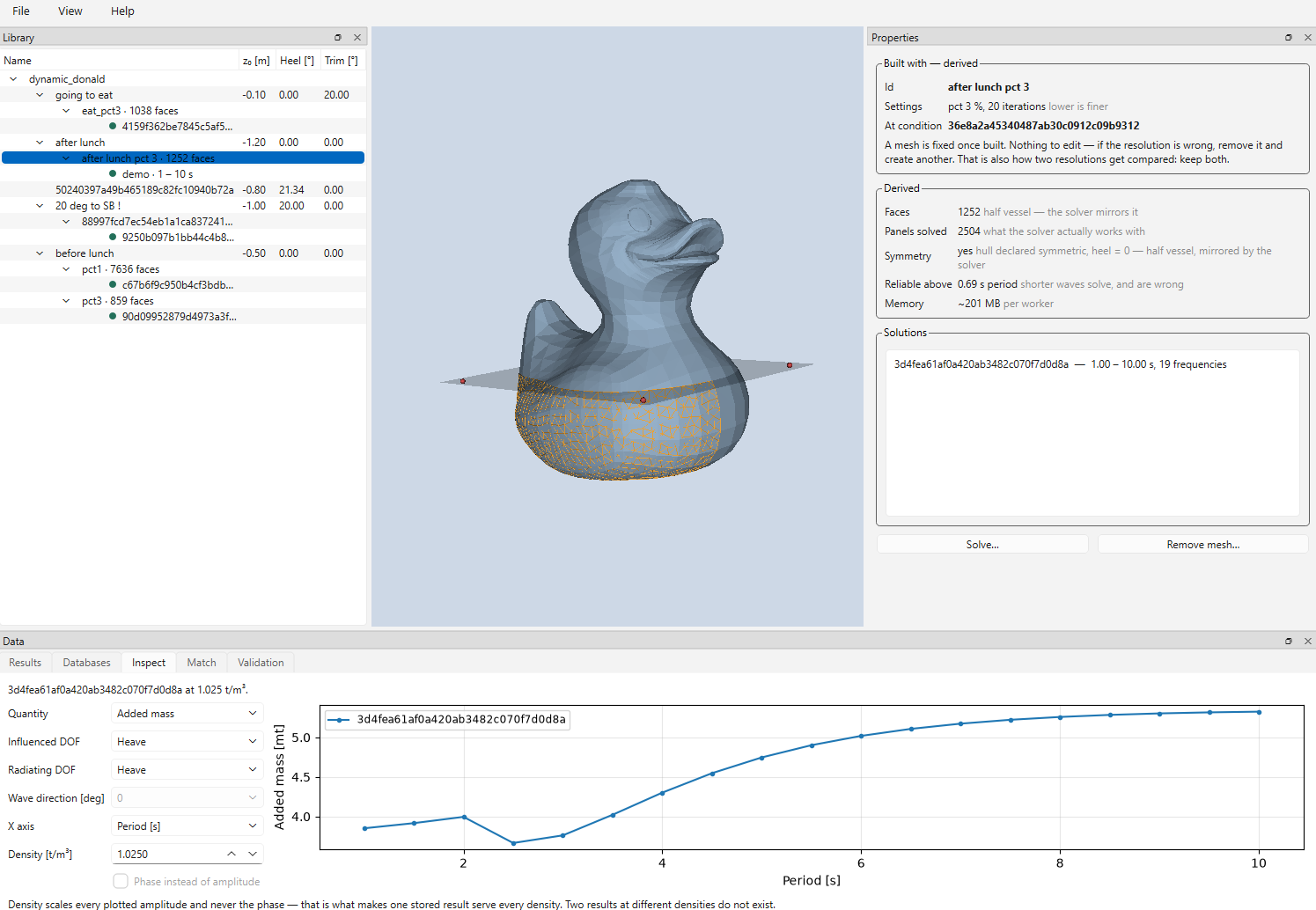
The whole idea is a follows:
- define a base-shape for a vessel.
- create calculation meshes for different "floating conditions" by cutting the base-shape at the water-surface and meshing (automatic)
- run capytaine to obtain hydrodynamic data
- store in a sqlite database
then, on the consumer side:
- load the database
- get the best matching floating condition (using surface probes)
- convert into a mafredo hyddb1 for further use
to limit the python environment for the consumer side, the pylot package is split into pylot-db and pylot-bem.
run
uvx pylot-bem
pylot-bem
Write side of the hydrodynamic database: meshing, in-process Capytaine solving, assembly, a command line and a standalone application.
Pylot is a pylot_db.Library — it adds meshing and solving to the same
object, so a file written here opens as a plain Library on a machine with no
BEM solver installed. That split is the point, and a test enforces it.
Build a library
import numpy as np
from pylot_bem import Pylot, SolveSettings

d = Pylot.create_new("tanker.pylot", "tanker.stl", "stern, centerline, keel",
                     is_xz_symmetric=True)

condition = d.create_condition(z_origin=-12.0, condition_id="design")
mesh      = d.create_mesh(condition, pct=2.0)
result    = d.run_solve(mesh, SolveSettings(
    omegas=[2 * np.pi / T for T in (12.0, 16.0, 20.0)],
    wave_directions=[0.0, 45.0, 90.0, 135.0, 180.0],
))

print(d.validate() or "clean")
d.close()
Pylot writes the file in place. The application does not: it works on a copy,
and so can pylot_bem.Workspace from a script — see
docs/api.md. Opening and closing a
Pylot rewrites the file's header even if you only read, so a script that only
reads should use Library.open(path, read_only=True), which touches nothing.
Reading one back is pylot-db, which
this package depends on and which needs no solver.
The application
uv run pylot-bem

A window for building and inspecting libraries: the tree, a 3D view in
diffraction space, property panes, and tabs for Results, Databases, Inspect,
Match and Validation. docs/manual.md walks through it screen
by screen and assumes you already know Capytaine.
It works like a text editor. Open makes a private working copy of the library
on your local disk, everything you do happens to the copy, and Save replaces
your file in one atomic step — so a library the application has saved, in a
Nextcloud or OneDrive folder, has no -wal or -shm files beside it, and the
library file a sync client sees is always the old version or the whole new one.
Closing or opening with unsaved changes asks first, and a crash leaves the
working copy to recover from at the next start. See
Saving, and where your work lives.
Filling a library overnight
Right-click the library → Batch…. A grid of drafts, heels and trims, and one
line per mesh saying which periods it carries:
z_origin  -4.7 to -0.1 step 0.1     heel  -1, 0, 1     trim  -2, -1, 0, 1, 2

1 -> 1, 2, 3, 4
2 -> 5, 6, 7, 8, 9, 10, 12
705 conditions, 1410 meshes, 1410 solves — counted on screen before Start. A step
that fails is logged and the run carries on, and starting the same job again
resumes rather than duplicates, so a night that ended early needs no arithmetic
to continue. When a run ends the library is saved for you — File → Save when a batch finishes, on by default, with the same check that the file has not been
changed by someone else.
Save job… keeps the whole thing as a 29-line text file beside the library, so
it can be edited, kept and run again. pylot_bem.batch is the same feature
without a window.
Standalone executable
uv sync --group build
uv run pyinstaller packaging/pylot-bem.spec --noconfirm
Produces dist/pylot/pylot.exe — no Python install required on the target
machine. Zip the dist/pylot/ folder to distribute it.
What is where
docs/manual.md |
The application, screen by screen |
docs/api.md |
The reference: every public name, with its units |
examples/ |
Six runnable scripts, smallest first |
docs/README.md |
Where the specification lives and why it is not here |
Licence
MIT. Copyright 2026 Ruben de Bruin / DAVE Lab.
1 maintainer

Metadata
1 maintainer
Release files for pylot-bem 2026.9.0
For a detailed explanation of source distributions (sdists) and built distributions (wheels), please see the package formats documentation.
Source distribution (sdist)
| File | Size | Uploaded | |
|---|---|---|---|
| pylot_bem-2026.9.0.tar.gz | 1.7 MB | Details |
Built distribution (wheel)
| File | Interpreter | ABI | Platform | Reset |
|---|---|---|---|---|
| pylot_bem-2026.9.0-py3-none-any.whl | Python 3 | none | any | Details |
Total release size: 1.9 MB
Release files / pylot_bem-2026.9.0.tar.gz
| Download URL | pylot_bem-2026.9.0.tar.gz |
|---|---|
| Size | 1.7 MB |
| Tags | Source |
|
SHA-256 checksum How to use checksums |
33cf97d6696986a189c97b12bd8c7b9a43563c72f15e6ce6027c9f9c60be1b27
|
|
BLAKE2b-256 checksum How to use checksums |
007d0621f2d2e1e282ea05ad0fc871d12e36aab7a5882229f78f9c8428f17500
|
| Upload date | |
|
Uploaded using Trusted Publishing? What is trusted publishing? |
Yes |
| Uploaded via |
twine/7.0.0 CPython/3.13.14
|
Release files / pylot_bem-2026.9.0-py3-none-any.whl
| Download URL | pylot_bem-2026.9.0-py3-none-any.whl |
|---|---|
| Size | 213.7 kB |
| Tags | Python 3 |
|
SHA-256 checksum How to use checksums |
a3a383b417e8d765831d5a0a17dcf130f89e0d66236cd7f73037a4dd679b1e49
|
|
BLAKE2b-256 checksum How to use checksums |
02efffc4421b32b66c836bb23168e7a3c65b541f2ad06dffbf9498fa26f2e70e
|
| Upload date | |
|
Uploaded using Trusted Publishing? What is trusted publishing? |
Yes |
| Uploaded via |
twine/7.0.0 CPython/3.13.14
|














