
A self-hosted web dashboard for supervising multiple Claude Code AI sessions running in tmux
Verified details
These details have been verified by PyPIProject links
GitHub Statistics
Maintainers

Project description
Lumbergh
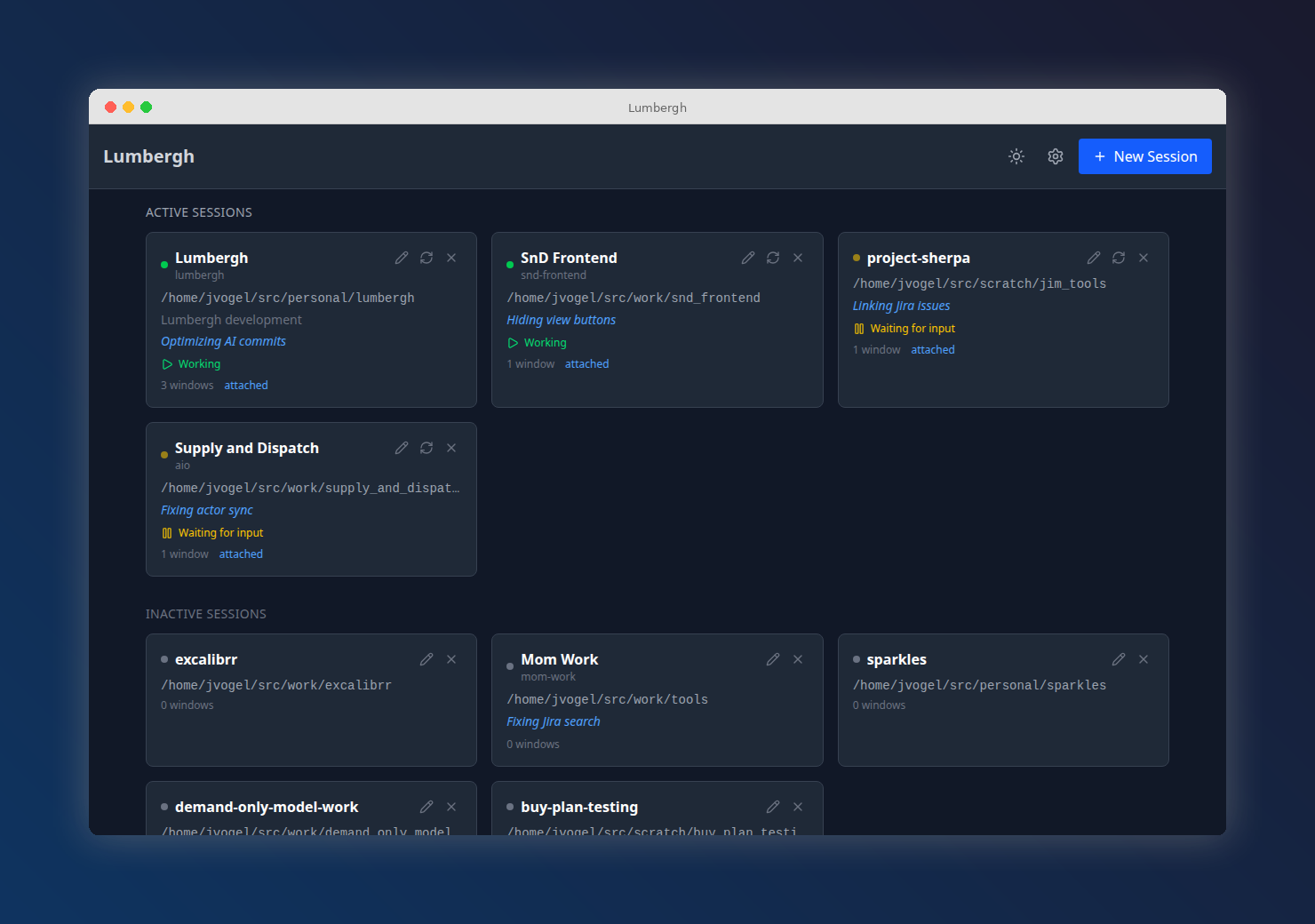
A self-hosted web dashboard for supervising multiple Claude Code AI sessions running in tmux. Think "micromanager for your AI interns."
Install and Run
uv tool install pylumbergh   # or: pip install pylumbergh
lumbergh
# open http://localhost:8420
You just need tmux and git installed. Lumbergh checks on startup and tells you what's missing.
Features
- Multi-session dashboard -- view and manage all your Claude Code sessions at a glance
- Live terminals -- interact with real terminal sessions via xterm.js and WebSockets
- Git diff viewer -- watch diffs, commits, and branch changes in real time
- Git graph -- interactive commit history visualization
- File browser -- browse project files with syntax highlighting
- Manager AI -- built-in AI chat pane for reviewing and coordinating work
- Prompt templates -- reusable prompts with variables, fire them at any session with one click
- Todo lists and scratchpad -- per-project notes and task tracking
- Mobile-first -- responsive design with PWA support, works great from a phone or tablet
- Dark and light themes -- toggle with one click
Prerequisites
| Tool | Install |
|---|---|
| tmux | sudo apt install tmux / brew install tmux |
| git | sudo apt install git / brew install git |
Remote Access
Lumbergh binds to 0.0.0.0 so it works from other devices on your network. For secure remote access (especially mobile), we recommend Tailscale -- private, encrypted, no exposed ports.
Links
License
MIT
Project details
Verified details
These details have been verified by PyPIProject links
GitHub Statistics
Maintainers
Release history Release notifications | RSS feed


Download files
Download the file for your platform. If you're not sure which to choose, learn more about installing packages.
Source Distribution
Built Distribution
Filter files by name, interpreter, ABI, and platform.
If you're not sure about the file name format, learn more about wheel file names.
Copy a direct link to the current filters
File details
Details for the file pylumbergh-0.1.0a188.tar.gz.
File metadata
- Download URL: pylumbergh-0.1.0a188.tar.gz
- Upload date:
- Size: 2.2 MB
- Tags: Source
- Uploaded using Trusted Publishing? Yes
- Uploaded via: twine/7.0.0 CPython/3.13.14
File hashes
| Algorithm | Hash digest | |
|---|---|---|
| SHA256 |
b36357ed7953ca785a44aed25d0b2442a3f871401843b57f03f65f86ab92b636
|
|
| MD5 |
c4898d349ddc01886cac10dd979b6a0c
|
|
| BLAKE2b-256 |
0d3a56db6e670e7e3fc41d47a1ed084a385b543ef427dbe3bc503bcffd39402a
|
Provenance
The following attestation bundles were made for pylumbergh-0.1.0a188.tar.gz:
Publisher:
release-alpha.yml on voglster/lumbergh
-
Statement:
-
Statement type:
https://in-toto.io/Statement/v1 -
Predicate type:
https://docs.pypi.org/attestations/publish/v1 -
Subject name:
pylumbergh-0.1.0a188.tar.gz -
Subject digest:
b36357ed7953ca785a44aed25d0b2442a3f871401843b57f03f65f86ab92b636 - Sigstore transparency entry: 2283846845
- Sigstore integration time:
-
Permalink:
voglster/lumbergh@f2d53da57a60db016f230859e06335a6edc541e9 -
Branch / Tag:
refs/heads/main - Owner: https://github.com/voglster
-
Access:
public
-
Token Issuer:
https://token.actions.githubusercontent.com -
Runner Environment:
github-hosted -
Publication workflow:
release-alpha.yml@f2d53da57a60db016f230859e06335a6edc541e9 -
Trigger Event:
workflow_run
-
Statement type:
File details
Details for the file pylumbergh-0.1.0a188-py3-none-any.whl.
File metadata
- Download URL: pylumbergh-0.1.0a188-py3-none-any.whl
- Upload date:
- Size: 2.3 MB
- Tags: Python 3
- Uploaded using Trusted Publishing? Yes
- Uploaded via: twine/7.0.0 CPython/3.13.14
File hashes
| Algorithm | Hash digest | |
|---|---|---|
| SHA256 |
e2ff868e32178ea88023c5e054850047ffb63ffd1c2568a7f619354c3661ad9a
|
|
| MD5 |
c84286c59cd8ec9a82ab997e5816236a
|
|
| BLAKE2b-256 |
50d4e14d7f6104b90935bbb6fa2fc6763008c0e6a22959761ce563dbd999c094
|
Provenance
The following attestation bundles were made for pylumbergh-0.1.0a188-py3-none-any.whl:
Publisher:
release-alpha.yml on voglster/lumbergh
-
Statement:
-
Statement type:
https://in-toto.io/Statement/v1 -
Predicate type:
https://docs.pypi.org/attestations/publish/v1 -
Subject name:
pylumbergh-0.1.0a188-py3-none-any.whl -
Subject digest:
e2ff868e32178ea88023c5e054850047ffb63ffd1c2568a7f619354c3661ad9a - Sigstore transparency entry: 2283846936
- Sigstore integration time:
-
Permalink:
voglster/lumbergh@f2d53da57a60db016f230859e06335a6edc541e9 -
Branch / Tag:
refs/heads/main - Owner: https://github.com/voglster
-
Access:
public
-
Token Issuer:
https://token.actions.githubusercontent.com -
Runner Environment:
github-hosted -
Publication workflow:
release-alpha.yml@f2d53da57a60db016f230859e06335a6edc541e9 -
Trigger Event:
workflow_run
-
Statement type:






