
p
Python Version Management, Simplified. Wrap pipx and poetry Tools
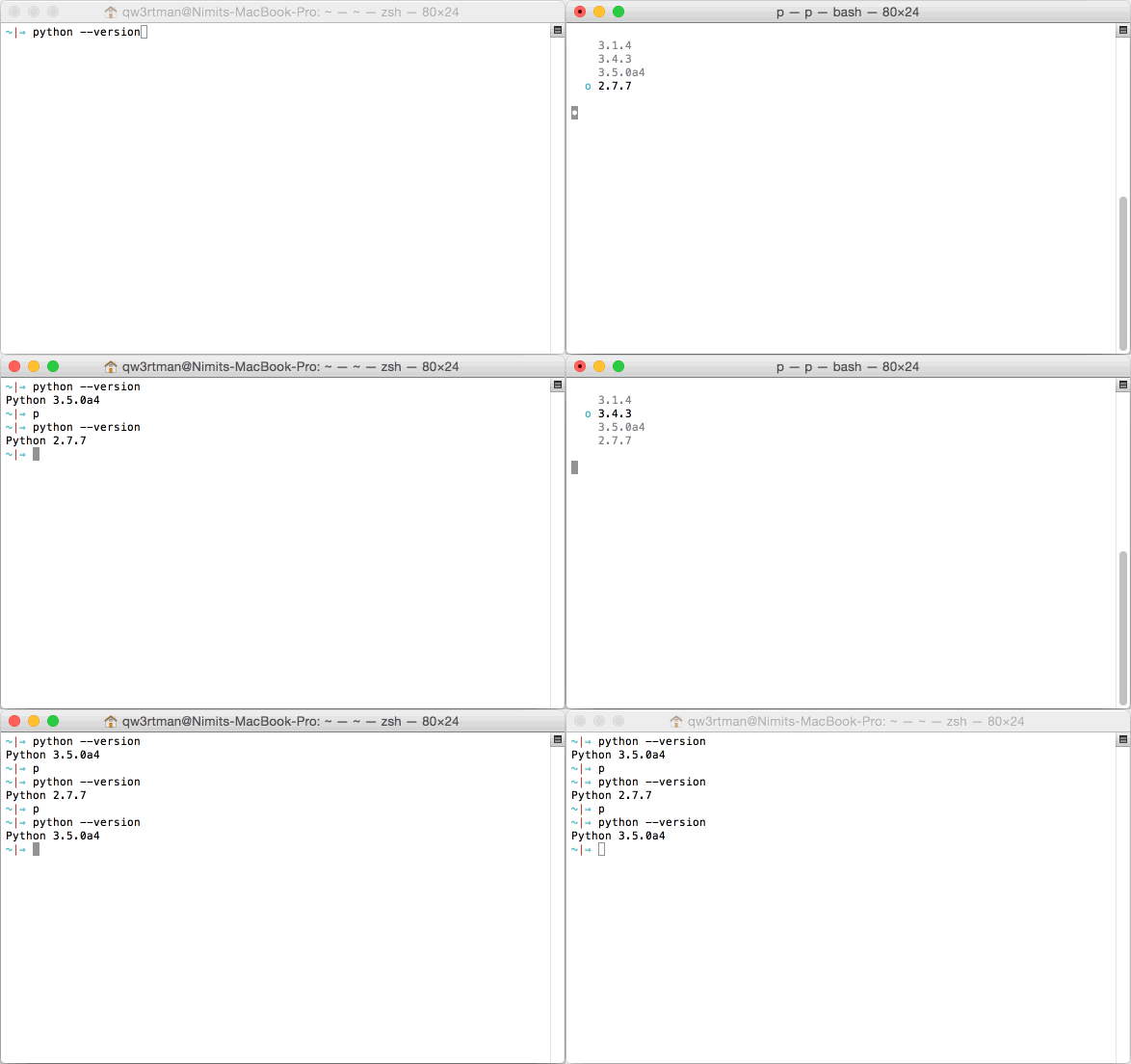
p is powerful and feature-packed, yet simple; both in setup and use. There are no tricky settings, options, or crazy dependencies. p is just a helpful ~600 line Bash script that gets the job done.
p let's you quickly switch between Python versions whenever you need to, removing the barrier between Python 2.x.x and 3.x.x.
p was heavily inspired by n, a version manager for Node.js.
p is also great for getting started using Python development versions. Use p latest to get up and running with the latest development version of Python!
Getting Started
After the super painless drag-and-drop installation, you can start using p right away.
Usage
Usage: p [COMMAND] [args]

Commands:

p                              Output versions installed
p status                       Output current status
p <version>                    Activate to Python <version>
	p latest                     Activate to the latest Python release
	p stable                     Activate to the latest stable Python release
p use <version> [args ...]     Execute Python <version> with [args ...]
p bin <version>                Output bin path for <version>
p rm <version ...>             Remove the given version(s)
p prev                         Revert to the previously activated version
p default                      Revert to the system default python version
p ensurepath                   Add python path to your search path
p unpkg <pkg ...>              Remove the given name(s) pip packages and unused dependencies
p shell                        Add python bin path to a new bash shell
p p                            Wrap pip command
p px                           Wrap pipx command
p py                           Wrap poetry command
p up                           Update all pipx libs,Wrap pipdate command,update all pip packages
p migrate <ver1> <ver2>        Migrate pip package from a Python version to another
p ls                           Output the versions of Python available
	p ls latest                  Output the latest Python version available
	p ls stable                  Output the latest stable Python version available
p i <version>                  Install Python <version> from prebuilt binaries

Options:

-V, --version   Output current version of p
-h, --help      Display help information

Environment variables:

P_PREFIX        Python versions installation dir ,default: ~/.local
PY_INSTALL_FLAG Python installation configure flags, eg: --enable-optimizations
Installation Python dependencies(Option)
Ubuntu/Debian:
sudo apt-get install -y zstd curl build-essential zlib1g-dev libffi-dev libsqlite3-dev
Centos/Rocky/Alma/Fedora:
sudo yum install -y zstd curl which diffutils perl gcc gcc-c++ zlib-devel xz-devel sqlite-devel libffi-devel
Installation
After downloading the Bash script, simply copy it over to your $PATH and p will take care of the rest.
$ curl -o p https://raw.githubusercontent.com/tomasky/pym3/master/bin/p
$ chmod +x p
$ mv p /usr/local/bin
Alternatively, you can install p via npm:
npm install -g pym3
So far, p has only been tested in Bash. If you can make p work on another shell, please send in a pull request!
Set python versions installation dir:
# default is `~/.local`
# add this to .bashrc
export P_PREFIX=/usr/local
Set python download mirror:
# add this to .bashrc
export PYTHON_MIRROR=https://mirrors.huaweicloud.com/python/
Updating
Simply follow the above steps and swap out the old Bash script with the new one!
Contributing
Contributions are always welcome.
Find something interesting in the TODO below, fork our code, create a new branch, and send us a pull request.
There are only two rules: avoid code smells and abide by the syntax-formatting of the existing code.
TODO
- greater abstraction between Python 2.x.x and 3.x.x
- per-directory/project Python version
- also manage PyPy
FAQs
- How does
pdiffer frompyenv?pis designed for the average Python user. You can get up and running with the latest development build of Python with one simple command:p latest. No configuration is necessary;pmanages everything for you.- On the other hand,
pyenvis for the more advanced user who is comfortable configuring their Python environment to all their needs.pprovides the basics in one easy to use aesthetically-pleasing command. - Additionally,
pis easier to use. To switch your Python version, simply runpand you'll be presented with a list of installed Python versions to select from that you can scroll through with your arrow keys and select with the return key. pis great at dealing with any version of Python. If it's not installed, runningp <version>will download the source, configure it for your system, and compile it, all in one simple command.
- How does
pwork?pstores each Python version installed in/usr/local/p/versions/python. When a Python version is activated,pcreates a symbolic link to the Python binary located at/usr/local/p/versions/python/python. Sincepprefixes the $PATH with/usr/local/p/versions/python, this version ofpythonis found first; hence, it is used over the default version of Python installed on your system.
- How do I revert back to my default Python version?
- Simply run
p defaultandpwill remove the symbolic link described above; therefore reverting back to your default Python version.
- Simply run
- Does
pdownload the source each time I activate or install a version?- Nope.
pstores the source for each of the versions installed, allowing for quick activations between already-installed versions.
- Nope.
- How do I get this working on Windows?
- Unfortunately,
pis not supported on Windows at the time. If you know of a workaround, send in a pull request!
- Unfortunately,
License
The below license was included in n and is included below. p's license (also MIT) can be found in the LICENSE file.
(The MIT License)
Copyright (c) 2014 TJ Holowaychuk <tj@vision-media.ca>
Permission is hereby granted, free of charge, to any person obtaining a copy of this software and associated documentation files (the 'Software'), to deal in the Software without restriction, including without limitation the rights to use, copy, modify, merge, publish, distribute, sublicense, and/or sell copies of the Software, and to permit persons to whom the Software is furnished to do so, subject to the following conditions:
The above copyright notice and this permission notice shall be included in all copies or substantial portions of the Software.
THE SOFTWARE IS PROVIDED 'AS IS', WITHOUT WARRANTY OF ANY KIND, EXPRESS OR IMPLIED, INCLUDING BUT NOT LIMITED TO THE WARRANTIES OF MERCHANTABILITY, FITNESS FOR A PARTICULAR PURPOSE AND NONINFRINGEMENT. IN NO EVENT SHALL THE AUTHORS OR COPYRIGHT HOLDERS BE LIABLE FOR ANY CLAIM, DAMAGES OR OTHER LIABILITY, WHETHER IN AN ACTION OF CONTRACT, TORT OR OTHERWISE, ARISING FROM, OUT OF OR IN CONNECTION WITH THE SOFTWARE OR THE USE OR OTHER DEALINGS IN THE SOFTWARE.
1 maintainer

Metadata
1 maintainer
Release files for pym3 1.1.1
For a detailed explanation of source distributions (sdists) and built distributions (wheels), please see the package formats documentation.
Source distribution (sdist)
| File | Size | Uploaded | |
|---|---|---|---|
| pym3-1.1.1.tar.gz | 12.4 kB | Details |
Built distribution (wheel)
| File | Interpreter | ABI | Platform | Reset |
|---|---|---|---|---|
| pym3-1.1.1-py3-none-any.whl | Python 3 | none | any | Details |
Total release size: 23.0 kB
Release files / pym3-1.1.1.tar.gz
| Download URL | pym3-1.1.1.tar.gz |
|---|---|
| Size | 12.4 kB |
| Tags | Source |
|
SHA-256 checksum How to use checksums |
7765c4df4755c78f1a2f24cf810511a1f566d3270277dd421834a2f569ca93f6
|
|
BLAKE2b-256 checksum How to use checksums |
1f20c819831c8375afb681d676fe48391d85a4f4ad0e8543367a0b8305801bfe
|
| Upload date | |
|
Uploaded using Trusted Publishing? What is trusted publishing? |
No |
| Uploaded via |
twine/3.8.0 pkginfo/1.9.6 readme-renderer/34.0 requests/2.27.1 requests-toolbelt/0.10.1 urllib3/1.26.15 tqdm/4.64.1 importlib-metadata/4.8.3 keyring/23.4.1 rfc3986/1.5.0 colorama/0.4.5 CPython/3.6.8
|
Release files / pym3-1.1.1-py3-none-any.whl
| Download URL | pym3-1.1.1-py3-none-any.whl |
|---|---|
| Size | 10.6 kB |
| Tags | Python 3 |
|
SHA-256 checksum How to use checksums |
25335ffaa3c49771665d39af773c646636457891646569b3daf6ef40c98dd0e0
|
|
BLAKE2b-256 checksum How to use checksums |
169ee354e05b108140b95e8a33cfa26f8931064c2bbef98fd72c72142ce3f2dc
|
| Upload date | |
|
Uploaded using Trusted Publishing? What is trusted publishing? |
No |
| Uploaded via |
twine/3.8.0 pkginfo/1.9.6 readme-renderer/34.0 requests/2.27.1 requests-toolbelt/0.10.1 urllib3/1.26.15 tqdm/4.64.1 importlib-metadata/4.8.3 keyring/23.4.1 rfc3986/1.5.0 colorama/0.4.5 CPython/3.6.8
|













