
pymailfeedback
Never wonder if your long-running script finished or crashed.
pymailfeedback is Python decorator that emails you the moment your script finishes, whether it succeeded or crashed. Get instant notifications with full tracebacks on failure and optional file attachments.
This project is a Python port of MatlabMailFeedback. pymailfeedback reproduces the same core idea — wrapping a script/function in a try/except block to report its exit status by email.
Installation
pip install pymailfeedback
Quick start
from pymailfeedback import sendstatus

@sendstatus("recipient@example.com")
def train_model():
    # your long-running code here
    ...

train_model()
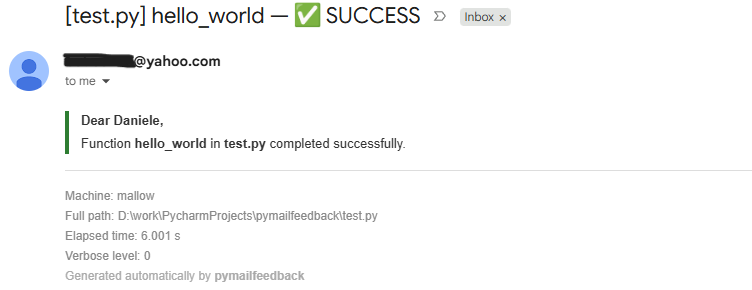
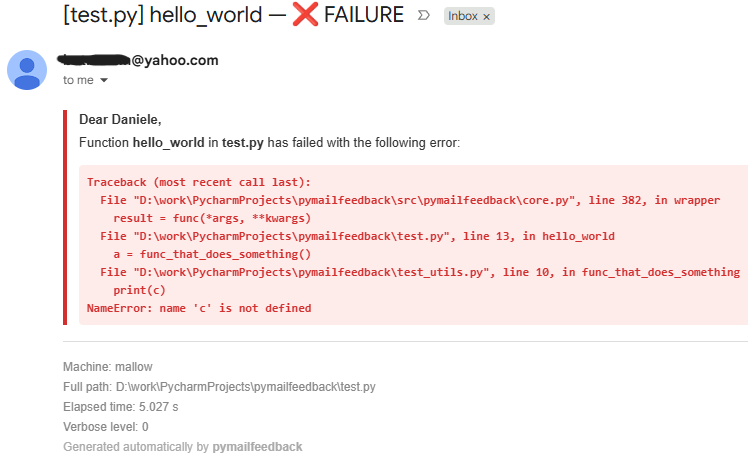
That's it. If train_model() finishes normally, you get a ✅ SUCCESS email. If it raises an exception, you get a ❌ FAILURE email with the full traceback — and the exception is still re-raised, so your program behaves exactly as if the decorator wasn't there.
sendstatus — the core feature
sendstatus is a decorator. Place it directly above the function or script entry point you want to monitor:
@sendstatus(to_addresses=None, verbose=None, shutdown=False, shutdown_delay=60)
def my_function(...):
    ...
| Parameter | Description |
|---|---|
to_addresses |
Recipient email address, or a list of addresses. If omitted, the default_recipient from your configuration is used. |
verbose |
Controls attachments sent on failure: 0 = no attachment, 1 = attach the file that caused the error, 2 = attach the entire traceback's file stack. If omitted, uses default_verbose from your configuration (default: 0). |
shutdown |
If True, shuts down the machine after the run completes, regardless of success or failure. |
shutdown_delay |
Seconds to wait before shutting down (default 60 seconds). |
Configuration
pymailfeedback needs SMTP credentials (sender email + password) to actually send mail.
There are three ways to configure it, checked in this order (note: you probably want to go with option 2 or 3):
1. Environment variables
| Variable | Maps to | Required |
|---|---|---|
PYMAIL_SENDER_EMAIL |
sender email | Yes |
PYMAIL_SENDER_PASSWORD |
sender password (e.g. a Yahoo Mail App Password) | Yes |
PYMAIL_SMTP_SERVER |
SMTP server | No (default: smtp.mail.yahoo.com) |
PYMAIL_SMTP_PORT |
SMTP port | No (default: 465) |
PYMAIL_DEFAULT_RECIPIENT |
default recipient if none is passed explicitly | No |
PYMAIL_DEFAULT_VERBOSE |
default verbose level | No (default: 0) |
export PYMAIL_SENDER_EMAIL="you@gmail.com"
export PYMAIL_SENDER_PASSWORD="your_app_password"
export PYMAIL_DEFAULT_RECIPIENT="you@example.com"
python train.py
If both PYMAIL_SENDER_EMAIL and PYMAIL_SENDER_PASSWORD are set, environment variables take priority over any JSON config file.
2. A JSON configuration file (recommended)
Create a file named .pymailfeedback.json, either in your current working directory or in your home directory (checked in that order):
{
    "sender_email": "you@gmail.com",
    "sender_password": "your_app_password",
    "smtp_server": "smtp.mail.yahoo.com",
    "smtp_port": 465,
    "default_recipient": "you@example.com",
    "default_verbose": 0
}
3. Interactive setup wizard
If no environment variables or config file are found, and you're running in an interactive terminal, pymailfeedback will offer to walk you through creating ~/.pymailfeedback.json on the spot. You can also trigger this manually at any time:
python -c "from pymailfeedback.core import _interactive_setup; _interactive_setup()"
It will prompt you for the sender email, password, SMTP server/port, default recipient, and default verbose level, then print exactly where the file was saved.
No configuration found?
If configuration is missing and no interactive terminal is available (e.g. inside a script run non-interactively), pymailfeedback raises a RuntimeError with a ready-to-copy JSON template and the command to launch the setup wizard.
A note on security: don't use your personal email
Whichever configuration method you choose, the sender password ends up stored in plain text somewhere on your machine — in a JSON file, in an environment variable, or in your shell history. That's fine for a throwaway or dedicated address, but it is not wise to use your personal, everyday email account for this. If that password (or app password) ever leaks — through a shared server, a committed config file, a misconfigured Docker image — you don't want it to be the same account tied to your personal identity, contacts, and other services.
Best practice: create a dedicated, "burner" email account used only for sending these notifications. Yahoo Mail is a good, free choice for this. Once created, don't use its regular password in pymailfeedback — generate a dedicated App Password instead, which can be revoked independently at any time without affecting the account's main login:
- Sign in to your new Yahoo account and go to Account settings.
- Open External Connections (sometimes shown as "App passwords" depending on the region/UI).
- Select Create app password (a generic label like "python" or "pymailfeedback" is fine).
- Copy the generated password and use it as
sender_password— either in your.pymailfeedback.jsonfile or as thePYMAIL_SENDER_PASSWORDenvironment variable. - Set
smtp_servertosmtp.mail.yahoo.comwhen using a Yahoo account.
This way, even in the worst case, the only thing exposed is a disposable notification account, not your main mailbox.
Extra utilities
These are optional helpers built on top of the same configuration system. sendstatus is the main feature — the rest are conveniences for specific use cases.
sendmsg
Send a one-off email manually, with an optional attachment:
from pymailfeedback import sendmsg

sendmsg("you@example.com", subject="Checkpoint saved", message="Epoch 50 completed.")
If to_addresses is omitted, the configured default_recipient is used.
sendbeacon
Send a periodic "still alive" email from inside a long-running loop, without spamming your inbox every iteration:
from pymailfeedback import sendbeacon

for epoch in range(1000):
    # ... training code ...
    sendbeacon(delta_time_minutes=60 * 12)  # one email every ~12 hours
1 maintainer

Download files
Download the file for your platform. If you're not sure which to choose, learn more about installing packages.
Source Distribution
Built Distribution
Filter files by name, interpreter, ABI, and platform.
If you're not sure about the file name format, learn more about wheel file names.
Copy a direct link to the current filters
File details
Details for the file pymailfeedback-0.1.0.tar.gz.
File metadata
- Download URL: pymailfeedback-0.1.0.tar.gz
- Upload date:
- Size: 12.3 kB
- Tags: Source
- Uploaded using Trusted Publishing? No
- Uploaded via: twine/7.0.0 CPython/3.10.0
File hashes
| Algorithm | Hash digest | |
|---|---|---|
| SHA256 |
5fb87dc69ac162bb99b7d24b5ee96ddbfa55f1de9125f13fa3aa9c6850ed5dd1
|
|
| MD5 |
1082abb7a557dc83a33e20ef8c493d85
|
|
| BLAKE2b-256 |
7e78cdde2021e7affbc6aff3d23a59dca5f73d6e282e2e3f54c2081742075bfe
|
File details
Details for the file pymailfeedback-0.1.0-py3-none-any.whl.
File metadata
- Download URL: pymailfeedback-0.1.0-py3-none-any.whl
- Upload date:
- Size: 10.5 kB
- Tags: Python 3
- Uploaded using Trusted Publishing? No
- Uploaded via: twine/7.0.0 CPython/3.10.0
File hashes
| Algorithm | Hash digest | |
|---|---|---|
| SHA256 |
64f9c8ed9fd3c31809e5a5b2be1a61d8a553b5cbe8bc4dcd2155827fa324e44d
|
|
| MD5 |
954fd9a8165041046306d322922754f2
|
|
| BLAKE2b-256 |
3280624eb50aa30b99d915f8c7de0662e33353a2a4824f9c1407decee9446e74
|







