
No project description provided

Project description
pymaketool



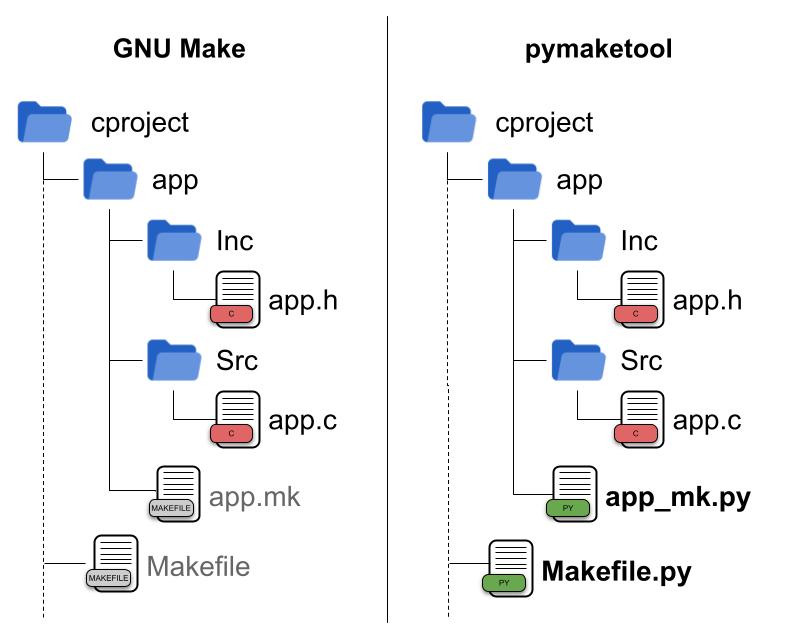
pymaketool is an elegant and simple tool to build and manage large C/C++ projects and libraries. The main purpose is to simplify the build process by using Python to find and organize source files.
Quick Start
Install required packages:
Ubuntu
$ sudo apt-get install -y gcc make python3 python3-pip python3-gi python3-gi-cairo gir1.2-gtk-3.0 git time zip
Fedora
$ sudo dnf install python3 python3-pip python3-gobject gtk3 time zip git gcc
Arch Linux
$ sudo pacman -S gcc make python python-pip python-gobject gtk3 time zip git
Install pymaketool:
$ pip3 install pymaketool
Quick Start with Poetry
If you prefer using Poetry for dependency management, you can set up your C project as a Poetry project:
Install Poetry
$ curl -sSL https://install.python-poetry.org | python3 -
Create a new C project with Poetry
$ pynewproject CLinuxGCC
  (author) Your name: Ericson
  (project_name) Your project name: hello

$ cd hello

# Initialize Poetry in your project
hello$ poetry init --name hello --dependency pymaketool

# Install dependencies
hello$ poetry install
Build using Poetry
# Clean the project
hello$ poetry run make clean

# Build the project
hello$ poetry run make

# Run the executable
hello$ ./Release/hello
Example pyproject.toml for a C project
[project]
name = "hello"
version = "0.1.0"
description = "My C project using pymaketool"
authors = [{ name = "Your Name", email = "your@email.com" }]
requires-python = ">=3.10"
dependencies = ["pymaketool"]

[build-system]
requires = ["poetry-core>=2.0.0"]
build-backend = "poetry.core.masonry.api"

[tool.poetry.scripts]
build = "subprocess:run"
Using Poetry ensures consistent Python environments across different machines and simplifies dependency management for your build tools.
Create new basic C project.
$ pynewproject CLinuxGCC
  (author) Your name: Ericson
  (project_name) Your project name: hello

$ cd hello

hello$ make clean

hello$ make

hello$ ./Release/hello
Note: This example uses EclipseAddon by default; pymaketool generates the files .settings/language.settings.xml and .cproject.
Quick start in Docker
Pull the image and run a container:
$ docker pull ericsonjoseph/pymaketool

$ docker run -it ericsonjoseph/pymaketool

ubuntu@$ pynewproject CLinuxGCC
Quick Info
pymaketool processes code modules as objects. These objects are defined by files ending with _mk.py. With Python, you can write code to discover and retrieve source files and include paths, e.g.:
# File app_mk.py

from pymakelib import module

@module.ModuleClass
class App(module.AbstractModule):

    def getSrcs(self):
        # Get all .c source files in the current folder ./app/
        # Returns e.g.: [ 'app/app.c' ]
        return self.getAllSrcsC()

    def getIncs(self):
        # Get all include paths in the current folder ./app/
        # Returns e.g.: [ 'app' ]
        return self.getAllIncsC()
The file app_mk.py can be shorter and simpler, e.g.:
# File app_mk.py

from pymakelib import module

# BasicCModule inherits from AbstractModule and implements getSrcs and getIncs.
@module.ModuleClass
class App(module.BasicCModule):
    pass
The file app_mk.py in raw style:
# File app_mk.py

from pymakelib import module

@module.ModuleClass
class App():

    def getSrcs(self):
        return [
            'app/app.c'
        ]

    def getIncs(self):
        return [
            'app'
        ]
Remote modules can be loaded as static libraries with custom compiler flags, e.g.:
# File extlib_mk.py

from pymakelib import module

@module.ModuleClass
class ExtLib(module.ExternalModule):

    def init(self):
        # Compile modulelib as a static library (Optional)
        return module.StaticLibrary("modulelib", "Release", rebuild=True)

    def getModulePath(self)->str:
        # Location of module
        return '/LIBS/module_lib/module_lib_mk.py'


    def getCompilerOpts(self):
        # Override method and set special compiler flags (Optional)
        opts = project.getCompilerOpts()
        opts['CONTROL-C-OPTS'] = ['-std=c99']
        return opts
For install guide go to install-guide
For more documentation go to Read the Docs
Release history Release notifications | RSS feed


Download files
Download the file for your platform. If you're not sure which to choose, learn more about installing packages.
Source Distribution
Built Distribution
Filter files by name, interpreter, ABI, and platform.
If you're not sure about the file name format, learn more about wheel file names.
Copy a direct link to the current filters
File details
Details for the file pymaketool-3.0.0rc3.tar.gz.
File metadata
- Download URL: pymaketool-3.0.0rc3.tar.gz
- Upload date:
- Size: 191.7 kB
- Tags: Source
- Uploaded using Trusted Publishing? No
- Uploaded via: poetry/2.3.3 CPython/3.14.3 Linux/6.17.0-1010-azure
File hashes
| Algorithm | Hash digest | |
|---|---|---|
| SHA256 |
eaefa63e6e08f13e96876c6f31f911c33f7692a7292d5a7d0a511f50838da3a5
|
|
| MD5 |
dbae808a90bff81005422d2d06aa21f9
|
|
| BLAKE2b-256 |
f0aa75037d305bdec3e8e36ccbdfc546f04dd5fca61fa001ce744eb9e0789b56
|
File details
Details for the file pymaketool-3.0.0rc3-py3-none-any.whl.
File metadata
- Download URL: pymaketool-3.0.0rc3-py3-none-any.whl
- Upload date:
- Size: 223.1 kB
- Tags: Python 3
- Uploaded using Trusted Publishing? No
- Uploaded via: poetry/2.3.3 CPython/3.14.3 Linux/6.17.0-1010-azure
File hashes
| Algorithm | Hash digest | |
|---|---|---|
| SHA256 |
27caf311c99ba615efbc5c97fa8cc416d43325f0b1186ac4c2d37ccd2a2475ee
|
|
| MD5 |
726a45a9264e673fc3fdcee19ef0fa39
|
|
| BLAKE2b-256 |
fe0b870c39d45b3bb49abae7b5ba7ac0269a9cf3e2dd9dff33c83145f4ec6065
|






