
Manga-dl
Manga-dl is a command line tool which helps you search and download comic from multiple sources.
Support for Dogemanga、Mangabz、Manhuagui、Manhuabei、Manhuadb and Ykmh. See supported sources.
Python3 Only. Python 3.7+ Recommended.
English | 中文文档
Manga-dl是一个基于Python3的命令行工具,可以从多个网站搜索和下载漫画,方便寻找漫画,解决不知道哪个网站有版权的问题。工具的本意是聚合搜索,API是从公开的网络中获得,不是破解版,也不能下载付费漫画。
欢迎提交插件支持更多漫画站点!插件写法参考manga_dl/addons中的文件。查看 支持的漫画站点。
禁止将本工具用于商业用途,如产生法律纠纷与本人无关,如有侵权,请联系我删除。
功能
- 使用解析js的方式爬取图片
- 支持 HTTP 和 SOCKS 代理
- 支持搜索结果去重和排序
- 支持搜索关键字高亮
- 支持多线程下载
注意:仅支持Python3,建议使用 Python3.7 以上版本
安装
使用pip安装(推荐,注意前面有一个py):
$ pip install pymanga-dl
手动安装(最新):
$ git clone https://github.com/iworldtong/manga-dl.git
$ cd manga-dl
$ python setup.py install
不安装直接运行:
$ git clone https://github.com/iworldtong/manga-dl.git
$ cd manga-dl
$ pip install -r requirements.txt
$ ./manga-dl

# 或 python manga-dl
在以下环境测试通过:
| 系统名称 | 系统版本 | Python版本 |
|---|---|---|
| macOS | 10.15 | 3.7.3 |
使用方式
建议先查看帮助
$ manga-dl --help
Usage: manga-dl [OPTIONS]

  Search and download comic from multiple sources.

  Supported sites: https://github.com/iworldtong/manga-dl#支持的漫画站点

  Example: manga-dl -k 辉夜大小姐

Options:
  --version             Show the version and exit.
  -k, --keyword TEXT    搜索关键字
  -u, --url TEXT        通过指定的漫画URL下载(可指定为包含漫画链接的txt文件)
  -s, --source TEXT     支持的数据源 ('+'分割): manhuabei+mangabz
  -n, --number INTEGER  搜索数量限制
  -o, --outdir TEXT     指定输出目录, 默认当前终端目录
  -a, --download_all    下载整部漫画,不进入章节选择界面
  -x, --proxy TEXT      指定代理(如socks5://127.0.0.1:1086)
  -v, --verbose         详细模式
  --nomerge             不对搜索结果列表排序和去重
  --auto_proxy          自动按站点配置代理,需设置-x
  --aes_key TEXT        manhuabei
  --aes_iv TEXT         manhuebai
  --help                Show this message and exit.
-
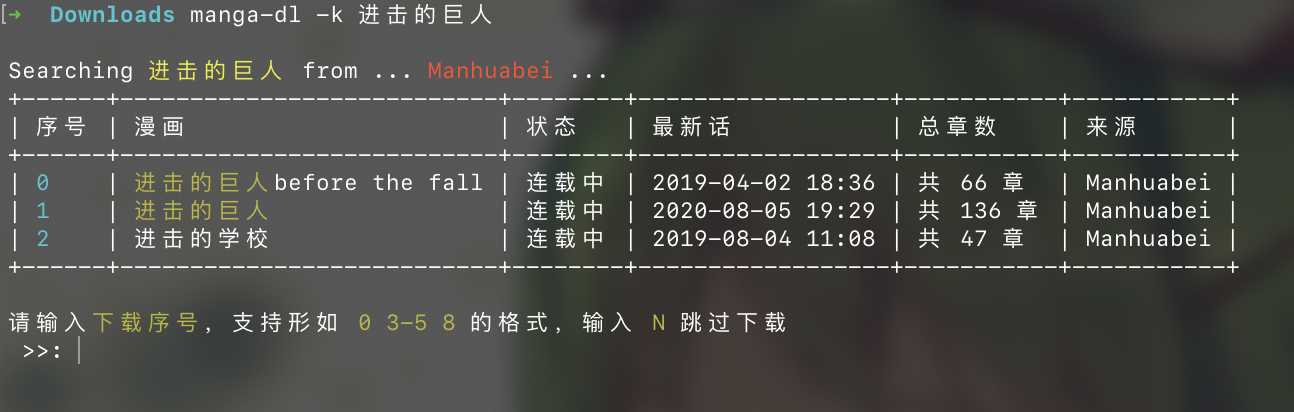
默认搜索
manhuabei,数量限制为5,保存到当前终端路径 -
指定序号时可以使用
1-5 7 10的形式 -
默认对搜索结果排序和去重
-
支持http代理和socks代理,格式形如
-x http://127.0.0.1:1087或-x socks5://127.0.0.1:1086 -
-u参数可指定为包含漫画链接的txt文件,由于不同站点代理设置不同,若从文件加载最好自动设置代理-x socks5://127.0.0.1:1086 --auto_proxy:
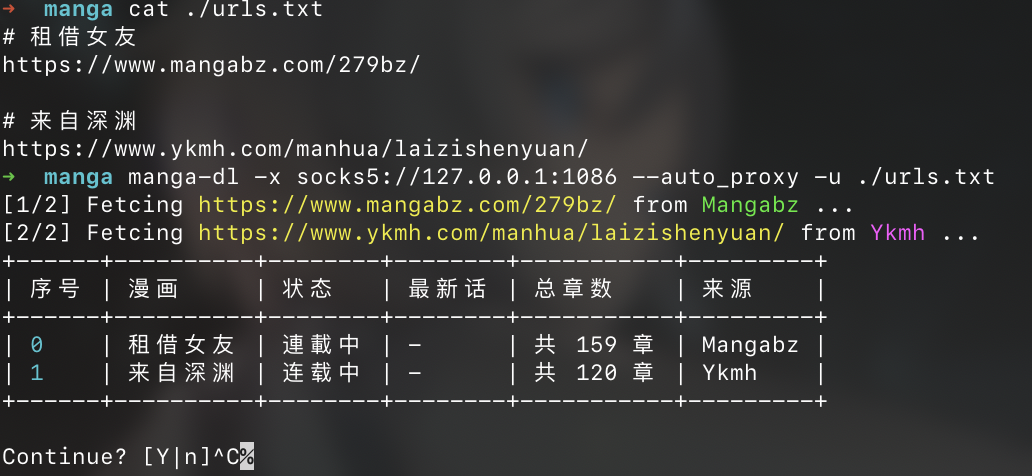
示例:
支持的漫画站点
| 网站 | 名称 | 简介 |
|---|---|---|
 |
漫画狗 | 近期能上去的。。。 |
 |
Mangabz | 全網資源最全的在線漫畫、日本漫畫閱讀平臺。擁有時下最熱門的日漫作品,超快的更新速度,第一時間為你奉上極致的閱讀體驗。 |
 |
漫画柜 | 海量的国产漫画、日韩漫画、欧美漫画等丰富漫画资源,免费为漫画迷提供及时的更新、清新的界面和舒适的体验,努力打造属于漫画迷的漫画乐园。 |
 |
漫画呗 | 原名漫画堆、50漫画网,非商业性的二次元分享交流网站,不仅是一个提供宣传推广全世界各种不同漫画文化的分享交流平台,更致力于推动和发展国内原创动漫。不需翻墙 |
 |
漫画DB | 最专业的日本漫画大全资料库。所有漫画均可免费在线看,同时每部漫画都有丰富的资料,包括登场人物、用语、设定、改编作品及创作幕后等深层的内容。 |
 |
优酷漫画 | 有可能找到一些上面版权受限的漫画,推荐,需翻墙 |
参数名:dogemanga, mangabz, manhuagui, manhuabei, manhuadb, ykmh
欢迎提交插件支持更多漫画源!插件写法参考manga_dl/addons中的文件
更新记录
- 2021-04-23 推荐使用Dogemanga
- 2020-08-25 实现Manhuabei中AES加密KEY、IV的自动获取,但保留接口;添加ykmh站点;0.1.11
- 2020-08-23 Manhuagui访问不稳定;Manhuabei JS解析变动,暂通过
--aes_key、-aes_iv手动配置 - 2020-08-18 修复下载进度条显示错位问题
- 2020-08-15 完成v0.1版
LICENSE
1 maintainer

Metadata
1 maintainer
Release files for pymanga-dl 0.1.12
For a detailed explanation of source distributions (sdists) and built distributions (wheels), please see the package formats documentation.
Source distribution (sdist)
| File | Size | Uploaded | Provenance | Actions |
|---|---|---|---|---|
| pymanga-dl-0.1.12.tar.gz | 23.4 kB | Without provenance | Details for pymanga-dl-0.1.12.tar.gz |
Built distribution (wheel)
| File | Interpreter | ABI | Platform | Actions Reset |
|---|---|---|---|---|
| pymanga_dl-0.1.12-py3-none-any.whl | Python 3 | none | any | Details for pymanga_dl-0.1.12-py3-none-any.whl |
Total release size: 55.2 kB
Release files / pymanga-dl-0.1.12.tar.gz
| Download URL | pymanga-dl-0.1.12.tar.gz |
|---|---|
| Size | 23.4 kB |
| Tags | Source |
|
SHA-256 checksum How to use checksums |
85f12b8a1a283ef1b3152c692704e8071ae3cfbd067c0436bbfb1bc31e974a19
|
|
BLAKE2b-256 checksum How to use checksums |
b669ab1d50deb13321483fe7be21960d22e88c778e842826d1ce4e72c5b1490b
|
| Upload date | |
|
Uploaded using Trusted Publishing? What is trusted publishing? |
No |
| Uploaded via |
twine/3.2.0 pkginfo/1.5.0.1 requests/2.24.0 setuptools/41.0.1 requests-toolbelt/0.9.1 tqdm/4.32.1 CPython/3.7.3
|
Release files / pymanga_dl-0.1.12-py3-none-any.whl
| Download URL | pymanga_dl-0.1.12-py3-none-any.whl |
|---|---|
| Size | 31.8 kB |
| Tags | Python 3 |
|
SHA-256 checksum How to use checksums |
5e78ff67ac930921c0faf1c17e1b501f5da7818e902a7fd0c9498321d551b232
|
|
BLAKE2b-256 checksum How to use checksums |
f9c0ba48cf5f1c7517999fe920a8a64f71926a30e5a221cd8925ad46cd821466
|
| Upload date | |
|
Uploaded using Trusted Publishing? What is trusted publishing? |
No |
| Uploaded via |
twine/3.2.0 pkginfo/1.5.0.1 requests/2.24.0 setuptools/41.0.1 requests-toolbelt/0.9.1 tqdm/4.32.1 CPython/3.7.3
|
Security for pymanga-dl 0.1.12
Provenance
Provenance describes where a file came from. On PyPI, provenance is shared via attestations, which provide a verifiable record of the build or publishing details. View details, limitations and caveats.
No provenance found
None of the files in this release were uploaded with provenance metadata.
A note on package security
PyPI is a repository for distributing packages, not a service for auditing them. While third-party security researchers and our staff do their best to detect and remove malicious packages, PyPI cannot guarantee the quality, security or suitability of any given package.
To learn more about protecting yourself from malicious actors, visit our package security documentation.














