
Pymations




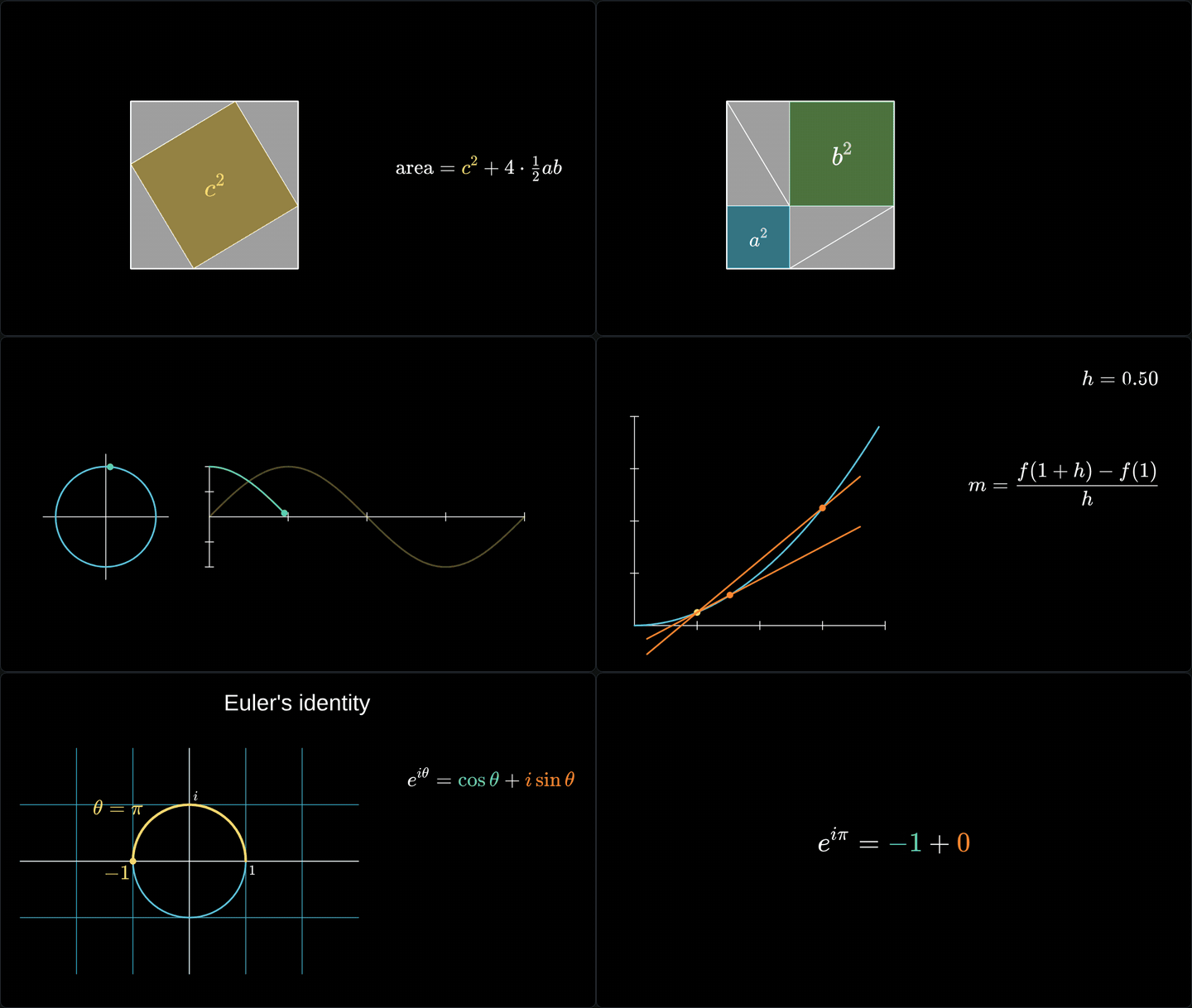
See them playing in your browser, with their code → Nothing to install. Or change the code and run it on the Pymations page →
Pymations ("Python animations") makes maths animations and explainers in Python: shapes, equations, graphs, pictures and text that draw themselves, move, and turn into each other. Write a short program and it plays straight away in your web browser, with a scrubber to pause, replay and drag to any moment. It runs scripts written for Manim Community unchanged, and builds any scene into a web page that plays on any website.
- Plays as you write. Scenes play in real time in the browser; there is no render step to wait for.
- Runs Manim scripts.
from manim import *andSceneclasses work, so a script from a Manim tutorial, or one an AI assistant wrote, runs as it is. - Nothing heavy to install.
pip install pymationsinstalls nothing else: no LaTeX, no ffmpeg, no Cairo. Equations are drawn with KaTeX. - Shares as one file.
pymations buildmakes a folder or a single.htmlfile that plays anywhere. - Explainer helpers. Titles, callouts, cards, a spotlight, scene transitions, pictures, voice-over and music.
Install
pip install pymations
Python 3.9 or newer.
A first scene
Save this as hello.py:
from pymations import *

square = Square(color=YELLOW)
circle = Circle(color=BLUE, fill_opacity=0.5)

play(Create(square))
play(Transform(square, circle))
play(square.animate.shift(RIGHT * 2).scale(0.5))
wait()

That is a whole program. play() adds animations to the scene's timeline, one after another, and wait() holds still for a second.
The class form
The same scene, written the way Manim tutorials write it:
from manim import *

class Hello(Scene):
    def construct(self):
        square = Square(color=YELLOW)
        circle = Circle(color=BLUE, fill_opacity=0.5)
        self.play(Create(square))
        self.play(Transform(square, circle))
        self.play(square.animate.shift(RIGHT * 2).scale(0.5))
        self.wait()
Every Scene class in a file plays, in the order they are written, each starting empty. The scrubber has a tick where each one starts. Use the bare form for short demos, and the class form for scripts you also want to run with Manim.
Things that follow each other
Updaters keep one thing tied to another while it moves. Here a dot rides the curve and its value goes with it:
from pymations import *

x = ValueTracker(0)
axes = Axes(x_range=[0, 4, 1], y_range=[0, 16, 4])
curve = axes.plot(lambda t: t ** 2, color=BLUE)
dot = always_redraw(lambda: Dot(axes.c2p(x.get_value(), x.get_value() ** 2), color=YELLOW))
value = always_redraw(lambda: DecimalNumber(x.get_value() ** 2).next_to(dot, UP))

play(Create(axes), Create(curve))
add(dot, value)
play(x.animate.set_value(4), run_time=3)
wait()

They are worked out in the browser on every frame, so dragging the scrubber to any moment shows exactly what plays there. Updaters has the rest.
Manim Community scripts
Manim was created by Grant Sanderson to make the animations in his 3Blue1Brown maths videos. Manim Community is the community-maintained version that most people use today. Pymations is a fresh rewrite of its script API, not a fork: no Manim code is included. It is built to play in real time in a browser, and its defaults, placement and timings were checked against values measured from real Manim. Most 2D scenes run unchanged; Differences from Manim lists what does not.

That is examples/pythagoras.py, a Manim script, running as it is.
Pymations is an independent project and is not affiliated with Manim, Manim Community or 3Blue1Brown.
Run it
pymations run hello.py
Your browser opens and the scene plays. The program runs in your own Python, so numpy and anything else you have installed works. Save the file and it runs again. Errors are shown on the page with the line they happened on.
Options: --port 9000, --no-browser.
Share it
pymations build hello.py -o site/
site/ is a folder of plain files that plays the scene entirely in the browser, with Pyodide loaded from its official CDN. Put it on any static host. Every path in it is relative.
Or make one file:
pymations build hello.py -o hello.html
hello.html holds the scene and everything it needs, the animation engine and its fonts included, so you can email it, put it on any website, or open it straight from your disk. Python still loads from Pyodide's CDN.
Use it on your website
<div data-pymations-src="hello.py"></div>
<script type="module" src="pymations/pymations.js"></script>
Each animation fills its box, starts when it scrolls into view, and pauses when it is out of view. pymations build my-page/ -o site/ copies your page and adds the pymations/ folder. See Building pages.
What is supported
- Shapes: circles, squares, polygons, lines, arrows, arcs, angles, braces, dashed and curved lines, SVG files and pictures.
- Text and maths:
Text,MathTexandTex(drawn with KaTeX),DecimalNumber, tables, matrices and code. - Graphs:
Axes,NumberPlane,NumberLine, plots, areas and Riemann rectangles, bar charts, polar and complex planes, network graphs. - Animations:
Create,Write,FadeIn,Transform,TransformMatchingTex,.animate,Indicate,LaggedStart, and the rest of Manim's common set, with Manim's rate functions. - Updaters:
ValueTracker,add_updater,always_redrawandTracedPath. Most run in the browser, so scrubbing stays exact. - The camera:
MovingCameraSceneandself.camera.frameto zoom and pan. - Explainers:
Card,Callout,LowerThird,Badge,Highlight,Spotlight,EndCard, pictures with rounded corners and shadows, and transitions between scenes. - Sound: voice-overs, music and sound effects, in step with the scrubber.
- Pyctures drawing: a scene can paint a background with Pyctures'
ctxevery frame, or place a Pyctures canvas inside the scene as an object.
3D scenes play flat, in 2D. Differences from Manim has the full list.
Make a video
The library plays scenes and builds pages; it does not write video files yet. To make a video, open the scene in Circuitry: its code editor has a live preview beside the code and a Record Video button that renders the scene frame by frame to MP4 (720p, 1080p, 4K, Shorts or square, 30 or 60 fps) with nothing dropped and sound in step. There you can also mix scenes with Pyctures 2D and 3D animations, and prepare pictures in code (cut out a product, resize, trace a logo into shapes).
Examples
In examples/. The twelve reference scenes are real Manim Community scripts, unchanged. All of them play in the online gallery.
| File | What it is |
|---|---|
pythagoras.py |
The theorem shown by rearranging four right triangles |
derivative.py |
A secant line closing in on the tangent |
unit_circle_sine.py |
A point going round the circle draws the sine wave |
completing_the_square.py, euler_identity.py, sum_pairing.py |
Algebra explained step by step |
tangent_slider.py, riemann_sum.py, cycloid.py |
Updaters: a sliding tangent, Riemann sums, a rolling wheel |
matrix_transform.py |
The plane moved by a matrix |
sin_cos_plot.py, grid_camera.py, moving_frame_box.py, brace_annotation.py, point_on_shapes.py, moving_around.py |
Graphs, the camera, braces and placement |
hello.py, hello_class.py |
The first scene, in both forms |
equation_steps.py, two_scenes.py, with_pyctures.py |
Equations, several scenes in one file, a Pyctures background |
pymations run examples/pythagoras.py
pymations run examples            # a list of them all
Docs
Start with Getting started, then scenes and sections, shapes, text and maths, graphs, animations, updaters, layout, colours, the camera, sound and titles and callouts. Building pages covers sharing, and Differences from Manim what runs differently. Tutorials are in docs/tutorials.
Pymations in Circuitry Studio
Pymations comes from Circuitry Studio, which runs on phones, iPad, the web and desktop. Scenes written with this library run there unchanged, and the other way round. Edit a scene and play it on its Pymations page: circuitry.dev/pymations.
Licence
MIT. See LICENSE. Pymations includes KaTeX (MIT) with its fonts (SIL OFL 1.1), opentype.js (MIT) and the Liberation Sans font (SIL OFL 1.1), and loads Pyodide (MPL 2.0) from its CDN; see THIRD-PARTY-NOTICES.
Author: John Wylie
1 maintainer

Metadata
1 maintainer
Release files for pymations 0.1.0
For a detailed explanation of source distributions (sdists) and built distributions (wheels), please see the package formats documentation.
Source distribution (sdist)
| File | Size | Uploaded | |
|---|---|---|---|
| pymations-0.1.0.tar.gz | 1.2 MB | Details |
Built distribution (wheel)
| File | Interpreter | ABI | Platform | Reset |
|---|---|---|---|---|
| pymations-0.1.0-py3-none-any.whl | Python 3 | none | any | Details |
Total release size: 2.4 MB
Release files / pymations-0.1.0.tar.gz
| Download URL | pymations-0.1.0.tar.gz |
|---|---|
| Size | 1.2 MB |
| Tags | Source |
|
SHA-256 checksum How to use checksums |
f6bfd53805d5deb812f5a464349c00764e85d4928e0547466d00c70aa5a587ac
|
|
BLAKE2b-256 checksum How to use checksums |
fd17183d7f6e489fc4a1feefa5fc1e99aa44ab27ad4b8d39366f35bb1a0b422c
|
| Upload date | |
|
Uploaded using Trusted Publishing? What is trusted publishing? |
Yes |
| Uploaded via |
twine/7.0.0 CPython/3.13.14
|
Provenance
Provenance describes where a file came from. On PyPI, provenance is shared via attestations, which provide a verifiable record of the build or publishing details. View details, limitations and caveats.


PyPI Publish Attestation
PyPI verified that this artifact, at this checksum, originated from the publisher listed below.
Signed by GitHub Actions, verified by PyPI on Oct 9, 2026.
Transparency logRelease files / pymations-0.1.0-py3-none-any.whl
| Download URL | pymations-0.1.0-py3-none-any.whl |
|---|---|
| Size | 1.2 MB |
| Tags | Python 3 |
|
SHA-256 checksum How to use checksums |
014cbf286722270ed0dd8ec877d01da5e6e65753bdbed3798201049d1c7258cb
|
|
BLAKE2b-256 checksum How to use checksums |
6158063a8d7cce6a93feb0457979ded6ec5f862f4a1f5ec8a1e120214fe090e0
|
| Upload date | |
|
Uploaded using Trusted Publishing? What is trusted publishing? |
Yes |
| Uploaded via |
twine/7.0.0 CPython/3.13.14
|
Provenance
Provenance describes where a file came from. On PyPI, provenance is shared via attestations, which provide a verifiable record of the build or publishing details. View details, limitations and caveats.
PyPI Publish Attestation
PyPI verified that this artifact, at this checksum, originated from the publisher listed below.
Signed by GitHub Actions, verified by PyPI on Oct 9, 2026.
Transparency log












