
Model driven genration - from UML to Code & Docs

Project description



pyMDG
Overview
Parser and tools to perform model driven generation of artifacts (code, schema, documentation etc) from UML models. Current version supports Sparx EA Generated XMI 2.1, Sparx DB (including sqlite which is the '.qea' native file format for Sparx v16+) or diagrams.net XML. Coming soon is ERWIN XMI 1.0
Used to parse model files to native classes (see metamodel below) which are passed to jinja2 templates for generation of code (POJO, POCO, Django etc), JSON data and HTML documentation.
Quickstart and docs can be found here: readthedocs
Test
Testing (powershell):
.\test.ps1
Testing (unittest):
python -m unittest
Generate
To generate code call the generate script and pass in the recipe folder. A sample recipe folder is provided in the github repo:
python mdg-tool.py generate ./sample_recipe/drawio/config-drawio-django.yaml
Or once installed into site-packages execute:
mdg-tool generate <my/config.yaml>
See the sample_recipe configs for examples
Sparx EA XMI (versions earlier than V16) Export Process
The UML parser expects a specific package hierarchy, please see the sample EA file.
- In Sparx select the domain root node (e.g. Model/Sample )
- Select the publish tab at the top
- Select Publish As... from top menu
- Set export type as XMI 2.1
- Optionally select 'Export Diagrams', 'Generate Diagram Images' and PNG format
- Export to folder where you want to generate from
Note: Sparx V16+ does not need to be export. Parser uses native SQLite file format which is the same schema as database repositories.
Draw.io Export Process
The UML parser expects a specific package layout which mimics the Sparx hierarchy, please see the sample files.
- In the web editor select Export As -> XML
- Uncheck 'Compressed'
Wiki documentation upload
If your generation recipe has created a file for your wiki (Confluence) then an uploader utilitity can be used. This assumes that you have done the XMI export from Sparx EA with export diagrams and generate diagram images. To generate a confluence token please see: https://confluence.atlassian.com/cloud/api-tokens-938839638.html
python mdg/confluence.py {your email} {your confluence token} {confluence page id} {path to images} {doc filename}
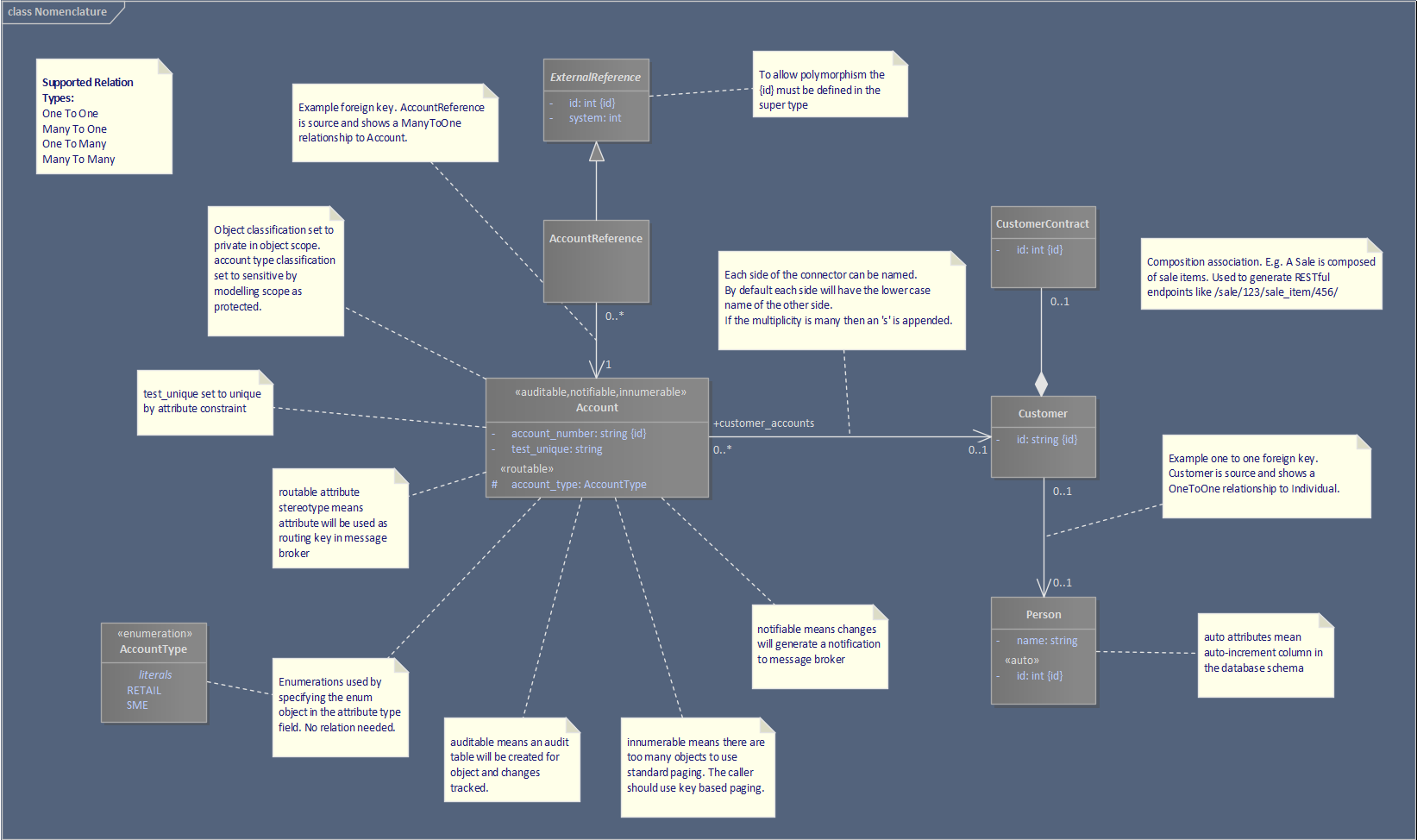
Nomenclature:
This diagram shows all the features and how to model in UML
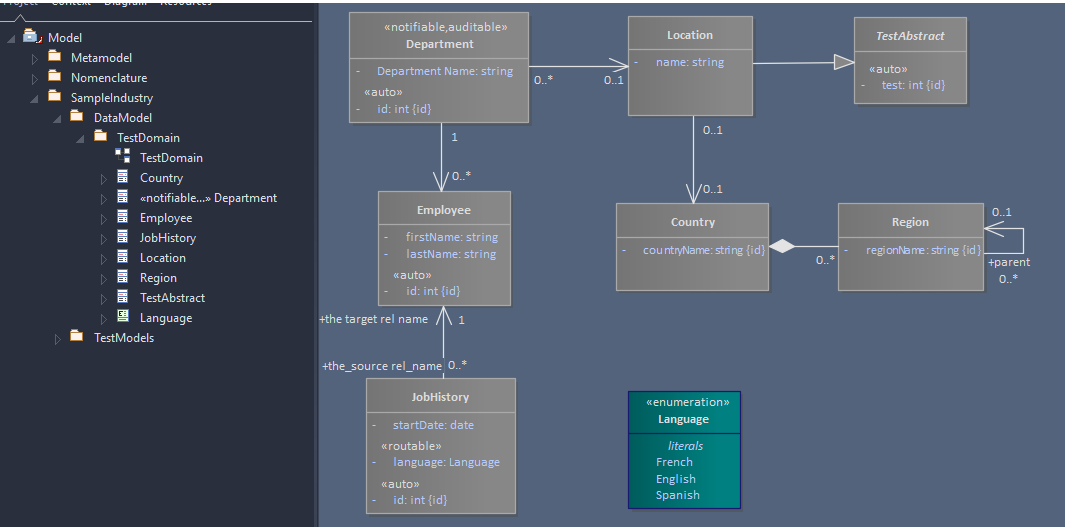
Sample model
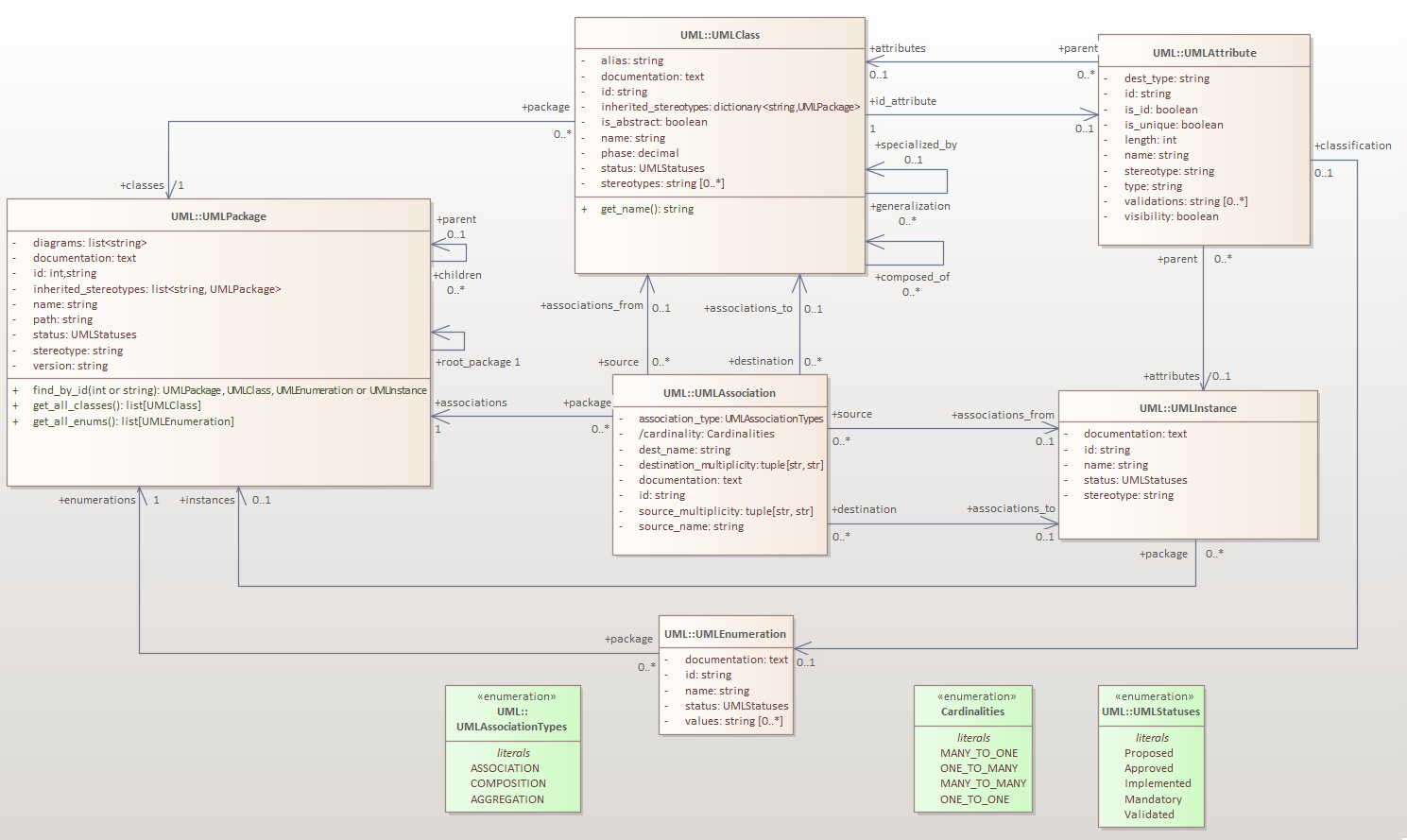
Metamodel
This diagram shows the internal classes which are passed to the templates during generation.
Build the docs
Install sphinx
 > cd pyMDG
 > sphinx-apidoc -o docs\source mdg
 > cd docs
 > make html
Release history Release notifications | RSS feed


Download files
Download the file for your platform. If you're not sure which to choose, learn more about installing packages.
Source Distribution
Built Distribution
Filter files by name, interpreter, ABI, and platform.
If you're not sure about the file name format, learn more about wheel file names.
Copy a direct link to the current filters
File details
Details for the file pymdg-0.8a5.tar.gz.
File metadata
- Download URL: pymdg-0.8a5.tar.gz
- Upload date:
- Size: 63.6 kB
- Tags: Source
- Uploaded using Trusted Publishing? No
- Uploaded via: twine/4.0.1 CPython/3.10.6
File hashes
| Algorithm | Hash digest | |
|---|---|---|
| SHA256 |
fffec00affd70a568173b510fd7be29bcc104862290c690f862fd789bb3fceb7
|
|
| MD5 |
363096133e8da14192aa7e6a53ecfe62
|
|
| BLAKE2b-256 |
7c1cd44cb3f045506b50490aca8d4594e199014f75ee085d73243eadd40d28d5
|
File details
Details for the file pymdg-0.8a5-py3-none-any.whl.
File metadata
- Download URL: pymdg-0.8a5-py3-none-any.whl
- Upload date:
- Size: 79.3 kB
- Tags: Python 3
- Uploaded using Trusted Publishing? No
- Uploaded via: twine/4.0.1 CPython/3.10.6
File hashes
| Algorithm | Hash digest | |
|---|---|---|
| SHA256 |
cb8b8dacab464d6f9de2832e515e073a46cf7721f83271bbdcc5729424eac470
|
|
| MD5 |
c07b1097b09863ea66dca266382f045f
|
|
| BLAKE2b-256 |
55c2d76854a58be2e659f86d766b1dd367f2a0e5468d37ba4270205418ec1d3e
|






