
Python Wrapper for Facebook Messenger Platform

Project description
Python Wrapper for Facebook Messenger Platform.
Disclaimer: This wrapper is NOT an official wrapper and do not attempt to represent Facebook in anyway.
About
This wrapper has the following functions:
send_text_message(recipient_id, message)
send_message(recipient_id, message)
send_generic_message(recipient_id, elements)
send_button_message(recipient_id, text, buttons)
send_attachment(recipient_id, attachment_type, attachment_path)
send_attachment_url(recipient_id, attachment_type, attachment_url)
send_image(recipient_id, image_path)
send_image_url(recipient_id, image_url)
send_audio(recipient_id, audio_path)
send_audio_url(recipient_id, audio_url)
send_video(recipient_id, video_path)
send_video_url(recipient_id, video_url)
send_file(recipient_id, file_path)
send_file_url(recipient_id, file_url)
send_action(recipient_id, action)
send_raw(payload)
get_user_info(recipient_id)
You can see the code/documentation for there in bot.py.
The functions return the full JSON body of the actual API call to Facebook.
Register for an Access Token
You’ll need to setup a Facebook App, Facebook Page, get the Page Access Token and link the App to the Page before you can really start to use the Send/Receive service.
Installation
pip install pymessenger2Usage
from pymessenger2.bot import Bot

bot = Bot(<access_token>, [optional: app_secret])
bot.send_text_message(recipient_id, message)Note: From Facebook regarding User IDs
These ids are page-scoped. These ids differ from those returned from Facebook Login apps which are app-scoped. You must use ids retrieved from a Messenger integration for this page in order to function properly.
If app_secret is initialized, an app_secret_proof will be generated and send with every request. Appsecret Proofs helps further secure your client access tokens. You can find out more on the Facebook Docs
Sending a generic template message:
Generic Template Messages allows you to add cool elements like images, text all in a single bubble.
from pymessenger2.bot import Bot
from pymessenger2 import Element
bot = Bot(<access_token>)
elements = []
element = Element(title="test", image_url="<arsenal_logo.png>", subtitle="subtitle", item_url="http://arsenal.com")
elements.append(element)

bot.send_generic_message(recipient_id, elements)
Output:

Generic Bot Output
Sending an image/video/file using an URL:
from pymessenger2.bot import Bot
bot = Bot(<access_token>)
image_url = "http://url/to/image.png"
bot.send_image_url(recipient_id, image_url)
Todo
Structured Messages
Receipt Messages
Quick Replies
Airlines
Tests!
Example
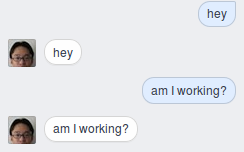
Screenshot of Echo Facebook Bot
You can find an example of an Echo Facebook Bot in examples/


Download files
Download the file for your platform. If you're not sure which to choose, learn more about installing packages.
Source Distribution
File details
Details for the file pymessenger2-3.0.0.tar.gz.
File metadata
- Download URL: pymessenger2-3.0.0.tar.gz
- Upload date:
- Size: 6.9 kB
- Tags: Source
- Uploaded using Trusted Publishing? No
File hashes
| Algorithm | Hash digest | |
|---|---|---|
| SHA256 |
9cea9f0dc31821c6a41ee8c7aec520840c0977ba76312cd73971776ea7dc70df
|
|
| MD5 |
a5891ccc2de41333fff6de76e8967b08
|
|
| BLAKE2b-256 |
b70f4b828081362a91dbdbeda244de010abb44ba2e7d491f35b7e27a84ff6dd3
|






