
A minimalist Python CLI tool for development workflow. Named after Taiwanese '歹命' (Pháiⁿ-miā), it turns common development pain points into simple solutions, providing package name validation, virtual environment management, and project information display with minimal configuration.

Project description
PyMin
pymin (0.0.21)
PyMin embodies Python's minimalist philosophy: a focused tool that does one thing exceptionally well. The name reflects our commitment to minimalism - minimal configuration, minimal complexity, but maximum effectiveness in Python development workflow.
Just as Python emphasizes readability and simplicity, PyMin provides a clean, intuitive interface for package management and development environment setup. No unnecessary features, no complex configurations - just straightforward, reliable development tools.
The name "PyMin" carries dual meanings:
In English: "Py" (Python) + "Min" (Minimal/Minimalist)
- Represents our commitment to minimalist design and focused functionality
- Follows Python's "Simple is better than complex" philosophy
In Taiwanese: "歹命" (Pháiⁿ-miā)
- A humorous reference to the common challenges in Python development
- Reflects developers' daily struggles with environment setup and package management
- Turns development pain points into a playful and helpful tool
This duality in naming captures both our design philosophy and the real-world problems we're solving, while adding a touch of Taiwanese developer humor to the Python ecosystem.
Built on top of standard Python tools (pip, venv, requirements.txt), PyMin enhances rather than replaces your familiar workflow. It seamlessly integrates with existing Python development practices, ensuring 100% compatibility with standard tools while providing enhanced functionality and better user experience.
A CLI tool for PyPI package management, providing package name validation, virtual environment management, and project information display with rich output formatting.
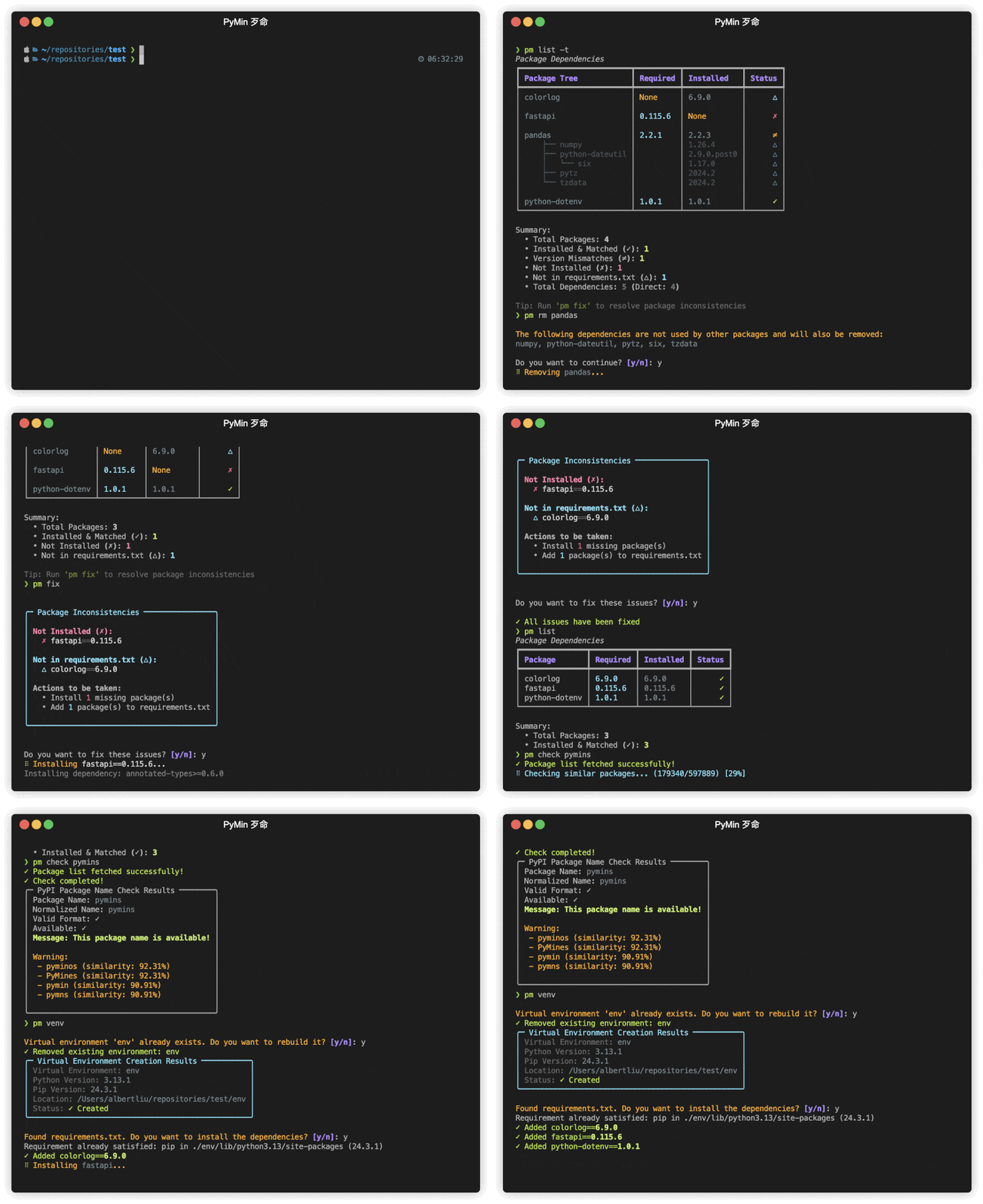
Demo
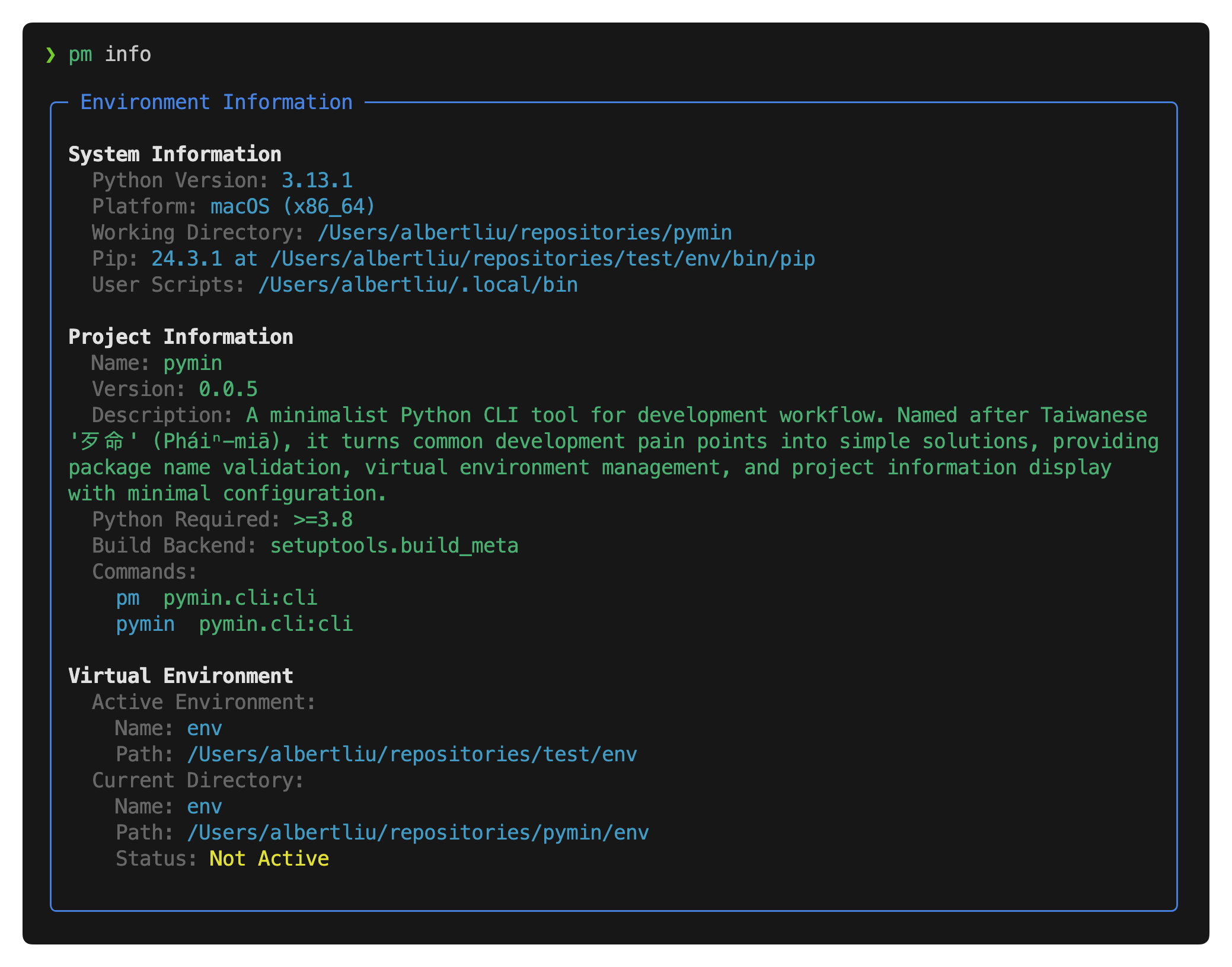
Environment Information
Features
Core Features
-
Environment Management
- Virtual environment creation and management (
pm venv/pm env) - One-command environment switching (
pm activate/pm deactivate) - Comprehensive environment information display (
pm info) - Automatic dependency installation and removal from requirements.txt
- Cross-platform compatibility
- Virtual environment creation and management (
-
Package Management
- Smart dependency visualization with tree structure (
pm list -t) - Efficient package installation and version management:
- Add new packages with version control
- Update existing packages to specific versions
- Support for both requirements.txt and pyproject.toml
- Intelligent package removal with dependency cleanup (
pm rm) - Comprehensive package inconsistency detection and auto-fix (
pm fix):- Version mismatches (≠)
- Missing packages (✗)
- Redundant dependencies (⚠)
- Unlisted installed packages (△)
- Dual dependency management support:
- Smart requirements.txt management
- pyproject.toml integration with PEP 621 compliance
- Synchronized dependency tracking across both files
- Case-sensitive package name handling
- Automatic version normalization
- Bulk package operations support
- One-command package updates (
pm update/pm up) - Version conflict detection and resolution
- Clear visual indicators for package status
- Smart dependency visualization with tree structure (
-
PyPI Integration
- Package name availability check (
pm check) - Similar package name search with threshold control (
pm search -t) - One-command package publishing (
pm release) - Test PyPI support for pre-release testing (
pm release --test) - Secure credential management
- Package name availability check (
Installation
Quick Start
Install via pipx:
$ pipx install pymin
System Requirements
| Component | Requirement |
|---|---|
| Python | >=3.8 |
| OS | Platform independent |
Usage
Command Interface
PyMin provides a streamlined command interface with intuitive aliases:
| Command | Description |
|---|---|
pm |
Main command (recommended) |
pymin |
Alternative full name |
Available Commands
Environment Management
| Command | Description | Alias/Options |
|---|---|---|
info |
Show environment information | |
venv |
Create a virtual environment | env, -y: auto-confirm |
activate |
Activate the virtual environment | on |
deactivate |
Deactivate current virtual environment | off |
Package Management
Both add and remove commands support multiple packages in one operation
add supports version specification using package==version format
| Command | Description | Alias/Options |
|---|---|---|
list |
List installed packages | ls, -a: all, -t: tree |
add |
Add or Update packages | -p: use pyproject.toml |
remove |
Remove packages from requirements.txt | rm |
update |
Update all packages to latest versions | up, -y: auto-confirm |
fix |
Fix package inconsistencies | -p: use pyproject.toml, -y: auto-confirm |
The fix command automatically resolves all package inconsistencies:
- Installs missing packages (✗)
- Updates packages to match required versions (≠)
- Removes redundant packages from requirements.txt/pyproject.toml (⚠)
- Adds unlisted installed packages to requirements.txt/pyproject.toml (△)
PyPI Integration
| Command | Description | Alias/Options |
|---|---|---|
check |
Check package name availability | |
search |
Search for similar package names | -t: threshold |
release |
Build and publish package to PyPI | --test: Test PyPI |
Command Examples
Environment Management
# Show environment info
$ pm info

# Create and manage virtual environment
$ pm venv          # Create with default name 'env'
$ pm venv my_env   # Create with custom name
$ pm venv -y       # Create without confirmation
$ pm env           # Alias for venv

# Activate/Deactivate
$ pm activate      # or pm on
$ pm deactivate    # or pm off
Package Management
# Add packages
$ pm add fastapi                # Add to requirements.txt
$ pm add fastapi -p             # Add to pyproject.toml
$ pm add fastapi==0.100.0       # Add or Update to specific version
$ pm add fastapi sqlalchemy     # Multiple packages


# Remove packages
$ pm rm fastapi

# List packages
$ pm list                       # Show main packages
$ pm list -a                    # Show all packages
$ pm list -t                    # Show dependency tree

# Update and fix
$ pm update                     # Update all packages
$ pm update -y                  # Update without confirmation
$ pm fix                        # Fix based on requirements.txt (default)
$ pm fix -p                     # Fix based on pyproject.toml
$ pm fix -y                     # Fix without confirmation
$ pm fix -p -y                  # Fix based on pyproject.toml without confirmation
PyPI Integration
# Check package name
$ pm check my-package-name

# Search similar names
$ pm search fastapi           # Default similarity (80%)
$ pm search fastapi -t 0.85   # Custom threshold

# Publish package
$ pm release                  # Publish to PyPI
$ pm release --test           # Publish to Test PyPI
This document was automatically generated by ReadGen.
Release history Release notifications | RSS feed


Download files
Download the file for your platform. If you're not sure which to choose, learn more about installing packages.
Source Distribution
Built Distribution
Filter files by name, interpreter, ABI, and platform.
If you're not sure about the file name format, learn more about wheel file names.
Copy a direct link to the current filters
File details
Details for the file pymin-0.0.21.tar.gz.
File metadata
- Download URL: pymin-0.0.21.tar.gz
- Upload date:
- Size: 70.4 kB
- Tags: Source
- Uploaded using Trusted Publishing? No
- Uploaded via: twine/6.1.0 CPython/3.13.1
File hashes
| Algorithm | Hash digest | |
|---|---|---|
| SHA256 |
cd2d0bd61294a3f0c16256720376c9ae435f6905ee97b1619d56cdfe40c6e400
|
|
| MD5 |
e0c3f033894172cc3d0d19c9654de31c
|
|
| BLAKE2b-256 |
7109ba78bfa0e804c6149565c2ed3699dd0e997bc5fcad857e5f092bfb984538
|
File details
Details for the file pymin-0.0.21-py3-none-any.whl.
File metadata
- Download URL: pymin-0.0.21-py3-none-any.whl
- Upload date:
- Size: 80.4 kB
- Tags: Python 3
- Uploaded using Trusted Publishing? No
- Uploaded via: twine/6.1.0 CPython/3.13.1
File hashes
| Algorithm | Hash digest | |
|---|---|---|
| SHA256 |
f62738c66b2ba97370a4c66764245f0d3ff7aad49e088f5e9c49003d46c6a43e
|
|
| MD5 |
3d7d11268e41518db30f7308ad1586ed
|
|
| BLAKE2b-256 |
36dd1e667eec044e4adc983546f7c8c177201f6845a45277029bef9c85f63975
|






