
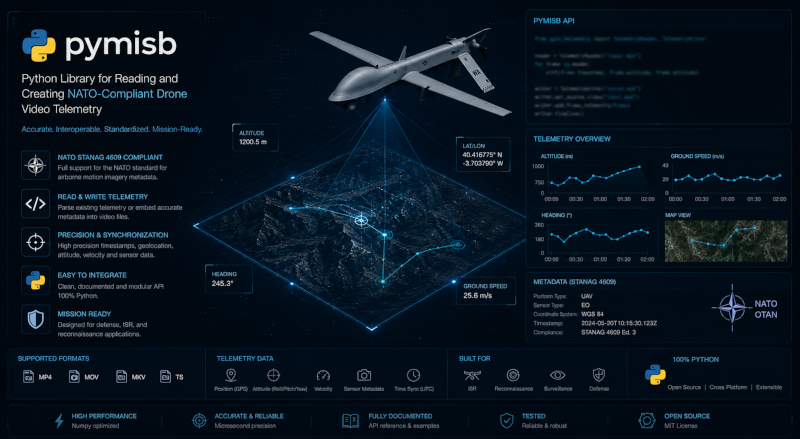
pymisb


MISB ST0601 / STANAG 4609 mux, demux & live streaming library for Python.
| Module | What it does |
|---|---|
| mux | Turn DJI drone footage + telemetry into STANAG 4609 videos with embedded KLV |
| mux (live) | Mux a continuous MPEG-TS with telemetry dicts that arrive at their own rate |
| demux | Extract and decode KLV telemetry from any STANAG-compliant video file |
| stream | Read KLV in real-time from live UDP/RTP/RTSP streams |
| vmti | Parse MISB ST 0903 VMTI target tracking metadata |
pip install pymisb
Donations — If this project is useful for you, consider buying me a beer!

Quick start
Mux — create a MISB video
from pymisb.common import build_klv_packets
from pymisb.mux import mux_with_ffmpeg

packets = build_klv_packets("telemetry.csv")
mux_with_ffmpeg("drone.mp4", packets, "output.ts")
Demux — read KLV from a video
from pymisb.demux import extract_klv, decode_packets

klv_data = extract_klv("output.ts")
packets = decode_packets(klv_data)
for pkt in packets:
    meta = pkt.MetadataList()
    print(meta[13])  # Sensor Latitude
Live mux — continuous video, telemetry when it arrives
The video is an ongoing MPEG-TS. The drone is polled at some rate, so most
iterations have no sample. When one does arrive it is a plain dict.
examples/live_mux.py simulates both and writes
muxed_data.ts:
python examples/live_mux.py
from pymisb.mux import LiveMuxer

muxer = LiveMuxer()
with open("muxed_data.ts", "wb") as fh:
    for chunk in video_chunks():       # any slice of an MPEG-TS
        sample = poll_drone()          # dict, or None
        fh.write(muxer.feed(chunk, sample))
    fh.write(muxer.close())
sample can use latitude, longitude, altitude, heading and an
ISO-8601 timestamp. The video has to already be MPEG-TS; an MP4 or a raw
elementary stream needs ffmpeg -c copy -f mpegts first.
Stream — real-time KLV from live feeds
from pymisb.stream import open_stream

with open_stream("udp://@:5000") as reader:
    for pkt in reader:
        meta = pkt.MetadataList()
        print(meta[13])  # Sensor Latitude in real-time
VMTI — target tracking metadata
from pymisb.vmti import parse_vmti, extract_vmti

targets = parse_vmti(extract_vmti("video.ts"))
for t in targets:
    print(t["target_centroid_lat"], t["target_classification"])
Package structure
pymisb/
├── constants.py          Shared constants (keys, versions, FOV, etc.)
├── common/
│   ├── encoder.py        MISB ST0601 KLV packet builder
│   ├── dji.py            DJI CSV + binary .txt flight record parsers
│   └── ts.py             Path defaults and KLV stream writer
├── mux/
│   ├── engine.py         MPEG-TS muxing (PES/PCR/KLV injection + FFmpeg)
│   └── live.py           Live mux: MPEG-TS chunks + telemetry dicts
├── demux/
│   └── engine.py         KLV extraction and decoding from files
├── stream/
│   └── engine.py         Real-time KLV from UDP/RTP/RTSP streams
├── vmti/
│   └── engine.py         MISB ST 0903 VMTI target metadata
└── klvdata/              Vendored MISB ST0601/0903 KLV decoder
Requirements
- Python 3.12+ (3.12, 3.13)
- FFmpeg on the PATH (for muxing, demuxing, and streaming)
Installation
From PyPI
pip install pymisb
From source
git clone https://github.com/All4Gis/pymisb.git
cd pymisb
pip install .
Development (editable)
git clone https://github.com/All4Gis/pymisb.git
cd pymisb
pip install -e ".[test]"
Verify
python -c "from pymisb.constants import UAS_LS_KEY; print('OK')"
pymisb-mux --help
pymisb-demux --help
CLI usage
Muxing
# From DJI CSV telemetry
pymisb-mux --video drone.mp4 --csv telemetry.csv
pymisb-mux --video drone.mp4 --csv telemetry.csv --out output.ts

# From DJI binary .txt flight record
pymisb-mux --video drone.mp4 --dji-txt DJIFlightRecord.txt

# KLV only (no video muxing)
pymisb-mux --csv telemetry.csv --out output.ts --klv-only

# Or via module
python -m pymisb.mux --video drone.mp4 --csv telemetry.csv
Demuxing
# Dump all KLV packets
pymisb-demux output.ts

# Playback at the video's real rate
pymisb-demux output.ts --play

# Accelerated playback x4
pymisb-demux output.ts --play --speed 4

# Show every ST0601 tag
pymisb-demux output.ts --all

# Tag tree of the first packet
pymisb-demux output.ts --structure
Streaming (live)
# Read KLV from a live UDP stream
pymisb-stream udp://@:5000

# RTSP camera
pymisb-stream rtsp://camera.local/stream --all

# Or via module
python -m pymisb.stream udp://@:5000
VMTI (target tracking)
# Decode VMTI targets from a video
pymisb-vmti video.ts

# Show all target fields
pymisb-vmti video.ts --all
Library API
pymisb.common — encoder and parsers
from pymisb.common import (
    build_st0601_packet,       # Build a single ST0601 KLV packet
    build_klv_packets,         # Parse DJI CSV -> list of KLV packets
    build_klv_packets_from_txt, # Parse DJI .txt -> list of KLV packets
    default_output,            # Generate default output path
    write_klv_stream,          # Write packets as raw KLV file
)
pymisb.mux — MPEG-TS muxing
from pymisb.mux import (
    mux_with_ffmpeg,       # Full mux pipeline (FFmpeg + KLV injection)
    inject_klv_into_ts,    # Low-level: inject KLV into existing TS
    LiveMuxer,             # Live: MPEG-TS chunks + telemetry dicts
    metadata_to_klv,       # One telemetry dict -> one ST0601 packet
)
pymisb.demux — KLV extraction and decoding from files
from pymisb.demux import (
    extract_klv,           # Extract raw KLV bytes from TS via FFmpeg
    decode_packets,        # Decode raw KLV into parsed ST0601 packets
)
pymisb.stream — real-time KLV from live streams
from pymisb.stream import open_stream

# Iterator mode — yields packets as they arrive
with open_stream("udp://@:5000") as reader:
    for pkt in reader:
        meta = pkt.MetadataList()
        print(meta[13])

# Callback mode
def on_packet(pkt):
    print(pkt.MetadataList()[13])

reader = open_stream("rtsp://camera.local/stream")
reader.start(callback=on_packet)
reader.stop()
pymisb.vmti — MISB ST 0903 VMTI target tracking
from pymisb.vmti import parse_vmti, extract_vmti, decode_vmti_stream

# From a TS file
targets = parse_vmti(extract_vmti("video.ts"))
for t in targets:
    print(t["target_centroid_lat"], t["target_classification"])

# From raw bytes
targets = decode_vmti_stream(vmti_bytes)
pymisb.constants — shared configuration
from pymisb.constants import (
    UAS_LS_KEY,            # 16-byte UAS Datalink Local Set universal key
    KLV_HEADER_KEY,        # Shifted key for DJI non-standard headers
    ST0601_VERSION,        # MISB ST0601 version (Tag 65)
    HFOV_DEG, VFOV_DEG,   # Camera field of view (degrees)
    EARTH_MEAN_RADIUS,     # WGS-84 radius in meters
)
Configuration
Edit pymisb/constants.py to adjust:
HFOV_DEG/VFOV_DEG— camera field of view (affects sensor footprint)ST0601_VERSION— advertised Local Set version (Tag 65)
Supported standards
| Standard | Name | Status |
|---|---|---|
| MISB ST 0601 | UAS Datalink Local Set | Full (encode + decode) |
| MISB ST 0903 | VMTI (Video Moving Target Indicator) | Decode |
| MISB ST 0102 | Security Metadata | Decode (via klvdata) |
| MISB EG 0104 | UAV Basic Universal Metadata | Decode (via klvdata) |
| STANAG 4609 | NATO video standard | Full (mux + demux) |
Testing
# Install with test dependencies
pip install -e ".[test]"

# Run all tests
pytest tests/ -v

# Run specific test file
pytest tests/test_misb_common.py -v

# Run specific test
pytest tests/test_misb_common.py::TestBuildSt0601Packet -v

# With coverage
pip install pytest-cov
pytest tests/ --cov=pymisb --cov-report=term-missing
| Test file | Coverage |
|---|---|
tests/test_misb_common.py |
ST0601 encoder, DJI parsers, BER/BCC, geometry |
tests/test_misb_mux.py |
MPEG-TS primitives (PES, PTS, PCR, packetization) |
tests/test_klvdata.py |
Vendored klvdata decoder (ST0601 tags, BER-TLV, integration) |
CI runs on every push across Python 3.12-3.13 on Linux, macOS, and Windows.
Publishing
# Build
pip install build
python -m build

# Publish to PyPI
pip install twine
twine upload dist/*

# Or TestPyPI first
twine upload --repository testpypi dist/*
pip install --index-url https://test.pypi.org/simple/ pymisb
License
This project is licensed under the MIT License.
The vendored klvdata decoder in pymisb/klvdata/ is derived from
paretech/klvdata (MIT). See
THIRD_PARTY_LICENSES.md for full attribution.
"From raw drone footage to geospatial intelligence — one KLV packet at a time."
Made with passion by Fran Raga franka1986@gmail.com - June 2026.
If this saved you a few hours, give the repo a star and fly safe. Happy coding!
1 maintainer

Metadata
1 maintainer
Release files for pymisb 2.0.2
For a detailed explanation of source distributions (sdists) and built distributions (wheels), please see the package formats documentation.
Source distribution (sdist)
| File | Size | Uploaded | Provenance | Actions |
|---|---|---|---|---|
| pymisb-2.0.2.tar.gz | 40.9 kB | Without provenance | Details for pymisb-2.0.2.tar.gz |
Built distribution (wheel)
| File | Interpreter | ABI | Platform | Actions Reset |
|---|---|---|---|---|
| pymisb-2.0.2-py3-none-any.whl | Python 3 | none | any | Details for pymisb-2.0.2-py3-none-any.whl |
Total release size: 91.3 kB
Release files / pymisb-2.0.2.tar.gz
| Download URL | pymisb-2.0.2.tar.gz |
|---|---|
| Size | 40.9 kB |
| Tags | Source |
|
SHA-256 checksum How to use checksums |
b03f52976b6cb09b6a5b307b3186396160e57dc345cb1ee3bd6ee5ae331401fa
|
|
BLAKE2b-256 checksum How to use checksums |
118c593a7b3abf713a0e26327bd40491f96af8131211c3327b3e36288c0d8ede
|
| Upload date | |
|
Uploaded using Trusted Publishing? What is trusted publishing? |
Yes |
| Uploaded via |
twine/7.0.0 CPython/3.13.14
|
Release files / pymisb-2.0.2-py3-none-any.whl
| Download URL | pymisb-2.0.2-py3-none-any.whl |
|---|---|
| Size | 50.4 kB |
| Tags | Python 3 |
|
SHA-256 checksum How to use checksums |
8abb7b5bb32d5c9b6a0bf4c9265dc1c5351f1cc07c22078720b47436a2e93488
|
|
BLAKE2b-256 checksum How to use checksums |
7b9d2daebe75abcc8e64a9886a14c8679fdc647412fd2af2e73a69e6adc4011f
|
| Upload date | |
|
Uploaded using Trusted Publishing? What is trusted publishing? |
Yes |
| Uploaded via |
twine/7.0.0 CPython/3.13.14
|
Security for pymisb 2.0.2
Provenance
Provenance describes where a file came from. On PyPI, provenance is shared via attestations, which provide a verifiable record of the build or publishing details. View details, limitations and caveats.
No provenance found
None of the files in this release were uploaded with provenance metadata.
A note on package security
PyPI is a repository for distributing packages, not a service for auditing them. While third-party security researchers and our staff do their best to detect and remove malicious packages, PyPI cannot guarantee the quality, security or suitability of any given package.
To learn more about protecting yourself from malicious actors, visit our package security documentation.














