
Modular Data Acquisition with Python
Project description



Linux |
PyQt5 |
PyQt6 |
PySide6 |
|---|---|---|---|
Python 3.10 |
|||
Python 3.11 |
|||
Python 3.12 |
|||
Python 3.13 |


Windows |
PyQt5 |
PyQt6 |
PySide6 |
|---|---|---|---|
Python 3.10 |
|||
Python 3.11 |
|||
Python 3.12 |
|||
Python 3.13 |


PyMoDAQ, Modular Data Acquisition with Python, is a set of python modules used to interface any kind of experiments. It simplifies the interaction with detector and actuator hardware to go straight to the data acquisition of interest.
It has two purposes:
First, to provide a complete interface to perform automated measurements or logging data without having to write a user/interface for each new experiment, this is under the Dashboard_module environment and its extensions.
Second, to provide various tools (modules) to easily build custom apps
It is organised a shown below:
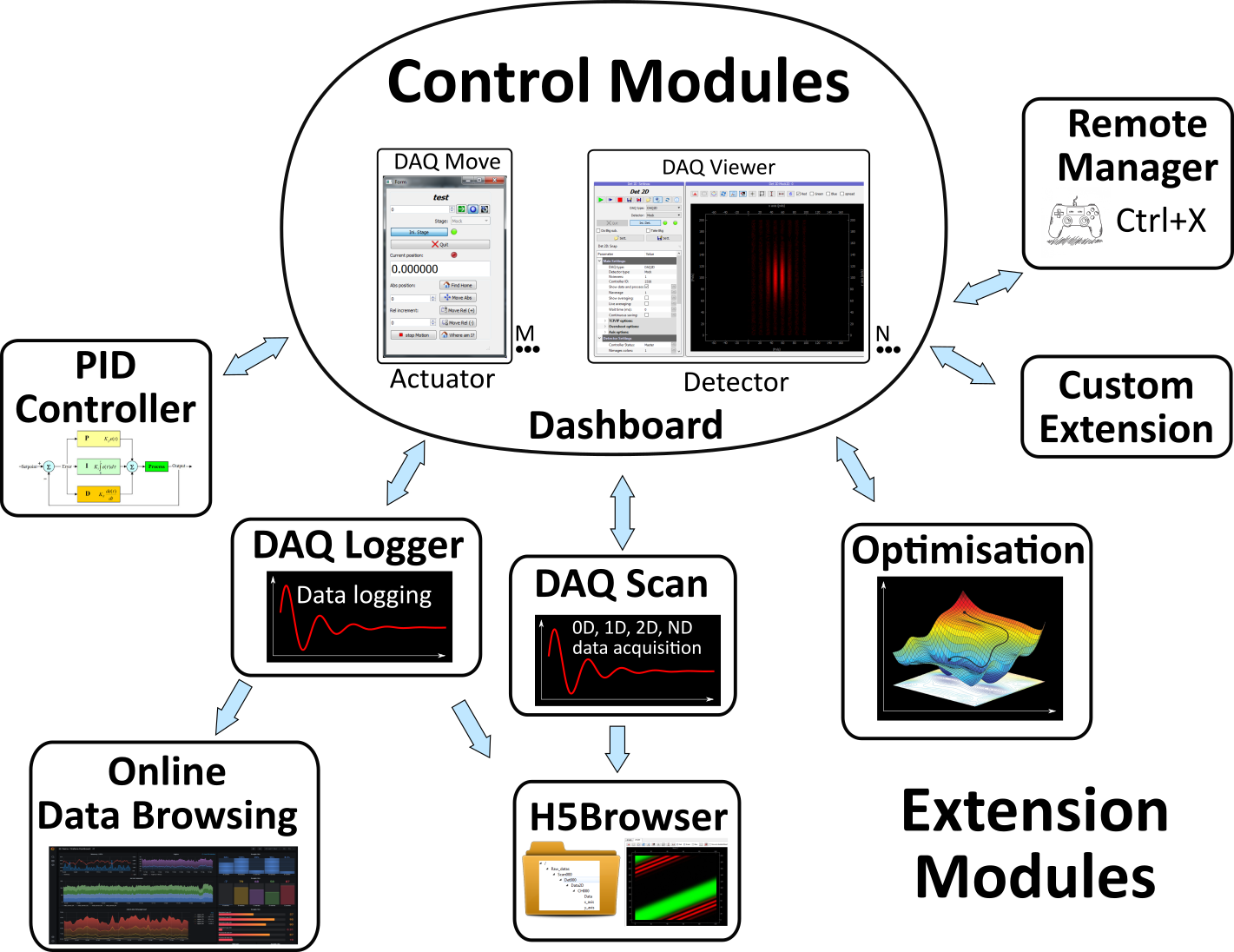
PyMoDAQ’s Dashboard and its extensions: DAQ_Scan for automated acquisitions, DAQ_Logger for data logging and many other.
The main component is the Dashboard : This is a graphical component that will initialize actuators and detectors given the need of your particular experiment. You configure the dashboard using an interface for quick launch of various configurations (numbers and types of control modules).
The detectors and the actuators are represented and manipulated using two control modules:
DAQ_Move_module : used to control/drive an actuator (stand alone and/or automated). Any number of these modules can be instantiated in the Dashboard
DAQ_Viewer_module : used to control/drive a detector (stand alone and/or automated).
Any number of these modules can be instantiated in the Dashboard.
The Dashboard allows you to start dedicated extensions that will make use of the control modules:
DAQ_Logger_module : This module lets you log data from one or many detectors defined in the dashboard. You can log data in a binary hierarchical hdf5 file or towards a sql database
DAQ_Scan_module : This module lets you configure automated data acquisition from one or many detectors defined in the dashboard as a function or one or more actuators defined also in the dashboard.
and many others to simplify any application development.
Published under the MIT FREE SOFTWARE LICENSE
GitHub repo: https://github.com/PyMoDAQ
Documentation: http://pymodaq.cnrs.fr/
Project details
Release history Release notifications | RSS feed


Download files
Download the file for your platform. If you're not sure which to choose, learn more about installing packages.
Source Distribution
Built Distribution
Filter files by name, interpreter, ABI, and platform.
If you're not sure about the file name format, learn more about wheel file names.
Copy a direct link to the current filters
File details
Details for the file pymodaq-5.1.13.tar.gz.
File metadata
- Download URL: pymodaq-5.1.13.tar.gz
- Upload date:
- Size: 475.4 kB
- Tags: Source
- Uploaded using Trusted Publishing? No
- Uploaded via: Hatch/1.17.0 {"ci":true,"cpu":"x86_64","distro":{"id":"noble","libc":{"lib":"glibc","version":"2.39"},"name":"Ubuntu","version":"24.04"},"implementation":{"name":"CPython","version":"3.12.13"},"installer":{"name":"hatch","version":"1.17.0"},"openssl_version":"OpenSSL 3.0.13 30 Jan 2024","python":"3.12.13","system":{"name":"Linux","release":"6.17.0-1018-azure"}} HTTPX2/2.4.0
File hashes
| Algorithm | Hash digest | |
|---|---|---|
| SHA256 |
175a5b1b580e7738a034f0f3f30eb1487539161ef148d825194b06de0af63d70
|
|
| MD5 |
ed01be6c683389e1fceb6530ac4573ae
|
|
| BLAKE2b-256 |
d87fcb867d49c42691469f1fa60b2ed51282da775b450659dd5c93c2c287b949
|
File details
Details for the file pymodaq-5.1.13-py3-none-any.whl.
File metadata
- Download URL: pymodaq-5.1.13-py3-none-any.whl
- Upload date:
- Size: 556.2 kB
- Tags: Python 3
- Uploaded using Trusted Publishing? No
- Uploaded via: Hatch/1.17.0 {"ci":true,"cpu":"x86_64","distro":{"id":"noble","libc":{"lib":"glibc","version":"2.39"},"name":"Ubuntu","version":"24.04"},"implementation":{"name":"CPython","version":"3.12.13"},"installer":{"name":"hatch","version":"1.17.0"},"openssl_version":"OpenSSL 3.0.13 30 Jan 2024","python":"3.12.13","system":{"name":"Linux","release":"6.17.0-1018-azure"}} HTTPX2/2.4.0
File hashes
| Algorithm | Hash digest | |
|---|---|---|
| SHA256 |
06aac9917efd350a69298028062fd607ada0abdca53d5f643c1ba7774924adfe
|
|
| MD5 |
97221f6456298ed40ee56200617c9ee7
|
|
| BLAKE2b-256 |
cb08dbfae944c917e7358e3179710ff69b6cbb9dbf0115896ac1efe0cc1aad40
|






