
A fully featured modbus protocol stack in python


Project description



Supported versions
Version 2.5.3 is the last 2.x release (Supports python 2.7.x - 3.7).
Version 3.0.0dev5 is the current prerelease of 3.0.0 (Supports Python >=3.8).
Remark: “Supports” means that we only test with those versions, lower versions (e.g. 3.7) might work depending on the functionality used.
Summary
Pymodbus is a full Modbus protocol implementation using a synchronous or asynchronous (using asyncio) core.
Supported modbus communication modes: tcp, rtu-over-tcp, udp, serial, tls
Pymodbus can be used without any third party dependencies (aside from pyserial) and is a very lightweight project.
Pymodbus also provides a lot os ready to use examples as well as a server/client simulator which can be controlled via REST Api and can be easily integrated into test suites.
Requires Python >= 3.8
The tests are run against Python 3.8, 3.9, 3.10 on Windows, Linux and MacOS.
Features
Client Features
Full read/write protocol on discrete and register
Most of the extended protocol (diagnostic/file/pipe/setting/information)
TCP, RTU-OVER-TCP, UDP, TLS, Serial ASCII, Serial RTU, and Serial Binary
asynchronous(powered by asyncio) and synchronous versions
Payload builder/decoder utilities
Pymodbus REPL for quick tests
Customizable framer to allow for custom implementations
Server Features
Can function as a fully implemented modbus server
TCP, RTU-OVER-TCP, UDP, TLS, Serial ASCII, Serial RTU, and Serial Binary
asynchronous and synchronous versions
Full server control context (device information, counters, etc)
A number of backend contexts (database, redis, sqlite, a slave device) as datastore
Use Cases
Although most system administrators will find little need for a Modbus server on any modern hardware, they may find the need to query devices on their network for status (PDU, PDR, UPS, etc). Since the library is written in python, it allows for easy scripting and/or integration into their existing solutions.
Continuing, most monitoring software needs to be stress tested against hundreds or even thousands of devices (why this was originally written), but getting access to that many is unwieldy at best.
The pymodbus server will allow a user to test as many devices as their base operating system will allow (allow in this case means how many Virtual IP addresses are allowed).
For more information please browse the project documentation:
https://riptideio.github.io/pymodbus/ or https://readthedocs.org/docs/pymodbus/en/latest/index.html
Example Code
For those of you that just want to get started fast, here you go:
from pymodbus.client import ModbusTcpClient

client = ModbusTcpClient('127.0.0.1')
client.write_coil(1, True)
result = client.read_coils(1,1)
print(result.bits[0])
client.close()
For more advanced examples, check out the Examples included in the repository. If you have created any utilities that meet a specific need, feel free to submit them so others can benefit.
Examples Directory structure
examples
├── common.      -> Common examples for clients and server (sync/async), Payload encoders and decoders.
├── contrib.     -> Examples contributed by contributors. Serial Forwarder, Database contexts etc.
If you are looking for UI, checkout Modbus Simulator or Modbus Cli
Also, if you have a question, please create a post in discussions q&a topic, so that others can benefit from the results.
If you think, that something in the code is broken/not running well, please open an issue, read the Template-text first and then post your issue with your setup information.
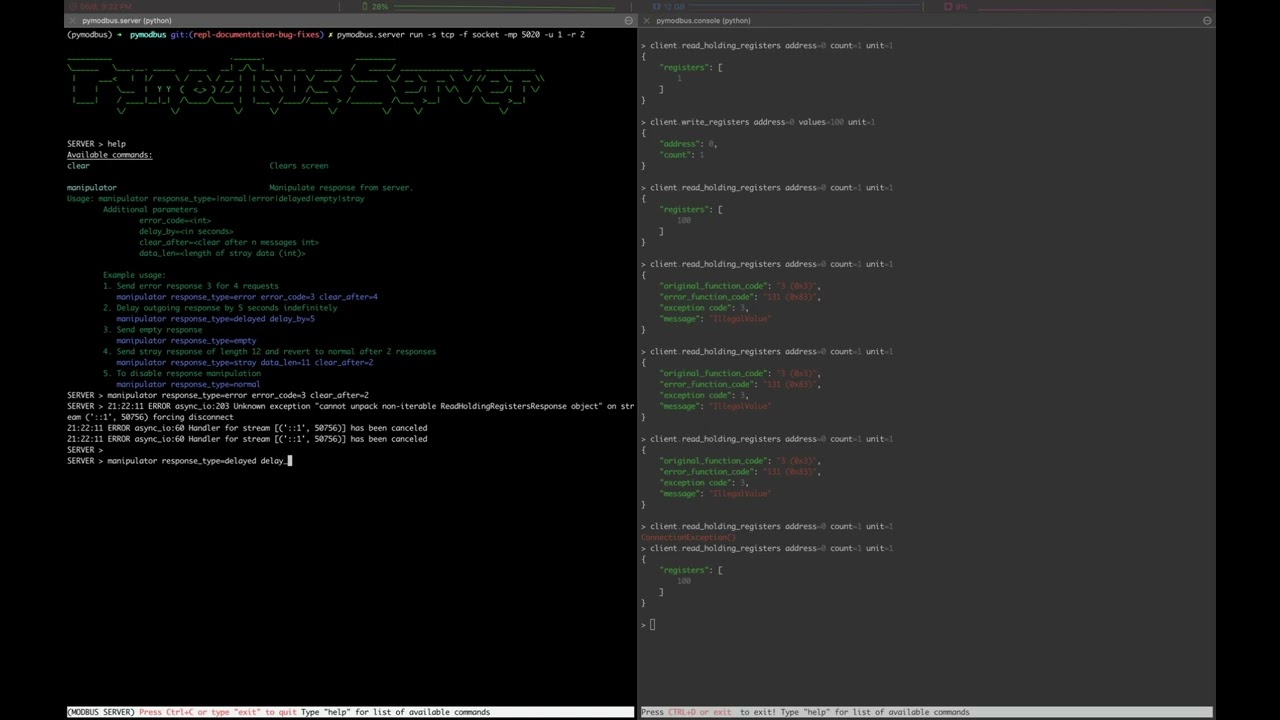
Pymodbus REPL (Read Evaluate Print Loop)
Pymodbus REPL Client
Pymodbus REPL comes with many handy features such as payload decoder to directly retrieve the values in desired format and supports all the diagnostic function codes directly .
For more info on REPL Client refer Pymodbus REPL Client

Pymodbus REPL Server
Pymodbus also comes with a REPL server to quickly run an asynchronous server with additional capabilities out of the box like simulating errors, delay, mangled messages etc.
For more info on REPL Server refer Pymodbus REPL Server
Installing
You can install using pip or easy install by issuing the following commands in a terminal window (make sure you have correct permissions or a virtualenv currently running):
pip install -U pymodbus
This will install a base version of pymodbus.
To install pymodbus with options run:
pip install -U pymodbus[<option>,…]
Available options are:
repl, installs pymodbus REPL.
serial, installs serial drivers.
datastore, installs databases (SQLAlchemy and Redit) for datastore.
documentation, installs tools to generate documentation.
development, installs development tools needed to enable test/check of pymodbus changes.
Or to install a specific release:
pip install -U pymodbus==X.Y.Z
Otherwise you can pull the trunk source and install from there:
git clone git://github.com/riptideio/pymodbus.git
cd pymodbus
pip install -r requirements.txt
To get latest release (for now v2.5.3 with Python 2.7 support):
git checkout master
To get bleeding edge:
git checkout dev
To get a specific version:
git checkout tags/vX.Y.Z -b vX.Y.Z
- Then::
pip install -r requirements.txt pip install -e .
This installs pymodbus in your virtual environment with pointers directly to the pymodbus directory, so any change you make is immediately available as if installed.
Either method will install all the required dependencies (at their appropriate versions) for your current python distribution.
Repository structure
- The repository contains a number of important branches and tags.
dev is where all development happens, this branch is not always stable.
master is where are releases are kept.
All releases are tagged with vX.Y.Z (e.g. v2.5.3)
All prereleases are tagged with vX.Y.ZrcQ (e.g. v3.0.0.0rc1)
If a maintenance release of an old version is needed (e.g. v2.5.4), the release tag is used to create a branch with the same name, and maintenance development is merged here.
Current Work In Progress
The maintenance team is very small with limited capacity and few modbus devices.
However, if you would like your device tested, we accept devices via mail or by IP address.
That said, the current work mainly involves polishing the library and solving issues:
Get version 3.0.0 released
Fixing bugs/feature requests
Architecture documentation
Functional testing against any reference we can find
The remaining edges of the protocol (that we think no one uses)
Development Instructions
The current code base is compatible python >= 3.8. Here are some of the common commands to perform a range of activities
- ::
pip install -r requirements.txt install all requirements pip install -e . source directory is “release”, useful for testing
tox -e py38 (or py39, py310, pypy38) Run pytest on source code
tox -e pylint Run pylint on source code tox -e codespell Run codespell on source code tox -e bandit Run bandit on source code tox -e flake8 Run flake8 on source code tox -e black Run black on source code
Generate documentation
- ::
cd doc make clean make html
Contributing
Just fork the repo and raise your PR against dev branch.
- Here are some of the items waiting to be done:
License Information
- Pymodbus is built on top of code developed from/by:
Copyright (c) 2001-2005 S.W.A.C. GmbH, Germany.
Copyright (c) 2001-2005 S.W.A.C. Bohemia s.r.o., Czech Republic.
Hynek Petrak, https://github.com/HynekPetrak
Released under the BSD License
Release history Release notifications | RSS feed


Download files
Download the file for your platform. If you're not sure which to choose, learn more about installing packages.
Source Distribution
Built Distribution
Filter files by name, interpreter, ABI, and platform.
If you're not sure about the file name format, learn more about wheel file names.
Copy a direct link to the current filters
File details
Details for the file pymodbus-3.0.0.dev5.tar.gz.
File metadata
- Download URL: pymodbus-3.0.0.dev5.tar.gz
- Upload date:
- Size: 154.0 kB
- Tags: Source
- Uploaded using Trusted Publishing? No
- Uploaded via: twine/4.0.1 CPython/3.10.4
File hashes
| Algorithm | Hash digest | |
|---|---|---|
| SHA256 |
af9be2eb9e5396ab4107e4ad36276ee63b80c948b5ca04c6c0aedc1c8af1f05d
|
|
| MD5 |
1087be2bc7c948d6da78abea5d3ff004
|
|
| BLAKE2b-256 |
4e2049c5c83411f80cb825e4d9f52def8ba84a6010239a55bf93af234194ec96
|
File details
Details for the file pymodbus-3.0.0.dev5-py2.py3-none-any.whl.
File metadata
- Download URL: pymodbus-3.0.0.dev5-py2.py3-none-any.whl
- Upload date:
- Size: 137.4 kB
- Tags: Python 2, Python 3
- Uploaded using Trusted Publishing? No
- Uploaded via: twine/4.0.1 CPython/3.10.4
File hashes
| Algorithm | Hash digest | |
|---|---|---|
| SHA256 |
40a3d99a58e966e0713e9a9917dc0e2398e97734fc19de5ec1264aef546ee6df
|
|
| MD5 |
630761c1e85908b02d3ae35b08c06756
|
|
| BLAKE2b-256 |
53dd60c7ef353f10e06922e3e4ea6b9acfe83ee8c7f57b7b22cdec37999f1c81
|






