


[English | 中文]
Installation
Just run the command pip install pymodhook.
Example Usage
An example that hooks the numpy and matplotlib libraries:
from pymodhook import *
init_hook()
hook_modules("numpy", "matplotlib.pyplot", for_=["__main__"]) # Record calls to numpy and matplotlib
enable_hook()
import numpy as np
import matplotlib.pyplot as plt
arr = np.array(range(1,11))
arr_squared = arr ** 2
mean = np.mean(arr)
std_dev = np.std(arr)
print(mean, std_dev)

plt.plot(arr, arr_squared)
plt.show()

# Display the recorded code
print(f"Raw call trace:\n{get_code()}\n")
print(f"Optimized code:\n{get_optimized_code()}")
After running, the output will be similar to that generated by tools like IDA:
Raw call trace:
import numpy as np
matplotlib = __import__('matplotlib.pyplot')
var0 = matplotlib.pyplot
var1 = np.array
var2 = var1(range(1, 11))
var3 = var2 ** 2
var4 = np.mean
var5 = var4(var2)
var6 = var2.mean
var7 = var6(axis=None, dtype=None, out=None)
var8 = np.std
var9 = var8(var2)
var10 = var2.std
var11 = var10(axis=None, dtype=None, out=None, ddof=0)
ex_var12 = str(var5)
ex_var13 = str(var9)
var14 = var0.plot
var15 = var14(var2, var3)
var16 = var2.shape
var17 = var2.shape
var18 = var2[(slice(None, None, None), None)]
var19 = var18.ndim
var20 = var3.shape
var21 = var3.shape
var22 = var3[(slice(None, None, None), None)]
var23 = var22.ndim
var24 = var2.values
var25 = var2._data
var26 = var2.__array_struct__
var27 = var3.values
...
var51 = var41.__array_struct__
var52 = var0.show
var53 = var52()

Optimized code:
import numpy as np
import matplotlib.pyplot as plt
var2 = np.array(range(1, 11))
plt.plot(var2, var2 ** 2)
plt.show()
Detailed Usage
- init_hook(export_trivial_obj=True, hook_method_call=False, **kw)Initializes module hooking. This must be called before using hook_module() or hook_modules().
export_trivial_obj: Whether to not hook basic types (such as int, list, dict) returned by module functions.
hook_method_call: Whether to hook internal method calls on module class instances (i.e., methods where self is a ProxiedObj instead of the original object).
Other parameters are passed to ObjChain via **kw.
- hook_module(module_name, for_=None, hook_once=False, deep_hook=False, deep_hook_internal=False, hook_reload=True)Hooks a module so that later imports will return the hooked version.
module_name: The name of the module to hook (e.g., "numpy").
for_: Only applies the hook when imported from specific modules (e.g., ["__main__"]), to avoid errors caused by dependencies between lower-level modules. If not specified, the hook is applied globally.
hook_once: Only returns the hooked module the first time it is imported; subsequent imports return the original module.
deep_hook: Whether to hook every function and class within the module instead of just the module itself. When deep_hook is True, the module is always hooked, and for_, hook_once, and enable_hook have no effect.
deep_hook_internal: If deep_hook is True, determines whether to hook objects whose names start with an underscore (excluding double-underscore objects like __loader__).
hook_reload: Whether hooking is still applied after importlib.reload() returns a new module.
- hook_modules(*modules, **kw)Hook multiple modules at once, for example, hook_modules("numpy","matplotlib"). Other keyword parameters are the same as in hook_module.
- unhook_module(module_name)Unhook a specified module, including those hooked with deep_hook.
module_name: The name of the module to unhook.
- enable_hook()Enables the global hook switch (off by default). Only when enabled will imports return the hooked module. Not required if deep_hook=True.
- disable_hook()Disables the global hook switch. While disabled, imports will not return the hooked module unless deep_hook=True is used.
- import_module(module_name)Imports and returns a submodule object rather than the root module.
module_name: For example, "matplotlib.pyplot" will return the pyplot submodule.
- get_code(*args, **kw)Generates Python code for the raw call trace, which can be used to reconstruct the current object dependency relationships and usage history.
- get_optimized_code(*args, **kw)Generates optimized code, similar to get_code. (Code optimization internally uses a Directed Acyclic Graph, DAG, see details in pyobject library.).
get_scope_dump() Returns a shallow copy of the variable namespace (scope) dictionary of the hook chain, commonly used for debugging and analysis.
dump_scope(file=None) Dumps the entire variable namespace dictionary to the stream file using pprint. If an object’s __repr__() method encounters an error, the output will not be interrupted. The default for file is sys.stdout.
- getchain()Returns the global pyobject.ObjChain instance used for module hooking, allowing manual manipulation. If init_hook() was not called, returns None.
How It Works
Internally, the library uses the ObjChain class from the pyobject.objproxy library for dynamic code generation. pymodhook itself is a higher-level wrapper around pyobject.objproxy. For more details, see the pyobject.objproxy documentation.
The pymodhook-patches Directory
The pymodhook-patches directory contains multiple JSON files named after Python modules. These files define custom attributes and function names that should not be hooked, ensuring compatibility with specific Python libraries.
For example, the structure of matplotlib.pyplot.json is as follows:
{
    // All keys are optional
    "export_attrs": ["attr"],  // Attribute names to export (i.e., `plt.attr` returns the original object instead of a `pyobject.ProxiedObj`)
    "export_funcs": ["plot", "show"],  // Function names to export (i.e., return values remain original objects instead of being wrapped)
    "alias_name": "plt",  // Common module alias (e.g., used for code generation formatting, such as `import matplotlib.pyplot as plt`)
    "use_proxied_obj":["Figure"] // Functions/classes that require further tracking; if the output code lacks certain calls, this item can be modified (effective only when deep_hook=True).
}
Usage of DLL Injection Tool
1. Copy Module Files
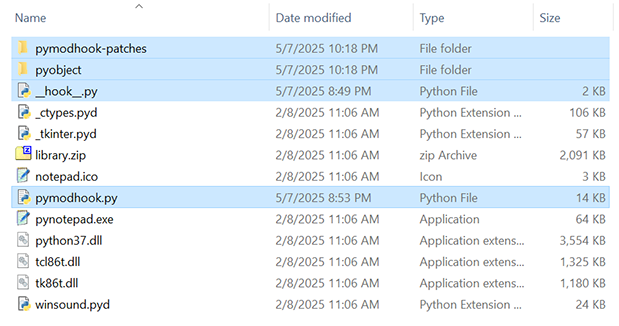
2. Modify __hook__.py
__hook__.py is the first piece of Python code executed by the injected DLL. The default __hook__.py is as follows:
# Template for __hook__.py to be placed in the packaged program directory
import atexit, pprint, traceback

CODE_FILE = "hook_output.py"
OPTIMIZED_CODE_FILE = "optimized_hook_output.py"
VAR_DUMP_FILE = "var_dump.txt"
ERR_FILE = "hooktool_err.log"

def export_code():
    try:
        with open(CODE_FILE, "w", encoding="utf-8") as f:
            f.write(get_code())
        with open(VAR_DUMP_FILE, "w", encoding="utf-8") as f:
            dump_scope(file=f)
        with open(OPTIMIZED_CODE_FILE, "w", encoding="utf-8") as f:
            f.write(get_optimized_code())
    except Exception:
        with open(ERR_FILE, "w", encoding="utf-8") as f:
            traceback.print_exc(file=f)

try:
    from pymodhook import *
    from pyobject.objproxy import ReprFormatProxy

    init_hook()
    hook_modules("wx","matplotlib.pyplot","requests",deep_hook=True) # This line can be modified by your own
    atexit.register(export_code)
except Exception:
    with open(ERR_FILE, "w", encoding="utf-8") as f:
traceback.print_exc(file=f)3. Inject the DLL
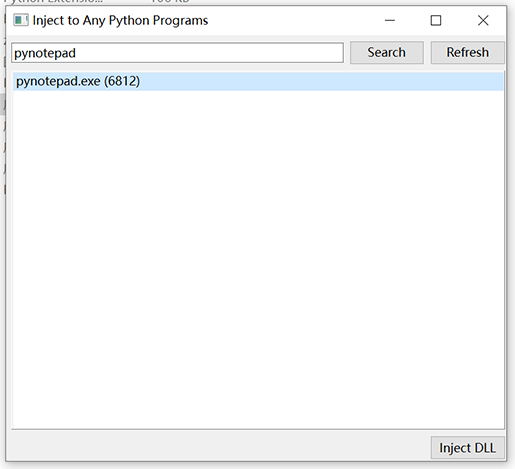
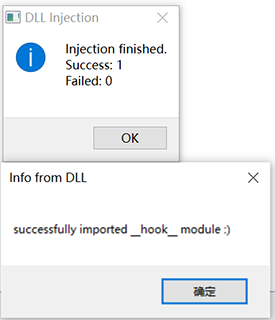
4. Retrieve Injection Results
If the result generation fails, an additional file hooktool_err.log will be created to record the error messages.
Example of optimized_hook_output.py:
import tkinter as tk
Canvas = tk.Canvas
import matplotlib.pyplot as plt
import requests
var0 = tk.Tk()
ex_var1 = int(tk.wantobjects)
var15 = var0.tk
var0.title('Tk')
var0.withdraw()
var0.iconbitmap('paint.ico')
var0.geometry('400x300')
var0.overrideredirect(ex_var1)
var43 = Frame(var0, bg='gray92')
var43._last_child_ids = {}
var28 = Canvas(var43, bg='#d0d0d0', fg='#000000')
var28.pack(expand=ex_var1, fill='x')
var28._last_child_ids = {}
# external var53: <function object at 0x000001F3F0A27180>
var0.bind('<Button-1>', var53)
var0.mainloop()
...
Example of var_dump.txt:
{...,
 'ex_var855': True,
 'ex_var860': True,
 'ex_var875': True,
 ...
 'var123': <function BaseWidget.__init__ at 0x04616B28>,
 'var124': <tkinter.ttk.Button object .!frame.!button3>,
 'var125': {'command': <bound method Painter.save of <painter.Painter object at 0x047298F0>>,
            'text': 'Save',
            'width': 4},
 'var126': None,
 'var127': <function BaseWidget._setup at 0x04616AE0>,
 'var128': {'command': <bound method Painter.save of <painter.Painter object at 0x047298F0>>,
            'text': 'Save',
            'width': 4},
 ...
 'var146': '.!frame.!button3',
 'var147': <built-in method call of _tkinter.tkapp object at 0x048C3890>,
 'var148': '',
 'var152': <function BaseWidget.__init__ at 0x04616B28>,
 'var153': <tkinter.ttk.Button object .!frame.!button4>,
 'var154': {'command': <bound method Painter.clear of <painter.Painter object at 0x047298F0>>,
            'text': 'Clear',
            'width': 4},
  ...
}
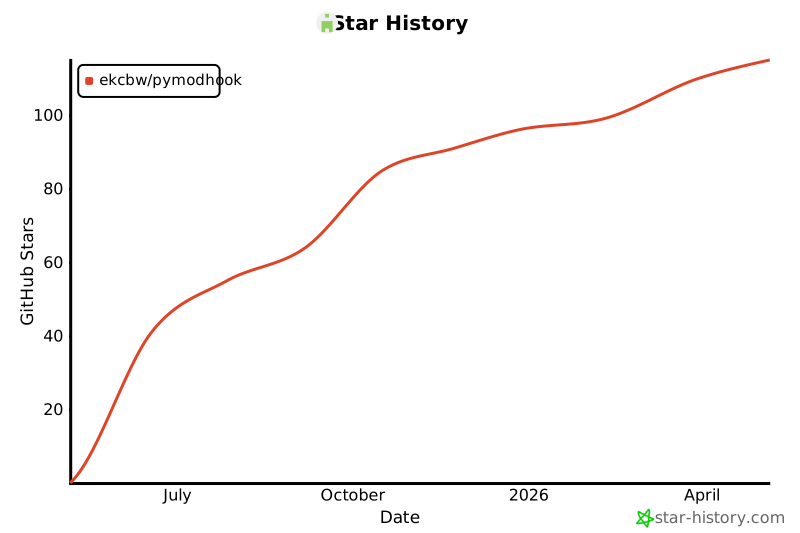
Star History
1 maintainer

Metadata
1 maintainer
Release files for pymodhook 1.0.5
For a detailed explanation of source distributions (sdists) and built distributions (wheels), please see the package formats documentation.
Source distribution (sdist)
| File | Size | Uploaded | Provenance | |
|---|---|---|---|---|
| pymodhook-1.0.5.tar.gz | 12.1 kB | Without provenance | Details |
Release files / pymodhook-1.0.5.tar.gz
| Download URL | pymodhook-1.0.5.tar.gz |
|---|---|
| Size | 12.1 kB |
| Tags | Source |
|
SHA-256 checksum How to use checksums |
7baf768c23d18c2ca9fbdf72f7d90b45b8ded4feb2bc72f5e4f55113fbed82b8
|
|
BLAKE2b-256 checksum How to use checksums |
b7fff1306b3d46e214853844c039fcfec0e50be7ecc14d3822e499de40178833
|
| Upload date | |
|
Uploaded using Trusted Publishing? What is trusted publishing? |
No |
| Uploaded via |
twine/6.2.0 CPython/3.13.11
|
Security for pymodhook 1.0.5
Provenance
Provenance describes where a file came from. On PyPI, provenance is shared via attestations, which provide a verifiable record of the build or publishing details. View details, limitations and caveats.
No provenance found
None of the files in this release were uploaded with provenance metadata.
A note on package security
PyPI is a repository for distributing packages, not a service for auditing them. While third-party security researchers and our staff do their best to detect and remove malicious packages, PyPI cannot guarantee the quality, security or suitability of any given package.
To learn more about protecting yourself from malicious actors, visit our package security documentation.













