
Generate module and __init__.py (in case of package) files in the specified directory. Set root directory and add root directory path to sys path so that absolute path imports will work even in child modules.

Project description
pymodulegen



Table of Contents
Description
pymodulegen is a project aimed to generate python modules and packages, and add root directory of the project in sys path to allow importing parent modules in child using absolute paths relative to root directory.
Issue Resolution
This section outlines the types of issues and problems that our package, pymodulegen, is designed to address. If you encounter any of the following scenarios, our package can be a valuable solution:
Problem 1: Importing modules from parent packages
Since Python 3.3, referencing or importing a module in the parent directory is not allowed. Hence, we must handle it manually. For example, in a folder structure like the one below,
.
    ├── directory_tree.txt
    └── src
        ├── main.py
        └── api
            ├── __init__.py
            └── common
                ├── load_environment.py
                ├── __init__.py
            └── v1
                ├── __init__.py
                └── endpoints
                    ├── chat.py
                    ├── __init__.py
If you wish to import 'load_environment' into 'chat.py', you will get the following error:
chat.py:
from src.api.common import load_environment
Error:
  File "your-machine-path\project-root\src\api\v1\endpoints\chat.py", line 1, in <module>
    from src.api.common import load_environment
ModuleNotFoundError: No module named 'src'
Problem 2: Creating folder structures, packages and modules for a python project
Currently, in Python development, we have to either manually create files and folders (along with init.py files) or use a third-party template provider like Cookiecutter, FastAPI Project Generator,Django-style CLI, etc. However, if you want to generate packages as per your liking in a custom fashion, it can only be done manually for the time being.
How Our Package Helps
When we setup the folder structures using our package, it includes codes in the init.py file (or in the module itself, depending on the user preference), which will allow us to do imports using absolute paths (not relative paths, like the usage of '.','..') even from parent packages. Also, it is pretty easy to setup folder structures using our command-line tool rather than doing it manually.
Installation
Using pip
pip install pymodulegen
Clone from source
git clone https://github.com/YashNarK/pymodulegen.git
Usage
To generate a module or package and set root directory, use the following command:
pymodulegen module_name [--options]
Options:
module_name: The name of the module to generate.--directory: (Optional) The directory where the module should be created.--root_directory: (Optional) The root directory for sys.path.--is_module_only: (Optional) Specify if the module should be used as a module only.--not_is_module_only: (Optional) Specify if the module should be used as a main program as well
Contributing
Contributions are welcome! Please follow these guidelines:
- Create an issue to discuss major changes or enhancements.
- Fork the repository and create a new branch for your contribution.
- Submit a pull request with a clear description of your changes.
- Follow coding standards and maintain code quality.
License
This project is licensed under the MIT License.
Acknowledgments
I would like to acknowledge the following resources that were helpful during the development of this project:
- GeeksforGeeks - Python Import from Parent Directory: This tutorial provided valuable insights into importing modules from parent directories in Python. It was a useful reference while working on this project.
Contact
- Email: narenkrithick@gmail.com
- GitHub: YashNarK
Examples and Screenshots
Example 1

Generate a module named "mymodule" in the current directory (default settings).
Example 2
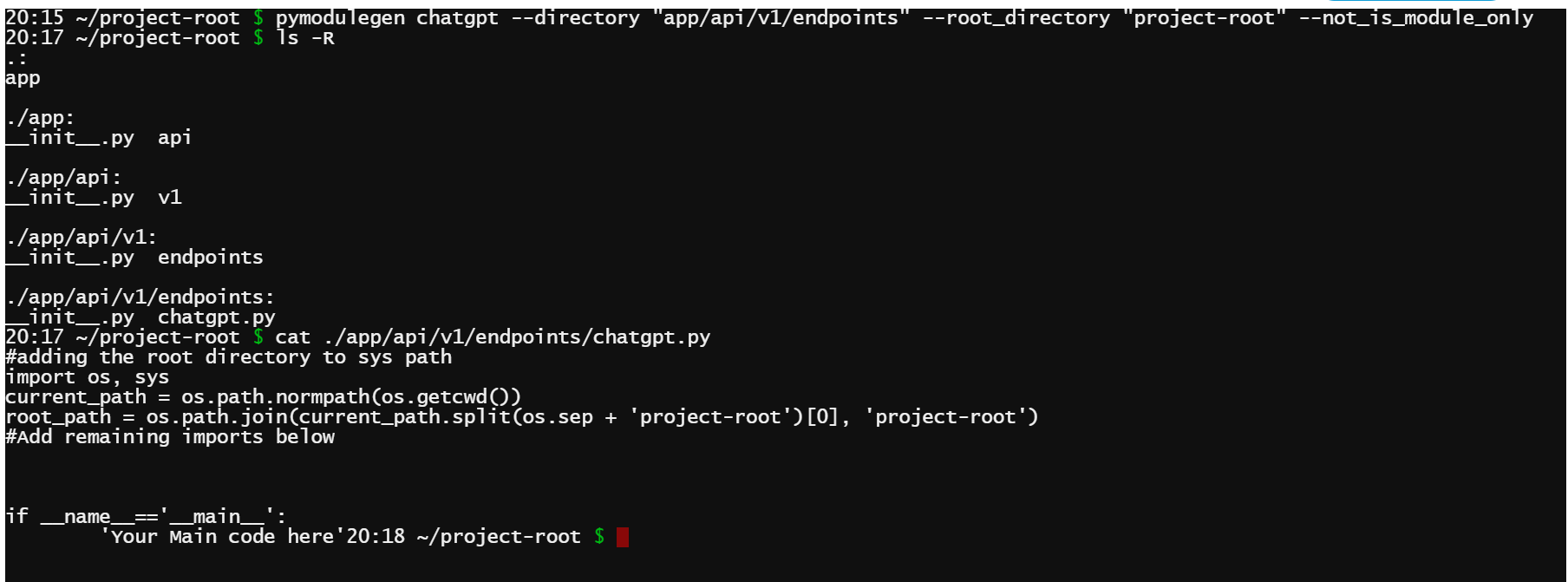
Generate a module named "chatgpt" in the "app/api/v1/endpoints" directory with root directory "project-root" and use it as a main program as well.
Example 3
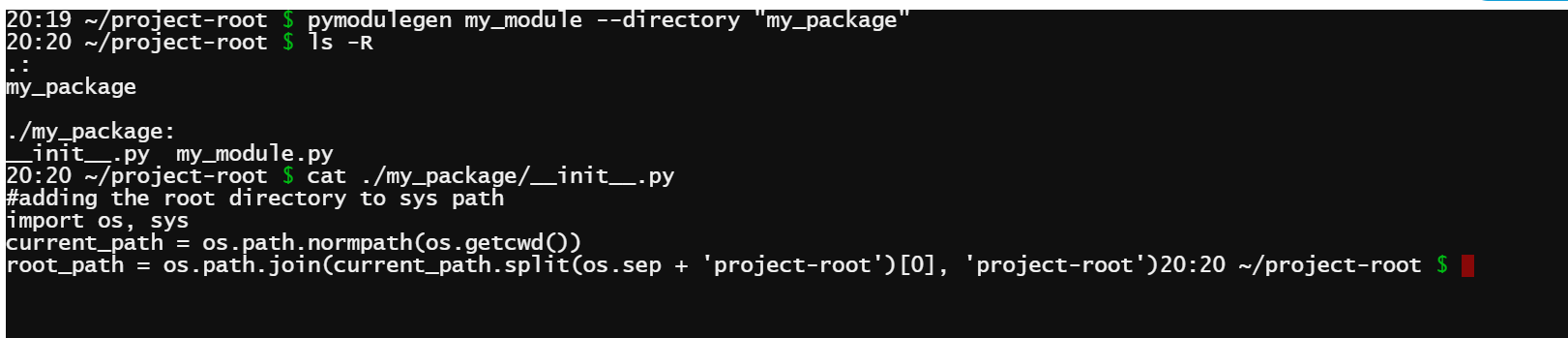
Generate a package (with init.py) named "my_package" in the current directory (default settings) with a module my_module.
Release history Release notifications | RSS feed


Download files
Download the file for your platform. If you're not sure which to choose, learn more about installing packages.
Source Distribution
Built Distribution
Filter files by name, interpreter, ABI, and platform.
If you're not sure about the file name format, learn more about wheel file names.
Copy a direct link to the current filters
File details
Details for the file pymodulegen-0.0.8.tar.gz.
File metadata
- Download URL: pymodulegen-0.0.8.tar.gz
- Upload date:
- Size: 7.4 kB
- Tags: Source
- Uploaded using Trusted Publishing? No
- Uploaded via: twine/4.0.2 CPython/3.10.0
File hashes
| Algorithm | Hash digest | |
|---|---|---|
| SHA256 |
4db77a749378d66015295e8db7d17a9014fff12599283125c739219b490838c6
|
|
| MD5 |
af16186aea72e42bc0b5c1d7d9002124
|
|
| BLAKE2b-256 |
6f743956a4c662284b5742722367883a2d77532453cdac9bea8def6c162c6dfe
|
File details
Details for the file pymodulegen-0.0.8-py3-none-any.whl.
File metadata
- Download URL: pymodulegen-0.0.8-py3-none-any.whl
- Upload date:
- Size: 6.8 kB
- Tags: Python 3
- Uploaded using Trusted Publishing? No
- Uploaded via: twine/4.0.2 CPython/3.10.0
File hashes
| Algorithm | Hash digest | |
|---|---|---|
| SHA256 |
bb3be906e1fdfb3d2f2404ef4f308acc03064e23f0efe5a9035c145314399108
|
|
| MD5 |
d45bad02da0ab43051d5fef42d046e0b
|
|
| BLAKE2b-256 |
7bd05ab2ec66e9060a38d21881bf7a5ca705cc7d5a48a6f3b0f70d39c46559ba
|






