
pymongo-schema
A schema analyser for MongoDB, written in Python.
This tool allows you to extract your application's schema, directly from your MongoDB data. It comes with powerful schema manipulation and export functionalities.
It will be particularly useful when you inherit a data dump, and want to quickly learn how the data is structured.
pymongo-schema allows to map your MongoDB data model to a relational (SQL) data model. This greatly helps to configure mongo-connector-postgresql, a tool to synchronize data from MongoDB to a target PostgreSQL database.
It also helps you to compare different versions of your data model.
This tools is inspired by variety, with the following enhancement
- extract the hierarchical structure of the schema
- versatile output options : json, yaml, tsv, markdown or htlm
- finer grained types. ex: INTEGER, DOUBLE rather than NUMBER
- filtering of the output schema, using a
namespaceas defined by mongo-connector - mapping to a relational schema
- comparison of successive schema


Install
You can install latest stable version PyPi :
pip install --upgrade pymongo-schema
Or directly from github :
pip install --upgrade git+https://github.com/pajachiet/pymongo-schema
Usage
Command line
python -m pymongo_schema -h
usage: [-h] [--quiet] {extract,transform,tosql,compare} ...

commands:
  {extract,transform,tosql,compare}
    extract             Extract schema from a MongoDB instance
    transform           Transform a json schema to another format, potentially
                        filtering or changing columns outputs
    tosql               Create a mapping from mongo schema to relational
                        schema (json input and output)
    compare             Compare two schemas

optional arguments:
  -h, --help            show this help message and exit
  --quiet               Remove logging on standard output

Usage:
    python -m pymongo_schema extract -h
    usage:  [-h] [-f [FORMATS [FORMATS ...]]] [-o OUTPUT] [--port PORT] [--host HOST]
                 [-d [DATABASES [DATABASES ...]]] [-c [COLLECTIONS [COLLECTIONS ...]]]
                 [--columns COLUMNS [COLUMNS ...]] [--size SIZE] [--without-counts]

    python -m pymongo_schema transform -h
    usage: [-h] [-f [FORMATS [FORMATS ...]]] [-o OUTPUT] [--category CATEGORY] [-n FILTER]
                [--columns COLUMNS [COLUMNS ...]] [--without-counts] [input]

    python -m pymongo_schema tosql -h
    usage: [-h] [-f [FORMATS [FORMATS ...]]] [--columns COLUMNS [COLUMNS ...]]
                [--without-counts] [-o OUTPUT] [input]

    python -m pymongo_schema compare -h
    usage: [-h] [-f [FORMATS [FORMATS ...]]] [-o OUTPUT] [input]
                [--columns COLUMNS [COLUMNS ...]] [--without-counts]
                [--detailed_diff] prev_schema [new_schema]
To display full usage, with options description, run:
pymongo-schema <command> -h
Python package
pymongo_schema modules can also be imported to be used directly inside python code :
from pymongo_schema.compare import compare_schemas_bases
from pymongo_schema.export import transform_data_to_file
from pymongo_schema.extract import extract_pymongo_client_schema
from pymongo_schema.filter import filter_mongo_schema_namespaces
from pymongo_schema.tosql import mongo_schema_to_mapping
Fore more details, refer to modules and functions docstrings.
Examples
First, lets populate a collection in test database from mongo shell
db.users.insert({name: "Tom", bio: "A nice guy.", pets: ["monkey", "fish"], someWeirdLegacyKey: "I like Ike!"})
db.users.insert({name: "Dick", bio: "I swordfight.", birthday: new Date("1974/03/14")})
db.users.insert({name: "Harry", pets: "egret", birthday: new Date("1984/03/14"), location:{country:"France", city: "Lyon"}})
db.users.insert({name: "Geneviève", bio: "Ça va?", location:{country:"France", city: "Nantes"}})
db.users.insert({name: "MadJacques", location:{country:"France", city: "Paris"}})
Bash api examples
Easy examples
Extract the schema from this database, with a json format on standard output
$ python -m pymongo_schema extract --database test
=== Start MongoDB schema analysis
Extract schema of database test
...collection users
   scanned 5 documents out of 5 (100.00 %)
--- MongoDB schema analysis took 0.00 s
=== Write output

{"test": {
    "users": {
        "object": {"_id": {"prop_in_object": 1.0, "count": 5, "type": "oid", "types_count": {"oid": 5}},
                   "pets": {"array_types_count": {"string": 2}, "prop_in_object": 0.4, "count": 2, "array_type": "string", "type": "ARRAY", "types_count": {"string": 1, "ARRAY": 1}},
                   "birthday": {"prop_in_object": 0.4, "count": 2, "type": "date", "types_count": {"date": 2}},
                   "name": {"prop_in_object": 1.0, "count": 5, "type": "string", "types_count": {"string": 5}},
                   "bio": {"prop_in_object": 0.6, "count": 3, "type": "string", "types_count": {"string": 3}},
                   "someWeirdLegacyKey": {"prop_in_object": 0.2, "count": 1, "type": "string", "types_count": {"string": 1}},
                   "location": {"object": {"country": {"prop_in_object": 1.0, "count": 3, "type": "string", "types_count": {"string": 3}},
                                           "city": {"prop_in_object": 1.0, "count": 3, "type": "string", "types_count": {"string": 3}}},
                                "types_count": {"OBJECT": 3}, "prop_in_object": 0.6, "type": "OBJECT", "count": 3}},
        "count": 5}}}
Extract the same schema in md format.
$ python -m pymongo_schema extract --database test --format md
=== Start MongoDB schema analysis
Extract schema of database test
...collection users
   scanned 5 documents out of 5 (100.00 %)
--- MongoDB schema analysis took 0.00 s
=== Write output

### Database: test
#### Collection: users
|Field_compact_name     |Field_name             |Count     |Percentage     |Types_count                           |
|-----------------------|-----------------------|----------|---------------|--------------------------------------|
|_id                    |_id                    |5         |100.0          |oid : 5                               |
|name                   |name                   |5         |100.0          |string : 5                            |
|bio                    |bio                    |3         |60.0           |string : 3                            |
|location               |location               |3         |60.0           |OBJECT : 3                            |
| . city                |city                   |3         |100.0          |string : 3                            |
| . country             |country                |3         |100.0          |string : 3                            |
|birthday               |birthday               |2         |40.0           |date : 2                              |
|pets                   |pets                   |2         |40.0           |ARRAY(string : 2) : 1, string : 1     |
|someWeirdLegacyKey     |someWeirdLegacyKey     |1         |20.0           |string : 1                            |
Map this schema to a relational mapping
$ python -m pymongo_schema extract --database test | python -m pymongo_schema tosql
=== Start MongoDB schema analysis
Extract schema of database test
...collection users
   scanned 5 documents out of 5 (100.00 %)
--- MongoDB schema analysis took 0.00 s
=== Write output
=== Generate mapping from mongo to sql
=== Write output

{"test":
 {"users":
      {"_id": {"type": "TEXT", "dest": "_id"},
       "pets": {"valueField": "pets", "fk": "id_users", "type": "_ARRAY_OF_SCALARS", "dest": "users__pets"},
       "location.city": {"type": "TEXT", "dest": "location__city"},
       "name": {"type": "TEXT", "dest": "name"},
       "someWeirdLegacyKey": {"type": "TEXT", "dest": "someWeirdLegacyKey"},
       "pk": "_id",
       "bio": {"type": "TEXT", "dest": "bio"},
       "birthday": {"type": "TIMESTAMP", "dest": "birthday"},
       "location.country": {"type": "TEXT", "dest": "location__country"}},
  "users__pets": {"id_users": {"type": "TEXT"},
                  "pets": {"type": "TEXT", "dest": "pets"},
                  "pk": "_id_postgres"}}}
Other examples
extract: Extract the schema for collections test_collection_1 and test_collection_2 from test_db and write it into mongo_schema.html and mongo_schema.json files
python -m pymongo_schema extract --databases test_db --collections test_collection_1 test_collection_2 --output mongo_schema --format html json
extract: Extract the schema for collection test_collection_1 with only 1000 random rows scanned and write it into mongo_schema.html files
python -m pymongo_schema extract --collections test_collection_1 --size 1000 --output mongo_schema --format html
transform: Filter extracted schema (mongo_schema.json) using namespace.json file and write output into mongo_schema_filtered.html, mongo_schema_filtered.csv and mongo_schema_filtered.json files
python -m pymongo_schema transform mongo_schema.json --filter namespace.json --output mongo_schema_filtered --format html csv json
tosql: Create mapping file based on mongo_schema_filtered.json
python -m pymongo_schema tosql mongo_schema_filtered.json --output mapping.json
Python api examples
Extract the schemas of all collections and all databases in a MongoDB instance:
import pymongo
from pymongo_schema.extract import extract_pymongo_client_schema

with pymongo.MongoClient() as client:
    schema = extract_pymongo_client_schema(client)
Arguments can be specified to extract only some databases and some collections. See code documentation for more details.
Filter extract schema with a namespace:
import json
from pymongo_schema.filter import filter_mongo_schema_namespaces

# assuming a namespace is defined in a file named namespace.json
with open("namespace.json") as f:
    namespace = json.load(f)

schema_filtered = filter_mongo_schema_namespaces(schema, namespace)
Save filtered_schema (could be used for schema) to file in json and md formats in a docs directory:
from pymongo_schema.export import transform_data_to_file

transform_data_to_file(schema_filtered, ['json', 'md'], output='docs/schema_filtered')
Compare filtered_schema (could be used for schema) to another (previous for example) schema:
from pymongo_schema.compare import compare_schemas_bases

# assuming a namespace is defined in a file named namespace.json
with open("old_schema_filtered.json") as f:
    old_schema_filtered = json.load(f)

differences = compare_schemas_bases(old_schema_filtered, schema_filtered)
Save differences to file in json and md formats in a docs directory:
transform_data_to_file(differences, ['json', 'md'], output='docs/diff', category='diff')
Transform filtered_schema to a relational mapping:
from pymongo_schema.tosql import mongo_schema_to_mapping

mapping = mongo_schema_to_mapping(schema_filtered)
Save mapping to file in json and md formats in a docs directory:
transform_data_to_file(mapping, ['json', 'md'], output='docs/mapping', category='mapping')
Schema
We define 'schema' as a dictionary describing the structure of MongoDB component, being either a MongoDB instances, a database, a collection, an objects or a field.
Schema are hierarchically nested, with the following structure :
# mongo_schema : A MongoDB instance contains databases
{
    "database_name_1": {}, #database_schema,
    "database_name_2": # A database contains collections
    {
        "collection_name_1": {}, # collection_schema,
        "collection_name_2": # A collection maintains a 'count' and contains 1 object
        {
            "count" : int,
            "object":  # object_schema : An object contains fields.
             {
                "field_name_1" : {}, # field_schema,
                "field_name_2": # A field maintains 'types_count_information
                                # An optional 'array_types_count' field maintains 'types_count' information for values encountered in arrays
                                # An 'OBJECT' or 'ARRAY(OBJECT)' field recursively contains 1 'object'
                {
                    'count': int,
                    'prop_in_object': float,
                    'type': 'type_str',
                    'types_count': {  # count for each encountered type
                        'type_str' : 13,
                        'Null' : 3
                    },
                    'array_type': 'type_str',
                    'array_types_count': {  # (optional) count for each type encountered  in arrays
                        'type_str' : 7,
                        'Null' : 3
                    },
                    'object': {}, # (optional) object_schema
                }
            }
        }
    }
}
Contributing - Limitations - TODO
The code base should be easy to read and improve upon. Contributions are welcomed.
Mixed types handling
pymongo-schema handles mixed types by looking for the lowest common parent type in the following tree.
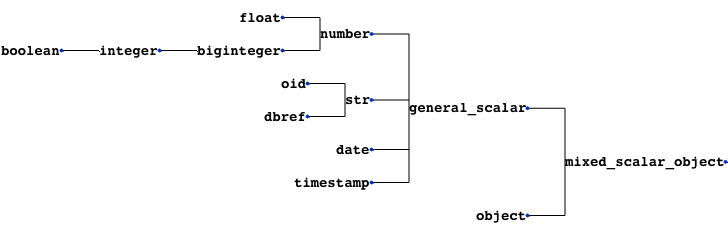
If a field contains both arrays and scalars, it is considered as an array. The 'array_type' is defined as the common parent type of scalars and array_types encountered in this field.
TODO
-
Improve mapping from Python type to name (TYPE_TO_STR dict)
- see documentation: bson-types, spec
-
Check a mongo scheme for compatibility to an sql mapping
-
Handle incompatibilities
Support Python 3 version
- fix encoding issues when exporting manually added non-ascii characters
Diff between schemas
A way to compare the schema dictionaries and highlights the differences.
Test if a mongo schema can be mapped tosql
- test for the presence of mongo types in the mapping
- look for mixes of list and scalar, that are currently not supported by mongo-connector-postgresql
- look for the presence of an '_id'
=> It may be donne directly in mongo-connector-postgresql doc_manager
Adding fields in json/yaml outputs
- for example to add comments
Other option to sort text outputs
- It is currently based on counts and then alphabetically.
Tackle bigger databases
This code has been only used on a relatively small sized Mongo database, on which it was faster than Variety.
To tackle bigger databases, it certainly would be usefull to implement the following variety's features :
- Analyze subsets of documents, most recent documents, or documents to a maximum depth.
Tests
The codebase is still under development. It should not be trusted blindly.
Devcontainer
This project contains a devcontainer definition.
Just open the project in VS Code and hit [CTRL] + [SHIFT] + [P] > Reopen in container and it will launch the dev container with all dependencies installed.
2 maintainers


Metadata
2 maintainers
Release files for pymongo-schema 0.4.2
For a detailed explanation of source distributions (sdists) and built distributions (wheels), please see the package formats documentation.
Source distribution (sdist)
| File | Size | Uploaded | |
|---|---|---|---|
| pymongo_schema-0.4.2.tar.gz | 38.5 kB | Details |
Built distribution (wheel)
| File | Interpreter | ABI | Platform | Reset |
|---|---|---|---|---|
| pymongo_schema-0.4.2-py3-none-any.whl | Python 3 | none | any | Details |
Total release size: 68.1 kB
Release files / pymongo_schema-0.4.2.tar.gz
| Download URL | pymongo_schema-0.4.2.tar.gz |
|---|---|
| Size | 38.5 kB |
| Tags | Source |
|
SHA-256 checksum How to use checksums |
4ecee8a4c107e0dfdd70be98603dce489d384acb6d9ca1bb85ec30db9bd9a98d
|
|
BLAKE2b-256 checksum How to use checksums |
a304c20cf2b7d63b0d2d56f06d931e7058cf840ad0b188a7f85254adaacf6eda
|
| Upload date | |
|
Uploaded using Trusted Publishing? What is trusted publishing? |
No |
| Uploaded via |
uv/0.8.14
|
Release files / pymongo_schema-0.4.2-py3-none-any.whl
| Download URL | pymongo_schema-0.4.2-py3-none-any.whl |
|---|---|
| Size | 29.6 kB |
| Tags | Python 3 |
|
SHA-256 checksum How to use checksums |
3f776817494e8954e603afbe2f76b069852c65cc5034b92210333bcbdbc41a3e
|
|
BLAKE2b-256 checksum How to use checksums |
6f3c0129887e741d327fc820889d834e9b571d4dd885caa95c74b01001f84042
|
| Upload date | |
|
Uploaded using Trusted Publishing? What is trusted publishing? |
No |
| Uploaded via |
uv/0.8.14
|














