
Generates motion, force and torque profiles for electric motor selection.

Project description
PyMotor
Overview
PyMotor is a tool for electric motor selection. It generates force and torque plots from linear motion profiles and physical parameters describing motors, drivetrains, and loads.
Development Status
PyMotor is being developed with Python 3.7 using packages described in requirements.txt.
This is Alpha phase software. This means that features and usage are not fixed, the documentation is most likely incomplete, and there may be bugs.
Some versions of this package are uploaded to pypi.org and can be installed, at your own risk, like this:
$ pip install numpy
$ pip install pandas
$ pip install pymotor
Physics Equations
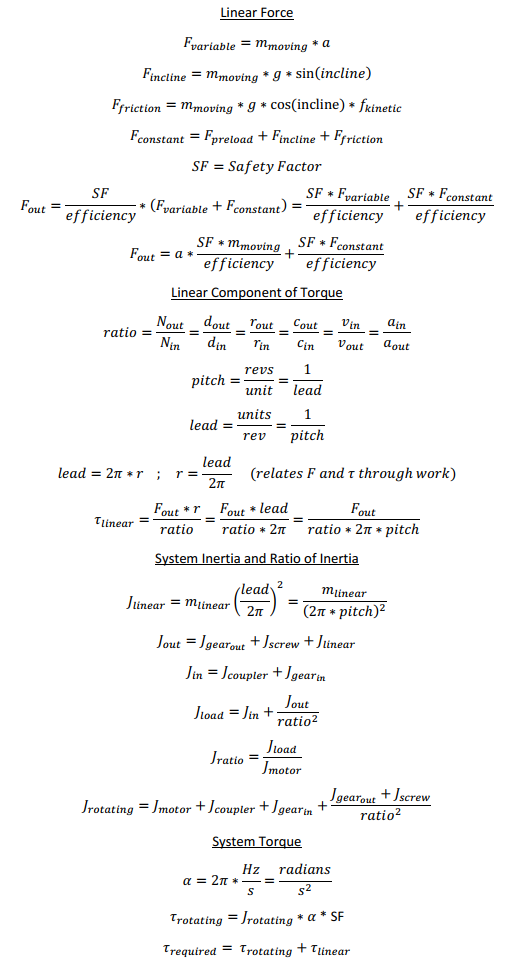
The math used to calculate force, inertia and torque is shown below. Note that angular velocity and angular acceleration in the equations below are in rad/s and rad/s2, respectively. Internally, the software stores these values as Hz and Hz/s.
Physical Units
The native physical units used by the package are shown in the table below. Functions in the module conversions.py are provided so parameters can be entered in other units.
| Parameter | Internal Symbol | Unit |
|---|---|---|
| Time | t | s |
| Length | x | m |
| Linear Velocity | v | m/s |
| Linear Acceleration | a | m/s2 |
| Force | f | N |
| Rotations | revs | Revolutions |
| Angular Velocity | hz | Hz |
| Angular Acceleration | hzps | Hz/s |
| Torque | tau | N*m |
| Moment of Inertia | j | kg*m2 |
| Angle | incline_angle | ° |
Usage
Creating a Linear Motion Profile
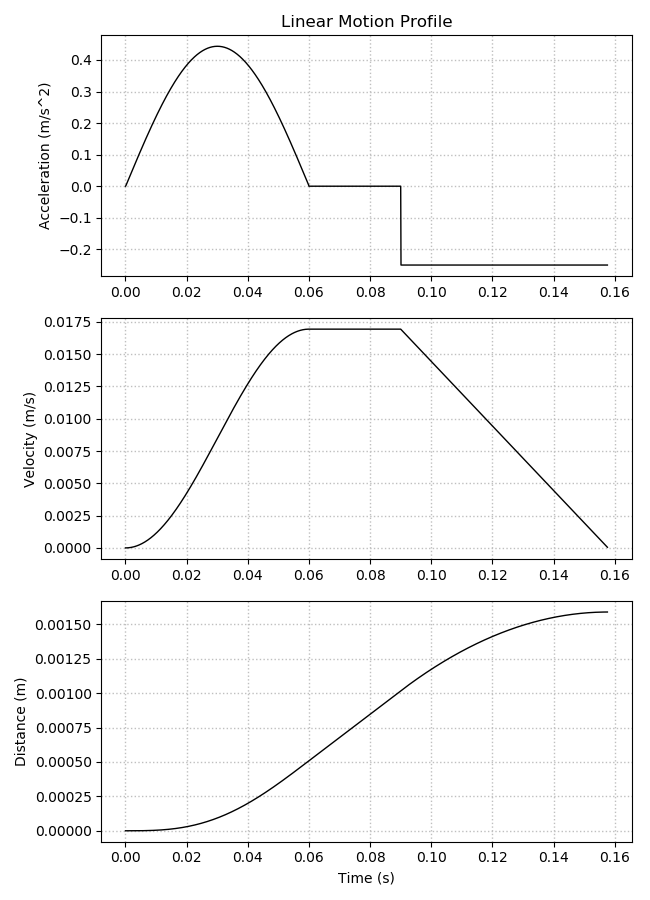
Code to import the pymotor package and configure the LinearMotion object is shown below. Linear motion profiles are created from three segments: acceleration from zero, constant velocity, and deceleration to zero.
fs is Fsample, or the sample rate in Hz of the generated profiles.
Acceleration and deceleration segments can be defined by their time, distance, or acceleration. The constant velocity segment can be defined by time or distance.
If the smoothing options are set True, the acceleration and deceleration segments use Hann windows to create smoothed velocity profiles. If set False, triangular windows are used to create a trapezoidal velocity profile with constant acceleration.
The conversion functions ipm() and inch() have been used to convert from inches/min and inches, respectively, to native units.
import pymotor as pm

lm_settings = {
    'fs': 10000.0,
    'max_velocity': pm.ipm(40),
    'acc_mode': 'time',
    'acc_value': 0.06,
    'acc_smooth': True,
    'con_mode': 'distance',
    'con_value': pm.inch(.02),
    'dec_mode': 'acceleration',
    'dec_value': 0.25,
    'dec_smooth': False,
}

lm = pm.LinearMotion(lm_settings)
lm.plot()
Converting to a Linear Force Profile
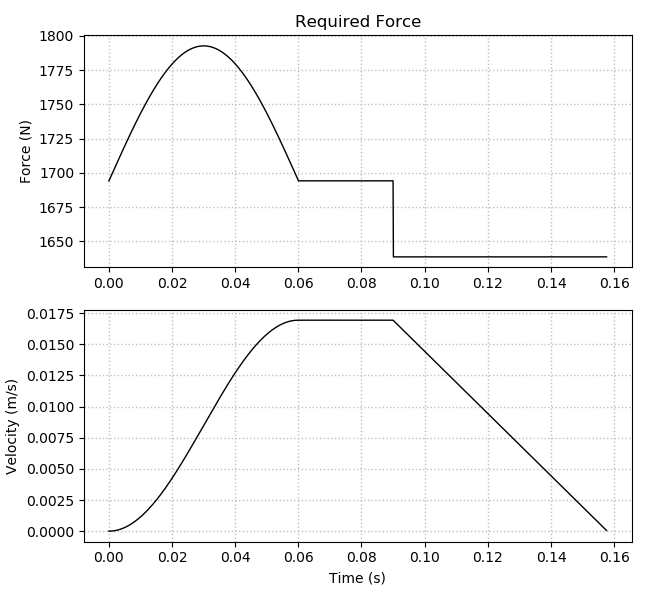
LinearForce objects take a settings dictionary and LinearMotion object as arguments, and generates a plot of force and velocity versus time.
The safety factor defined here is also used in the AngularTorque objects.
lf_settings = {
    'safety_factor': 2,
    'moving_mass': 100,
    'preload_force': 0.1,
    'efficiency': 0.9,
    'incline_angle': 45,
    'friction_coef': 0.1,
    'gravity': 9.8,
}

lf = pm.LinearForce(lf_settings, lm)
lf.plot()
Defining a Motor Object
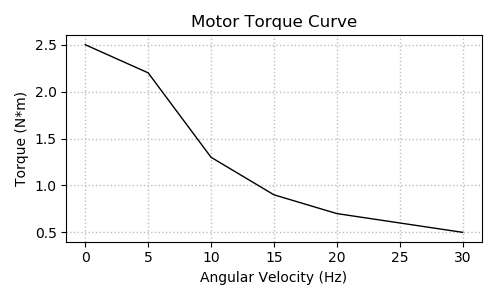
Motor objects contain torque curve and moment of inertia data. The method Motor.tau(hz) returns an interpolated torque value for a given angular velocity, which is used by AngularTorque objects to plot available motor torque vs required torque. Motor.plot() generates a plot of the torque curve which can be used for verification.
The curve_hz list defines the X axis values of the curve. The values must be positive, unique, and ascending.
The curve_tau list defines the Y axis values of the curve. The values must be positive.
curve_hz = [
    0,
    pm.rpm(300),
    pm.rpm(600),
    pm.rpm(900),
    pm.rpm(1200),
    pm.rpm(1500),
    pm.rpm(1800),
]

curve_tau = [
    2.5,
    2.2,
    1.3,
    0.9,
    0.7,
    0.6,
    0.5,
]

motor = pm.Motor(curve_hz=curve_hz, curve_tau=curve_tau, j=pm.gcm2(460))
motor.plot()
Defining Other Drivetrain Objects
Other necessary drivetrain objects are created in the following code. Gear ratios, drive screw lead, and moments of inertia are used in the torque generation process. The conversion functions gcm2() and inch() have been used to convert from g*cm2 and inches, respectively, to native units.
coupler = pm.Coupler(j=pm.gcm2(5))
gear = pm.Gear(ratio=2, j_in=pm.gcm2(10), j_out=pm.gcm2(15))
screw = pm.Screw(lead=pm.inch(.05), j=pm.gcm2(20))
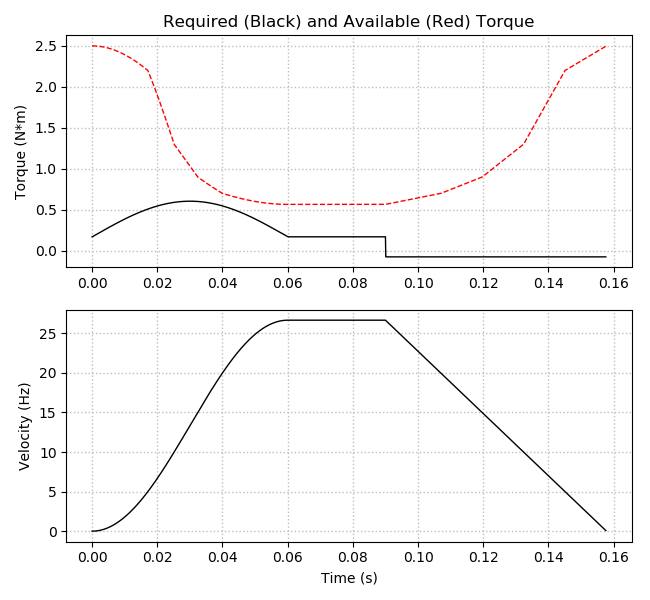
Generating a Torque Profile
AngularTorque objects take LinearForce, Motor, and drivetrain objects as arguments. The generated torque profile uses the safety factor defined in the LinearForce object.
The required torque plot includes an overlay of available motor torque. The velocity profile is also plotted.
at = pm.AngularTorque(lf, motor=motor, coupler=coupler, gear=gear, drivetrain=screw)
at.plot()
Planned Changes
- More complete conversions.py module.
- Complete functions to output profile statistics.
- Reduction of pandas DataFrame copy operations.
- Configurable plot units.
- Stepper motor table and three-phase motor signal generation.
Release history Release notifications | RSS feed


Download files
Download the file for your platform. If you're not sure which to choose, learn more about installing packages.
Source Distribution
Built Distribution
Filter files by name, interpreter, ABI, and platform.
If you're not sure about the file name format, learn more about wheel file names.
Copy a direct link to the current filters
File details
Details for the file pymotor-0.3.6.tar.gz.
File metadata
- Download URL: pymotor-0.3.6.tar.gz
- Upload date:
- Size: 12.2 kB
- Tags: Source
- Uploaded using Trusted Publishing? No
- Uploaded via: twine/1.11.0 pkginfo/1.4.2 requests/2.19.1 setuptools/40.2.0 requests-toolbelt/0.8.0 tqdm/4.25.0 CPython/3.7.0
File hashes
| Algorithm | Hash digest | |
|---|---|---|
| SHA256 |
69b467656f47bd5c0b36113aac4d809b75db562256faa37f10c9b0240d71406a
|
|
| MD5 |
2dec01312036e42b6c4583bc7c4db9cd
|
|
| BLAKE2b-256 |
18237cfaaba67288501005be0404eb9fddb501ce1660c2dd25f5865335a8e47f
|
File details
Details for the file pymotor-0.3.6-py3-none-any.whl.
File metadata
- Download URL: pymotor-0.3.6-py3-none-any.whl
- Upload date:
- Size: 11.0 kB
- Tags: Python 3
- Uploaded using Trusted Publishing? No
- Uploaded via: twine/1.11.0 pkginfo/1.4.2 requests/2.19.1 setuptools/40.2.0 requests-toolbelt/0.8.0 tqdm/4.25.0 CPython/3.7.0
File hashes
| Algorithm | Hash digest | |
|---|---|---|
| SHA256 |
350e053db4af9f5499529290a782e9191d00021bcd0ab937486d711f10039d4f
|
|
| MD5 |
3f4207563c866c98caa70770757717c1
|
|
| BLAKE2b-256 |
d5facd0059d017a2312bae8164c6563e9a71510df02ce7a349ff8f3f80287a86
|






