

PyMoX-Kit








🏗️ Installation : 🐧→ Process habituel - 🪟 → ./start
🐧
py -m venv .venv
source .venv/Scripts/activate
pip install -r requirements

→ flet run
🪟 Commande automatique uniquement pour les utilisateurs Windows pour l'instant
./start -h
→ Liste des commandes dont celle pour exécuter la commande flet run (Rafraîchissement automatique de la page / CLI), au besoin re-initialiser soit toutes les libs, soit juste celle de PyMoX.fr pour en avoir la dernière version si necessaire.
🚀 Utilisation
from pytmox_kit import *

cls()
print(f"Bon {GREEN}{SI}{SB}code{R} !\n")
end()
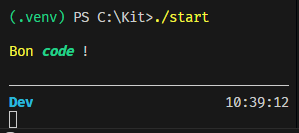
Voir + 👉 Doc détaillée
🧪 Dev & exécution locale du package
Préparez un environnement de développement et installez le package en mode editable pour avoir accès au script console pymox-kit :
py -m venv .venv
.\.venv\Scripts\activate
py -m pip install --upgrade pip
pip install -e .  # crée la console pymox-kit
Si vous avez besoin des dépendances listées dans requirements.txt :
pip install -r requirements.txt
Sans installation complète, vous pouvez toujours lancer les modules en ajoutant src dans PYTHONPATH :
$env:PYTHONPATH='src'; python -m pymox_kit  # exécute __main__
$env:PYTHONPATH='src'; python -m pymox_kit --version  # affiche la version
$env:PYTHONPATH='src'; python -m pymox_kit.main  # appelle pymox_kit.main.main()
& .venv\Scripts\python.exe src\pymox_kit\main.py  # équivalent revenir à la racine
Après pip install -e ., le script console est disponible directement :
pymox-kit
Pour les diagnostics rapides du module tokens :
& .venv\Scripts\python.exe src\pymox_kit\tokens.py
Notes :
__main__.pypropose--versionet délègue d'abord àpymox_kit.main.main()avant d'imprimerhello()/bye().main.pyremet automatiquement la racinesrcdanssys.pathquand il est exécuté comme script, ce qui garantit que la même logique marche depuis le dépôt ou après installation. ./rmain.py permet même de tester la vraie lib installée en VE (Bref, comme un user lambda)
💡 Contribution
Pour tester la lib PyMox_Kit :

Si volonté d' ↑ la lib : → Merge Request

🧩 Help

1 maintainer

Metadata
1 maintainer
Release files for pymox-kit 1.2.16
For a detailed explanation of source distributions (sdists) and built distributions (wheels), please see the package formats documentation.
Source distribution (sdist)
| File | Size | Uploaded | Provenance | Actions |
|---|---|---|---|---|
| pymox_kit-1.2.16.tar.gz | 43.9 kB | Without provenance | Details for pymox_kit-1.2.16.tar.gz |
Built distribution (wheel)
| File | Interpreter | ABI | Platform | Actions Reset |
|---|---|---|---|---|
| pymox_kit-1.2.16-py3-none-any.whl | Python 3 | none | any | Details for pymox_kit-1.2.16-py3-none-any.whl |
Total release size: 61.9 kB
Release files / pymox_kit-1.2.16.tar.gz
| Download URL | pymox_kit-1.2.16.tar.gz |
|---|---|
| Size | 43.9 kB |
| Tags | Source |
|
SHA-256 checksum How to use checksums |
af672fbf8e620ba981565c22c3ab249a5c7af91a86c1935fb8c477c89196653f
|
|
BLAKE2b-256 checksum How to use checksums |
c829b7ae8d30adfd4f3e00ea1de89a32df370c84173d63aeececc6046b9299b4
|
| Upload date | |
|
Uploaded using Trusted Publishing? What is trusted publishing? |
No |
| Uploaded via |
twine/6.2.0 CPython/3.12.13
|
Release files / pymox_kit-1.2.16-py3-none-any.whl
| Download URL | pymox_kit-1.2.16-py3-none-any.whl |
|---|---|
| Size | 18.0 kB |
| Tags | Python 3 |
|
SHA-256 checksum How to use checksums |
138be44804ef304dd07e57a9a0b6c6b4258248b6b83a7ae369bfad7e2b71cfc3
|
|
BLAKE2b-256 checksum How to use checksums |
8582eda7211f49b5c07512822da48cba4dfdd83cd3ab669e3cfe87221003c2c9
|
| Upload date | |
|
Uploaded using Trusted Publishing? What is trusted publishing? |
No |
| Uploaded via |
twine/6.2.0 CPython/3.12.13
|
Security for pymox-kit 1.2.16
Provenance
Provenance describes where a file came from. On PyPI, provenance is shared via attestations, which provide a verifiable record of the build or publishing details. View details, limitations and caveats.
No provenance found
None of the files in this release were uploaded with provenance metadata.
A note on package security
PyPI is a repository for distributing packages, not a service for auditing them. While third-party security researchers and our staff do their best to detect and remove malicious packages, PyPI cannot guarantee the quality, security or suitability of any given package.
To learn more about protecting yourself from malicious actors, visit our package security documentation.














