
PyMT5






Provides simplified, multithreaded, socket-based Python interfaces to MT5 gateways. PyMT5 requires a DevCartel MT5 gateway installed on the MT5 platform to work with PyMT5.
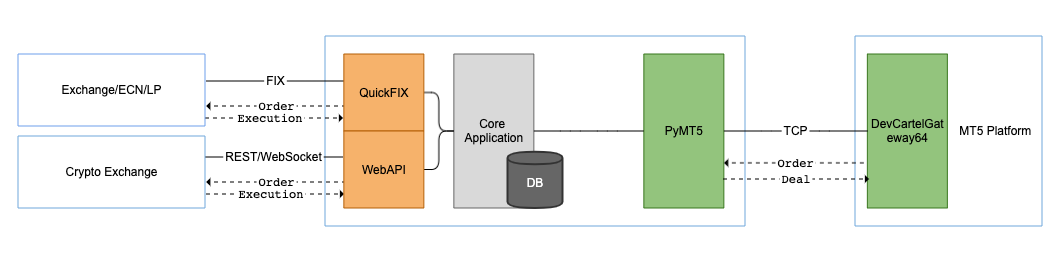
Installation
PyMT5 supports both Python 2 and 3. Simply install from PyPI using pip:
pip install pymt5
Example
import pymt5

def onData(data):
    client = data.get('client_id')
    # Login
    if data.get('type') == '1':
        # Send heartbeat
        m.send(client, {'ver':'3','type':'6'})
        # Send login OK response
        m.send(client, {'ver':'3',
                        'type':'1',
                        'login':data.get('login'),
                        'password':data.get('password'),
                        'res':'0'})

m = pymt5.PyMT5()
m.onConnected = onConnected
m.onDisconnected = onDisconnected
m.onData = onData
Checkout more message examples.
API
pymt5.PyMT5([host=''], [port=16838])
host: str
port: int
➥return: object
Starts a PyMT5 server and listening on a port defined by port.
>> m = pymt5.PyMT5()
Upon incoming connection from a gateway, PyMT5 stores client information in pymt5.requests in dict format as
pymt5.stop()
Disconnects all MT5 gateway connections and stop the server.
>> m.stop()
pymt5.broadcast(data)
data: dict
Sends a message to all connected gateways. Consider using this when sending market data.
>> #send a tick
>> m.broadcast({'ver':'3','type':'4','symbol':'EURUSD.TEST','bank':'dc','bid':'1.2661','ask':'1.2665','last':'1.2665','volume':'1','datetime':'0'})
pymt5.send(client_id, data)
client_id: int
data: dict
Sends a message to a connected gateway.
>> #send heartbeat
>> m.send(123145536110592, {'ver':'3','type':'6'})
pymt5.disconnect(client_id)
client_id: int
Terminates a connection.
>> m.disconnect(123145536110592)
pymt5.onConnected(client_info)
client_info: dict
A callback onConnected, if assigned, is called upon a successful connection from a client. Client information can be accessed from client_info's values as client_id, client_address and client_port.
>> def onConnected(client_info):
>>     print(str(client_info))
>>     # print {'client_port': 64941, 'client_address': '127.0.0.1', 'client_id': 123145536110592}
>>
>> m = pymt5.PyMT5()
>> m.onConnected = onConnected
pymt5.onDisconnected(client_info)
client_info: dict
A callback onDisconnected, if assigned, is called upon a disconnection from a client. Client information can be accessed from client_info's values as client_id, client_address and client_port.
>> def onDisonnected(client_info):
>>     print(str(client_info))
>>
>> m = pymt5.PyMT5()
>> m.onDisconnected = onDisconnected
pymt5.onData(data)
data: dict
A callback onData, if assigned, is called upon receiving messages from gateways. See Data Format for more information.
>> def onData(data):
>>     print(json.dumps(data))
>>
>> m = pymt5.PyMT5()
>> m.onData = onData
Data Format
Data is to be composed as a dict with key/value defined below to be sent and received from a gateway.
| Data type | Header | Tags |
|---|---|---|
| Login | 'ver':'3','type':1' |
'login','password','res' |
| Logout | 'ver':'3','type':2' |
None |
| Symbol | 'ver':'3','type':3' |
'index','symbol','path','description','page','currency_base','currency_profit','currency_margin','digits','tick_flags','calc_mode','exec_mode','chart_mode','fill_flags','expir_flags','tick_value','tick_size','contract_size','volume_min','volume_max','volume_step','market_depth','margin_flags','margin_initial','margin_maintenance','margin_long','margin_short','margin_limit','margin_stop','margin_stop_limit','settlement_price','price_limit_max','price_limit_min','time_start','time_expiration','trade_mode' |
| Tick | 'ver':'3','type':4' |
'symbol','bank','bid','ask','last','volume','datetime' |
| Order | 'ver':'3','type':5' |
'symbol','bank','bid','ask','last','volume','datetime','order_action','state','order','exchange_id','custom_data','request_id','symbol','login','type_order','type_time','type_fill','action','price_order','price_sl','price_tp','price_tick_bid','price_tick_ask','volume','expiration_time','result' |
| Heartbeat | 'ver':'3','type':6' |
None |
| Deal | 'ver':'3','type':7' |
'exchange_id','order','symbol','login','type_deal','volume','volume_rem','price','position' |
| External Deal | 'ver':'3','type':50' |
'exchange_id','order','symbol','login','type_deal','volume','volume_rem','price','datetime','comment' |
Support
- Get a DevCartel MT5 Gateway in order to work with PyMT5
- Report an issue in issue tracker
Changelog
1.4.0
- 30 October 2022
- Fix potential data loss due to data fragmentation
1.3.0
- 8 August 2021
- Fix parsing data buffer
1.2.0
- 8 July 2019
- Support for Python 3.7
- Update support links
- Add examples
1.1.0
- 21 April 2018
- Released on PyPI
- Added README
1.0.0
- 13 April 2018
- Initial release
1 maintainer

Metadata
1 maintainer
Release files for pymt5 1.4.0
For a detailed explanation of source distributions (sdists) and built distributions (wheels), please see the package formats documentation.
Source distribution (sdist)
| File | Size | Uploaded | Provenance | Actions |
|---|---|---|---|---|
| pymt5-1.4.0.tar.gz | 6.3 kB | Without provenance | Details for pymt5-1.4.0.tar.gz |
Built distribution (wheel)
| File | Interpreter | ABI | Platform | Actions Reset |
|---|---|---|---|---|
| pymt5-1.4.0-py2.py3-none-any.whl | Python 3, Python 2 | none | any | Details for pymt5-1.4.0-py2.py3-none-any.whl |
Total release size: 12.2 kB
Release files / pymt5-1.4.0.tar.gz
| Download URL | pymt5-1.4.0.tar.gz |
|---|---|
| Size | 6.3 kB |
| Tags | Source |
|
SHA-256 checksum How to use checksums |
b4fedb8178c6952da341e644d99d6932dac20a4f9a31a7936685715e89ff05df
|
|
BLAKE2b-256 checksum How to use checksums |
4355fcaf12e4e8d24216e36ed0b26e2df23e82fa377126d0787c4ed2cb61dd3c
|
| Upload date | |
|
Uploaded using Trusted Publishing? What is trusted publishing? |
No |
| Uploaded via |
twine/4.0.2 CPython/3.10.6
|
Release files / pymt5-1.4.0-py2.py3-none-any.whl
| Download URL | pymt5-1.4.0-py2.py3-none-any.whl |
|---|---|
| Size | 5.9 kB |
| Tags | Python 2 Python 3 |
|
SHA-256 checksum How to use checksums |
b077cf04d65d2a0f85031c881f62df66722e2f9154fd170979952a3cf8886e12
|
|
BLAKE2b-256 checksum How to use checksums |
52d977ce25f9c0a2465804e36963a0adc601b31a542d477f69f5d5b5a98118f7
|
| Upload date | |
|
Uploaded using Trusted Publishing? What is trusted publishing? |
No |
| Uploaded via |
twine/4.0.2 CPython/3.10.6
|
Security for pymt5 1.4.0
Provenance
Provenance describes where a file came from. On PyPI, provenance is shared via attestations, which provide a verifiable record of the build or publishing details. View details, limitations and caveats.
No provenance found
None of the files in this release were uploaded with provenance metadata.
A note on package security
PyPI is a repository for distributing packages, not a service for auditing them. While third-party security researchers and our staff do their best to detect and remove malicious packages, PyPI cannot guarantee the quality, security or suitability of any given package.
To learn more about protecting yourself from malicious actors, visit our package security documentation.














