
About
pymultissher is a simple CLI tool that runs commands on multiple servers over SSH.
Why "yet another" SSH tool?
There is already endless number of tools and utilities, which are able to run commands on a cluster of servers over SSH (e.g., ansible, fabric, paramiko, you-name-it). However, from time to time you just need a simple and straightforward CLI tool, which take a list of domains and runs a list of command on them over SSH and aggregates output. This is exactly what pymultissher is trying to accomplish.
P.S. SSH heavy-lifting is done by Paramiko
How it works?
The utility relies on two YAML configuration files to control its operations:
domains.yml: This file defines default SSH values and domain names. Each domain can have its own set of SSH parameters.commands.yml: This file specifies the commands to be executed over SSH connections.
You can generate these initial configuration files using the init argument.
The utility also allows using custom YAML configuration files to store domain information and commands.
Getting Started
- Install
pip install --upgrade pymultissher - Generate initial configuration files
pymultissher init - Edit YAML configuration files according to needs
- List available CLI parameters
pymultissher --help - Running with
--dry-runoption, which will not executed any commands over SSHpymultissher run-command --command "whoiam" --dry-run - Utility could also be started as a Python module. Here is an example:
python -m pymultissher --help
Usage: CLI
Output of the CLI command:
pymultissher --help
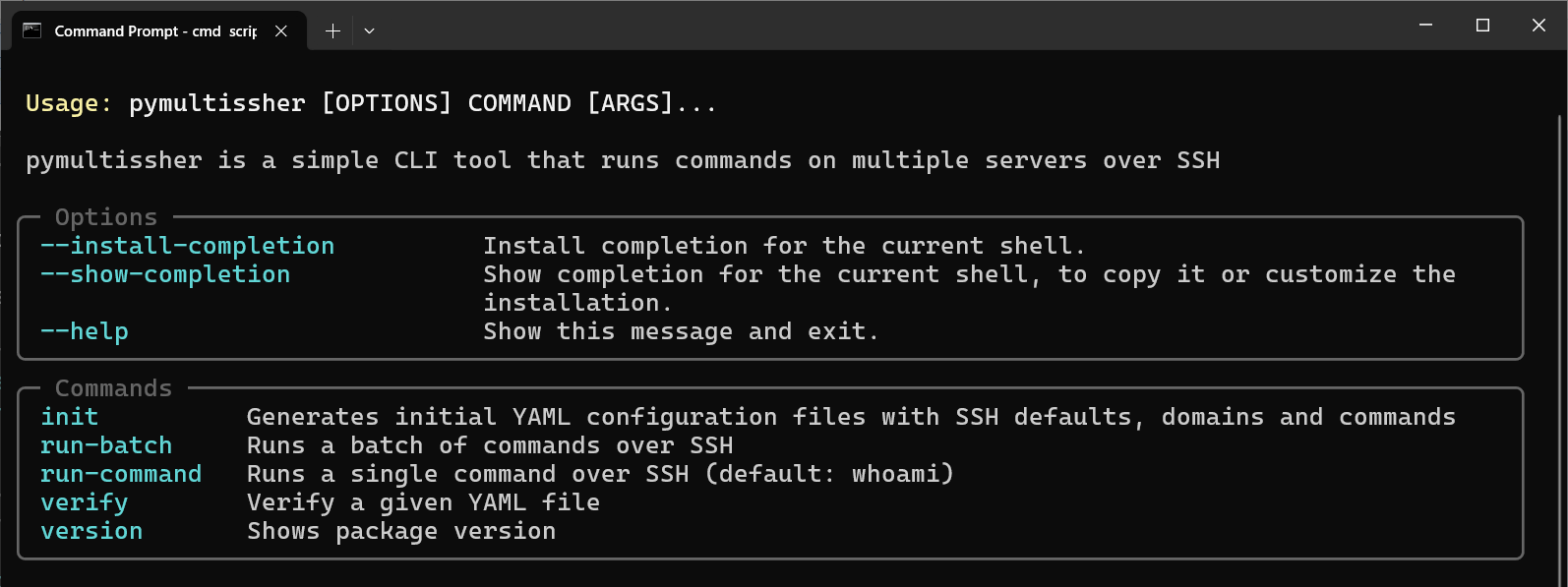
N.B. CLI could be also run as a Python module: python -m pymultissher --help
Documentation
Contributing
Please, check CONTRIBUTING.rst
License
1 maintainer

Release files for pymultissher 0.4.2
For a detailed explanation of source distributions (sdists) and built distributions (wheels), please see the package formats documentation.
Source distribution (sdist)
| File | Size | Uploaded | |
|---|---|---|---|
| pymultissher-0.4.2.tar.gz | 72.9 kB | Details |
Built distribution (wheel)
| File | Interpreter | ABI | Platform | Reset |
|---|---|---|---|---|
| pymultissher-0.4.2-py3-none-any.whl | Python 3 | none | any | Details |
Total release size: 86.8 kB
Release files / pymultissher-0.4.2.tar.gz
| Download URL | pymultissher-0.4.2.tar.gz |
|---|---|
| Size | 72.9 kB |
| Tags | Source |
|
SHA-256 checksum How to use checksums |
87a6dd37c969f5a0da5df352ee28afbfac0c5b17791959226ee7c766f2c3abaf
|
|
BLAKE2b-256 checksum How to use checksums |
f32eebb66c5f4e8c502eb17e88230f09ba15fc22e1969beae228f1cbe77f9f78
|
| Upload date | |
|
Uploaded using Trusted Publishing? What is trusted publishing? |
Yes |
| Uploaded via |
twine/7.0.0 CPython/3.13.14
|
Provenance
Provenance describes where a file came from. On PyPI, provenance is shared via attestations, which provide a verifiable record of the build or publishing details. View details, limitations and caveats.


PyPI Publish Attestation
PyPI verified that this artifact, at this checksum, originated from the publisher listed below.
Signed by GitHub Actions, verified by PyPI on Aug 7, 2026.
Transparency logRelease files / pymultissher-0.4.2-py3-none-any.whl
| Download URL | pymultissher-0.4.2-py3-none-any.whl |
|---|---|
| Size | 13.9 kB |
| Tags | Python 3 |
|
SHA-256 checksum How to use checksums |
ccb7b46be1e057861b9b04d156d4a0896317e7f30daa4db721bdd132e7ccab31
|
|
BLAKE2b-256 checksum How to use checksums |
a22b5bdbc40d8e8b47f320bad5d2f10ac28f0946a861fddc88782f7e9bb5ec6b
|
| Upload date | |
|
Uploaded using Trusted Publishing? What is trusted publishing? |
Yes |
| Uploaded via |
twine/7.0.0 CPython/3.13.14
|
Provenance
Provenance describes where a file came from. On PyPI, provenance is shared via attestations, which provide a verifiable record of the build or publishing details. View details, limitations and caveats.
PyPI Publish Attestation
PyPI verified that this artifact, at this checksum, originated from the publisher listed below.
Signed by GitHub Actions, verified by PyPI on Aug 7, 2026.
Transparency log













