








Many professional data scientists use Jupyter Notebook to accomplish their daily tasks, from preliminary data exploration to model prototyping. Notebooks' interactivity is particularly convenient for data-centric programming and their self-documenting nature provides excellent support for the communication of analytical results.
Nevertheless, Jupyter Notebook has been often criticized for inducing bad programming habits and scarcely supporting Software Engineering best practices. To really benefit from notebooks, users should be aware of their common pitfalls and learn how to prevent them.
In previous work (see "Eliciting Best Practices for Collaboration with Computational Notebooks" [1]), we introduced a catalog of 17 empirically-validated guidelines for the collaborative use of notebooks in a professional context.
To foster the adoption of these best practices, we have created Pynblint, a static analysis tool for Jupyter notebooks written in Python. Pynblint reveals potential notebook defects and recommends corrective actions. It can be operated either as a standalone CLI application or as part of a CI/CD pipeline.
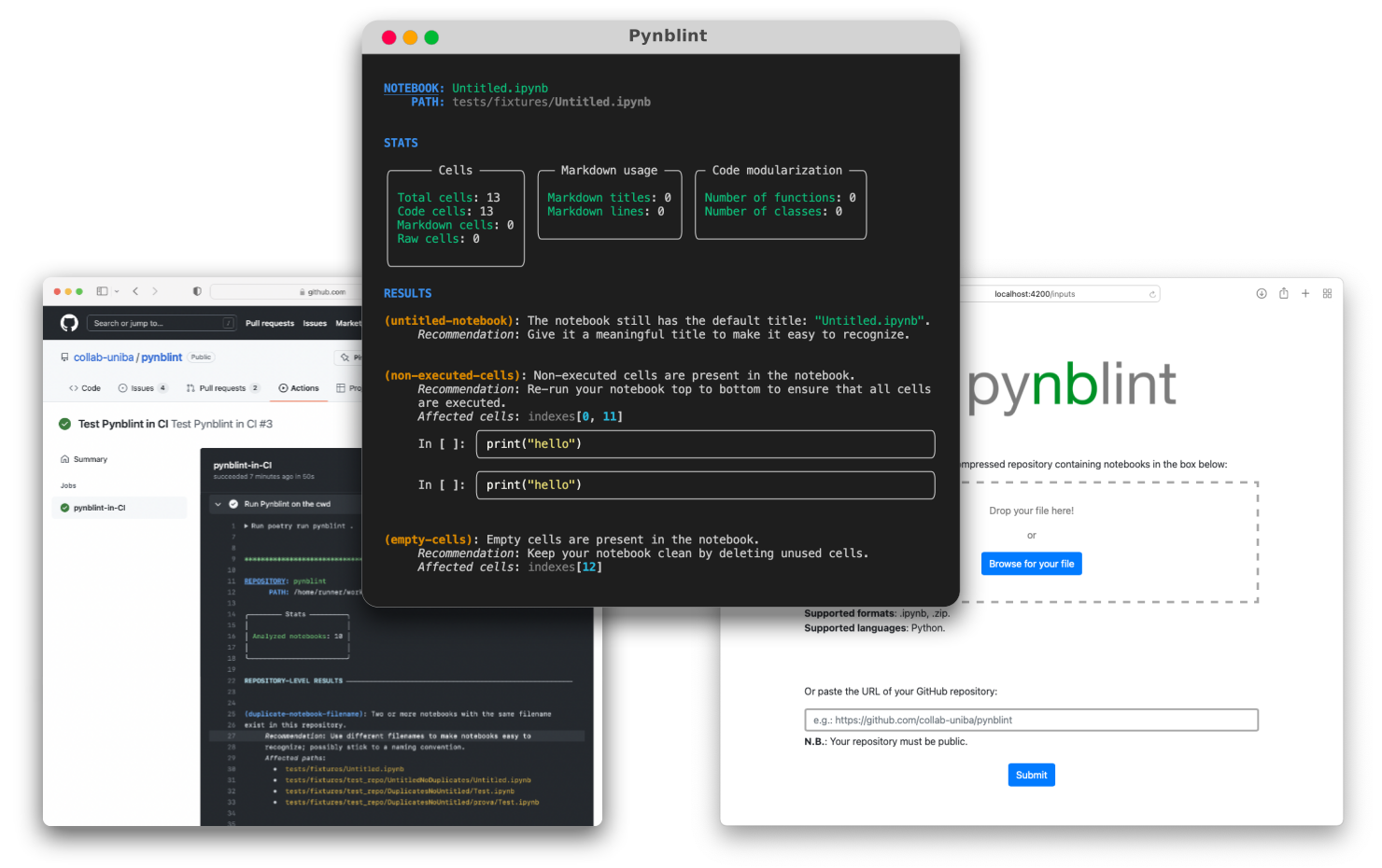
The core linting rules of Pynblint have been derived as operationalizations of the best practices from our catalog. Nonetheless, the plug-in architecture of Pynblint enables its users to easily extend the core set of checks with their own linting rules.
Requirements
Python 3.7+.
Installation
Pynblint can be installed with pip or another PyPI package manager:
pip install pynblint
After installation, we recommend exploring the command-line interface of the tool:
pynblint --help
Usage
Pynblint can be used to analyze:
-
a standalone notebook:
pynblint path/to/the/notebook.ipynb -
a code repository containing notebooks:
pynblint path/to/the/project/dir/-
(possibly also compressed as a
.ziparchive):pynblint path/to/the/compressed/archive.zip
-
-
a public GitHub repository containing notebooks (support for private repositories is on our roadmap 🙂):
pynblint --from-github https://github.com/collab-uniba/pynblint
For further information on the available options, please refer to the project documentation.
Catalog of best practices
In the following, we report the catalog of empirically-validated best practices on which Pynblint is based [1].
For each guideline, we specify the current state of implementation within Pynblint:
- ✅ = "implemented"
- ⏳ = "partially implemented / work in progress"
- ❌ = "not on our roadmap"
| State | Best Practice from [1] |
|---|---|
| ✅ | Use version control |
| ✅ | Manage project dependencies |
| ⏳ | Use self-contained environments |
| ✅ | Put imports at the beginning |
| ✅ | Ensure re-executability (re-run notebooks top to bottom) |
| ⏳ | Modularize your code |
| ⏳ | Test your code |
| ✅ | Name your notebooks consistently |
| ⏳ | Stick to coding standards |
| ⏳ | Use relative paths |
| ✅ | Document your analysis |
| ✅ | Leverage Markdown headings to structure your notebook |
| ✅ | Keep your notebook clean |
| ✅ | Keep your notebook concise |
| ❌ | Distinguish production and development artifacts |
| ⏳ | Make your notebooks available |
| ✅ | Make your data available |
License
This project is licensed under the terms of the MIT license.
References
[1] Luigi Quaranta, Fabio Calefato, and Filippo Lanubile. 2022. Eliciting Best Practices for Collaboration with Computational Notebooks. Proc. ACM Hum.-Comput. Interact. 6, CSCW1, Article 87 (April 2022), 41 pages. https://doi.org/10.1145/3512934
1 maintainer

Metadata
1 maintainer
Release files for pynblint 0.1.6
For a detailed explanation of source distributions (sdists) and built distributions (wheels), please see the package formats documentation.
Source distribution (sdist)
| File | Size | Uploaded | |
|---|---|---|---|
| pynblint-0.1.6.tar.gz | 21.7 kB | Details |
Built distribution (wheel)
| File | Interpreter | ABI | Platform | Reset |
|---|---|---|---|---|
| pynblint-0.1.6-py3-none-any.whl | Python 3 | none | any | Details |
Total release size: 46.1 kB
Release files / pynblint-0.1.6.tar.gz
| Download URL | pynblint-0.1.6.tar.gz |
|---|---|
| Size | 21.7 kB |
| Tags | Source |
|
SHA-256 checksum How to use checksums |
10853c0fc9bf84b85e9227c132f59f9af539771623a3aac99d0d6ababd45e601
|
|
BLAKE2b-256 checksum How to use checksums |
9c1d85cb08bcb43446ec4c0237bb0718f705c91eae02ad3c729950db9afea20a
|
| Upload date | |
|
Uploaded using Trusted Publishing? What is trusted publishing? |
No |
| Uploaded via |
poetry/1.3.1 CPython/3.10.2 Darwin/23.5.0
|
Release files / pynblint-0.1.6-py3-none-any.whl
| Download URL | pynblint-0.1.6-py3-none-any.whl |
|---|---|
| Size | 24.4 kB |
| Tags | Python 3 |
|
SHA-256 checksum How to use checksums |
8bb972696431144768ba6bf238a83f646c3faa4dac2810338ef87fb24d91742c
|
|
BLAKE2b-256 checksum How to use checksums |
86309bcd030408ae80e3a516da13834065d667798a622309fb891d50e77d30d6
|
| Upload date | |
|
Uploaded using Trusted Publishing? What is trusted publishing? |
No |
| Uploaded via |
poetry/1.3.1 CPython/3.10.2 Darwin/23.5.0
|














