
PyNeuronJ
What is this?
A Python implementation of NeuronJ for tracing nerve fibers in 2D grayscale images. Give it a start and an end point; it returns the centerline and its length. NDF files can be read, edited and saved for use in NeuronJ.
The algorithm follows Meijering et al. (2004).
The default practical mode includes numerical corrections.
Use mode="paper" for the paper formulas.
Installation
Python 3.10 or newer:
python -m pip install "pyneuronj[fast,examples]"
Requires NumPy and SciPy. The command also installs Numba for acceleration
and Pillow for the example. For the library alone, use python -m pip install pyneuronj.
To install from source, run python -m pip install -e ".[fast,examples]" in the repository.
Quick start
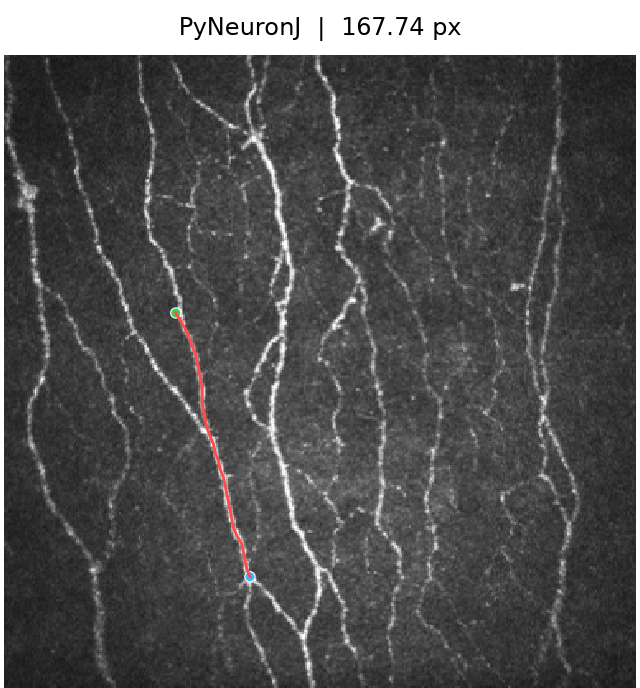
Results on the bundled image, using the same endpoints:
| PyNeuronJ | NeuronJ 1.4.3 |
|---|---|
 |
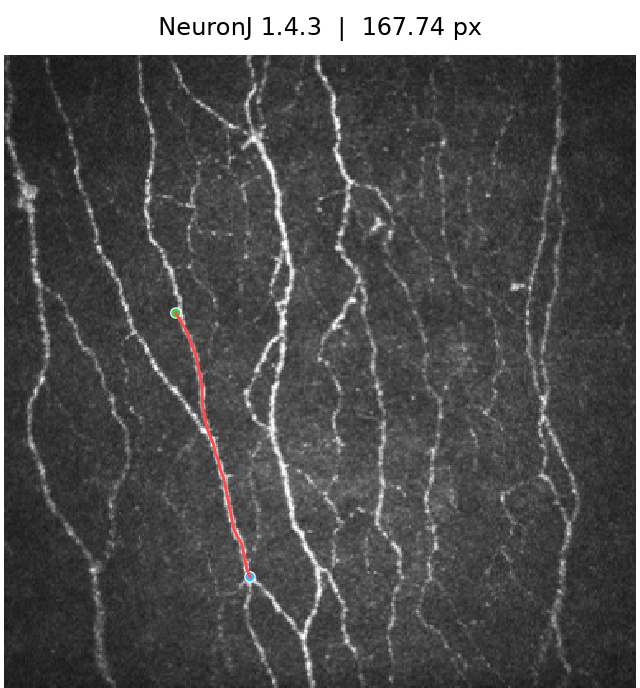 |
Red: centerline. Green: start. Blue: end.
from importlib.resources import files

import numpy as np
from PIL import Image
from pyneuronj import PyNeuronJ, load_ndf, save_ndf

with files("pyneuronj").joinpath("data/test.jpg").open("rb") as image_file:
    with Image.open(image_file) as source:
        image = np.asarray(source.convert("L"))

tracer = PyNeuronJ(image)
result = tracer.trace(start=(104, 156), end=(149, 316))

print(result.points_xy)       # Centerline coordinates
print(result.length_pixels)   # Length in pixels
save_ndf("test.ndf", result)

document = load_ndf("test.ndf")
document.tracings[0].label = "Fiber 1"
save_ndf("edited.ndf", document)
Coordinates are (x, y) pixel centers. For calibrated lengths, use
result.length(pixel_size=(sx, sy)). Replace the image and endpoints to trace
your own data.
NDF supports versions 1.0.0–1.4.3 and saves as 1.4.3. Types, colors, clusters, labels and segment boundaries are preserved. To load the saved annotation in NeuronJ, open the same image first.
The complete example can also be run from the command line:
python examples/basic.py
Validation
Compared with NeuronJ 1.4.3 on 196 images and 9,305 segments, using the same endpoints.
| Difference from NeuronJ | paper |
practical |
|---|---|---|
| Mean centerline distance | 0.026199 px | 0.006588 px |
| F1 within 2 px | 99.9260% | 99.9823% |
| Identical displayed vertices | 8,826 / 9,305 | 8,828 / 9,305 |
| Segments with mean distance > 5 px | 2 | 0 |
| Segment length MAE | 0.01140 px | 0.00788 px |
| Complete-tracing length MAPE | 0.01714% | 0.01489% |
1 maintainer

Metadata
1 maintainer
Release files for pyneuronj 1.0
For a detailed explanation of source distributions (sdists) and built distributions (wheels), please see the package formats documentation.
Source distribution (sdist)
| File | Size | Uploaded | Provenance | Actions |
|---|---|---|---|---|
| pyneuronj-1.0.tar.gz | 522.6 kB | Without provenance | Details for pyneuronj-1.0.tar.gz |
Built distribution (wheel)
| File | Interpreter | ABI | Platform | Actions Reset |
|---|---|---|---|---|
| pyneuronj-1.0-py3-none-any.whl | Python 3 | none | any | Details for pyneuronj-1.0-py3-none-any.whl |
Total release size: 617.6 kB
Release files / pyneuronj-1.0.tar.gz
| Download URL | pyneuronj-1.0.tar.gz |
|---|---|
| Size | 522.6 kB |
| Tags | Source |
|
SHA-256 checksum How to use checksums |
c3eca75f32945f2a35417f01b90b0bdf6fdfb3b02edcd627b23d5f9f90345f2a
|
|
BLAKE2b-256 checksum How to use checksums |
a95c0c7fa45af3556a6913a16d51f8e2fe4b933803e251ef10ef7930bf763634
|
| Upload date | |
|
Uploaded using Trusted Publishing? What is trusted publishing? |
No |
| Uploaded via |
twine/7.0.0 CPython/3.11.13
|
Release files / pyneuronj-1.0-py3-none-any.whl
| Download URL | pyneuronj-1.0-py3-none-any.whl |
|---|---|
| Size | 95.1 kB |
| Tags | Python 3 |
|
SHA-256 checksum How to use checksums |
8b70609debd9130ba62e8b43f8526b3f0ea6614efb8c6fc068e4c4c421330ce3
|
|
BLAKE2b-256 checksum How to use checksums |
239e4cc73f61a93a0d2b28c7af2c47415adbf162e82ec2081db3183ed59192c2
|
| Upload date | |
|
Uploaded using Trusted Publishing? What is trusted publishing? |
No |
| Uploaded via |
twine/7.0.0 CPython/3.11.13
|
Security for pyneuronj 1.0
Provenance
Provenance describes where a file came from. On PyPI, provenance is shared via attestations, which provide a verifiable record of the build or publishing details. View details, limitations and caveats.
No provenance found
None of the files in this release were uploaded with provenance metadata.
A note on package security
PyPI is a repository for distributing packages, not a service for auditing them. While third-party security researchers and our staff do their best to detect and remove malicious packages, PyPI cannot guarantee the quality, security or suitability of any given package.
To learn more about protecting yourself from malicious actors, visit our package security documentation.













