
Pynguin is a tool for automated unit test generation for Python

Project description
Pynguin
Pynguin (IPA: ˈpɪŋɡuiːn), the PYthoN General UnIt test geNerator, is a tool that allows developers to generate unit tests automatically.
Testing software is often considered to be a tedious task. Thus, automated generation techniques have been proposed and mature tools exist—for statically typed languages, such as Java. There is, however, no fully-automated tool available that produces unit tests for general-purpose programs in a dynamically typed language. Pynguin is, to the best of our knowledge, the first tool that fills this gap and allows the automated generation of unit tests for Python programs.
Internal Pipeline Status










Attention
Please Note:
Pynguin executes the module under test! As a consequence, depending on what code is in that module, running Pynguin can cause serious harm to your computer, for example, wipe your entire hard disk! We recommend running Pynguin in an isolated environment; use, for example, a Docker container to minimize the risk of damaging your system.
Pynguin is only a research prototype! It is not tailored towards production use whatsoever. However, we would love to see Pynguin in a production-ready stage at some point; please report your experiences in using Pynguin to us.
Prerequisites
Before you begin, ensure you have met the following requirements:
-
You have installed Python 3.10 (we have not yet tested with Python 3.11, there might be some problems due to changed internals regarding the byte-code instrumentation).
Attention: Pynguin now requires Python 3.10! Older versions are no longer supported!
-
You have a recent Linux/macOS/Windows machine.
Please consider reading the online documentation to start your Pynguin adventure.
Installing Pynguin
Pynguin can be easily installed using the pip tool by typing:
pip install pynguin
Make sure that your version of pip is that of a supported Python version, as any
older version is not supported by Pynguin!
Using Pynguin
Before you continue, please read the quick start guide
Pynguin is a command-line application.
Once you installed it to a virtual environment, you can invoke the tool by typing
pynguin inside this virtual environment.
Pynguin will then print a list of its command-line parameters.
A minimal full command line to invoke Pynguin could be the following,
where we assume that a project foo is located in /tmp/foo,
we want to store Pynguin's generated tests in /tmp/testgen,
and we want to generate tests using a whole-suite approach for the module foo.bar
(wrapped for better readability):
pynguin \
  --project-path /tmp/foo \
  --output-path /tmp/testgen \
  --module-name foo.bar
Please find a more detailed example in the quick start guide.
Contributing to Pynguin
For the development of Pynguin you will need the poetry
dependency management and packaging tool.
To start developing, follow these steps:
-
Clone the repository
-
Change to the
pynguinfolder:cd pynguin -
Create a virtual environment and install dependencies using
poetry:poetry install -
Make your changes
-
Run
make checkto verify that your changes pass all checksPlease see the
poetrydocumentation for more information on this tool.
Contributors
Pynguin is developed at the Chair of Software Engineering II of the University of Passau.
Maintainer: Stephan Lukasczyk
Contributors:
- Tucker Blue
- Gordon Fraser
- Abdur-Rahmaan Janhangeer
- Maximilian Königseder
- Florian Kroiß
- Simon Labrenz
- Roman Levin
- Juan Julián Merelo Guervós
- Lukas Steffens
- Florian Straubinger
- Sara Tavares
Development using PyCharm.
If you want to use the PyCharm IDE you have to set up a few things:
- Import
pynguininto PyCharm. - Let PyCharm configure configure a virtual environment using
poetry. - Set the default test runner to
pytest - Set the DocString format to
Google
License
This project is licensed under the terms of the MIT License. Pynguin was using the GNU Lesser General Public License (LGPL) until version 0.29.0, its licence was changed with version 0.30.0.
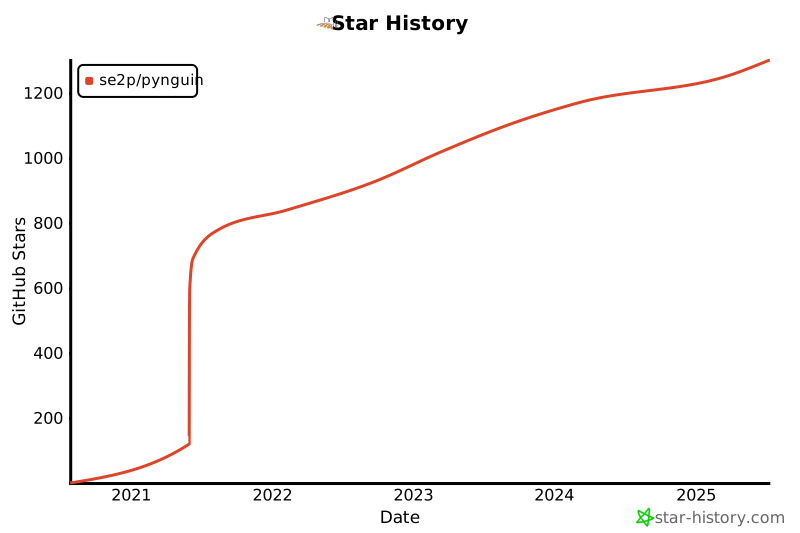
Star History
Release history Release notifications | RSS feed


Download files
Download the file for your platform. If you're not sure which to choose, learn more about installing packages.
Source Distribution
Built Distribution
Filter files by name, interpreter, ABI, and platform.
If you're not sure about the file name format, learn more about wheel file names.
Copy a direct link to the current filters
File details
Details for the file pynguin-0.32.0.tar.gz.
File metadata
- Download URL: pynguin-0.32.0.tar.gz
- Upload date:
- Size: 339.4 kB
- Tags: Source
- Uploaded using Trusted Publishing? No
- Uploaded via: poetry/1.4.2 CPython/3.10.8 Darwin/22.4.0
File hashes
| Algorithm | Hash digest | |
|---|---|---|
| SHA256 |
b49865f5becf205cd886935c7245d64adf8e825bb135e62a9dc0d0070a13aadd
|
|
| MD5 |
5caac973225f2ce225a264c4e4c82d57
|
|
| BLAKE2b-256 |
5adb4e44e97184941af3b9fb53bf3f7926f314c0ef7f49659b70d309f5de4b70
|
File details
Details for the file pynguin-0.32.0-py3-none-any.whl.
File metadata
- Download URL: pynguin-0.32.0-py3-none-any.whl
- Upload date:
- Size: 288.7 kB
- Tags: Python 3
- Uploaded using Trusted Publishing? No
- Uploaded via: poetry/1.4.2 CPython/3.10.8 Darwin/22.4.0
File hashes
| Algorithm | Hash digest | |
|---|---|---|
| SHA256 |
97a7605beaa1d6e76bfdcf4e0ee2679b3dd5670bd43b6d8a9df62f90004c1e3d
|
|
| MD5 |
834ad0640cf2610e265eeace7ece3257
|
|
| BLAKE2b-256 |
c928dea632bdcc4574a2d452fa9e13e0596b519296cae808f9c9f30e0287b07e
|






