


Package |
Description |
|---|---|
Navigate and subset NHDPlus (MR and HR) using web services |
|
Access topographic data through National Map’s 3DEP web service |
|
Access NWIS, NID, WQP, eHydro, NLCD, CAMELS, and SSEBop databases |
|
Access daily, monthly, and annual climate data via Daymet |
|
Access daily climate data via GridMET |
|
Access hourly NLDAS-2 data via web services |
|
A collection of tools for computing hydrological signatures |
|
High-level API for asynchronous requests with persistent caching |
|
Send queries to any ArcGIS RESTful-, WMS-, and WFS-based services |
|
Utilities for manipulating geospatial, (Geo)JSON, and (Geo)TIFF data |
PyNLDAS2: Hourly NLDAS-2 Forcing Data









Features
PyNLDAS2 is a part of HyRiver software stack that is designed to aid in hydroclimate analysis through web services. This package provides access NLDAS-2 Forcing dataset via Hydrology Data Rods. Currently, only hourly data is supported. There are three main functions:
get_bycoords: Forcing data for a list of coordinates as a pandas.DataFrame or xarray.Dataset,
get_bygeom: Forcing data within a geometry as a xarray.Dataset,
get_grid_mask: NLDAS2 land/water grid mask as a xarray.Dataset.
Both get_bygeom and get_bycoords functions save the intermediate files returned by the web service in a local cache folder (./cache in the current directory). The cache folder is created automatically when the functions are called for the first time. The cache folder is used to store the intermediate files to avoid re-downloading them. These two functions allow modifying the web service calls via two options:
conn_timeout: Sets the connection timeout in seconds. The default value is 5 minutes. This can be increaseed for larger requests. If running these functions fails with a connection timeout error, try increasing this value.
validate_filesize: If True, the functions compares the file size of the previously cached files in the ./cache folder, if they exist, with their size on the remote server. If the sizes do not match, the cached files are removed and they will be re-download. By default this is set to False since the files on the server rarely change. So, if a request has already been cached there shouldn’t be a need for re-donwloading them from scratch. However, if you suspect that the files on the server have changed or the functions fails to process the cached files, you can set this to True or manually delete the cached files in the ./cache folder.
You can find some example notebooks here. You can also try using PyNLDAS2 without installing it on your system by clicking on the binder badge. A Jupyter Lab instance with the HyRiver stack pre-installed will be launched in your web browser, and you can start coding!
Moreover, requests for additional functionalities can be submitted via issue tracker.
Citation
If you use any of HyRiver packages in your research, we appreciate citations:
@article{Chegini_2021,
    author = {Chegini, Taher and Li, Hong-Yi and Leung, L. Ruby},
    doi = {10.21105/joss.03175},
    journal = {Journal of Open Source Software},
    month = {10},
    number = {66},
    pages = {1--3},
    title = {{HyRiver: Hydroclimate Data Retriever}},
    volume = {6},
    year = {2021}
}
Installation
You can install pynldas2 using pip:
$ pip install pynldas2Alternatively, pynldas2 can be installed from the conda-forge repository using Conda:
$ conda install -c conda-forge pynldas2Quick start
The NLDAS2 database provides forcing data at 1/8th-degree grid spacing and range from 01 Jan 1979 to present. Let’s take a look at NLDAS2 grid mask that includes land, water, soil, and vegetation masks:
import pynldas2 as nldas

grid = nldas.get_grid_mask()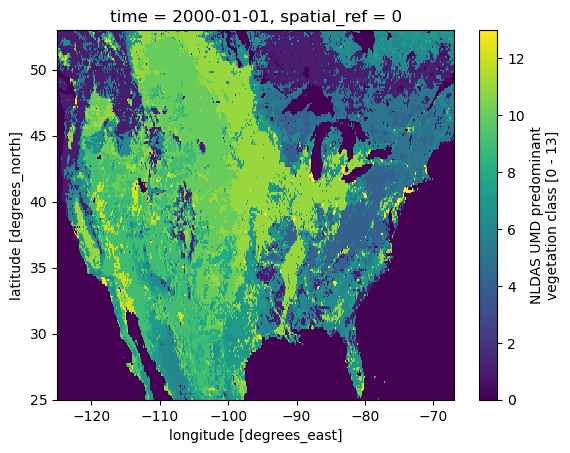
Next, we use PyGeoHydro to get the geometry of a HUC8 with ID of 1306003, then we get the forcing data within the obtained geometry.
from pygeohydro import WBD

huc8 = WBD("huc8")
geometry = huc8.byids("huc8", "13060003").geometry[0]
clm = nldas.get_bygeom(geometry, "2010-01-01", "2010-01-31", 4326)
Road Map
[ ] Add PET calculation functions similar to PyDaymet but at hourly timescale.
[ ] Add a command line interfaces.
Contributing
Contributions are appreciated and very welcomed. Please read CONTRIBUTING.rst for instructions.
1 maintainer

Metadata
1 maintainer
Release files for pynldas2 0.19.3
For a detailed explanation of source distributions (sdists) and built distributions (wheels), please see the package formats documentation.
Source distribution (sdist)
| File | Size | Uploaded | Provenance | Actions |
|---|---|---|---|---|
| pynldas2-0.19.3.tar.gz | 29.6 kB | With provenance | Details for pynldas2-0.19.3.tar.gz |
Built distribution (wheel)
| File | Interpreter | ABI | Platform | Actions Reset |
|---|---|---|---|---|
| pynldas2-0.19.3-py3-none-any.whl | Python 3 | none | any | Details for pynldas2-0.19.3-py3-none-any.whl |
Total release size: 46.3 kB
Release files / pynldas2-0.19.3.tar.gz
| Download URL | pynldas2-0.19.3.tar.gz |
|---|---|
| Size | 29.6 kB |
| Tags | Source |
|
SHA-256 checksum How to use checksums |
335dd6151857be5a1142060353695af37f17be7ffe36131fc6ed80d4ecc54ab1
|
|
BLAKE2b-256 checksum How to use checksums |
b36899bd7179ef6b7208ce93eddd579bf0f7d8356dea8d43c27afd907cda87c4
|
| Upload date | |
|
Uploaded using Trusted Publishing? What is trusted publishing? |
Yes |
| Uploaded via |
twine/6.1.0 CPython/3.12.9
|
Provenance
Provenance describes where a file came from. On PyPI, provenance is shared via attestations, which provide a verifiable record of the build or publishing details. View details, limitations and caveats.


PyPI Publish Attestation
PyPI verified that this artifact, at this checksum, originated from the publisher listed below.
Signed by GitHub Actions, verified by PyPI on Mar 7, 2025.
Transparency logRelease files / pynldas2-0.19.3-py3-none-any.whl
| Download URL | pynldas2-0.19.3-py3-none-any.whl |
|---|---|
| Size | 16.6 kB |
| Tags | Python 3 |
|
SHA-256 checksum How to use checksums |
261fd55b85cf182f2e9b28d424cec430eb2eab94fbb22ac95e4fbee0988e88db
|
|
BLAKE2b-256 checksum How to use checksums |
9c1c30e0c096a19c667c56c635f7e0ae59ffa6627714a3dd93802a52cf0450bb
|
| Upload date | |
|
Uploaded using Trusted Publishing? What is trusted publishing? |
Yes |
| Uploaded via |
twine/6.1.0 CPython/3.12.9
|
Provenance
Provenance describes where a file came from. On PyPI, provenance is shared via attestations, which provide a verifiable record of the build or publishing details. View details, limitations and caveats.
PyPI Publish Attestation
PyPI verified that this artifact, at this checksum, originated from the publisher listed below.
Signed by GitHub Actions, verified by PyPI on Mar 7, 2025.
Transparency logSecurity for pynldas2 0.19.3
Provenance
Provenance describes where a file came from. On PyPI, provenance is shared via attestations, which provide a verifiable record of the build or publishing details. View details, limitations and caveats.
Full provenance
All 2 files in this release have been uploaded with provenance metadata.
Attestation for pynldas2-0.19.3.tar.gz
PyPI Publish Attestation
PyPI verified that this artifact, at this checksum, originated from the publisher listed below.
Signed by GitHub Actions, verified by PyPI on Mar 7, 2025.
Transparency logA note on package security
PyPI is a repository for distributing packages, not a service for auditing them. While third-party security researchers and our staff do their best to detect and remove malicious packages, PyPI cannot guarantee the quality, security or suitability of any given package.
To learn more about protecting yourself from malicious actors, visit our package security documentation.














