
pynotebook
Introduction
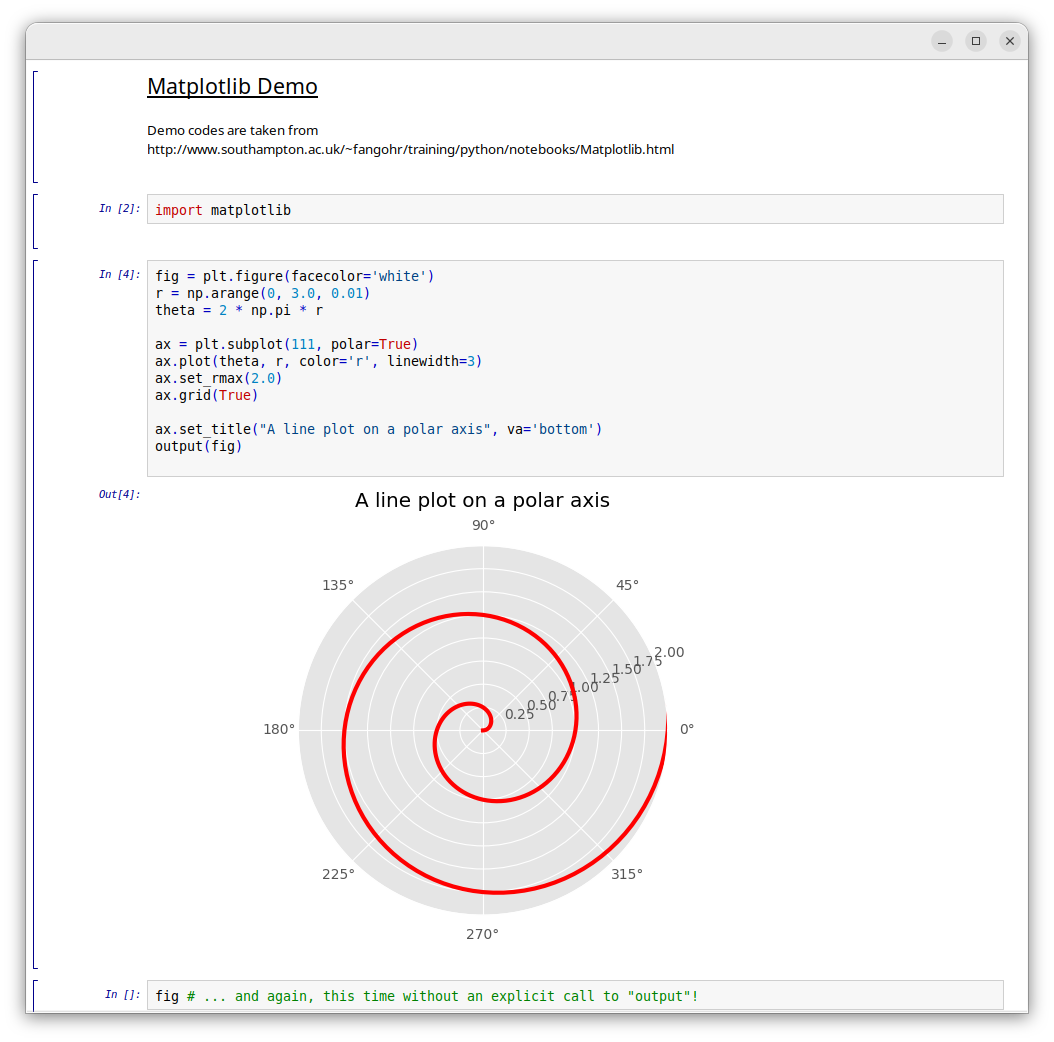
Pynotebook is a library for building notebook interfaces within wxPython. A notebook is an interactive document that integrates program code, rich text, and graphics into a single file.
Unlike heavier environments such as Jupyter or Spyder, Pynotebook is exceptionally lightweight and designed to be easily embedded into existing wxPython applications. While Python is its native language, the library is flexible enough to support other scripting languages as well.
Features
- Code cells with syntax highlighting, completion and help; the output appears right below the cell
- Text cells with formatted text for notes and documentation
- Graphics in the document: matplotlib figures, bitmaps and built-in
vector graphics (
pynotebook.graphics) - A notebook is a single wx widget, easy to embed
- Other languages can be plugged in as clients;
demo/rnotebook.pyshows R (needs rpy2) - Safe, readable file format: notebooks are saved as JSON, and opening a file never runs code
- Few dependencies: wxPython (not installed automatically), and cerealizer to read files of older versions; BSD license
Embedding
import wx
from pynotebook.nbview import NBView

app = wx.App()
frame = wx.Frame(None, title='My notebook', size=(800, 600))
view = NBView(frame)   # or NBView(frame, filename='example.pnb')
frame.Show()
app.MainLoop()
view.save(filename) writes the notebook to a file.
Applications using the Pynotebook library include:
- pnb – a Python notebook application
Run demo (no installation, needs matplotlib)
cd demo
python plot_demo.py
Installation
Pynotebook needs wxPython 4.2 or newer, which is not installed automatically: usually your application or your Linux distribution already provides it. From PyPI:
pip install pynotebook
To install wxPython as well (on Linux, pip has to build it from source):
pip install "pynotebook[wx]"
From the source folder:
pip install .
If you also want to install pnb:
pip install pnb
Testing
Most files have builtin tests. All of them run with:
python all_tests.py
The tests of a single file:
python runtests.py pynotebook/nbtexels.py
Some files also have builtin demos:
python runtests.py pynotebook/nbview.py demo_00
Links
1 maintainer

Metadata
1 maintainer
Release files for pynotebook 0.4.0
For a detailed explanation of source distributions (sdists) and built distributions (wheels), please see the package formats documentation.
Source distribution (sdist)
| File | Size | Uploaded | Provenance | Actions |
|---|---|---|---|---|
| pynotebook-0.4.0.tar.gz | 87.7 kB | With provenance | Details for pynotebook-0.4.0.tar.gz |
Built distribution (wheel)
| File | Interpreter | ABI | Platform | Actions Reset |
|---|---|---|---|---|
| pynotebook-0.4.0-py3-none-any.whl | Python 3 | none | any | Details for pynotebook-0.4.0-py3-none-any.whl |
Total release size: 190.7 kB
Release files / pynotebook-0.4.0.tar.gz
| Download URL | pynotebook-0.4.0.tar.gz |
|---|---|
| Size | 87.7 kB |
| Tags | Source |
|
SHA-256 checksum How to use checksums |
6362a4867aade439769439be2599b507758effb004fab6f23c118676bc8f7669
|
|
BLAKE2b-256 checksum How to use checksums |
15d1ba935482ff0a0ff4122b8082e3dfb7b2b94679c9fbb06313a1c7fdcfdd0f
|
| Upload date | |
|
Uploaded using Trusted Publishing? What is trusted publishing? |
Yes |
| Uploaded via |
twine/7.0.0 CPython/3.13.16
|
Provenance
Provenance describes where a file came from. On PyPI, provenance is shared via attestations, which provide a verifiable record of the build or publishing details. View details, limitations and caveats.


PyPI Publish Attestation
PyPI verified that this artifact, at this checksum, originated from the publisher listed below.
Signed by GitHub Actions, verified by PyPI on Nov 14, 2026.
Transparency logRelease files / pynotebook-0.4.0-py3-none-any.whl
| Download URL | pynotebook-0.4.0-py3-none-any.whl |
|---|---|
| Size | 103.0 kB |
| Tags | Python 3 |
|
SHA-256 checksum How to use checksums |
3652d2f66df7670d1615faf9825b47ef480ac663ae60068a544ee0b53458d48a
|
|
BLAKE2b-256 checksum How to use checksums |
889ab306f625ce47460e4caf91602049dd1d83b5af9e0ce1068ba7b705eb11eb
|
| Upload date | |
|
Uploaded using Trusted Publishing? What is trusted publishing? |
Yes |
| Uploaded via |
twine/7.0.0 CPython/3.13.16
|
Provenance
Provenance describes where a file came from. On PyPI, provenance is shared via attestations, which provide a verifiable record of the build or publishing details. View details, limitations and caveats.
PyPI Publish Attestation
PyPI verified that this artifact, at this checksum, originated from the publisher listed below.
Signed by GitHub Actions, verified by PyPI on Nov 14, 2026.
Transparency logSecurity for pynotebook 0.4.0
Provenance
Provenance describes where a file came from. On PyPI, provenance is shared via attestations, which provide a verifiable record of the build or publishing details. View details, limitations and caveats.
Full provenance
Both files in this release have been uploaded with provenance metadata.
Attestation for pynotebook-0.4.0.tar.gz
PyPI Publish Attestation
PyPI verified that this artifact, at this checksum, originated from the publisher listed below.
Signed by GitHub Actions, verified by PyPI on Nov 14, 2026.
Transparency logA note on package security
PyPI is a repository for distributing packages, not a service for auditing them. While third-party security researchers and our staff do their best to detect and remove malicious packages, PyPI cannot guarantee the quality, security or suitability of any given package.
To learn more about protecting yourself from malicious actors, visit our package security documentation.














