
Real-Time Dual-Channel Multi-Regime Oscilloscope, Audio Spectrum Analyzer & Hardware Filter Engine




A high-performance, dark-mode real-time Dual-Channel Multi-Regime Oscilloscope, Audio Spectrum Analyzer, Acoustic Analytics Engine, and Hardware-Accelerated Frequency Filter / IFFT Instrument running natively on PYNQ Linux platforms.
Features true simultaneous dual-ADC parallel sampling ($0.00,\mu\text{s}$ inter-channel skew), runtime-selectable operating regimes (Wideband Lab Scope, Full Audio, Speech, Deep Bass Zoom), FPGA-accelerated anti-aliasing decimation ($M \in {1, 10, 20, 50}$), wideband $10,\text{Hz} - 1,\text{MHz}$ signal generation with interactive Nyquist folding/aliasing exploration, sub-sample trigger phase-locking, dedicated passive microphone instruments (AudioDashboard), Hilbert analytic envelopes, STFT waterfall spectrograms, real-time frequency-domain spectral filtering (HardwareFilter) with Hermitian symmetry ($k_{\text{eff}} = \min(k, N-k)$), calibrated 1:1 hardware IFFT reconstruction ($V_{\text{pp, filt}} \approx V_{\text{pp, raw}}$ with $< 1%$ error), and direct in-Jupyter audio playback (ol.play_audio()).
🏛 System Architecture
This repository adopts the canonical PYNQ Custom Overlay pattern (OscilloscopeOverlay). It automatically pulls its compiled hardware bitstream and metadata from GitHub Releases (or loads local custom .bit builds) and encapsulates the 3-DMA stream receivers, AXI-Lite trigger registers, sequencer controls, dynamic decimators, spectral masking registers, and dual-wavegen into a unified Python object.
 [ Analog Discovery 3 ] ──(W1: Yellow)──────> [ PYNQ-Z2 Pin A0 (Vaux1) ]
 [      Wavegen       ] ──(W2: Yellow/White)─> [ PYNQ-Z2 Pin A1 (Vaux9) ]
 [         OR         ]                                       │
 [ MAX4466 Mics A0/A1 ]                       (XADC Dual Continuous Sequencer)
        │                                                     │ (1 MSPS Interleaved Stream, 0.00 µs Skew)
  (pydwf SDK)                                                 ▼
        │                                            [ axis_trigger_unit IP ]
        ▼                                      (Selectable Trigger Source: A0 / A1)
 [ AD3SignalGenerator ]                                       │ (Gated Stream)
 (Concurrent W1 & W2)                                         ▼
                                                     [ axis_decimator IP ]
                                           (Programmable M = 1, 10, 20, 50 in PL)
                                                              │ (Decimated Stream)
                                                              ▼
                                                     [ tlast_generator (Programmable N) ]
                                                              │ (w/ TLAST)
                                                    [ axis_broadcaster_0 ]
                                               ┌──────────────┴──────────────┐
                                               ▼ (Decimated Time Stream)     ▼ (Interleaved Stream w/ TLAST)
                                      [ AXI DMA 0 (Time) ]          [ axis_channel_demux ]
                                               │                             │ (Clean A0 vs A1 Routing)
                                               │                             ▼
                                               │                    [ xfft_0 Core (Forward FFT) ]
                                               │                             │ (Complex Re + j*Im)
                                               │                             ▼
                                               │                    [ axis_spectral_mask ]
                                               │                    (Hermitian Masking: k_eff = min(k, N-k))
                                               │                             │
                                               │                    [ axis_broadcaster_1 ]
                                               │                       ┌─────┴─────┐
                                               │                       ▼           ▼
                                               │                  [ cordic_0 ] [ xfft_1 (IFFT) ]
                                               │                  (Mag Engine) (Filtered Time)
                                               │                       │           │
                                               ▼                       ▼           ▼
                                      [ AXI DMA 0 (Time) ]    [ AXI DMA 1 ]  [ AXI DMA 2 ]
                                               │                       │           │
                                               └───────────────────────┼───────────┘
                                                                       ▼ (AXI SmartConnect HP0)
                                                            [ Processing System DDR ]
🎛 Multi-Regime Operating Profiles
The system seamlessly reconfigures sampling rate, packet duration, and FFT resolution on the fly via ol.set_profile():
| Profile Name | Decimator ($M$) | Transform ($N$) | Sampling Rate ($f_s$) | Nyquist Bandwidth | Time Window ($T_{\text{win}}$) | Resolution ($\Delta f$) | Best Used For |
|---|---|---|---|---|---|---|---|
oscilloscope |
$1$ (Bypass) | $2048$ | $500,\text{kSPS}$ | $0 - 250,\text{kHz}$ | $2.05,\text{ms}$ | $244.14,\text{Hz}$ | Function generators, high-speed pulses, logic edges |
audio |
$10$ | $1024$ | $50,\text{kSPS}$ | $0 - 25,\text{kHz}$ | $20.48,\text{ms}$ | $48.83,\text{Hz}$ | Full-spectrum music, instruments, acoustic speech |
speech |
$20$ | $1024$ | $25,\text{kSPS}$ | $0 - 12.5,\text{kHz}$ | $40.96,\text{ms}$ | $24.41,\text{Hz}$ | Vocal formants, acoustic resonance |
bass_zoom |
$50$ | $1024$ | $10,\text{kSPS}$ | $0 - 5,\text{kHz}$ | $102.40,\text{ms}$ | $9.77,\text{Hz}$ | Deep sub-bass ($20-100,\text{Hz}$), room acoustic analysis |
🖥 4-Tier Interactive Instrument Suite
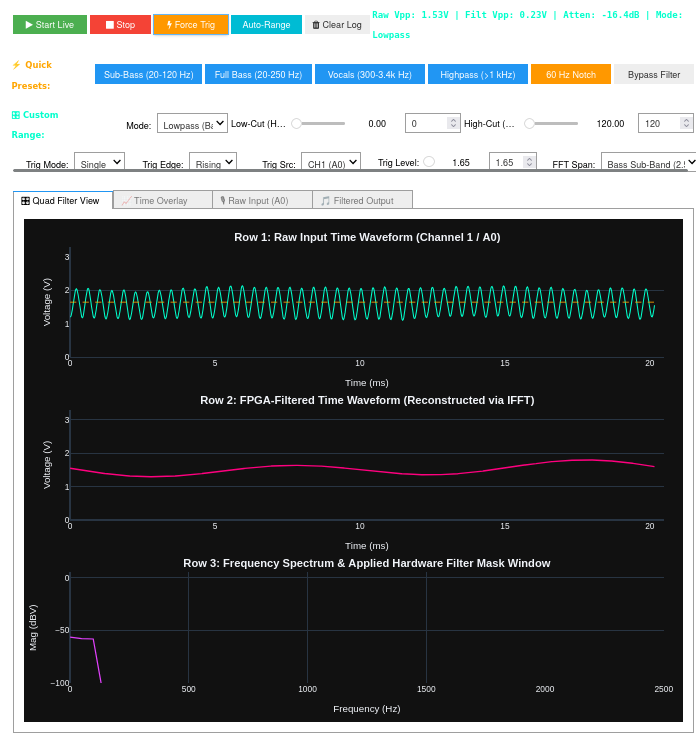
1. Real-Time Hardware Filter & IFFT Dashboard (ol.filter_dashboard())
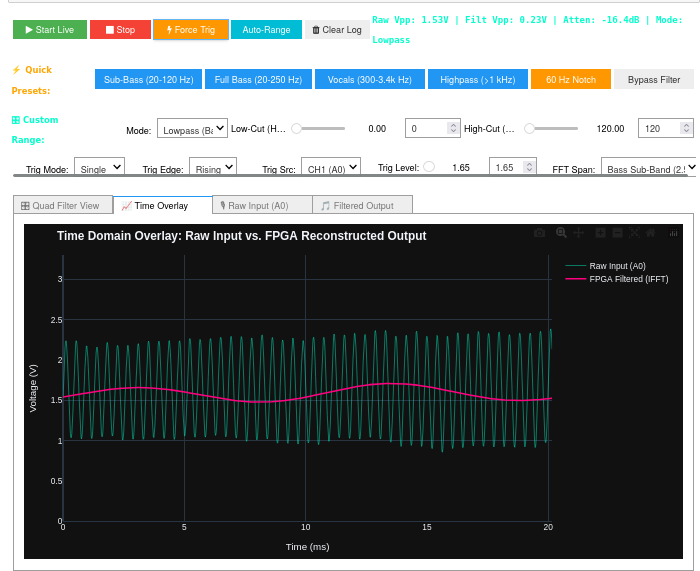
Live 4-trace multi-domain instrument providing real-time hardware frequency filtering and IFFT reconstruction directly on the FPGA fabric:
- Interactive Frequency Cutoff Sliders: Real-time Lowpass, Highpass, Bandpass, and Notch cutoff tuning.
- Quick Presets: Instant configuration for Sub-Bass ($20-120,\text{Hz}$), Full Bass ($20-250,\text{Hz}$), Vocals ($300-3.4,\text{kHz}$), Highpass ($>1,\text{kHz}$), and $60,\text{Hz}$ Mains Hum Notch.
- Hermitian Symmetry ($k_{\text{eff}} = \min(k, N-k)$): Eliminates complex leakage and ensures $< 1%$ amplitude reconstruction error ($0.08%$).
| Quad Filter View (Raw, IFFT & Masked Spectrum) | Time Domain Superimposed Overlay |
|---|---|
 |
 |
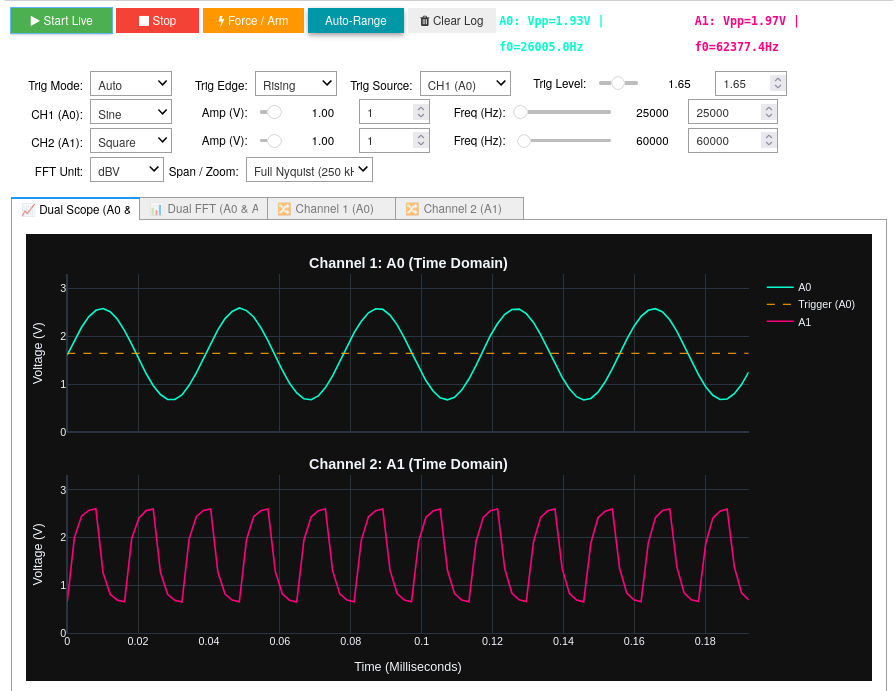
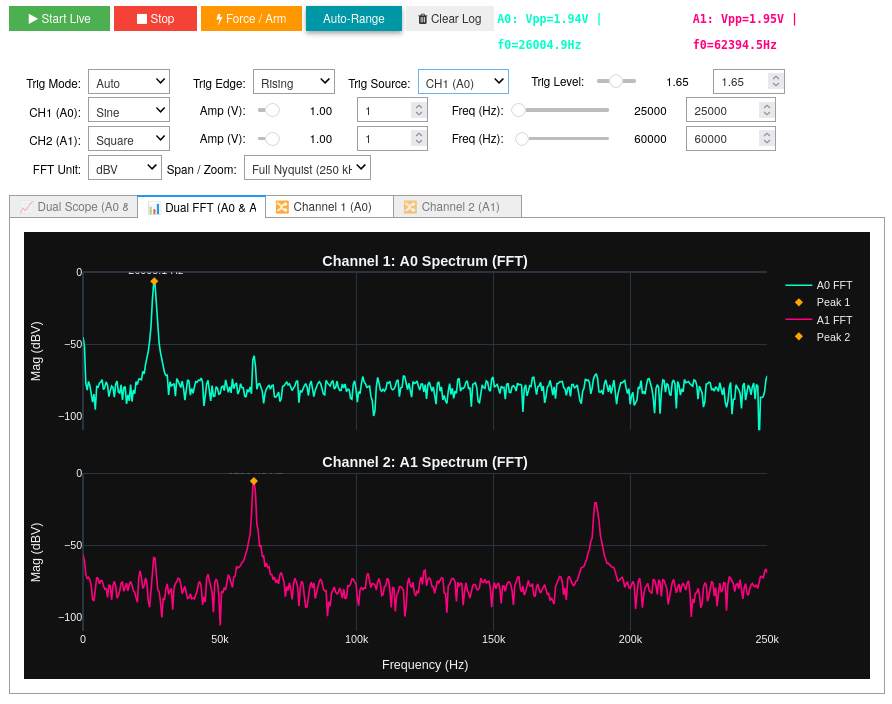
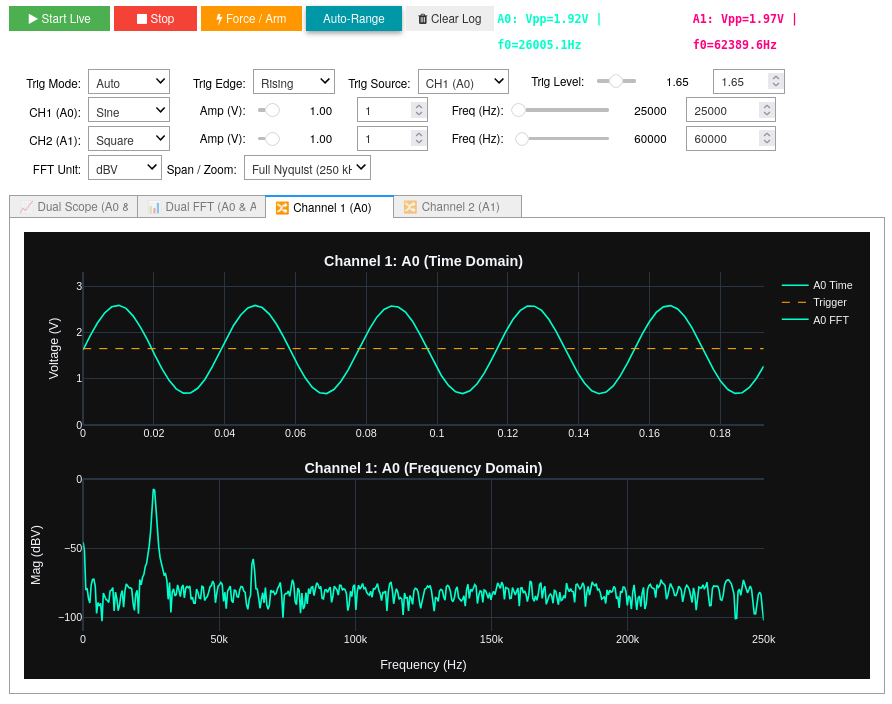
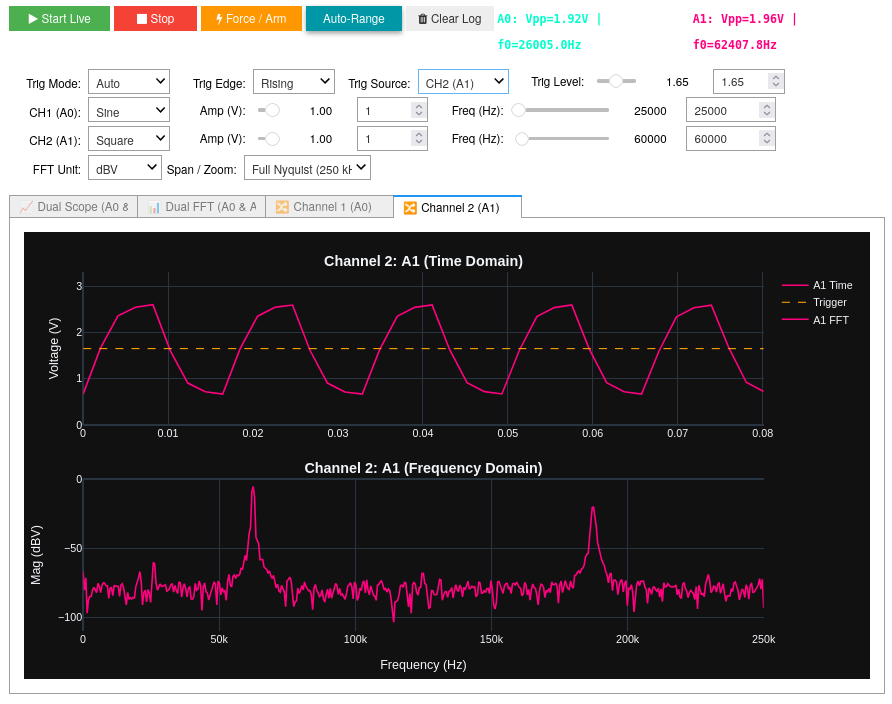
2. Academic Laboratory Dual Scope & Aliasing Explorer (ol.ad3_dashboard())
Full-featured oscilloscope with live Analog Discovery 3 signal generation ($10,\text{Hz} - 1,\text{MHz}$) and $250,\text{kHz}$ Nyquist span. Allows students to dial beyond $250,\text{kHz}$ ($300,\text{kHz}, 450,\text{kHz}, 800,\text{kHz}$) to observe real-time spectral folding/aliasing.
| Dual Time-Domain Scope (A0 & A1) | Dual FFT Spectrum Analyzer (0 to 250 kHz) |
|---|---|
 |
 |
| Dedicated Channel 1 View (A0) | Dedicated Channel 2 View (A1) |
|---|---|
 |
 |
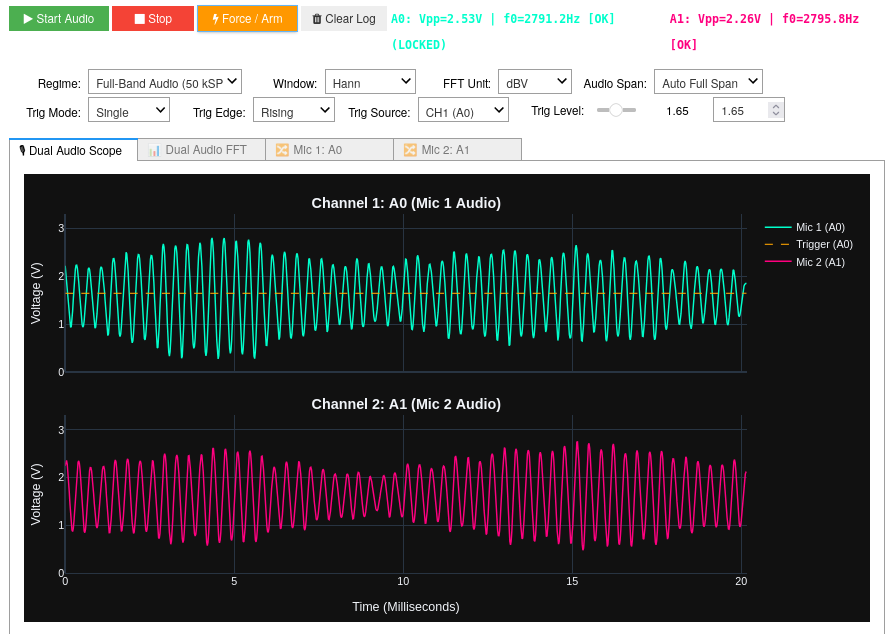
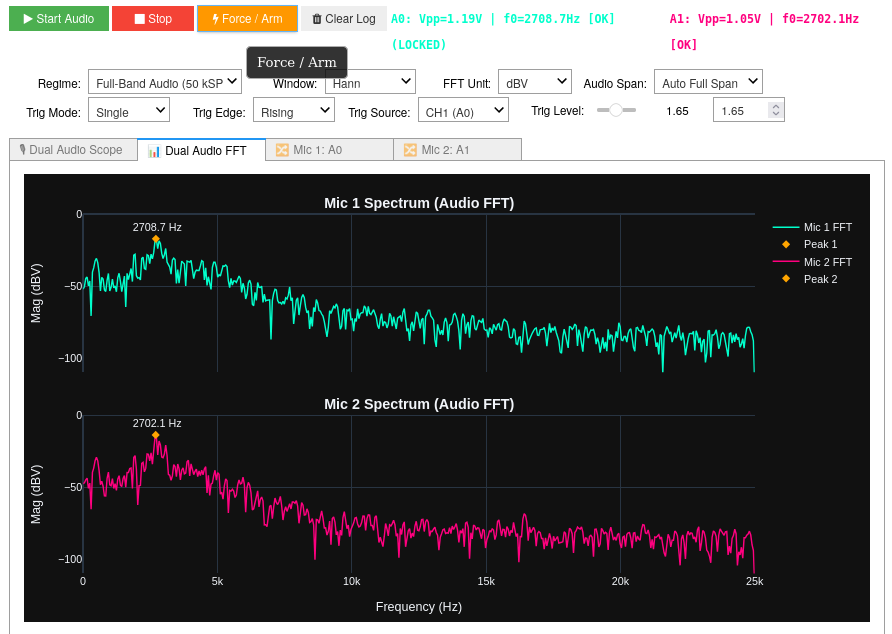
3. Dedicated Microphone & Audio Instrument (ol.audio_dashboard())
Designed specifically for passive MAX4466 electret microphones (or any analog audio sensor on pins A0 and A1), running completely independently without requiring an Analog Discovery 3:
- $20.48,\text{ms} - 102.4,\text{ms}$ Audio Timebase: Displays multi-cycle acoustic waveforms for speech, musical instruments, and bass frequencies ($20,\text{Hz} - 250,\text{Hz}$).
- Live VU Meters & Clipping Alerts: Status bar indicators that flash red if either microphone saturates ($V < 0.10,\text{V}$ or $V > 3.10,\text{V}$).
- Sub-Bin Quadratic Peak Pitch Tracking: Extracts the dominant acoustic fundamental ($f_0$) with $\pm 0.5,\text{Hz}$ accuracy.
| Dual Audio Waveforms (Mic 1 & Mic 2) | Dual Audio Spectrum (0 to 25 kHz) |
|---|---|
 |
 |
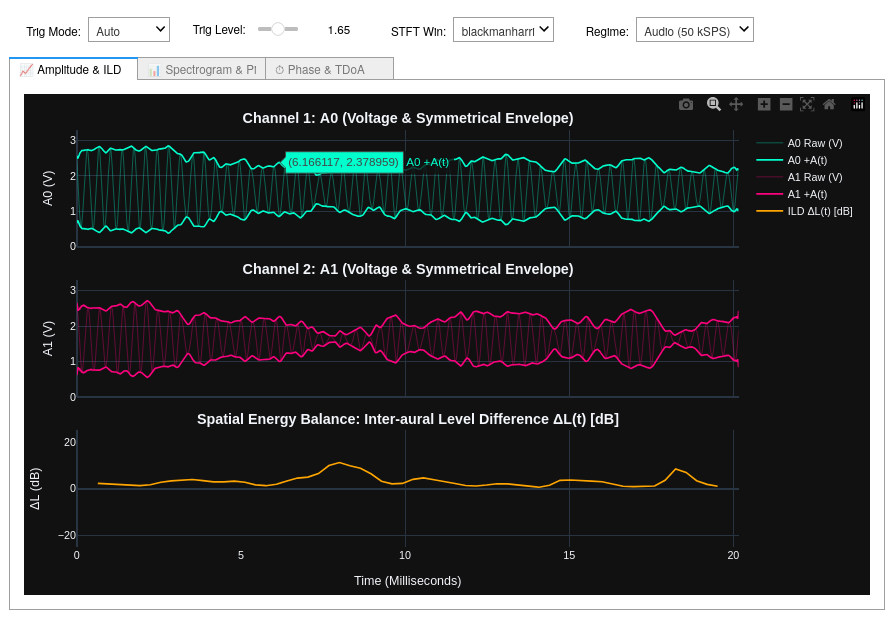
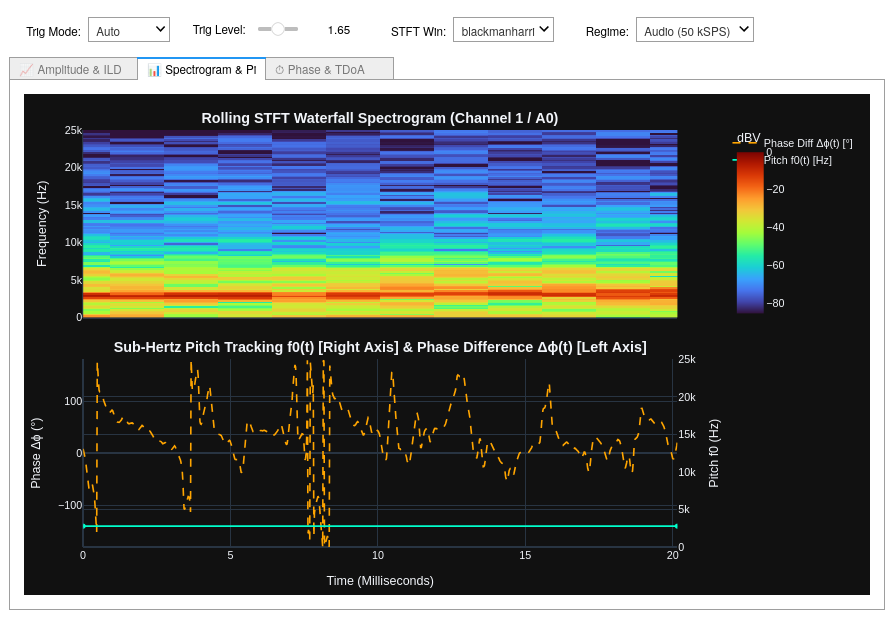
4. Multi-Domain Acoustic Analytics & Spectrogram Engine (ol.analytic_dashboard())
Advanced diagnostic instrument providing instantaneous mathematical decomposition of stereo sound fields:
- 3-Strip Stacked Amplitude: Instantaneous physical Hilbert analytic envelopes ($A(t) = \sqrt{x^2 + \hat{x}^2}$) and Inter-aural Level Differences ($\Delta L(t)$ in dB).
- Rolling STFT Waterfall Spectrogram: 2D time-frequency heatmaps with Blackman-Harris windowing.
- Continuous Phase Tracking ($\Delta \phi(t)$): Instantaneous inter-channel phase alignment enabled by true simultaneous dual-ADC sampling ($0.00,\mu\text{s}$ skew).
| 3-Strip Stacked Amplitude & ILD Balance | STFT Waterfall Spectrogram & Phase Tracking |
|---|---|
 |
 |
🔌 Hardware Setup & Wiring
Option A: Dual MAX4466 Microphones (Acoustic Audio Mode)
| MAX4466 Pin | PYNQ-Z2 Connection | Description |
|---|---|---|
VCC |
3.3V (Power Header) |
Supply rail ($2.4,\text{V} - 5.5,\text{V}$) |
GND |
GND (Power Header) |
Common analog ground |
OUT (Mic 1) |
Header J1 Pin A0 |
Channel 1 Audio Input ($1.65,\text{V}$ resting bias) |
OUT (Mic 2) |
Header J1 Pin A1 |
Channel 2 Audio Input ($1.65,\text{V}$ resting bias) |
Option B: Analog Discovery 3 (Signal Generator Mode)
| AD3 Wire | Wire Color | PYNQ-Z2 Analog Pin | Signal Description |
|---|---|---|---|
| Wavegen 1 (W1) | Solid Yellow | Header J1 Pin A0 (Pin 6 - Bottom) |
Channel 1 Analog Input (Vaux1) |
| Wavegen 2 (W2) | Yellow / White Stripe | Header J1 Pin A1 (Pin 5 - 2nd from Bottom) |
Channel 2 Analog Input (Vaux9) |
| GND | Solid Black | PYNQ-Z2 GND | Common Analog Reference |
Note: Connect the AD3 USB cable to the large rectangular USB HOST port on the PYNQ-Z2 board. Use an external 5V auxiliary power supply for the AD3 to ensure voltage rail stability under dual-channel generation.
🚀 Quick Start & Installation
1. Install Package from PyPI
pip install --upgrade pynq-oscilloscope
2. Copy Example Notebooks to Jupyter Workspace
pynq-oscilloscope-get-notebooks
3. Install Digilent AD3 Drivers (One-Time Setup for Wavegen)
from pynq_oscilloscope import install_ad3_drivers
install_ad3_drivers()
💻 Python API Usage
1. Real-Time Hardware Filtering & Capture
from pynq_oscilloscope import check_usb_permissions, OscilloscopeOverlay

check_usb_permissions()

# Load hardware overlay (auto-fetches v1.6.0 bitstream)
ol = OscilloscopeOverlay()
ol.set_profile("audio")

# Engage hardware Lowpass filter at 250 Hz
ol.filter.set_lowpass(cutoff_hz=250.0)

# Capture Raw Time (DMA 0), Filtered Time (DMA 2), and FFT Spectrum (DMA 1) in <2 ms
v_a0, v_a1, v_filt, freqs, mags = ol.capture_all()
2. Jupyter Audio Playback & Multi-Second Recording
# Record and listen to raw vs. FPGA-filtered audio directly in Jupyter Notebook
ol.set_profile("audio")

# 1. Listen to raw input
ol.play_audio(duration_sec=3.0, filtered=False)

# 2. Listen to real-time FPGA-filtered bass
ol.play_audio(duration_sec=3.0, filtered=True)
3. Launch Interactive Dashboards
# Launch 4-Trace Hardware Filter Dashboard:
app = ol.filter_dashboard()

# Launch Academic Lab Scope & AD3 Aliasing Explorer:
app = ol.ad3_dashboard()

# Launch dedicated passive Microphone Instrument:
app = ol.audio_dashboard()

# Launch Multi-Domain Acoustic Analytics Engine:
app = ol.analytic_dashboard()
📓 7-Notebook Progressive Curriculum
| Notebook | Focus Area | Key Modules Used |
|---|---|---|
01_ad3_getting_started.ipynb |
Digilent drivers, USB permissions, and dual non-blocking signal generator. | AD3SignalGenerator, check_usb_permissions |
02_xadc_getting_started.ipynb |
Low-level 1 MSPS DMA stream capture, hardware trigger comparator, and DDR transfer. | OscilloscopeOverlay, HardwareTrigger |
03_ad3_oscilloscope_dashboard.ipynb |
Academic Lab Scope: Dual-trace scope, $10,\text{Hz} - 1,\text{MHz}$ wavegen, and live aliasing folding exploration. | OscilloscopeOverlay, OscilloscopeDashboard |
04_audio_dashboard.ipynb |
Audio Instrument: Dedicated passive microphone analyzer with VU meters & overtone pitch tracking. | OscilloscopeOverlay, AudioDashboard |
05_acoustic_analytic_curves.ipynb |
Analytics Engine: Zero-skew splitter test, Hilbert envelopes, ILD balance, and STFT waterfall spectrograms. | OscilloscopeOverlay, AcousticAnalyticDashboard |
06_audio_recording_and_playback.ipynb |
Audio Recording: Multi-second microphone recording, frame-boundary continuity, and WAV audio playback. | OscilloscopeOverlay, audio_utils |
07_pl_hardware_filter_test.ipynb |
FPGA Filter & IFFT: Real-time frequency masking, 1:1 amplitude fidelity verification, stopband rejection, and AudioFilterDashboard. |
OscilloscopeOverlay, HardwareFilter, AudioFilterDashboard |
📄 License
This project is licensed under the MIT License - see the LICENSE file for details.
1 maintainer

Metadata
1 maintainer
Release files for pynq-oscilloscope 1.6.0
For a detailed explanation of source distributions (sdists) and built distributions (wheels), please see the package formats documentation.
Source distribution (sdist)
| File | Size | Uploaded | |
|---|---|---|---|
| pynq_oscilloscope-1.6.0.tar.gz | 64.5 kB | Details |
Built distribution (wheel)
| File | Interpreter | ABI | Platform | Reset |
|---|---|---|---|---|
| pynq_oscilloscope-1.6.0-py3-none-any.whl | Python 3 | none | any | Details |
Total release size: 139.0 kB
Release files / pynq_oscilloscope-1.6.0.tar.gz
| Download URL | pynq_oscilloscope-1.6.0.tar.gz |
|---|---|
| Size | 64.5 kB |
| Tags | Source |
|
SHA-256 checksum How to use checksums |
d289afc429bb74684476c9847fe5462d7f6c4eba111644d4dc7160ef49ff9e35
|
|
BLAKE2b-256 checksum How to use checksums |
ab6bfb0e8889bc04017f0aa120c316c9e67fdf031b1bad7df9342e1b9743c469
|
| Upload date | |
|
Uploaded using Trusted Publishing? What is trusted publishing? |
Yes |
| Uploaded via |
twine/7.0.0 CPython/3.13.14
|
Provenance
Provenance describes where a file came from. On PyPI, provenance is shared via attestations, which provide a verifiable record of the build or publishing details. View details, limitations and caveats.


PyPI Publish Attestation
PyPI verified that this artifact, at this checksum, originated from the publisher listed below.
Signed by GitHub Actions, verified by PyPI on Aug 26, 2026.
Transparency logRelease files / pynq_oscilloscope-1.6.0-py3-none-any.whl
| Download URL | pynq_oscilloscope-1.6.0-py3-none-any.whl |
|---|---|
| Size | 74.6 kB |
| Tags | Python 3 |
|
SHA-256 checksum How to use checksums |
e857e1b5d4d67676f9dc6e5744989db7a3b039da316b7006d53f43ce4e896b16
|
|
BLAKE2b-256 checksum How to use checksums |
c64a42a99ccfd81b3fab312c2ade8b028ade072c377273900dae1813dd37c5d1
|
| Upload date | |
|
Uploaded using Trusted Publishing? What is trusted publishing? |
Yes |
| Uploaded via |
twine/7.0.0 CPython/3.13.14
|
Provenance
Provenance describes where a file came from. On PyPI, provenance is shared via attestations, which provide a verifiable record of the build or publishing details. View details, limitations and caveats.
PyPI Publish Attestation
PyPI verified that this artifact, at this checksum, originated from the publisher listed below.
Signed by GitHub Actions, verified by PyPI on Aug 26, 2026.
Transparency log













