
Nutshell




A simple to use yet robust python library containing tools to perform:

- Text summarization
- Information retrieval
- Finding similarities
- Sentence ranking
- Keyword extraction
- and many more in progress...
Getting Started
These instructions will get you a copy of the project and ready for use for your python projects.
Installation
Quick Access
-
Download from PyPi.org
pip install pynutshell
Developer Style
-
Requires Python version >=3.6
-
Clone this repository using the command:
git clone https://github.com/KrishnanSG/Nutshell.git
cd Nutshell
-
Then install the library using the command:
python setup.py install
Note: The package is distributed as pynutshell due to unavailability of the name, but the package name is nutshell and request you not to get confused.
How does the library work?
The library has several components:
- Summarizers
- Rankers
- Similarity Algorithms
- Information Retrievers
- Keyword Extractors
Summarization
A technique of transforming or condensing textual information using natural language processing techniques.
Types of summarization
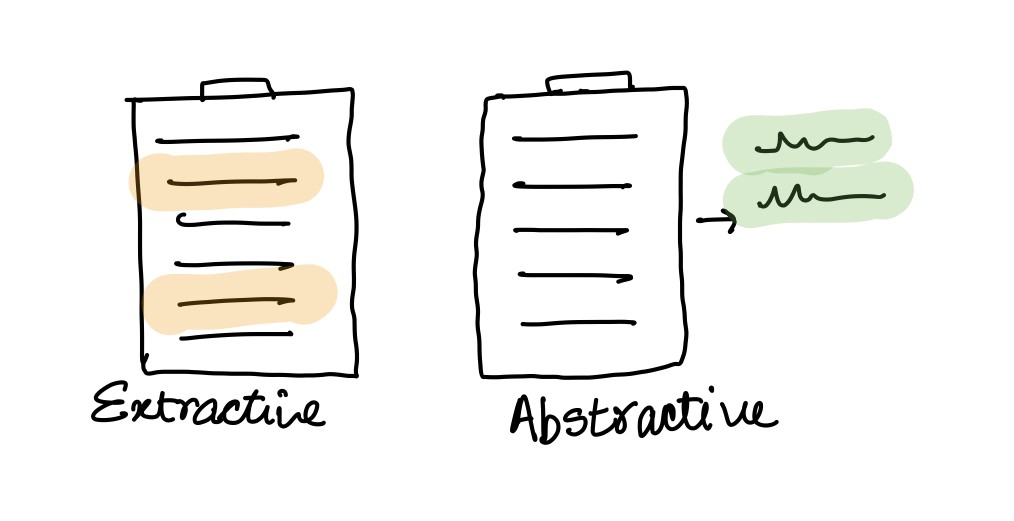
Extractive
This technique is very much similar to highlighting important sentence while we read a book.
The algorithm finds the important sentences in the corpus (NLP term for raw input text) by reducing the similarity between sentence by removing sentences which are very similar to each other by retaining one among them.
Though this method is a powerful it fails to combine 2 or more sentences into a complex sentence, there by not provide optimal result for some cases.
Abstractive
This technique unlike extractive is much more complex and robust in producing summaries. The algorithm used for this technique performs sentence clustering using Semantic Analysis (finding the meaning of sentence).
Sentence Ranking
Text rankers are algorithms similar to web page ranking algorithms used to rank web pages. These rankers find the importance of the sentence in the document and provide ranks to the sentence, thereby providing us with the information of how important the sentence is.
Similarity Algorithms
Text similarity algorithms define the similarity between 2 documents (sentences).
A few classic algorithms for finding similarity are:
- Cosine Similarity
- Euclidean Distance
Note: word2vec is an important transformation step used to convert words into vectors to easily perform mathematical operations.
Features
Checklist of features the library currently offers and plans to offer.
- Keyword Extraction
- Text Tokenizers
- Text cleaners
- Semantic decoder
- Summarization
- Extractive
- Abstractive
- Text Rankers
- Intermediate
- Advanced
- Information Retrieval
- Intermediate
- Advanced
Examples
Summarization
A simple example on how to use the library and perform extractive text summarization from the given input text(corpus).
from nutshell.algorithms.information_retrieval import ClassicalIR
from nutshell.algorithms.ranking import TextRank
from nutshell.algorithms.similarity import BM25Plus
from nutshell.model import Summarizer
from nutshell.preprocessing.cleaner import NLTKCleaner
from nutshell.preprocessing.preprocessor import TextPreProcessor
from nutshell.preprocessing.tokenizer import NLTKTokenizer
from nutshell.utils import load_corpus, construct_sentences_from_ranking

# Example
corpus = load_corpus('input.txt')
print("\n --- Original Text ---\n")
print(corpus)

preprocessor = TextPreProcessor(NLTKTokenizer(), NLTKCleaner())
similarity_algorithm = BM25Plus()
ranker = TextRank()
ir = ClassicalIR()

# Text Summarization
model = Summarizer(preprocessor, similarity_algorithm, ranker, ir)
summarised_content = model.summarise(corpus, reduction_ratio=0.70, preserve_order=True)

print("\n --- Summarized Text ---\n")
print(construct_sentences_from_ranking(summarised_content))
Keyword Extraction
A simple example on how to use the library and perform keyword extraction from the given input text(corpus).
from nutshell.algorithms.information_retrieval import ClassicalIR
from nutshell.model import KeywordExtractor
from nutshell.preprocessing.cleaner import NLTKCleaner
from nutshell.preprocessing.preprocessor import TextPreProcessor
from nutshell.preprocessing.tokenizer import NLTKTokenizer
from nutshell.utils import load_corpus

corpus = load_corpus('input.txt')
print("\n --- Original Text ---\n")
print(corpus)

# Text Keyword Extraction
preprocessor = TextPreProcessor(NLTKTokenizer(), NLTKCleaner(skip_stemming=True))
keyword_extractor = KeywordExtractor(preprocessor, ClassicalIR())
keywords = keyword_extractor.extract_keywords(corpus, count=10, raw=False)


print("\n --- Keywords ---\n")
print(keywords)
Contribution
Contributions are always welcomed, it would be great to have people use and contribute to this project to help user understand and benefit from library.
How to contribute
- Create an issue: If you have a new feature in mind, feel free to open an issue and add some short description on what that feature could be.
- Create a PR: If you have a bug fix, enhancement or new feature addition, create a Pull Request and the maintainers of the repo, would review and merge them.
Authors
- Krishnan S G - @KrishnanSG
- Shruthi Abirami - @Shruthi-22
1 maintainer

Metadata
1 maintainer
Release files for pynutshell 1.0.2
For a detailed explanation of source distributions (sdists) and built distributions (wheels), please see the package formats documentation.
Source distribution (sdist)
| File | Size | Uploaded | |
|---|---|---|---|
| pynutshell-1.0.2.tar.gz | 11.0 kB | Details |
Built distribution (wheel)
| File | Interpreter | ABI | Platform | Reset |
|---|---|---|---|---|
| pynutshell-1.0.2-py3-none-any.whl | Python 3 | none | any | Details |
Total release size: 23.1 kB
Release files / pynutshell-1.0.2.tar.gz
| Download URL | pynutshell-1.0.2.tar.gz |
|---|---|
| Size | 11.0 kB |
| Tags | Source |
|
SHA-256 checksum How to use checksums |
48d822b49447761c92fbd43bb478ff7146b363c801b248c9120f464bdc94518d
|
|
BLAKE2b-256 checksum How to use checksums |
80c342670849b0e43ff1d0d131b4013f1d0815d9a75ad1a03d38d73c4f506591
|
| Upload date | |
|
Uploaded using Trusted Publishing? What is trusted publishing? |
No |
| Uploaded via |
twine/3.2.0 pkginfo/1.6.1 requests/2.22.0 setuptools/50.3.2 requests-toolbelt/0.9.1 tqdm/4.49.0 CPython/3.7.3
|
Release files / pynutshell-1.0.2-py3-none-any.whl
| Download URL | pynutshell-1.0.2-py3-none-any.whl |
|---|---|
| Size | 12.1 kB |
| Tags | Python 3 |
|
SHA-256 checksum How to use checksums |
15933e3803624f4fd8405bc613ea151fee9c14187b6c5075ee23aa323de851bc
|
|
BLAKE2b-256 checksum How to use checksums |
1a788885affdf52afd0e419759f2a1889310ba068b1bbc3374df50dab167da86
|
| Upload date | |
|
Uploaded using Trusted Publishing? What is trusted publishing? |
No |
| Uploaded via |
twine/3.2.0 pkginfo/1.6.1 requests/2.22.0 setuptools/50.3.2 requests-toolbelt/0.9.1 tqdm/4.49.0 CPython/3.7.3
|














