
pynuvie
A pure-Python library and command-line tool to read, write, encode and document Commodore 64 NUVIE REU video files — no emulator and no original tools required.
A NUVIE is a 16 MiB REU image holding a
sequence of NUFLI still images, an optional
SID soundtrack, and a playlist that scripts playback. NUVIEs are normally produced
on a real C64 (or in VICE) with Crest's NUVIEmaker; pynuvie reads, builds and
documents the same files in pure Python.
Showcase
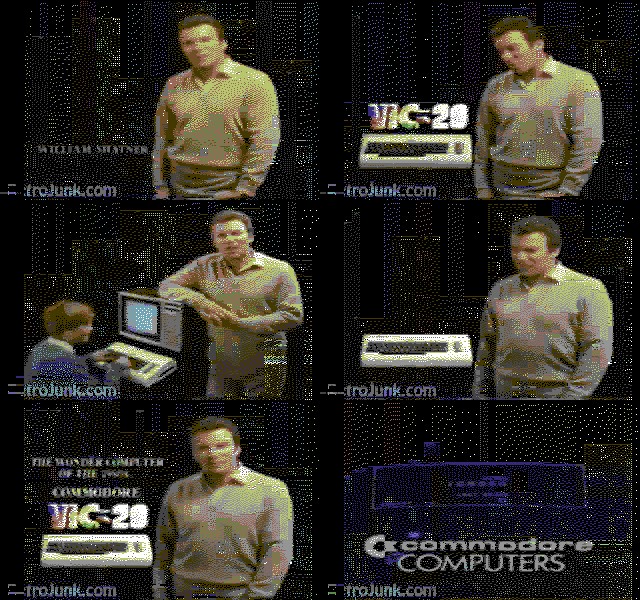
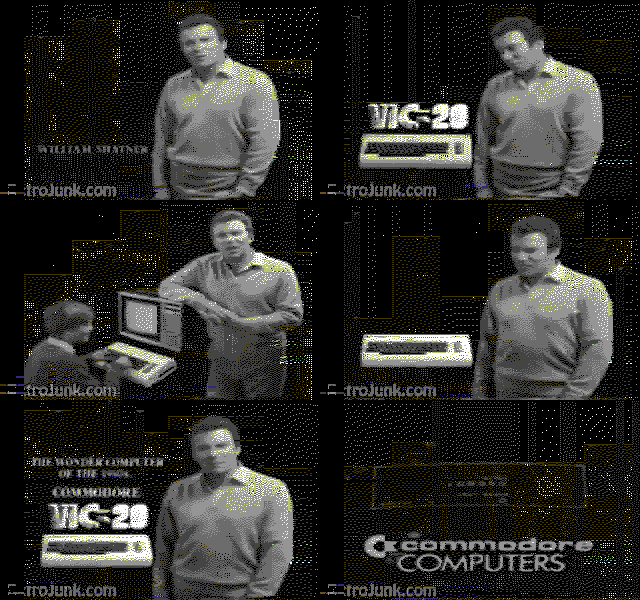
30 seconds of a VIC-20 ad, encoded by pynuvie's FLI-aware encoder and rendered
as the C64 would show it — full colour and greyscale, 16 colours, 320×200:
| colour | greyscale |
|---|---|
 |
 |
Install
pip install pynuvie          # core library + CLI
pip install pynuvie[image]   # also decode/encode images (needs Pillow + numpy)
numba (in the dev extra) is an optional accelerator for the encoder; it is not
required and does not change the output.
Library
from nuvie import Nuvie

movie = Nuvie.read("zardoz.reu")
print(movie)                         # <Nuvie valid=True frames=256 music=False>
print(movie.control)                 # music flags, borders, infoscreen, charset
for tok in movie.playlist:           # decoded playback script
    print(tok.describe())

slot = movie.frame(0)                # one frame as its 21840-byte slot
movie.set_frame(0, slot)
movie.write("out.reu")               # losslessly round-trips
Decode a standalone NUFLI .nuf image to a picture, and encode one back:
from PIL import Image
from nuvie.nufli import NufliImage

NufliImage.from_prg(open("000.nuf", "rb").read()).to_image().save("000.png")

# FLI-aware encode: per-8x2 ink/paper + the sprite-underlay third colour,
# co-designed with a 2px-pair error-diffusion dither.
nuf = NufliImage.from_image(Image.open("photo.png"))   # backend="clean" (default)
Encode a video into a player-ready NUVIE:
from nuvie.encode import encode_video
encode_video("clip.mp4", "clip.reu", fps=12.5)

from nuvie import build_movie                          # or from a list of images
build_movie([img0, img1, ...], "out.reu")
The encoder and the byte-exact packer are described in
research/ENCODING.md.
CLI
nuvie info movie.reu                       # signature, frame count, music, playlist
nuvie playlist movie.reu                   # full decoded playlist
nuvie extract movie.reu -o frames/         # dump each frame as a .slot
nuvie build frames/*.slot -o out.reu       # pack frame slots into a NUVIE
nuvie encode clip.mp4 -o clip.reu          # video -> NUVIE (parallel; --workers N)
nuvie music clip.reu --csv tune.csv        # attach a SID soundtrack from a CSV
nuvie testpattern -o test.reu --style colour   # gradient showcase, no video needed
SID music from a CSV
NUVIE stores its soundtrack as a stream of SID register dumps — 25 register
values ($D400..$D418) for every 1/50 s tick. That maps onto a CSV with one row
per tick and 25 integer columns (0..255, decimal or 0x hex; a non-numeric
header row is ignored):
nuvie music clip.reu --csv tune.csv             # add/loop music in place
nuvie music clip.reu --csv tune.csv -o out.reu --restart   # write a copy, restart per loop
nuvie encode clip.mp4 -o clip.reu --music tune.csv         # encode + score in one step
from nuvie import Nuvie, read_sid_csv
movie = Nuvie.read("clip.reu")
movie.set_music(read_sid_csv("tune.csv"))       # or flag=MUSIC_RESTART
movie.write("clip.reu")
Music grows down from the top of the REU, so a scored movie holds fewer than the 768 frames a silent one can.
See it run
Generate a showcase test pattern (no video file needed) and play it on the C64:
nuvie testpattern -o test.reu --style colour -n 64 # or --style greyscale
Play test.reu in VICE's x64sc with Crest's
nuvieplayer1.0.prg (from the
NUVIEmaker 0.1e release):
# VICE wipes the REU image on exit, so play a copy:
cp test.reu test-play.reu
x64sc -warp -reu -reusize 16384 -reuimage test-play.reu -reuimagerw \
      -autostart nuvieplayer1.0.prg
The byte format is documented in docs/FORMAT.md. The leftmost
~24px is NUFLI's "flibug" edge, an FLI sprite trick that pynuvie generates
deterministically so it follows the picture (see
docs/FORMAT.md).
License
Apache-2.0. NUVIE, NUVIEmaker, NUFLI and the reference player are the work of Crossbow & DeeKay of Crest.
1 maintainer

Metadata
1 maintainer
Release files for pynuvie 0.1.0
For a detailed explanation of source distributions (sdists) and built distributions (wheels), please see the package formats documentation.
Source distribution (sdist)
| File | Size | Uploaded | |
|---|---|---|---|
| pynuvie-0.1.0.tar.gz | 160.6 kB | Details |
Built distribution (wheel)
| File | Interpreter | ABI | Platform | Reset |
|---|---|---|---|---|
| pynuvie-0.1.0-py3-none-any.whl | Python 3 | none | any | Details |
Total release size: 220.0 kB
Release files / pynuvie-0.1.0.tar.gz
| Download URL | pynuvie-0.1.0.tar.gz |
|---|---|
| Size | 160.6 kB |
| Tags | Source |
|
SHA-256 checksum How to use checksums |
dde91b7d03ae5c97b953b3c78a5b479914437229c9137f22f3a4ae390064db64
|
|
BLAKE2b-256 checksum How to use checksums |
c27be2d187de477f841ab22e6c829b04ce217fd8a917f9f70170aa996b99f7e2
|
| Upload date | |
|
Uploaded using Trusted Publishing? What is trusted publishing? |
Yes |
| Uploaded via |
twine/6.1.0 CPython/3.13.12
|
Provenance
Provenance describes where a file came from. On PyPI, provenance is shared via attestations, which provide a verifiable record of the build or publishing details. View details, limitations and caveats.


PyPI Publish Attestation
PyPI verified that this artifact, at this checksum, originated from the publisher listed below.
Signed by GitHub Actions, verified by PyPI on Jun 2, 2026.
Transparency logRelease files / pynuvie-0.1.0-py3-none-any.whl
| Download URL | pynuvie-0.1.0-py3-none-any.whl |
|---|---|
| Size | 59.4 kB |
| Tags | Python 3 |
|
SHA-256 checksum How to use checksums |
e2d92f5c0c95e8c2af753df56f1a9bd342ae3b180d8e1f8d0a7aa8da800327d1
|
|
BLAKE2b-256 checksum How to use checksums |
6d13a8f854579aaeded4e02dfda413f1f3ab59275785bfeac4bf8fb4fe4ea368
|
| Upload date | |
|
Uploaded using Trusted Publishing? What is trusted publishing? |
Yes |
| Uploaded via |
twine/6.1.0 CPython/3.13.12
|
Provenance
Provenance describes where a file came from. On PyPI, provenance is shared via attestations, which provide a verifiable record of the build or publishing details. View details, limitations and caveats.
PyPI Publish Attestation
PyPI verified that this artifact, at this checksum, originated from the publisher listed below.
Signed by GitHub Actions, verified by PyPI on Jun 2, 2026.
Transparency log












