
This release is a pre-release and may not be stable for production use.
PyNVVL


PyNVVL is a thin wrapper of NVIDIA Video Loader (NVVL). This package enables you to load videos directoly to GPU memory and access them as CuPy ndarrays with zero copy. The pre-built binaries of PyNVVL include NVVL itself, so you do not need to install NVVL.
Requirements
- CUDA 8.0, 9.0, 9.1, or 9.2
- Python 2.7.6+, 3.4.7+, 3.5.1+, or 3.6.0+
- CuPy v4.5.0
Tested Environment
- Ubuntu 16.04
- Python 2.7.6+, 3.4.7+, 3.5.1+, and 3.6.0+
- CUDA 8.0, 9.0, 9.1, and 9.2
Install the pre-built binary
Please choose a right package depending on your CUDA version.
# [For CUDA 8.0]
pip install pynvvl-cuda80

# [For CUDA 9.0]
pip install pynvvl-cuda90

# [For CUDA 9.1]
pip install pynvvl-cuda91

# [For CUDA 9.2]
pip install pynvvl-cuda92
Usage
import pynvvl
import matplotlib.pyplot as plt

# Create NVVLVideoLoader object
loader = pynvvl.NVVLVideoLoader(device_id=0, log_level='error')

# Show the number of frames in the video
n_frames = loader.frame_count('examples/sample.mp4')
print('Number of frames:', n_frames)

# Load a video and return it as a CuPy array
video = loader.read_sequence(
    'examples/sample.mp4',
    horiz_flip=True,
    scale_height=512,
    scale_width=512,
    crop_y=60,
    crop_height=385,
    crop_width=512,
    scale_method='Linear',
    normalized=True
)

print(video.shape)  # => (91, 3, 385, 512): (n_frames, channels, height, width)
print(video.dtype)  # => float32

# Get the first frame as numpy array
frame = video[0].get()
frame = frame.transpose(1, 2, 0)

plt.imshow(frame)
plt.savefig('examples/sample.png')
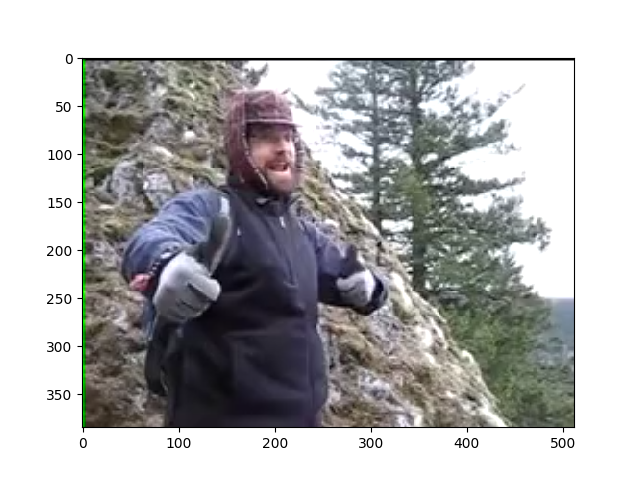
This video is flickr-2-6-3-3-5-2-7-6-5626335276_4.mp4 from the Moments-In-Time dataset.
Note that cropping is performed after scaling. In the above example, NVVL performs scaling up from 256 x 256 to 512 x 512 first, then cropping the region [60:60 + 385, 0:512]. See the following section to know more about the transformation options.
VideoLoader options
Please specify the GPU device id when you create a NVVLVideoLoader object.
You can also specify the logging level with a argument log_level for the constructor of NVVLVideoLoader.
Wrapper of NVVL VideoLoader

    Args:
        device_id (int): Specify the device id used to load a video.
        log_level (str): Logging level which should be either 'debug',
            'info', 'warn', 'error', or 'none'.
            Logs with levels >= log_level is shown. The default is 'warn'.
Transformation Options
pynvvl.NVVLVideoLoader.read_sequence can take some options to specify the color space, the value range, and what transformations you want to perform to the video.
Loads the video from disk and returns it as a CuPy ndarray.

    Args:
        filename (str): The path to the video.
        frame (int): The initial frame number of the returned sequence.
            Default is 0.
        count (int): The number of frames of the returned sequence.
            If it is None, whole frames of the video are loaded.
        channels (int): The number of color channels of the video.
            Default is 3.
        scale_height (int): The height of the scaled video.
            Note that scaling is performed before cropping.
            If it is 0 no scaling is performed. Default is 0.
        scale_width (int): The width of the scaled video.
            Note that scaling is performed before cropping.
            If it is 0, no scaling is performed. Default is 0.
        crop_x (int): Location of the crop within the scaled frame.
            Must be set such that crop_y + height <= original height.
            Default is 0.
        crop_y (int): Location of the crop within the scaled frame.
            Must be set such that crop_x + width <= original height.
            Default is 0.
        crop_height (int): The height of cropped region of the video.
            If it is None, no cropping is performed. Default is None.
        crop_width (int): The width of cropped region of the video.
            If it is None, no cropping is performed. Default is None.
        scale_method (str): Scaling method. It should be either of
            'Nearest' or 'Lienar'. Default is 'Linear'.
        horiz_flip (bool): Whether horizontal flipping is performed or not.
            Default is False.
        normalized (bool): If it is True, the values of returned video is
            normalized into [0, 1], otherwise the value range is [0, 255].
            Default is False.
        color_space (str): The color space of the values of returned video.
            It should be either 'RGB' or 'YCbCr'. Default is 'RGB'.
        chroma_up_method (str): How the chroma channels are upscaled from
            yuv 4:2:0 to 4:4:4. It should be 'Linear' currently.
        out (cupy.ndarray): Alternate output array where place the result.
            It must have the same shape and the dtype as the expected
            output, and its order must be C-contiguous.
How to build
Build wheels using Docker:
Requirements:
- Docker
- nvidia-docker (v1/v2)
bash docker/build_wheels.sh
Setup development environment without Docker:
The setup.py script searches for necessary libraries.
Requirements: the following libraries are available in LIBRARY_PATH.
- libnvvl.so
- libavformat.so.57
- libavfilter.so.6
- libavcodec.so.57
- libavutil.so.55
You can build libnvvl.so in the nvvl repository. Follow the instructions
of nvvl library. The build directory must be in LIBRARY_PATH.
Other three libraries are available as packages in Ubuntu 16.04.
They are installed under /usr/lib/x86_64-linux-gnu, so they must be in LIBRARY_PATH as well.
python setup.py develop
python setup.py bdist_wheel
1 maintainer

Metadata
1 maintainer
Release files for pynvvl-cuda90 0.0.3a2
For a detailed explanation of source distributions (sdists) and built distributions (wheels), please see the package formats documentation.
Built distributions (wheels)
| File | Reset | |||
|---|---|---|---|---|
| pynvvl_cuda90-0.0.3a2-cp36-cp36m-manylinux1_x86_64.whl | CPython 3.6 | CPython 3.6 pymalloc | Linux glibc 2.5+ x86-64 | Details |
| pynvvl_cuda90-0.0.3a2-cp35-cp35m-manylinux1_x86_64.whl | CPython 3.5 | CPython 3.5 pymalloc | Linux glibc 2.5+ x86-64 | Details |
| pynvvl_cuda90-0.0.3a2-cp34-cp34m-manylinux1_x86_64.whl | CPython 3.4 | CPython 3.4 pymalloc | Linux glibc 2.5+ x86-64 | Details |
| pynvvl_cuda90-0.0.3a2-cp27-cp27mu-manylinux1_x86_64.whl | CPython 2.7 | CPython 2.7 pymalloc wide-unicode | Linux glibc 2.5+ x86-64 | Details |
Total release size: 3.2 MB
Release files / pynvvl_cuda90-0.0.3a2-cp36-cp36m-manylinux1_x86_64.whl
| Download URL | pynvvl_cuda90-0.0.3a2-cp36-cp36m-manylinux1_x86_64.whl |
|---|---|
| Size | 802.9 kB |
| Tags | CPython 3.6 CPython 3.6 pymalloc Linux glibc 2.5+ x86-64 |
|
SHA-256 checksum How to use checksums |
146f6a49dfc586d66c0fede500407892c25ae275d66e530757be5eceaa6ae3e1
|
|
BLAKE2b-256 checksum How to use checksums |
2e411b50a9ae60420b558d8051e4783f1f3141232763669dcddeb90d9d50ddc3
|
| Upload date | |
|
Uploaded using Trusted Publishing? What is trusted publishing? |
No |
| Uploaded via |
twine/1.12.1 pkginfo/1.4.2 requests/2.18.4 setuptools/40.4.3 requests-toolbelt/0.8.0 tqdm/4.26.0 CPython/3.6.3
|
Release files / pynvvl_cuda90-0.0.3a2-cp35-cp35m-manylinux1_x86_64.whl
| Download URL | pynvvl_cuda90-0.0.3a2-cp35-cp35m-manylinux1_x86_64.whl |
|---|---|
| Size | 798.4 kB |
| Tags | CPython 3.5 CPython 3.5 pymalloc Linux glibc 2.5+ x86-64 |
|
SHA-256 checksum How to use checksums |
3726b9730f7e4ab83bb416475013b0e3e83433ba531212acf6acd77ad03491c1
|
|
BLAKE2b-256 checksum How to use checksums |
89cc1cde4f7d30b4d874c08ff0835515e779e9f14bddae5d5d98bd97142df28a
|
| Upload date | |
|
Uploaded using Trusted Publishing? What is trusted publishing? |
No |
| Uploaded via |
twine/1.12.1 pkginfo/1.4.2 requests/2.18.4 setuptools/40.4.3 requests-toolbelt/0.8.0 tqdm/4.26.0 CPython/3.6.3
|
Release files / pynvvl_cuda90-0.0.3a2-cp34-cp34m-manylinux1_x86_64.whl
| Download URL | pynvvl_cuda90-0.0.3a2-cp34-cp34m-manylinux1_x86_64.whl |
|---|---|
| Size | 801.3 kB |
| Tags | CPython 3.4 CPython 3.4 pymalloc Linux glibc 2.5+ x86-64 |
|
SHA-256 checksum How to use checksums |
8fcc03e1304effb08f004ae5eedf73d2ac33fe85b0bfac909079fef0866c2f4d
|
|
BLAKE2b-256 checksum How to use checksums |
f68b3f01478451590a54f26674f81345a4ff647048ed3944487b31fa56cb95cb
|
| Upload date | |
|
Uploaded using Trusted Publishing? What is trusted publishing? |
No |
| Uploaded via |
twine/1.12.1 pkginfo/1.4.2 requests/2.18.4 setuptools/40.4.3 requests-toolbelt/0.8.0 tqdm/4.26.0 CPython/3.6.3
|
Release files / pynvvl_cuda90-0.0.3a2-cp27-cp27mu-manylinux1_x86_64.whl
| Download URL | pynvvl_cuda90-0.0.3a2-cp27-cp27mu-manylinux1_x86_64.whl |
|---|---|
| Size | 786.6 kB |
| Tags | CPython 2.7 CPython 2.7 pymalloc wide-unicode Linux glibc 2.5+ x86-64 |
|
SHA-256 checksum How to use checksums |
1e7e178f2ead1f548def1044bf72df4ee80ba92c4ee01134b62d3547de214907
|
|
BLAKE2b-256 checksum How to use checksums |
d94b92566a5bd51983e8f79d699da1d9e3da17fb268fd39c5acff673ccb0f31e
|
| Upload date | |
|
Uploaded using Trusted Publishing? What is trusted publishing? |
No |
| Uploaded via |
twine/1.12.1 pkginfo/1.4.2 requests/2.18.4 setuptools/40.4.3 requests-toolbelt/0.8.0 tqdm/4.26.0 CPython/3.6.3
|














