


pyobject - A multifunctional all-in-one utility tool for managing internal Python objects, compatible with nearly all Python 3 versions and all platforms (Windows, Linux, macOS, etc.).
[English | 中文]
Submodules:
pyobject.__init__ - Displays and outputs attribute values of Python objects.
pyobject.browser - Provides a visual interface to browse Python objects using tkinter.
pyobject.code - Provides tools for manipulating Python native bytecode.
pyobject.search - Implements the utility for locating the path to a specific object.
pyobject.objproxy - Implement a generic object proxy that can replace any Python object, including modules, functions, and classes
pyobject.pyobj_extension - A C extension module offering functions to manipulate low-level Python objects.
Functions:
describe(obj, level=0, maxlevel=1, tab=4, verbose=False, file=sys.stdout):
browse(object, verbose=False, name=‘obj’):
Browse any Python objects in a GUI using tkinter. - verbose: Same as in describe(), whether to print special methods.
The GUI of browse() function is:
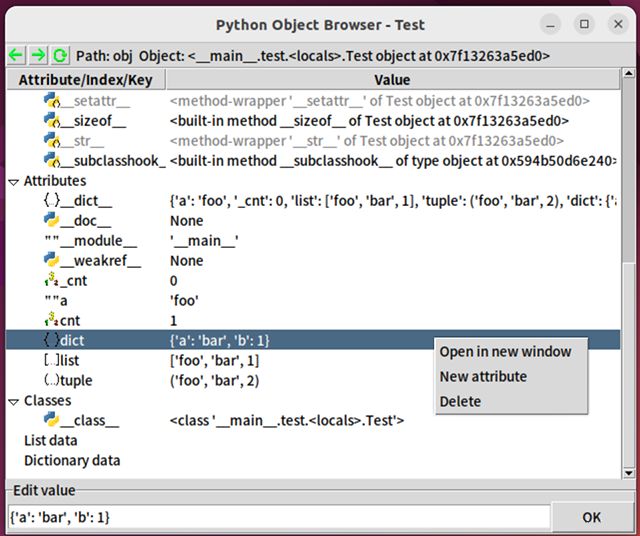
GUI of browse()
bases(obj, level=0, tab=4):
Prints base classes and the inheritance order of an object. - tab: Number of spaces for indentation, default is 4.
Functions for searching objects:
make_iter(start_obj, recursions=2, all=False):
Creates an iterator of objects without duplicates. - start: The object to start searching from. - recursion: Number of recursions. - all: Whether to include special attributes (e.g., __init__) in the list.
make_list(start_obj, recursions=2, all=False):
Similar to make_iter, but creates an list.
search(obj, start, recursions=3, search_str=False):
Searches for objects starting from a specified starting point. For example, search(os, sys, 3) returns results like ["sys.modules['site'].os", "sys.modules['os']", ...]. - obj: The object to search for. - start: The starting object. - recursion: Number of recursions. - search_str: Whether to search substrings within strings.
Class: pyobject.Code
The Code class provides a wrapper for Python bytecode objects to manipulate them.
Python’s internal bytecode object, CodeType (e.g., func.__code__), is immutable. The Code class offers a mutable bytecode object and a set of methods to simplify operations on the underlying bytecode.
Unlike Java bytecode, Python bytecode is not cross-version compatible. Bytecode generated by different versions of the Python interpreter is incompatible.
The Code class provides a universal interface for bytecode, supporting all Python versions from 3.6 to 3.14 (including PyPy’s .pyc format), simplifying complex version compatibility issues.
Constructor (def __init__(self, code=None))
The Code class can be initialized with an existing CodeType object or another Code instance. If no argument is provided, a default CodeType object is created.
Attributes
_code: The internal bytecode of the current Code object. Use exec(c._code) or exec(c.to_code()) instead of directly using exec(c).
The following are attributes of Python’s built-in bytecode (also attributes of the Code object). While Python’s internal CodeType bytecode is immutable and these attributes are read-only, the Code object is mutable, meaning these attributes can be modified:
co_argcount: The number of positional arguments (including those with default values).
co_cellvars: A tuple containing the names of local variables referenced by nested functions.
co_code: A bytes object representing the sequence of bytecode instructions, storing the actual binary bytecode.
co_consts: A tuple containing the literals used by the bytecode.
co_filename: The filename of the source code being compiled.
co_firstlineno: The first line number of the source code corresponding to the bytecode. Used internally by the interpreter in combination with co_lnotab to output precise line numbers in tracebacks.
co_flags: An integer encoding multiple flags used by the interpreter.
co_freevars: A tuple containing the names of free variables.
co_kwonlyargcount: The number of keyword-only arguments.
co_lnotab: A string encoding the mapping of bytecode offsets to line numbers (replaced by co_linetable in Python 3.10).
co_name: The name of the function/class corresponding to the bytecode.
co_names: A tuple containing the names used by the bytecode.
co_nlocals: The number of local variables used by the function (including arguments).
co_stacksize: The stack size required to execute the bytecode.
co_varnames: A tuple containing the names of local variables (starting with argument names).
Attributes introduced in Python 3.8 and later: - co_posonlyargcount: The number of positional-only arguments, introduced in Python 3.8. - co_linetable: Line number mapping data, introduced in Python 3.10 as a replacement for co_lnotab. - co_exceptiontable: Exception table data, introduced in Python 3.11. - co_qualname: The qualified name of the bytecode, introduced in Python 3.11.
Methods
Core Methods
exec(globals_=None, locals_=None): Executes the code object within the provided global and local scope dictionaries.
eval(globals_=None, locals_=None): Executes the code object within the provided global and local scope dictionaries and returns the result.
copy(): Creates a copy of the Code object and returns the duplicate.
to_code(): Converts the Code instance back to a built-in CodeType object, equivalent to c._code.
to_func(globals_=None, name=None, argdefs=None, closure=None, kwdefaults=None): Converts the code object into a Python function. The parameters are the same as those used when instantiating Python’s built-in FunctionType.
get_flags(): Returns a list of flag names for the co_flags attribute, e.g., ["NOFREE"].
get_sub_code(name): Searches for sub-code objects (e.g., functions or class definitions) in the co_consts attribute. This method does not perform recursive searches. Returns the found Code object or raises a ValueError if not found.
Serialization
to_pycfile(filename): Dumps the code object into a .pyc file using the marshal module.
from_pycfile(filename): Creates a Code instance from a .pyc file.
from_file(filename): Creates a Code instance from a .py or .pyc file.
pickle(filename): Serializes the Code object into a pickle file.
Debugging and Inspection
show(*args, **kw): Internally calls pyobject.desc to display the attributes of the code object. The parameters are the same as those used in desc().
info(): Internally calls dis.show_code to display basic information about the bytecode.
dis(*args, **kw): Calls the dis module to output the disassembly of the bytecode, equivalent to dis.dis(c.to_code()).
decompile(version=None, *args, **kw): Decompile the code object into source code. (deprecated)
Factory Functions
fromfunc(function): Creates a Code instance from a Python function object, equivalent to Code(func.__code__).
fromstring(string, mode='exec', filename=''): Creates a Code instance from a source code string. The parameters are the same as those used in the built-in compile function, which is called internally.
Compatibility Details
Attribute co_lnotab: In Python 3.10 and later, attempts to set the co_lnotab attribute will automatically be converted into setting the co_linetable attribute.
Example usage: (excerpted from the doctest):
>>> def f():print("Hello")
...
>>> c=Code.fromfunc(f) # or c=Code(f.__code__)
>>> 'Hello' in c.co_consts
True
>>> c.co_consts=tuple(('Hello World!' if item=='Hello' else item) for item in c.co_consts)
>>> c.exec()
Hello World!
>>>
>>> # Save to pickle files
>>> import os,pickle
>>> temp=os.getenv('temp') if os.name=='nt' else '/tmp'
>>> with open(os.path.join(temp,"temp.pkl"),'wb') as f:
...     pickle.dump(c,f)
...
>>>
>>> # Execute bytecodes from pickle files
>>> with open(os.path.join(temp,"temp.pkl"),'rb') as f:
...     pickle.load(f).to_func()()
...
Hello World!
>>>
>>> # Convert to pyc files and import them
>>> c.to_pycfile(os.path.join(temp,"temppyc.pyc"))
>>> sys.path.append(temp)
>>> import temppyc
Hello World!
>>> Code.from_pycfile(os.path.join(temp,"temppyc.pyc")).exec()
Hello World!
Object Proxy Classes ObjChain and ProxiedObj
Example usage:
from pyobject import ObjChain

chain = ObjChain(export_attrs=["__array_struct__"])
np = chain.new_object("import numpy as np", "np")
plt = chain.new_object("import matplotlib.pyplot as plt", "plt",
                        export_funcs=["show"])

# Testing the pseudo numpy and matplotlib modules
arr = np.array(range(1, 11))
arr_squared = arr ** 2
print(np.mean(arr)) # Output the average value

plt.plot(arr, arr_squared) # Plot the graph of y=x**2
plt.show()

# Display the auto-generated code calling numpy and matplotlib libraries
print(f"Code:\n{chain.get_code()}\n")
print(f"Optimized:\n{chain.get_optimized_code()}")
Output:
Code: # Unoptimized code that contains all detailed access records for objects
import numpy as np
import matplotlib.pyplot as plt
var0 = np.array
var1 = var0(range(1, 11))
var2 = var1 ** 2
var3 = np.mean
var4 = var3(var1)
var5 = var1.mean
var6 = var5(axis=None, dtype=None, out=None)
ex_var7 = str(var4)
var8 = plt.plot
var9 = var8(var1, var2)
var10 = var1.to_numpy
var11 = var1.values
var12 = var1.shape
var13 = var1.ndim
...
var81 = var67.__array_struct__
ex_var82 = iter(var70)
ex_var83 = iter(var70)
var84 = var70.mask
var85 = var70.__array_struct__
var86 = plt.show
var87 = var86()

Optimized: # Optimized code
import numpy as np
import matplotlib.pyplot as plt
var1 = np.array(range(1, 11))
plt.plot(var1, var1 ** 2)
plt.show()
Detailed Usage
``ProxiedObj``
ProxiedObj is the type of object returned by ObjChain’s new_object() and add_existing_obj() methods. It can be used as a substitute for any regular object, though it is generally not recommended to directly use the methods and properties of the ProxiedObj class itself.
Implementation Details
Principle of Code Optimization
temp_var = [1, 2, 3]
unused_var = func(temp_var)Module: pyobj_extension
This module is written in C and can be imported directly using import pyobject.pyobj_extension as pyobj_extension. It includes the following functions:
convptr(pointer):
Converts an integer pointer to a Python object, as a reverse of id().
py_decref(obj):
Decreases the reference count of an object.
py_incref(obj):
Increases the reference count of an object.
getrealrefcount(obj):
setrefcount(obj, n):
getrefcount_nogil(obj) and setrefcount_nogil(obj, ref_data):
In the GIL-free version of Python 3.13+, get and set reference counts, where ref_data is (ob_ref_local, ob_ref_shared), without considering the reference counts added during the call.
Warning: Improper use of these functions above may lead to crash of the intepreter.
list_in(obj, lst):
Determine whether obj is in the sequence lst. Compared to the built-in Python call obj in lst that invokes the == operator (__eq__()) multiple times, this function directly compares the pointers to improve the performance.
get_string_intern_dict():
Return the internal dictionary for interning strings (sys.intern()).
Current ``pyobject`` Version: 1.3.5.2
Change Log
1 maintainer

Download files
Download the file for your platform. If you're not sure which to choose, learn more about installing packages.
Source Distribution
Built Distributions
Filter files by name, interpreter, ABI, and platform.
If you're not sure about the file name format, learn more about wheel file names.
Copy a direct link to the current filters
File details
Details for the file pyobject-1.3.5.3.tar.gz.
File metadata
- Download URL: pyobject-1.3.5.3.tar.gz
- Upload date:
- Size: 61.8 kB
- Tags: Source
- Uploaded using Trusted Publishing? No
- Uploaded via:
twine/6.2.0 CPython/3.13.11
File hashes
| Algorithm | Hash digest | |
|---|---|---|
| SHA256 |
1edc49711d5532d006fd3ee46e58533fa9f12b33c605d08bda0d6d3d72775456
|
|
| MD5 |
e6cc20af134246be634c0b9378e49d9b
|
|
| BLAKE2b-256 |
a2facda63331f30fd5e1bbc88b212c09e4b6a79278c0a2ad0d7aa0ec0a7c09c2
|
File details
Details for the file pyobject-1.3.5.3-pp311-pypy311_pp73-win_amd64.whl.
File metadata
- Download URL: pyobject-1.3.5.3-pp311-pypy311_pp73-win_amd64.whl
- Upload date:
- Size: 53.6 kB
- Tags: PyPy, Windows x86-64
- Uploaded using Trusted Publishing? No
- Uploaded via:
twine/6.2.0 CPython/3.13.11
File hashes
| Algorithm | Hash digest | |
|---|---|---|
| SHA256 |
86abceecdb5ad4aceab07af0e6e0e9d05b33a95fd850e93b3698621813a0dd67
|
|
| MD5 |
06cf1b03b49388c63b5d3c1c89c1537d
|
|
| BLAKE2b-256 |
c7c109261ff0b452e6c33418a10cee796b476fdc86023325e14219ecc94b93e2
|
File details
Details for the file pyobject-1.3.5.3-pp311-pypy311_pp73-manylinux_2_24_x86_64.whl.
File metadata
- Download URL: pyobject-1.3.5.3-pp311-pypy311_pp73-manylinux_2_24_x86_64.whl
- Upload date:
- Size: 52.7 kB
- Tags: PyPy, manylinux: glibc 2.24+ x86-64
- Uploaded using Trusted Publishing? No
- Uploaded via:
twine/6.2.0 CPython/3.13.11
File hashes
| Algorithm | Hash digest | |
|---|---|---|
| SHA256 |
34d7b4a1475cdeee5bb32046a48e29282a95f578aa4a97367c4e4a20be94152c
|
|
| MD5 |
086a246c6f89e1dcfefef88c1561217a
|
|
| BLAKE2b-256 |
ca93504af99c6073d15c2a54ca866321ed22869c487651564867eaf0f24e8726
|
File details
Details for the file pyobject-1.3.5.3-pp38-pypy38_pp73-win_amd64.whl.
File metadata
- Download URL: pyobject-1.3.5.3-pp38-pypy38_pp73-win_amd64.whl
- Upload date:
- Size: 53.7 kB
- Tags: PyPy, Windows x86-64
- Uploaded using Trusted Publishing? No
- Uploaded via:
twine/6.2.0 CPython/3.13.11
File hashes
| Algorithm | Hash digest | |
|---|---|---|
| SHA256 |
8b89a128397e769f2df8276152dbd8c11e9633e17b52f25310737ba916818e69
|
|
| MD5 |
6be2f424d1c07883d1bd58789ded5965
|
|
| BLAKE2b-256 |
e9c3c418c7fbf308c463afe2433e2c1855cd7ca95b8bb0edab680c8f3d2a5c35
|
File details
Details for the file pyobject-1.3.5.3-cp314-cp314t-win_amd64.whl.
File metadata
- Download URL: pyobject-1.3.5.3-cp314-cp314t-win_amd64.whl
- Upload date:
- Size: 55.1 kB
- Tags: CPython 3.14t, Windows x86-64
- Uploaded using Trusted Publishing? No
- Uploaded via:
twine/6.2.0 CPython/3.13.11
File hashes
| Algorithm | Hash digest | |
|---|---|---|
| SHA256 |
7a62a0721dfbb4f3a6255edf6c169190d8160efea55e66808174d27f71306c7f
|
|
| MD5 |
080e5d1f1b4bf01fad492ea87db06d0f
|
|
| BLAKE2b-256 |
8d6cd82675c517136e31ea1e755f2cc1d05471233ea2c6242f1a0d074c576b52
|
File details
Details for the file pyobject-1.3.5.3-cp314-cp314t-manylinux_2_24_x86_64.whl.
File metadata
- Download URL: pyobject-1.3.5.3-cp314-cp314t-manylinux_2_24_x86_64.whl
- Upload date:
- Size: 67.3 kB
- Tags: CPython 3.14t, manylinux: glibc 2.24+ x86-64
- Uploaded using Trusted Publishing? No
- Uploaded via:
twine/6.2.0 CPython/3.13.11
File hashes
| Algorithm | Hash digest | |
|---|---|---|
| SHA256 |
fcd4032fc40b97668c8dda1182216edbfa3a22acd4633979fbe45cecb5e02318
|
|
| MD5 |
be6493099e066a8a8771a50f0e1f6cdc
|
|
| BLAKE2b-256 |
7067b5f1f5510136ca6b81ac07f8223cd66f91b1c05b6b6c71d95d9a22162ec2
|
File details
Details for the file pyobject-1.3.5.3-cp314-cp314-win_amd64.whl.
File metadata
- Download URL: pyobject-1.3.5.3-cp314-cp314-win_amd64.whl
- Upload date:
- Size: 54.4 kB
- Tags: CPython 3.14, Windows x86-64
- Uploaded using Trusted Publishing? No
- Uploaded via:
twine/6.2.0 CPython/3.13.11
File hashes
| Algorithm | Hash digest | |
|---|---|---|
| SHA256 |
f366b6c5e010e6c67edd502b0c78722638a565b5003741fc9650553f9372664a
|
|
| MD5 |
f1ce937dcd24b31fcb05b9f0b120a929
|
|
| BLAKE2b-256 |
1599c1344b63f3793a6e6353f4d5bc0881a2b57f49dca079c52e7f8b9d3a4262
|
File details
Details for the file pyobject-1.3.5.3-cp313-cp313t-win_amd64.whl.
File metadata
- Download URL: pyobject-1.3.5.3-cp313-cp313t-win_amd64.whl
- Upload date:
- Size: 54.4 kB
- Tags: CPython 3.13t, Windows x86-64
- Uploaded using Trusted Publishing? No
- Uploaded via:
twine/6.2.0 CPython/3.13.11
File hashes
| Algorithm | Hash digest | |
|---|---|---|
| SHA256 |
94bd32c26e20dcbe014477605f5004fa091358b79524fd0bd82d03aee2a0dc4c
|
|
| MD5 |
d96a79de0e31bd55777ac704d2f23073
|
|
| BLAKE2b-256 |
aca02e654c83c099b7375a44cf932ae52f81a28f86f7145d541ad31f2051b64f
|
File details
Details for the file pyobject-1.3.5.3-cp313-cp313-win_amd64.whl.
File metadata
- Download URL: pyobject-1.3.5.3-cp313-cp313-win_amd64.whl
- Upload date:
- Size: 53.7 kB
- Tags: CPython 3.13, Windows x86-64
- Uploaded using Trusted Publishing? No
- Uploaded via:
twine/6.2.0 CPython/3.13.11
File hashes
| Algorithm | Hash digest | |
|---|---|---|
| SHA256 |
09af77a2c4e6c544d4816a70a6f6a930bd8f8b07cbba675daf1a9d072cbd9d95
|
|
| MD5 |
32ea13630bf850d60649384701e49cc7
|
|
| BLAKE2b-256 |
a239ed9d9bfeb02940f29068667d114c580bc28cc1159ea722743a27cd0fb1d6
|
File details
Details for the file pyobject-1.3.5.3-cp313-cp313-manylinux_2_24_x86_64.whl.
File metadata
- Download URL: pyobject-1.3.5.3-cp313-cp313-manylinux_2_24_x86_64.whl
- Upload date:
- Size: 63.6 kB
- Tags: CPython 3.13, manylinux: glibc 2.24+ x86-64
- Uploaded using Trusted Publishing? No
- Uploaded via:
twine/6.2.0 CPython/3.13.11
File hashes
| Algorithm | Hash digest | |
|---|---|---|
| SHA256 |
293c123aa103d224c079cf013b404475391de07f4ad13ceee799060eba1ddcff
|
|
| MD5 |
66ef58c9aa36b70360413ff4868862b5
|
|
| BLAKE2b-256 |
c36d6ff83a53d242e6651bcb5a6c900c105dbdd10680ea6cc9ef386dd82958f6
|
File details
Details for the file pyobject-1.3.5.3-cp312-cp312-win_amd64.whl.
File metadata
- Download URL: pyobject-1.3.5.3-cp312-cp312-win_amd64.whl
- Upload date:
- Size: 53.6 kB
- Tags: CPython 3.12, Windows x86-64
- Uploaded using Trusted Publishing? No
- Uploaded via:
twine/6.2.0 CPython/3.13.11
File hashes
| Algorithm | Hash digest | |
|---|---|---|
| SHA256 |
863103ca2abbdc536650ffbd3cdce29d0fa39f6a5dd4e8696391da67828a55aa
|
|
| MD5 |
1bdef3bdae3201c15faef761e0cd0723
|
|
| BLAKE2b-256 |
601b863332db9b3da134cd4dfa63c43f315d23ef12d700481a1244d48042dd18
|
File details
Details for the file pyobject-1.3.5.3-cp312-cp312-manylinux_2_24_x86_64.whl.
File metadata
- Download URL: pyobject-1.3.5.3-cp312-cp312-manylinux_2_24_x86_64.whl
- Upload date:
- Size: 63.4 kB
- Tags: CPython 3.12, manylinux: glibc 2.24+ x86-64
- Uploaded using Trusted Publishing? No
- Uploaded via:
twine/6.2.0 CPython/3.13.11
File hashes
| Algorithm | Hash digest | |
|---|---|---|
| SHA256 |
179801d3a55b0346c80b00559f231898149ee43efd3cf22032148cebc61990a5
|
|
| MD5 |
11ce4fe757b94e57cad5d1c32a521d5d
|
|
| BLAKE2b-256 |
25e9a69d565038ba1c0181843a64c5efa575a8bdceb171d172807adebfbfae12
|
File details
Details for the file pyobject-1.3.5.3-cp311-cp311-win_amd64.whl.
File metadata
- Download URL: pyobject-1.3.5.3-cp311-cp311-win_amd64.whl
- Upload date:
- Size: 53.5 kB
- Tags: CPython 3.11, Windows x86-64
- Uploaded using Trusted Publishing? No
- Uploaded via:
twine/6.2.0 CPython/3.13.11
File hashes
| Algorithm | Hash digest | |
|---|---|---|
| SHA256 |
dec9eb83588d1e33018b0f0fa77bd0d2558427ae0c34796470c4c7e8a5b850ff
|
|
| MD5 |
0485b77f3ec0517b8a4c5763ba0b65e8
|
|
| BLAKE2b-256 |
0272904d26cfd3226895f88ef4b66d5592be1a22169fa7aa32b4ef4cb3d7acc3
|
File details
Details for the file pyobject-1.3.5.3-cp310-cp310-win_amd64.whl.
File metadata
- Download URL: pyobject-1.3.5.3-cp310-cp310-win_amd64.whl
- Upload date:
- Size: 53.7 kB
- Tags: CPython 3.10, Windows x86-64
- Uploaded using Trusted Publishing? No
- Uploaded via:
twine/6.2.0 CPython/3.13.11
File hashes
| Algorithm | Hash digest | |
|---|---|---|
| SHA256 |
a1835f88dbc7b7f11d65a3a3a3860dd8acf4afeba24726b02336d0aaf0aee30b
|
|
| MD5 |
2a9c35755b4d91afcee101373fd0b1ef
|
|
| BLAKE2b-256 |
b036b7adcf554030a626a2f04a839a545071ed705ff362548afd2a9f95fd434b
|
File details
Details for the file pyobject-1.3.5.3-cp310-cp310-win32.whl.
File metadata
- Download URL: pyobject-1.3.5.3-cp310-cp310-win32.whl
- Upload date:
- Size: 52.9 kB
- Tags: CPython 3.10, Windows x86
- Uploaded using Trusted Publishing? No
- Uploaded via:
twine/6.2.0 CPython/3.13.11
File hashes
| Algorithm | Hash digest | |
|---|---|---|
| SHA256 |
9de0a4074e8b87601c718aec8827ce766a32594e1ba4e2f66c5dff23a1bac89c
|
|
| MD5 |
9ef515a64c09bdc85ad79f3fded1f41a
|
|
| BLAKE2b-256 |
82d2aa93c80f8f6ac77de8f655fac4d77f6cc1e2c03f4a87215d01a4a676afbd
|
File details
Details for the file pyobject-1.3.5.3-cp39-cp39-win_amd64.whl.
File metadata
- Download URL: pyobject-1.3.5.3-cp39-cp39-win_amd64.whl
- Upload date:
- Size: 53.5 kB
- Tags: CPython 3.9, Windows x86-64
- Uploaded using Trusted Publishing? No
- Uploaded via:
twine/6.2.0 CPython/3.13.11
File hashes
| Algorithm | Hash digest | |
|---|---|---|
| SHA256 |
05900616d5f63e72dd6489b573d1ff07e9ebf9548bb57a29a7a3733ecdee5ad2
|
|
| MD5 |
64725a3a11a201e3f58d7f476189dc1d
|
|
| BLAKE2b-256 |
dc9cca204216860a25f51222b2b3ad5ad5fbd8f911d35b147b5324c4645b1229
|
File details
Details for the file pyobject-1.3.5.3-cp39-cp39-win32.whl.
File metadata
- Download URL: pyobject-1.3.5.3-cp39-cp39-win32.whl
- Upload date:
- Size: 53.0 kB
- Tags: CPython 3.9, Windows x86
- Uploaded using Trusted Publishing? No
- Uploaded via:
twine/6.2.0 CPython/3.13.11
File hashes
| Algorithm | Hash digest | |
|---|---|---|
| SHA256 |
48a54aaa5fdfead18f9018f371450c1dd91bd2679077ef747937c3c5fcb8c496
|
|
| MD5 |
f3c895cfe95fe5e2b3fed2be7b26b17b
|
|
| BLAKE2b-256 |
e60145644f5c693920fd6eca39d355c5c4beeb6bc184d88cd76380d26b7be3c6
|
File details
Details for the file pyobject-1.3.5.3-cp38-cp38-win_amd64.whl.
File metadata
- Download URL: pyobject-1.3.5.3-cp38-cp38-win_amd64.whl
- Upload date:
- Size: 53.5 kB
- Tags: CPython 3.8, Windows x86-64
- Uploaded using Trusted Publishing? No
- Uploaded via:
twine/6.2.0 CPython/3.13.11
File hashes
| Algorithm | Hash digest | |
|---|---|---|
| SHA256 |
9819346941e35214863f63739ecf943c371bd87532586bee4fe80bdffd531e3d
|
|
| MD5 |
7f99cab854efac1dd064d3f21e48cacb
|
|
| BLAKE2b-256 |
f8eea03b158b2a2dd3514b7f8db8e90a85a4659d27cc7b509c6e723564e72a39
|
File details
Details for the file pyobject-1.3.5.3-cp38-cp38-win32.whl.
File metadata
- Download URL: pyobject-1.3.5.3-cp38-cp38-win32.whl
- Upload date:
- Size: 53.0 kB
- Tags: CPython 3.8, Windows x86
- Uploaded using Trusted Publishing? No
- Uploaded via:
twine/6.2.0 CPython/3.13.11
File hashes
| Algorithm | Hash digest | |
|---|---|---|
| SHA256 |
132742d060b312583e436b0d1a418462449ec7727dc76d3f77b8b59100dfcd99
|
|
| MD5 |
016712b8f9c34278cbd39a7e7757a22f
|
|
| BLAKE2b-256 |
bc31dfd7e3fed060d56f2934afba5967af8bbca1403c136fcb61a8acd4b0aad0
|
File details
Details for the file pyobject-1.3.5.3-cp37-cp37m-win_amd64.whl.
File metadata
- Download URL: pyobject-1.3.5.3-cp37-cp37m-win_amd64.whl
- Upload date:
- Size: 53.6 kB
- Tags: CPython 3.7m, Windows x86-64
- Uploaded using Trusted Publishing? No
- Uploaded via:
twine/6.2.0 CPython/3.13.11
File hashes
| Algorithm | Hash digest | |
|---|---|---|
| SHA256 |
aa6c6fb326faf01dd6365d5a123dc29444035c99768ddef4b5f62b8978dc1356
|
|
| MD5 |
8e9492adf24e6ffced4ee5cfe83c8d7f
|
|
| BLAKE2b-256 |
6efdee360c98a7e33d384d1966d0749921a247556534b274ad81fa16a764c8ef
|
File details
Details for the file pyobject-1.3.5.3-cp37-cp37m-win32.whl.
File metadata
- Download URL: pyobject-1.3.5.3-cp37-cp37m-win32.whl
- Upload date:
- Size: 53.0 kB
- Tags: CPython 3.7m, Windows x86
- Uploaded using Trusted Publishing? No
- Uploaded via:
twine/6.2.0 CPython/3.13.11
File hashes
| Algorithm | Hash digest | |
|---|---|---|
| SHA256 |
fe8d773c64af2fea783fba8989234098a18d3b7291652209fb5201a44d8abdcc
|
|
| MD5 |
755a9d0202f72db1ae930b515313c5af
|
|
| BLAKE2b-256 |
3d7a384f4ac8d7fd2cf012976965ff81b703aa117d809a77d8c5483343d503fb
|
File details
Details for the file pyobject-1.3.5.3-cp36-cp36m-win_amd64.whl.
File metadata
- Download URL: pyobject-1.3.5.3-cp36-cp36m-win_amd64.whl
- Upload date:
- Size: 53.6 kB
- Tags: CPython 3.6m, Windows x86-64
- Uploaded using Trusted Publishing? No
- Uploaded via:
twine/6.2.0 CPython/3.13.11
File hashes
| Algorithm | Hash digest | |
|---|---|---|
| SHA256 |
63dc6cf7432b49f46a20299d113a2e3330103b4091f5df4a8aad937a80618a28
|
|
| MD5 |
17d7bcfd885d8b2ae37525d8d8693749
|
|
| BLAKE2b-256 |
e25df152edd99624319849212628f8ea9e97906929f9f59ccd1366254a13e133
|
File details
Details for the file pyobject-1.3.5.3-cp36-cp36m-win32.whl.
File metadata
- Download URL: pyobject-1.3.5.3-cp36-cp36m-win32.whl
- Upload date:
- Size: 56.5 kB
- Tags: CPython 3.6m, Windows x86
- Uploaded using Trusted Publishing? No
- Uploaded via:
twine/6.2.0 CPython/3.13.11
File hashes
| Algorithm | Hash digest | |
|---|---|---|
| SHA256 |
40b6d6501bb371d763f8c9f01b9e5fff5bb1fbb9b37d7d7bd11daa0e0c50504a
|
|
| MD5 |
cf23b61cb72ab6986e264f1fbf2b61f2
|
|
| BLAKE2b-256 |
85a4673b4d93ddf438eb4bc7bfb4d6f6db0766f65b948d7a02b0dcbd0c28e5b4
|














