
Find and manipulate any note in your Obsidian vault

Project description
pyobsidian
Overview
pyobsidian is a python library for working with Obsidian vaults. It's allows you to find and manipulate any note in your Obsidian vault.
Installation
pip install pyobsidian
Usage
A common workflow used in this library is to define a vault, create a sequence of steps, and execute it to manipulate notes. This workflow can be seen below. This workflow can see bellow:
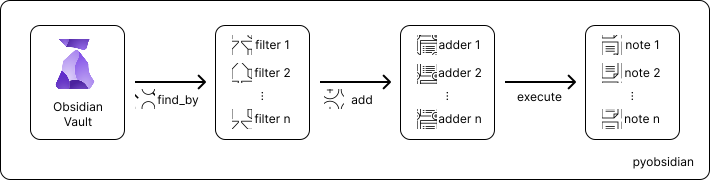
This can be translated to code in a very simple way.
>>> from pyobsidian.vault import Vault
>>> from pyobsidian.adder_op import OpMkHeader
>>> vault = Vault('your/obsidian/vault/path')
>>> new_vault = (
...    vault
...    .find_by('folder', 'some_folder')
...    .find_by('tag', 'some_tag')
...    .add('content', '# Some header', OpMkHeader('|>{1}h1'))
...    .execute()
...)
>>> print(vault)
Vault(
    path='your/obsidian/vault/path',
    notes=[],
    filter=Filter(),
    adder=Adder()
)
>>> print(new_vault)
Vault(
    path='your/obsidian/vault/path',
    notes=[Note(path='your/obsidian/vault/path/.../note.md')],
    filter=Filter(
        [
            FilterField(Field(key='folder', value='some_folder', occurrence='file'), mode = 'and'),
            FilterField(Field(key='tag', value='some_tag', occurrence='file'), mode = 'and')
        ]
    ),
    adder=Adder(
        [
            AdderField(key='content', value='# Some header', where=OpMkHeader('<|{1}h1'))
        ]
    )
)
>>> print(new_vault.notes)
[Note(path='your/obsidian/vault/path/.../note.md')]
Getting help
If you encounter a clear bug, please file an issue with a minimal reproducible example on GitHub.
Release history Release notifications | RSS feed


Download files
Download the file for your platform. If you're not sure which to choose, learn more about installing packages.
Source Distribution
Built Distribution
Filter files by name, interpreter, ABI, and platform.
If you're not sure about the file name format, learn more about wheel file names.
Copy a direct link to the current filters
File details
Details for the file pyobsidian-0.2.0.tar.gz.
File metadata
- Download URL: pyobsidian-0.2.0.tar.gz
- Upload date:
- Size: 15.6 kB
- Tags: Source
- Uploaded using Trusted Publishing? Yes
- Uploaded via: twine/5.0.0 CPython/3.12.3
File hashes
| Algorithm | Hash digest | |
|---|---|---|
| SHA256 |
83d442c5ab998b24ac7aa9024b4146bd1ba2098bebe19d3a261d883a24e9e7c9
|
|
| MD5 |
298b61dae2fe6f91d6697c36abf87da2
|
|
| BLAKE2b-256 |
d735bdd0c4e70977b4a34e7a6471c97578a4f58508de4a2005bf7d6f4654bf18
|
File details
Details for the file pyobsidian-0.2.0-py3-none-any.whl.
File metadata
- Download URL: pyobsidian-0.2.0-py3-none-any.whl
- Upload date:
- Size: 19.0 kB
- Tags: Python 3
- Uploaded using Trusted Publishing? Yes
- Uploaded via: twine/5.0.0 CPython/3.12.3
File hashes
| Algorithm | Hash digest | |
|---|---|---|
| SHA256 |
69d96004b17587e3f22c638b51323a942a7efcd90da797e63174f429edf0c633
|
|
| MD5 |
5852937bbe3808f3e1b334ac8ec385d8
|
|
| BLAKE2b-256 |
63d9e2bd62fb2673b5c0101fd218ce57feaa21c752b9e9ef2369b550923a2cd3
|






