
pyocrust






Native Rust wrapper (PyO3 + Maturin) with three preset families: text OCR
(pp_ocrv6*), document structure (pp_structurev3) and indra, built on the crate
oar-ocr 0.10.1.
This repository is the Python package: rust-bindings/pyocrust/ is both
the pyocrust_core crate root and the importable package directory
pyocrust/.
Installation
pyocrust ships as two distributions built from this same source tree, the same
way onnxruntime and onnxruntime-gpu do:
pip install pyocrust        # CPU build (portable, no CUDA)
pip install pyocrust-gpu    # CUDA build (NVIDIA GPUs)
Both distributions expose the identical Python API — the same three preset families and eleven task predictors; only the native binary changes:
| Distribution | Compiled feature | ONNX Runtime execution providers | Extra runtime at the destination | Platforms |
|---|---|---|---|---|
pyocrust |
(default) simd + auto-download |
CPU | none | Linux x86_64/aarch64, Windows x86_64, macOS aarch64 |
pyocrust-gpu |
cuda (Linux/Windows) / coreml (macOS) |
CPU + CUDA / CPU + CoreML | NVIDIA driver + CUDA/cuDNN (Linux/Windows); none extra on macOS | Linux x86_64, Windows x86_64, macOS aarch64 (Apple Silicon) |
pyocrust-gpu is the same API compiled with an accelerator feature chosen per
platform: cuda on Linux/Windows and coreml on macOS (Apple Silicon). On
Windows the build places the CUDA execution provider next to the extension
(pyocrust/onnxruntime_providers_cuda.dll), so ONNX Runtime finds it; on macOS
ONNX Runtime loads CoreML, which uses the Apple Neural Engine/GPU via Metal (no
CUDA exists on Apple hardware). The CPU distribution stays the portable default
and neither one depends on the other.
Running on a GPU (CUDA on Linux/Windows, CoreML on macOS)
One pyocrust-gpu wheel per platform, carrying the accelerator that platform
has: CUDA on Linux/Windows, CoreML (Apple Neural Engine / GPU via Metal)
on macOS. There is no CUDA on Apple hardware, so the macOS wheel is CoreML.
pip install pyocrust-gpu
python -c "import pyocrust; print(pyocrust.available_providers())"
# Linux/Windows: ['cuda']    macOS (Apple Silicon): ['coreml']
import pyocrust

ocr = pyocrust.VeloceOCR("pp_ocrv6", device="auto")    # picks the accelerator, else CPU
print(ocr.provider_effective)                          # 'cuda' / 'coreml' / 'cpu' — what actually ran
On Linux/Windows, CUDA also needs its own runtime (cublas64_13.dll,
cublasLt64_13.dll, cudnn*_9.dll) reachable by the process; an installed CUDA
toolkit (CUDA_PATH) or torch usually covers it. On macOS, CoreML needs no
extra runtime. If available_providers() prints [] — or a list without cuda
— it is not reachable (on Windows PATH is ignored since Python 3.8), and one
call fixes it by adding the CUDA directories that already exist in the
environment:
import pyocrust

pyocrust.enable_cuda()                                 # adds nvidia-*/torch CUDA dirs
print(pyocrust.available_providers())                  # ['cuda']
Two rules hold on both distributions: asking for device="cuda" when no CUDA
provider registers raises PyOcrValueError instead of falling back to CPU in
silence, and provider_effective reports the provider that really ran.
DirectML (--features directml) is the other provider: it registers without any
extra runtime, but it was slower than CPU on the small models measured here
(benchmarks/GPU.md). A cuda/coreml build registers only its own accelerator —
combining accelerators in one binary (--features cuda,directml) is untested.
The published GPU wheel (CI) has not been verified on an accelerated host
yet.
Quick start
from pyocrust import VeloceOCR

# Text OCR
engine = VeloceOCR("pp_ocrv6")
result = engine.recognize("document.png")
print(result.text)

# Document structure (markdown)
engine = VeloceOCR("pp_structurev3")
result = engine.recognize("document.png")
print(result.markdown)

# Individual task
from pyocrust import TaskPredictor
predictor = TaskPredictor("formula_recognition")
print(predictor.predict("formula.png")["formula"])
Status
The design sign-off S1 was APPROVED on 2026-11-09 (t_e560fff3): all seven
conditions S1.1-S1.7 were verified line by line against the tree, not against
the prose of the documents. cargo test --lib → 67 passed, 0 failed;
pytest tests/ → 162 passed, 1 skipped (the skip is a host TLS block on the
HuggingFace CDN, not a code failure — see DESIGN.md §10.1).
The benchmark campaign is measured and valid: benchmarks/validez_medicion.py
reports 9/9 VALIDA, with the GPU leg measured on CUDA 13
(provider_effective='cuda', 1858 GPU rows, 0 provider incoherences). Sample sizes
are stratified per feature: formula 10, table 8, full_page 6, layout 40,
the rest 20. Details and per-engine tables in
benchmarks/reports/SUMMARY.md.
What is not closed: under CUDA the isolated LaTeX of
pyocrust_formula/pyocrust_formulanet comes out empty, so GPU formula quality is
N/A there (CPU does measure it). That defect is fixed and verified (65326b8:
the CUDA_LAUNCH_BLOCKING workaround was applied too late), but the published
GPU formula rows still come from the defective binary and are being re-measured;
they are not treated as corrected here. Tracking card: t_5c3b7dfe; see
DESIGN.md §10.5-§10.6.
Presets and output
| Preset | Output |
|---|---|
pp_ocrv6 / pp_ocrv6_tiny, pp_ocrv6_small, pp_ocrv6_medium |
OcrResult |
pp_structurev3 |
StructureResult |
indra |
StructureResult (Markdown, regions and blocks) |
glm_ocr (vl only) |
StructureResult (Markdown only; elements/regions empty) |
VeloceOCR('indra') uses the same ensure_models, with .math(true) and nine
required artifacts in <models_dir>/indra/. models_status()['indra'] is the
full catalog (required=false); models_status()['presets']['indra']
lists the nine effective requirements (required=true).
In Indra, block confidence 0.0 means score not available; formulas=[]
does not imply absence of math: inline LaTeX is preserved in Markdown/regions.
Individual tasks (TaskPredictor)
Eleven tasks available; names, schemas and options in DESIGN.md §3.1.2.
Example with an explicit local model (no implicit download):
from pyocrust import TaskPredictor

predictor = TaskPredictor("text_detection", models="/path/to/pp-ocrv6_tiny_det.onnx")
print(predictor.predict("document.png")["detections"])
results = predictor.predict_batch(["document.png", "another.png"])
predict accepts path, PathLike or bytes; batch preserves order. models=None
manages registered artifacts and may download; explicit paths must exist.
Exposure does not certify inference of all eleven tasks, quality or GPU.
Examples by family
Detection (text_detection, seal_text_detection):
from pyocrust import TaskPredictor

predictor = TaskPredictor("text_detection", models="/path/to/pp-ocrv6_tiny_det.onnx")
print(predictor.predict("document.png")["detections"])
# [{"bbox": [[x1,y1],[x2,y1],[x2,y2],[x1,y2]], "score": 0.95}, ...]
Formula (formula_recognition):
predictor = TaskPredictor("formula_recognition")
print(predictor.predict("formula.png")["formula"])
# "E = mc^2"
Orientation (document_orientation, text_line_orientation):
predictor = TaskPredictor("document_orientation")
print(predictor.predict("page.png")["orientations"])
# [{"class_id": 0, "label": "0°", "score": 0.98}, ...]
API coverage
Once individual predictors plus three pipeline families:
| Type | Identifier | Public symbol | Status |
|---|---|---|---|
| Predictor | text_detection |
TaskPredictor("text_detection") |
Exposed |
| Predictor | text_recognition |
TaskPredictor("text_recognition") |
Exposed |
| Predictor | layout_detection |
TaskPredictor("layout_detection") |
Exposed |
| Predictor | table_classification |
TaskPredictor("table_classification") |
Exposed |
| Predictor | table_structure_recognition |
TaskPredictor("table_structure_recognition") |
Exposed |
| Predictor | table_cell_detection |
TaskPredictor("table_cell_detection") |
Exposed |
| Predictor | document_orientation |
TaskPredictor("document_orientation") |
Exposed |
| Predictor | document_rectification |
TaskPredictor("document_rectification") |
Exposed |
| Predictor | text_line_orientation |
TaskPredictor("text_line_orientation") |
Exposed |
| Predictor | seal_text_detection |
TaskPredictor("seal_text_detection") |
Exposed |
| Predictor | formula_recognition |
TaskPredictor("formula_recognition") |
Exposed |
| Pipeline | pp_ocrv6 |
VeloceOCR("pp_ocrv6") |
Exposed |
| Pipeline | pp_structurev3 |
VeloceOCR("pp_structurev3") |
Exposed |
| Pipeline | indra |
VeloceOCR("indra") |
Exposed |
Exposure via constructor/introspection does not equate to verified inference of
all 14 entries. Details and limits in PLANNING.md, S2.5/S2.6 update.
Models
Where they are stored
pyocrust resolves the models directory in this priority order:
custom_pathparameter inVeloceOCR(preset, custom_path=...).OAR_HOMEenvironment variable.OCR_MODELS_CACHE_DIRenvironment variable.~/.oar(default path ofoar-ocr).
pyocrust.models_status() returns the resolved directory in models_dir. On
this host, the actual value is C:\Users\vquilon\.oar.
How they self-download
Two origins, depending on the preset or task:
- ModelScope (
greatv/oar-ocr): provides artifacts for the 11 individual predictors and thepp_ocrv6*/pp_structurev3presets. Managed by theauto-downloadintegrated inoar-ocror the nativepyocrustpreflight (src/storage/models.rs:226). - HuggingFace (
datalab-to/indra-ocr, revisionbd02167f...): provides the nineindraartifacts. The download runs from the native preflight whenensure_modelsdetects missing artifacts.
The preflight (VeloceOCR::new / TaskPredictor::new) checks size and
SHA-256 for every preset before loading (sidecar <name>.sha256 first, re-hash
only when the sidecar is missing). If everything is on disk, it does not touch the network.
Known host limit (2026-11-09): on this machine the Rust downloader (
reqwest+rustls) cannot complete the certificate-revocation check against the HuggingFace CDN (us.aws.cdn.hf.co,CRYPT_E_NO_REVOCATION_CHECK), so a cold HuggingFace download fails with a typed error. The same artifact downloads fine withcurl --ssl-no-revokeand its SHA-256 matches the registry, so this is an environment limitation, not a code defect. The cold-download test isskiphere for that reason.
Size
Sizes are from the registry and local disk; they are not runtime memory.
| Preset / task | Artifacts | Approximate size |
|---|---|---|
pp_ocrv6 (Tiny) |
3 | ~6.3 MB |
pp_structurev3 |
11 | ~936 MB |
indra (required) |
9 | ~27 MB |
glm_ocr (vl only) |
2 snapshots | ~2.6 GB + ~133 MB |
Text and table dictionaries, the formulas tokenizer and metadata JSON files are model companions, not separate models.
Force offline
PYOCRUST_OFFLINE=1 python -c "from pyocrust import VeloceOCR; VeloceOCR('pp_ocrv6')"
With PYOCRUST_OFFLINE=1 and missing artifacts, the constructor fails with
PyOcrRuntimeError and the exact download command. Unset, 0, false or
no (case-insensitive) disables offline mode.
Prefetch
The honest way is to build the predictor/preset with models=None after
creating it, or call models_status() to inspect the on-disk state without
downloading:
from pyocrust import models_status, VeloceOCR

print(models_status()["models_dir"])
# If artifacts are missing, implicit construction downloads them:
engine = VeloceOCR("pp_ocrv6")
There is no public "prefetch only" API: download happens as a side effect of
the connected preflight (S2.0 closes S1.4).
Models and resolver
Pipeline resolver
resolve_pipeline chooses a preset/task without loading models or downloading.
Three typical cases:
# 1) Fast OCR on CPU
from pyocrust import TaskSpec, resolve_pipeline

choice = resolve_pipeline(TaskSpec(ocr_only=True, quality="speed"))
print(choice.id)       # pp_ocrv6_tiny
print(choice.preset)   # pp_ocrv6
print(choice.size)     # tiny
# 2) Scanned document with formulas
from pyocrust import TaskSpec, resolve_pipeline

choice = resolve_pipeline(
    TaskSpec(document_kind="scanned", formulas="with_text", output_format="markdown")
)
print(choice.id)                # pp_structurev3
print(choice.tasks)             # ('document_orientation', 'document_rectification')
# 3) GPU accuracy
from pyocrust import TaskSpec, HardwareProfile, GpuInfo, resolve_pipeline

hardware = HardwareProfile(
    cpu_count=20,
    ram_bytes=64 * 1024**3,
    gpu=GpuInfo(name="RTX PRO 4000 Blackwell", vram_bytes=16 * 1024**3),
)
choice = resolve_pipeline(
    TaskSpec(ocr_only=True, quality="accuracy"), hardware=hardware
)
print(choice.id)        # pp_ocrv6_medium
print(choice.tasks)     # ('indra',) — recommended alternative, not automatic execution
PipelineChoice exposes preset, size, tasks, models_dir and offline;
the id property is passed directly to VeloceOCR(preset=choice.id).
Recommended tasks are not executed automatically.
Pipeline footprint
pipeline_profiles() returns the exact footprint of each registered preset and task.
disk_bytes sums upstream registry sizes; ram_bytes is always None (not measured at runtime).
Indra keeps None because some of its artifacts are not in oar-ocr.
| ID | Family | disk_bytes | ram_bytes |
|---|---|---|---|
pp_ocrv6_tiny |
pp_ocrv6 |
6 270 385 | — |
pp_ocrv6_small |
pp_ocrv6 |
31 114 837 | — |
pp_ocrv6_medium |
pp_ocrv6 |
138 662 763 | — |
pp_structurev3 |
pp_structurev3 |
881 880 022 | — |
indra |
indra |
— | — |
text_detection |
task |
1 780 590 | — |
text_recognition |
task |
4 489 795 | — |
layout_detection |
task |
129 955 811 | — |
document_orientation |
task |
6 787 248 | — |
document_rectification |
task |
31 684 150 | — |
text_line_orientation |
task |
6 776 997 | — |
seal_text_detection |
task |
4 826 518 | — |
formula_recognition |
task |
234 018 918 | — |
table_classification |
task |
6 776 998 | — |
table_structure_recognition |
task |
367 743 951 | — |
table_cell_detection |
task |
129 331 821 | — |
Environment variables
| Variable | Effect |
|---|---|
OAR_HOME |
Primary models directory. Overrides OCR_MODELS_CACHE_DIR and ~/.oar. |
OCR_MODELS_CACHE_DIR |
Shared models directory. Used only if OAR_HOME is not set. |
PYOCRUST_OFFLINE |
If 1, true or yes (case-insensitive), blocks downloads. The resolver reads it to reflect the mode in PipelineChoice.offline. |
CUDA_LAUNCH_BLOCKING |
CUDA debugging. Propagated by oar-ocr / ONNX Runtime. |
RUST_LOG |
Rust crate logging (oar-ocr, reqwest). |
OAR_VL_DTYPE |
VLM dtype, read by oar-ocr-vl. Applies only with the vl feature; no effect without it. |
OAR_VL_ATTN_FULL_SEQ_THRESHOLD |
Vision full-sequence attention threshold, read by oar-ocr-vl (0 forces chunked attention). Applies only with vl. |
OAR_VL_DISABLE_* |
Family of VLM flags (OAR_VL_DISABLE_CUDA_GRAPH, OAR_VL_DISABLE_SPECULATIVE, …), read by oar-ocr-vl. Applies only with vl. |
Catalog and recommendation (S3, bounded approval)
model_catalog() describes models/dictionaries/tokenizers; pipeline_profiles()
exposes presets and tasks from the real registry. Unknown parameters and RAM are
None; sizes are file sizes, not runtime memory. Indra keeps
size_bytes=None/disk_bytes=None in these queries. Full contract:
DESIGN.md §3.1.3; reported evidence: PLANNING.md, S3 update.
Recommend only (no models, downloads or preflight)
from pyocrust import TaskSpec, detect_hardware, resolve_pipeline, pipeline_profiles

hardware = detect_hardware()  # physical inventory; does not test CUDA in the wheel
choice = resolve_pipeline(
    TaskSpec(document_kind="scanned", tables=True, output_format="markdown"),
    hardware=hardware,
)
print(choice.id, choice.tasks, choice.models_dir, choice.offline)
print(pipeline_profiles()[choice.id])
An explicit HardwareProfile avoids detection. The resolver can normalize and
reexport relative OAR_HOME through native resolution (§7.1), but does not
load models. Recommended tasks are not executed; Indra may appear as a
heuristic alternative, with no guarantee of availability or GPU. output_format
guides selection, it does not convert results.
Execute later, explicitly (may load/download models)
from pyocrust import VeloceOCR

# Standalone example: requires artifacts; offline with missing artifacts errors.
engine = VeloceOCR("pp_structurev3")
result = engine.recognize("document.png")
print(result.to_markdown())
Does not automatically run orientation/rectification or resolver alternatives. GPU, quality and local availability are not certified by S3 approval.
Structure
pyocrust/
├── Cargo.toml          # pyocrust_core crate (cdylib, edition 2024)
├── pyproject.toml      # Maturin backend, module-name = "pyocrust._pyocrust_core"
├── src/
│   ├── lib.rs          # #[pymodule] #[pyo3(name = "_pyocrust_core")]
│   ├── core/
│   │   ├── error.rs    # PyOcrError, PyOcrValueError, PyOcrRuntimeError
│   │   ├── image_processor.rs  # TileStrategy, pre/post-processing
│   │   └── types.rs    # OcrResult, StructureResult, RecognitionResult
│   ├── engines/
│   │   ├── oar_text.rs       # pp_ocrv6 engine (text)
│   │   ├── oar_structure.rs  # pp_structurev3 engine (table/layout)
│   │   └── oar_indra.rs      # indra engine (markdown + blocks)
│   ├── storage/
│   │   ├── registry.rs       # 11 ModelScope artifacts + 9 indra (HF)
│   │   ├── models.rs         # ensure_models / preflight / 4-thread parallelism
│   │   ├── download.rs       # parallel downloads with SHA-256 sidecar
│   │   ├── catalog.rs        # model_catalog / pipeline_profiles
│   │   └── config.rs         # OAR_HOME / OCR_MODELS_CACHE_DIR
│   └── tasks/
│       └── mod.rs            # TaskPredictor: 11 tasks + predict_batch
├── pyocrust/           # Importable Python package
│   ├── __init__.py     # Public facade
│   ├── __init__.pyi    # Type stubs
│   ├── gpu.py          # enable_cuda(): CUDA runtime search path
│   ├── hardware.py     # detect_hardware, HardwareProfile
│   ├── resolver.py     # resolve_pipeline, TaskSpec
│   └── py.typed        # PEP 561 marker
└── tests/              # V1 card + S2.x/S3.x/D5 additions
Requirements
- Rust toolchain with
rustc/cargo1.95 or higher (MSRV ofoar-ocr). - Python 3.10 or higher (the crate uses
abi3-py310). - The benchmark bank requires Python 3.12, and that is what the repo's
.venv/Scripts/python.exeis:paddlepaddle-gpuand the CUDA wheels oftorch/torchvisionpublish no Windows builds for 3.13/3.14 (on 3.14pip install torchsilently resolves to the CPU wheel, so the GPU axis of the comparison cannot be measured at all). The Rust crate keeps covering 3.10+ throughabi3-py310: this is a constraint of the measuring bench, not of the package. - The bank's dependency set pins
protobuf==3.20.3:paddlepaddle-gpu2.6.2 asks forprotobuf<=3.20.2on Windows whileonnxruntime-gpuasks for>=4.25. With 3.20.3 both work (verified with a real CUDA ORT session); ifpaddlexraises it,import paddledies withDescriptors cannot be created directly. - C linker: on Windows, MSVC Build Tools (
cl.exeinPATH).
Development
python -m venv .venv
source .venv/Scripts/activate   # Windows Git-Bash

pip install maturin
maturin develop                 # compiles and makes pyocrust importable in the venv

python -c "import pyocrust; print(pyocrust.__version__)"
maturin develop uses the release profile by default. The profile declares
panic = "unwind" (ADR-004): a Rust panic translates to a Python exception
instead of aborting the interpreter.
Quick checks
cargo check        # no linking; validates the crate and its dependencies
cargo test         # Rust unit tests (I2 card)
python -m pytest tests/ -q   # integration tests (V1 card)
Features
| Feature | Effect |
|---|---|
| (default) | CPU. download-binaries + simd from oar-ocr; links the ONNX Runtime shipped by the crate. |
cuda |
CUDA provider for ONNX Runtime (NVIDIA; Linux/Windows). |
coreml |
CoreML provider for ONNX Runtime (Apple Neural Engine/GPU; macOS). |
directml |
DirectML provider for ONNX Runtime (Windows). |
vl |
Opt-in VLM: enables the glm_ocr preset (VLM GLM-OCR 0.9B, MIT) on Candle / oar-ocr-vl. Never on by default (ADR-001). |
vl-cuda |
vl + Candle CUDA (cuda of oar-ocr-vl); compiles candle-flash-attn with nvcc. |
maturin develop --features cuda        # NVIDIA GPU (Linux/Windows)
maturin develop --features coreml      # Apple Neural Engine/GPU (macOS)
maturin develop --features vl          # VLM `glm_ocr` preset (Candle, CPU)
maturin develop --features vl-cuda     # VLM on NVIDIA GPU (Candle CUDA; needs nvcc)
Model downloads from ModelScope (auto-download) are enabled by
default in oar-ocr (ADR-010); the second download path, the custom
Hugging Face downloader, is implemented in src/storage/download.rs (card I3).
The vl feature (Candle / oar-ocr-vl) is opt-in and never on by default
(ADR-001): it turns on the glm_ocr preset (VLM GLM-OCR 0.9B, MIT). Without it,
VeloceOCR("glm_ocr") raises a typed error. It runs on Candle, not ONNX
Runtime, so the ONNX providers do not apply to that path and device="cuda"
needs --features vl-cuda.
Models are resolved in this priority order (see DESIGN.md §3.2):
custom_path parameter → OAR_HOME / OCR_MODELS_CACHE_DIR → ~/.oar.
Weight licenses
The code license (Apache-2.0) does not cover the weights: each artifact ships
its own. The catalog exposes it per artifact (license, license_commercial_use,
license_acknowledge, license_restricted, license_notes, license_url), and
VeloceOCR/TaskPredictor enforce it in the constructor — before any
download or disk read:
from pyocrust import VeloceOCR, model_catalog

model_catalog()["det.onnx"]["license"]               # 'OpenRAIL-M-Mod' (Indra)
model_catalog()["det.onnx"]["license_acknowledge"]   # True (§7)

VeloceOCR("pp_ocrv6")                                # Apache-2.0: allowed
VeloceOCR("indra")                                   # PyOcrValueError: not commercial-free
VeloceOCR("indra", license_commercial_use=False)     # PyOcrValueError: §7 requires attribution
VeloceOCR("indra", license_commercial_use=False,
           license_acknowledge=True)                 # allowed (non-commercial + attribution)
The flags are user declarations (commercial intent and acceptance of
attribution), not what the model permits. Unrecognized artifacts are treated as
restricted by default. See DESIGN.md ADR-017.
Benchmarking
Outside src/, benchmarks/ is organised by feature/component (like oar-ocr's
components): each capability has its own bank, its metric and real Python alternatives.
It measures all 9 features; every number is medido (run here) — never mixed
with external references, which are not published as comparable.
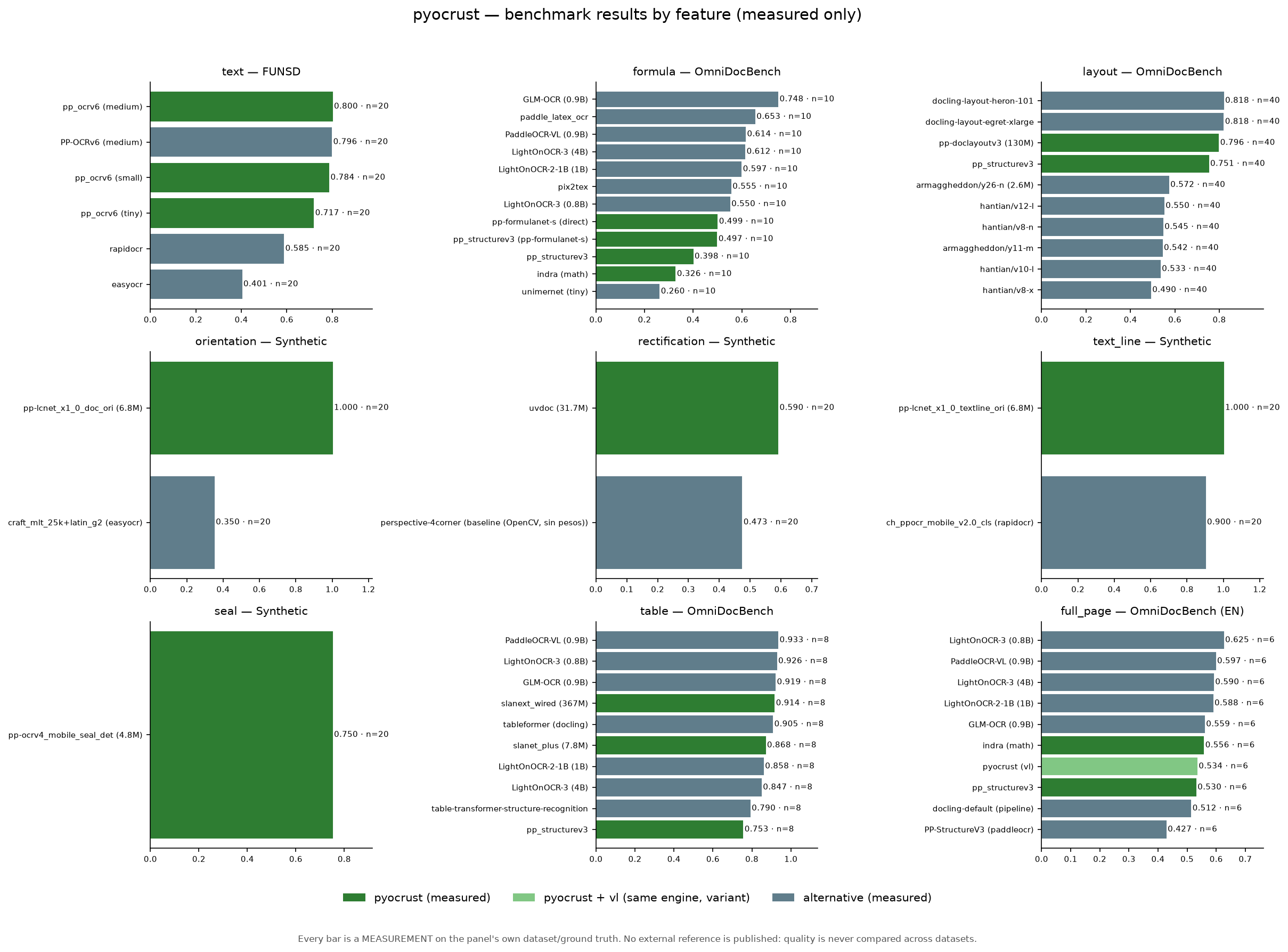
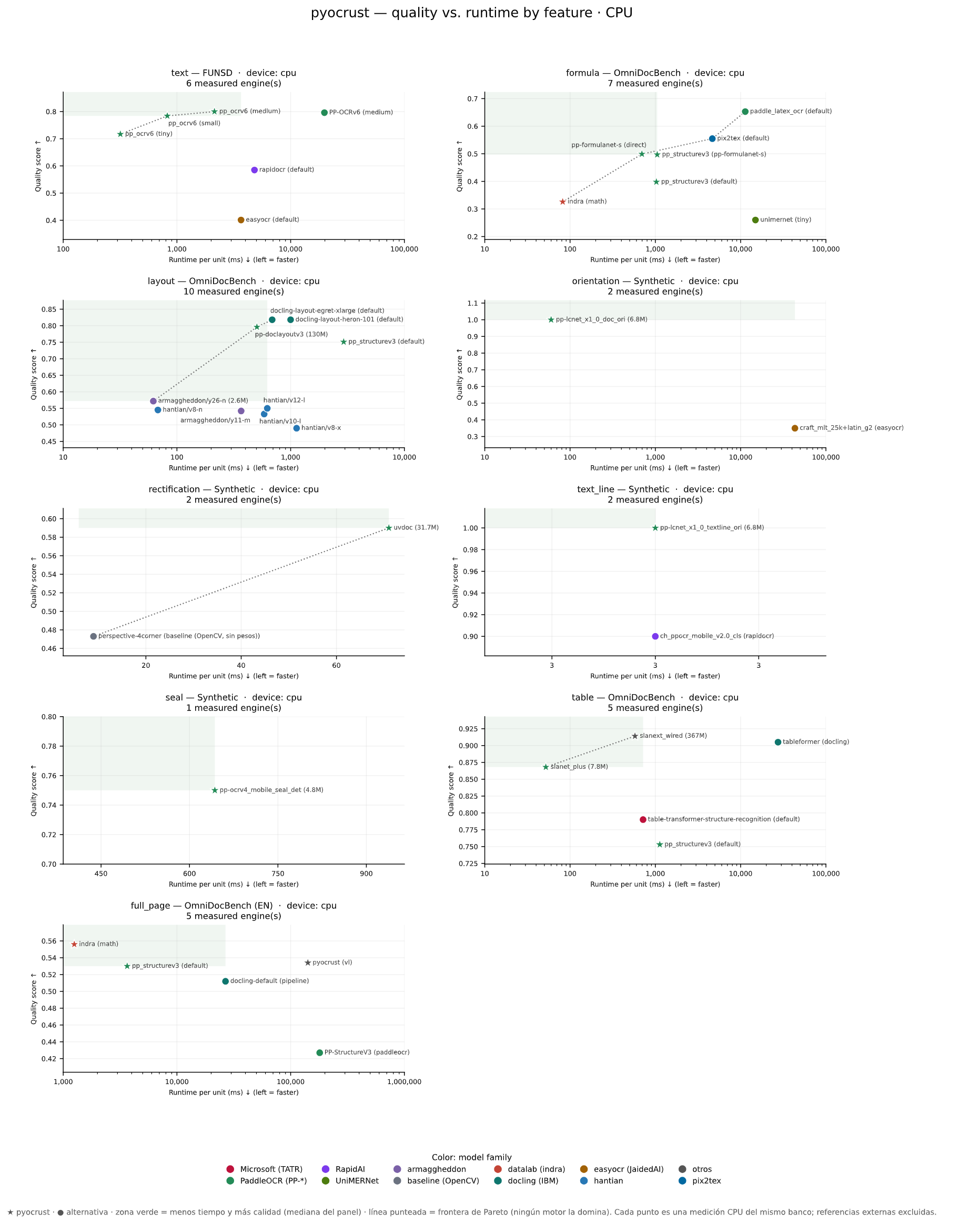
| Feature | Head metric ↑ | pyocrust (measured) | Best measured alternative | Status |
|---|---|---|---|---|
text |
word F1 | 0.717 | rapidocr 0.585 | measured |
formula |
LaTeX similarity | 0.499 | paddle_latex_ocr 0.653 | measured |
layout |
mAP@IoU 0.5 | 0.796 | docling-layout-heron-101 0.818 | measured |
orientation |
accuracy | 1.000 | pp-lcnet_x1_0_doc_ori (onnxruntime) 1.000 | measured |
rectification |
SSIM | 0.597 | uvdoc (onnxruntime) 0.604 | measured |
text_line |
accuracy | 1.000 | pp-lcnet_x1_0_textline_ori (onnxruntime) 1.000 | measured |
seal |
recall@IoU 0.5 | 0.750 | pp-ocrv4_mobile_seal_det (onnxruntime) 0.750 | measured |
table |
TEDS (struct.) | 0.914 | tableformer (docling) 0.905 | measured |
full_page |
Markdown F1 | 0.086 | docling-default (pipeline) 0.204 | measured |
Sample sizes are stratified per feature, not uniform: formula n=10,
table n=8, full_page n=6, layout n=40, the rest n=20
(CPU, warmup=1, repeats=1, pyocrust 0.1.0). The GPU leg of the same banks was
measured on CUDA 13 and benchmarks/validez_medicion.py reports 9/9
VALIDA — every feature pairs its CPU and GPU run on the same n and the same
motors. pyocrust's best engine per feature is shown, and where another
measured engine wins (formula, layout, full_page, table) the table says
so. Full per-engine tables, provenance (command, dataset, n, runtime) live in
benchmarks/README.md and
benchmarks/reports/SUMMARY.md.
How the campaign is measured.
- Uniform
nwithin a feature — every bank runs with the same--limit, and the CPU and GPU runs of a feature use the samenand the same motors.SUMMARY.mdandSCOREBOARD.mdare generated from a single CSV collector (benchmarks/features/summary.py::collect_rows), so they cannot diverge; the per-featureREPORT.mdcomes fromreport.py(run CSVs) andQUALITY_VS_TIME.mdderives from theREPORT.mdpanels.SCOREBOARD.mdcarries an explicitncolumn. - Real CPU vs GPU — each adapter records
provider_effective(the execution provider that actually ran).--device gpuon an engine without an accelerator staysskippedwith a reason; a CPU fallback is never reported as GPU (seebenchmarks/reports/CPU_VS_GPU.md). The current campaign's GPU leg is CUDA. - Per-engine license — the
licensecolumn is informative (it flags non-permissive weights, e.g. AGPL-3.0 for the YOLOv10 references); the binding gate is the artifact catalog + policy flags (ADR-017), not this column. - DocLayNet-only for
layout— only DocLayNet fine-tunes are comparable: the reference YOLOv10 rows carry DocLayNet mAP and the measured YOLO fine-tunes expose the 11 DocLayNet classes, never the 80 COCO classes. - Stratified sample — the four OmniDocBench features sample by
data_source × layout × subset, so no feature collapses onto a single stratum andequation_hardnever exceeds 50 % of the sample (benchmarks/tests/test_stratified.py).
# one bank per feature (example: text detection + recognition)
./.venv/Scripts/python.exe benchmarks/features/text/bank.py --limit 20
# regenerate per-feature reports + the global summaries (order matters)
./.venv/Scripts/python.exe benchmarks/features/report.py --all
./.venv/Scripts/python.exe benchmarks/tools_regen_derived.py
# check the measurement criterion (9/9 VALIDA expected)
./.venv/Scripts/python.exe benchmarks/validez_medicion.py
Engines that are not installed are recorded skipped, never as run; metrics without
ground truth are N/A, never 0. seal has no human-annotated set in cache, so it is
measured against a deterministic synthetic set (synthetic_seal), declared as such.
PyPI publication (CI/CD)
Publishing is handled by two GitHub Actions workflows with maturin and
trusted publishing (OIDC: no PyPI token stored in secrets):
| Workflow | Target | Trigger |
|---|---|---|
.github/workflows/ci-cd.yml |
PyPI | workflow_dispatch (manual) |
.github/workflows/ci-cd-test.yml |
TestPyPI | release: published + workflow_dispatch |
.github/workflows/ci-cd-gpu.yml |
PyPI (pyocrust-gpu) |
workflow_dispatch (manual) |
.github/workflows/ci-cd-gpu-test.yml |
TestPyPI (pyocrust-gpu) |
release: published + workflow_dispatch |
The two *-gpu workflows build the same source with the accelerator feature
of each platform (--features cuda on Linux/Windows, --features coreml on
macOS) and patch the project name in pyproject.toml to pyocrust-gpu before
publishing. They use their own trusted publisher and their own environments
(pypi-gpu, testpypi-gpu), and their matrix is Linux x86_64 + Windows
x86_64 (CUDA) and macOS aarch64 (CoreML). Linux aarch64 is excluded:
ort-sys ships no CUDA binary for aarch64-unknown-linux-gnu (only none in
its dist.tsv), so that build cannot exist.
Both compile the platform matrix, validate each wheel (ZIP integrity and
EOCD, no extra data) and publish. Because pyo3 is compiled with abi3-py310,
a single wheel per platform covers CPython 3.10-3.14: the build is not repeated per
Python version.
Platforms: x86_64/aarch64 Linux, x86_64 Windows and aarch64 macOS
(Apple Silicon). i686-pc-windows-msvc (Windows x86) and
x86_64-apple-darwin (macOS Intel) are omitted because oar-ocr compiles with its default
download-binaries feature and the ONNX Runtime binary catalog from
ort-sys does not ship those two architectures: those jobs would fail to compile.
Prerequisites (one time)
- Create the project on TestPyPI and on PyPI.
- In the GitHub repository, create the environments (
Settings > Environments)testpypiandpypi. - Configure trusted publishing on each project pointing to the repository and the
corresponding workflow (
ci-cd.ymlfor PyPI,ci-cd-test.ymlfor TestPyPI), without shared secrets. - Repeat 1-3 for the GPU distributions: create the
pyocrust-gpuproject on TestPyPI and PyPI, the environmentstestpypi-gpuandpypi-gpu, and the trusted publishers forci-cd-gpu-test.yml(TestPyPI) andci-cd-gpu.yml(PyPI).
Publish
TestPyPI:  Actions > "Publish pyocrust to TestPyPI" > Run workflow
           (or publish a release, which triggers it automatically)
PyPI:      Actions > "Publish pyocrust to PyPI" > Run workflow
TestPyPI GPU:  Actions > "Publish pyocrust-gpu to TestPyPI" > Run workflow
PyPI GPU:      Actions > "Publish pyocrust-gpu to PyPI" > Run workflow
Verify the wheel before uploading
./.venv/Scripts/python.exe -m maturin build --release --out dist
# GPU (CUDA) build:
./.venv/Scripts/python.exe -m maturin build --release --features cuda --out dist
pip install dist/pyocrust-0.1.0-cp310-abi3-*.whl
python -c "import pyocrust; print(pyocrust.__version__)"
The wheel lands in dist/ (ignored by git); in CI it is generated by
PyO3/maturin-action.
License
Apache-2.0, identical to oar-ocr. See LICENSE.
1 maintainer

Metadata
1 maintainer
Release files for pyocrust 0.1.0
For a detailed explanation of source distributions (sdists) and built distributions (wheels), please see the package formats documentation.
Built distributions (wheels)
| File | Actions Reset | |||
|---|---|---|---|---|
| pyocrust-0.1.0-cp310-abi3-win_amd64.whl | CPython 3.10 | abi3 | Windows x86-64 | Details for pyocrust-0.1.0-cp310-abi3-win_amd64.whl |
| pyocrust-0.1.0-cp310-abi3-manylinux_2_28_x86_64.whl | CPython 3.10 | abi3 | Linux glibc 2.28+ x86-64 | Details for pyocrust-0.1.0-cp310-abi3-manylinux_2_28_x86_64.whl |
| pyocrust-0.1.0-cp310-abi3-manylinux_2_28_aarch64.whl | CPython 3.10 | abi3 | Linux glibc 2.28+ ARM64 | Details for pyocrust-0.1.0-cp310-abi3-manylinux_2_28_aarch64.whl |
| pyocrust-0.1.0-cp310-abi3-macosx_11_0_arm64.whl | CPython 3.10 | abi3 | macOS 11.0+ ARM64 | Details for pyocrust-0.1.0-cp310-abi3-macosx_11_0_arm64.whl |
Total release size: 53.1 MB
Release files / pyocrust-0.1.0-cp310-abi3-win_amd64.whl
| Download URL | pyocrust-0.1.0-cp310-abi3-win_amd64.whl |
|---|---|
| Size | 12.7 MB |
| Tags | CPython 3.10 Windows x86-64 abi3 |
|
SHA-256 checksum How to use checksums |
14e23a2baabb52f1039fcb26aed675be283ec842b97325fc915f24d1a49b010f
|
|
BLAKE2b-256 checksum How to use checksums |
db810dacdd07c4687e319640264fd857c8a8c7fc80d27d6df0fe36d8b7b7db4a
|
| Upload date | |
|
Uploaded using Trusted Publishing? What is trusted publishing? |
Yes |
| Uploaded via |
twine/7.0.0 CPython/3.13.16
|
Provenance
Provenance describes where a file came from. On PyPI, provenance is shared via attestations, which provide a verifiable record of the build or publishing details. View details, limitations and caveats.


PyPI Publish Attestation
PyPI verified that this artifact, at this checksum, originated from the publisher listed below.
Signed by GitHub Actions, verified by PyPI on Nov 16, 2026.
Transparency logRelease files / pyocrust-0.1.0-cp310-abi3-manylinux_2_28_x86_64.whl
| Download URL | pyocrust-0.1.0-cp310-abi3-manylinux_2_28_x86_64.whl |
|---|---|
| Size | 14.1 MB |
| Tags | CPython 3.10 Linux glibc 2.28+ x86-64 abi3 |
|
SHA-256 checksum How to use checksums |
24e167065dd8ebfcf6d0f6c2f0c118d40545944b425cfe7f92e489d75b3c337f
|
|
BLAKE2b-256 checksum How to use checksums |
162074e5f8b72027558f12e5af54a0d089023f2e6c53fea42d500011e52c5a8f
|
| Upload date | |
|
Uploaded using Trusted Publishing? What is trusted publishing? |
Yes |
| Uploaded via |
twine/7.0.0 CPython/3.13.16
|
Provenance
Provenance describes where a file came from. On PyPI, provenance is shared via attestations, which provide a verifiable record of the build or publishing details. View details, limitations and caveats.
PyPI Publish Attestation
PyPI verified that this artifact, at this checksum, originated from the publisher listed below.
Signed by GitHub Actions, verified by PyPI on Nov 16, 2026.
Transparency logRelease files / pyocrust-0.1.0-cp310-abi3-manylinux_2_28_aarch64.whl
| Download URL | pyocrust-0.1.0-cp310-abi3-manylinux_2_28_aarch64.whl |
|---|---|
| Size | 14.3 MB |
| Tags | CPython 3.10 Linux glibc 2.28+ ARM64 abi3 |
|
SHA-256 checksum How to use checksums |
ccc292fb98f0174876c0c026dbbb3a7a9fd90144f1dc10244ef87154569bdf77
|
|
BLAKE2b-256 checksum How to use checksums |
0599fa1c585c820676fe50c2dd9bb1a515ce9eb25470b7b30178828f1b413072
|
| Upload date | |
|
Uploaded using Trusted Publishing? What is trusted publishing? |
Yes |
| Uploaded via |
twine/7.0.0 CPython/3.13.16
|
Provenance
Provenance describes where a file came from. On PyPI, provenance is shared via attestations, which provide a verifiable record of the build or publishing details. View details, limitations and caveats.
PyPI Publish Attestation
PyPI verified that this artifact, at this checksum, originated from the publisher listed below.
Signed by GitHub Actions, verified by PyPI on Nov 16, 2026.
Transparency logRelease files / pyocrust-0.1.0-cp310-abi3-macosx_11_0_arm64.whl
| Download URL | pyocrust-0.1.0-cp310-abi3-macosx_11_0_arm64.whl |
|---|---|
| Size | 12.0 MB |
| Tags | CPython 3.10 abi3 macOS 11.0+ ARM64 |
|
SHA-256 checksum How to use checksums |
f97046f4fee46c65438b2457e7d6d1a03d770aa1bcbced6442634b98de03ef09
|
|
BLAKE2b-256 checksum How to use checksums |
9ad9612328f95eaf7f397c6401e2e3ce9db65ab31b496438a9a24e06a380724e
|
| Upload date | |
|
Uploaded using Trusted Publishing? What is trusted publishing? |
Yes |
| Uploaded via |
twine/7.0.0 CPython/3.13.16
|
Provenance
Provenance describes where a file came from. On PyPI, provenance is shared via attestations, which provide a verifiable record of the build or publishing details. View details, limitations and caveats.
PyPI Publish Attestation
PyPI verified that this artifact, at this checksum, originated from the publisher listed below.
Signed by GitHub Actions, verified by PyPI on Nov 16, 2026.
Transparency logSecurity for pyocrust 0.1.0
Provenance
Provenance describes where a file came from. On PyPI, provenance is shared via attestations, which provide a verifiable record of the build or publishing details. View details, limitations and caveats.
Full provenance
All 4 files in this release have been uploaded with provenance metadata.
Attestation for pyocrust-0.1.0-cp310-abi3-win_amd64.whl
PyPI Publish Attestation
PyPI verified that this artifact, at this checksum, originated from the publisher listed below.
Signed by GitHub Actions, verified by PyPI on Nov 16, 2026.
Transparency logA note on package security
PyPI is a repository for distributing packages, not a service for auditing them. While third-party security researchers and our staff do their best to detect and remove malicious packages, PyPI cannot guarantee the quality, security or suitability of any given package.
To learn more about protecting yourself from malicious actors, visit our package security documentation.














