
Python toolbox for Operational Modal Analysis (OMA)
Verified details
These details have been verified by PyPIProject links
GitHub Statistics
Maintainers

Project description




pyOMA - Operational Modal Analysis in Python

pyOMA is an open-source toolbox for Operational Modal Analysis (OMA) developed by Simon Marwitz, Volkmar Zabel et al. at the Institute of Structural Mechanics (ISM) of the Bauhaus-Universität Weimar. Operational Modal Analysis is a methodology for the identification of structural modal properties from ambient (output-only) vibration measurements. It is written in Python 3.9+.
Documentation: https://py-oma.readthedocs.io
Source Code: https://github.com/pyOMA-dev/pyOMA
Citing in your work: https://doi.org/10.5281/zenodo.14936576
About Operational Modal Analysis
In a broader sense OMA consists of a series of processes:
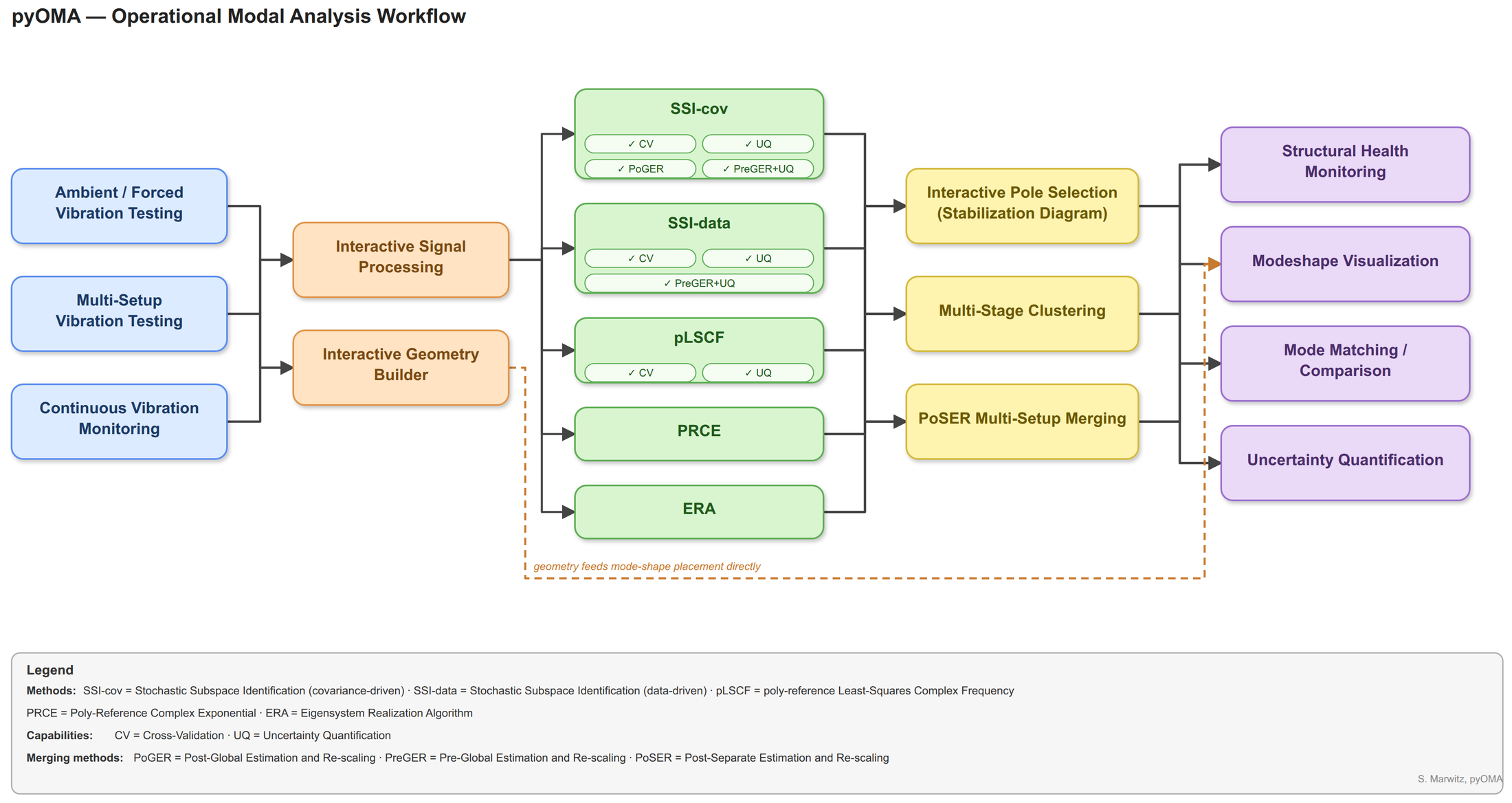
Ambient Vibration Testing |
Acquiring vibration signals (acceleration, velocity, …) from mechanical structures under ambient excitation (wind, traffic, microtremors, …) |
Signal Processing |
Filters, Windows, Decimation, Spectral Estimation, Correlation Function Estimation |
System Identification |
Various time-domain and frequency-domain methods for identifiying mathematical models from acquired vibration signals. |
Modal Analysis |
Estimation of modal parameters (frequencies, damping ratios, mode shapes) from identified systems. Manually, using stabilization diagrams or automatically using multi-stage clustering methods. |
Post Processing |
E.g. plotting of mode shapes, merging of multiple result datasets (setups), statistical analyses, SHM |
Applications of pyOMA
The toolbox is currently used on a daily basis to analyze the continuously acquired vibration measurements of a structural health monitoring system (since 2015). Further uses include various academic and commercial measurement campaigns on civil engineering structures including bridges, towers/masts, wide-span floors, etc.
Simon Marwitz et al. “An Experimental Evaluation of Two Potential Improvements for 3D Laser Vibrometer Based Operational Modal Analysis”. In: Experimental Mechanics 57.8 (July 2017), pp. 1311–1325.
Simon Marwitz et al. “Modalanalyse von Monitoringdaten eines Sendeturms”. In: Bautechnik 95.4 (Mar. 2018), pp. 288–295.
Simon Marwitz et al. “Operational Modal Analysis with a 3D Laser Vibrometer without External Reference”. In: Rotating Machinery, Hybrid Test Methods, Vibro-Acoustics & Laser Vibrometry. Ed. by James De Clerck et al. Vol. 8. Proceedings of the 34th IMAC, A Conference and Exposition on Structural Dynamics 2016. Society of Experimental Mechanics. Springer International Publishing, Jan. 25, 2016, pp. 75–85.
Simon Marwitz et al. “Automatisierte Modalanalyse und Langzeitmonitoring eines rotationssymmetrischen Turmtragwerks”. In: Berichte der Fachtagung Baustatik-Baupraxis 13. Ed. by Günther Meschke et al. Vol. 13. Baustatik Baupraxis e. V.. Ruhr-Universität Bochum: Lehrstuhl für Statik und Dynamik der Ruhr-Universität Bochum, Mar. 2017, pp. 165–172.
Simon Marwitz et al. “Cross-Evaluation of two Measures for the Assessment of Estimated State-Space Systems in Operational Modal Analysis”. In: Proceedings of the 7th International Operational Modal Analysis Conference. Shaker Verlag GmbH, Germany, May 11, 2017, pp. 253–256.
Simon Marwitz et al. “Betrachtung von Unsicherheiten in der Modalanalyse mit der Stochastic Subspace Identification am Beispiel eines seilabgespannten Masts”. In: Tagungsband der 15. D-A-CH Tagung Erdbebeningenieurwesen und Baudynamik. Sept. 21, 2017.
Simon Marwitz et al. “Modale Identifikation aus Langzeit-Dehnungsmessungen an einem Sendeturm”. In: Tagungsband der VDI Baudynamik Tagung. Apr. 17, 2018.
Simon Marwitz et al. “Relations between the quality of identified modal parameters and measured data obtained by structural monitoring”. In: Conference Proceedings of ISMA2018 - USD2018. Sept. 17, 2018.
Zabel, V. et al. “Bestimmung von modalen Parametern seilabgespannter Rohrmasten”. In: Berichte der Fachtagung Baustatik-Baupraxis, Institut für Baustatik und Baudynamik. 2020.
Marwitz, S. et al. “ Cross-Validation in Stochastic Subspace Identification”. In: Proceedings of the IOMAC 2025. 2025.
Install
Requirements
Python ≥ 3.9 — https://www.python.org/ or https://www.anaconda.com/download
NumPy, SciPy, Matplotlib (installed automatically)
Optional:
Jupyter widgets (interactive notebook GUI): pip install "pyoma-toolbox[jupyter]"
Desktop PyQt6 GUI: pip install "pyoma-toolbox[gui]"
After installing the gui extra, the pyoma command starts the desktop GUI directly - no script needed:
pyomaInstall from source
git clone https://github.com/pyOMA-dev/pyOMA.git
cd pyOMA
pip install -e .
Get started with a project
For a GUI-only start with nothing pre-written, see “Quickest start” on the gui_usage page - just run pyoma. The rest of this section covers the scripted five-step workflow (geometry → signals → pre-processing → identification → stabilisation).
Option A — Jupyter notebook (recommended)
Clone the repository and pip install -e . as shown above.
Open scripts/single_setup_analysis.ipynb in JupyterLab.
Run all cells — the notebook uses the bundled example data and requires no additional configuration.
To analyse your own data, set EXAMPLE_DATA and SETUP_DIR to point to your files and assign PreProcessSignals.load_measurement_file to a callable that reads your measurement format.
Option B — Plain Python script (PyQt6 GUI)
Install with pip install -e ".[gui]".
Run scripts/single_setup_analysis.py from the repository root, or launch the interactive GUI directly with the pyoma command installed alongside the package.
Full step-by-step guide: https://py-oma.readthedocs.io/en/latest/getting_started.html
Full documentation: https://py-oma.readthedocs.io
Getting help
In case of errors check that:
input files are formatted correctly
arguments are of the right type and order
search the internet for similar errors
Open an issue at https://github.com/pyOMA-dev/pyOMA/issues
Project Structure
pyOMA
├── pyOMA
│   ├── core
│   │  ├── PreProcessingTools.py
│   │  ├── ModalBase.py
│   │  ├── PLSCF.py
│   │  ├── PRCE.py
│   │  ├── SSICovRef.py
│   │  ├── SSIData.py
│   │  ├── VarSSIRef.py
│   │  ├── StabilDiagram.py
│   │  ├── PlotMSH.py
│   │  ├── PostProcessingTools.py
│   │  └── ...
│   ├── GUI
│   │  ├── MultiSetupGUI.py       # main entry point (also: `pyoma` launcher)
│   │  ├── GeometryProcessorGUI.py
│   │  ├── PreProcessSignalsGUI.py
│   │  ├── ChanDofEditorGUI.py
│   │  ├── ModalAnalysisGUI.py    # SSI-Cov-Ref / SSI-Data / Var-SSI-Ref / pLSCF / PRCE
│   │  ├── StabilGUI.py
│   │  ├── PlotMSHGUI.py
│   │  └── JupyterGUI.py          # ipywidgets for Jupyter
Additionally some further files are provided with it:
├── doc
├── input_files
├── scripts
├── tests
│   ├── test_helpers.py
│   ├── test_preprocessing.py
│   ├── test_modal_methods.py
│   ├── test_stabildiagram.py
│   ├── test_multi_setup.py
│   └── files
│       └── ...
├── LICENSE
├── README.rst
└── pyproject.toml
Current development is focused on the core package which contains all the algorithms.
The input_files packages provides templates for input files for automated and structured analysis of a dataset consisting of multiple measurements.
The scripts package contains templates for certain recurring tasks, as well as commonly used functions, derived from the core and GUI packages.
The tests package contains common use cases and files, which could be run to test if any changes in the modules result in breaking existing functionality.
The documentation is generated from the git repository by Sphinx automatically and available on https://py-oma.readthedocs.io/
Contributing
For beginners:
Fork the project on GitHub and start development
Open a Pull Request to get your changes merged into the project
Run the test suite before submitting: pip install -e ".[dev]" && pytest
Ensure the documentation can be built: navigate to the doc folder and run make clean && make html to catch any RST syntax errors.
Install the pre-commit hooks once after cloning, so GUI-related checks (Qt Designer .ui/generated file sync, GUI smoke tests) run automatically before each commit: pip install -e ".[dev]" && pre-commit install
Project details
Verified details
These details have been verified by PyPIProject links
GitHub Statistics
Maintainers
Release history Release notifications | RSS feed

Download files
Download the file for your platform. If you're not sure which to choose, learn more about installing packages.
Source Distribution
Built Distribution
Filter files by name, interpreter, ABI, and platform.
If you're not sure about the file name format, learn more about wheel file names.
Copy a direct link to the current filters
File details
Details for the file pyoma_toolbox-1.0.0.tar.gz.
File metadata
- Download URL: pyoma_toolbox-1.0.0.tar.gz
- Upload date:
- Size: 278.7 kB
- Tags: Source
- Uploaded using Trusted Publishing? Yes
- Uploaded via: twine/6.1.0 CPython/3.13.12
File hashes
| Algorithm | Hash digest | |
|---|---|---|
| SHA256 |
6fb21421917c3d9c6f3e707e9dab2d78317df4b751f04606e3c125e339e07275
|
|
| MD5 |
671cc6db8a6891f3e8d0cd72cb9674a2
|
|
| BLAKE2b-256 |
9414e63f568c841de60c84a55bfbd6a47e672c2041509d1a0f17e9619a13740d
|
Provenance
The following attestation bundles were made for pyoma_toolbox-1.0.0.tar.gz:
Publisher:
publish.yml on pyOMA-dev/pyOMA
-
Statement:
-
Statement type:
https://in-toto.io/Statement/v1 -
Predicate type:
https://docs.pypi.org/attestations/publish/v1 -
Subject name:
pyoma_toolbox-1.0.0.tar.gz -
Subject digest:
6fb21421917c3d9c6f3e707e9dab2d78317df4b751f04606e3c125e339e07275 - Sigstore transparency entry: 2138293163
- Sigstore integration time:
-
Permalink:
pyOMA-dev/pyOMA@c11fc0d696ca3f8029eaf20a00657c1773bb4091 -
Branch / Tag:
refs/tags/v1.0.0 - Owner: https://github.com/pyOMA-dev
-
Access:
public
-
Token Issuer:
https://token.actions.githubusercontent.com -
Runner Environment:
github-hosted -
Publication workflow:
publish.yml@c11fc0d696ca3f8029eaf20a00657c1773bb4091 -
Trigger Event:
push
-
Statement type:
File details
Details for the file pyoma_toolbox-1.0.0-py3-none-any.whl.
File metadata
- Download URL: pyoma_toolbox-1.0.0-py3-none-any.whl
- Upload date:
- Size: 267.3 kB
- Tags: Python 3
- Uploaded using Trusted Publishing? Yes
- Uploaded via: twine/6.1.0 CPython/3.13.12
File hashes
| Algorithm | Hash digest | |
|---|---|---|
| SHA256 |
3b1acca7511bf0d9f71426d9daa120d7890d7a00749c31d48e77c4730b38450d
|
|
| MD5 |
dba5e0cf970211d0860c28018bdaf87d
|
|
| BLAKE2b-256 |
13f4159f133f9e757ad6fe53423d3bdce27d55352d2bd0b14ef976eca8d7b843
|
Provenance
The following attestation bundles were made for pyoma_toolbox-1.0.0-py3-none-any.whl:
Publisher:
publish.yml on pyOMA-dev/pyOMA
-
Statement:
-
Statement type:
https://in-toto.io/Statement/v1 -
Predicate type:
https://docs.pypi.org/attestations/publish/v1 -
Subject name:
pyoma_toolbox-1.0.0-py3-none-any.whl -
Subject digest:
3b1acca7511bf0d9f71426d9daa120d7890d7a00749c31d48e77c4730b38450d - Sigstore transparency entry: 2138293167
- Sigstore integration time:
-
Permalink:
pyOMA-dev/pyOMA@c11fc0d696ca3f8029eaf20a00657c1773bb4091 -
Branch / Tag:
refs/tags/v1.0.0 - Owner: https://github.com/pyOMA-dev
-
Access:
public
-
Token Issuer:
https://token.actions.githubusercontent.com -
Runner Environment:
github-hosted -
Publication workflow:
publish.yml@c11fc0d696ca3f8029eaf20a00657c1773bb4091 -
Trigger Event:
push
-
Statement type:






