

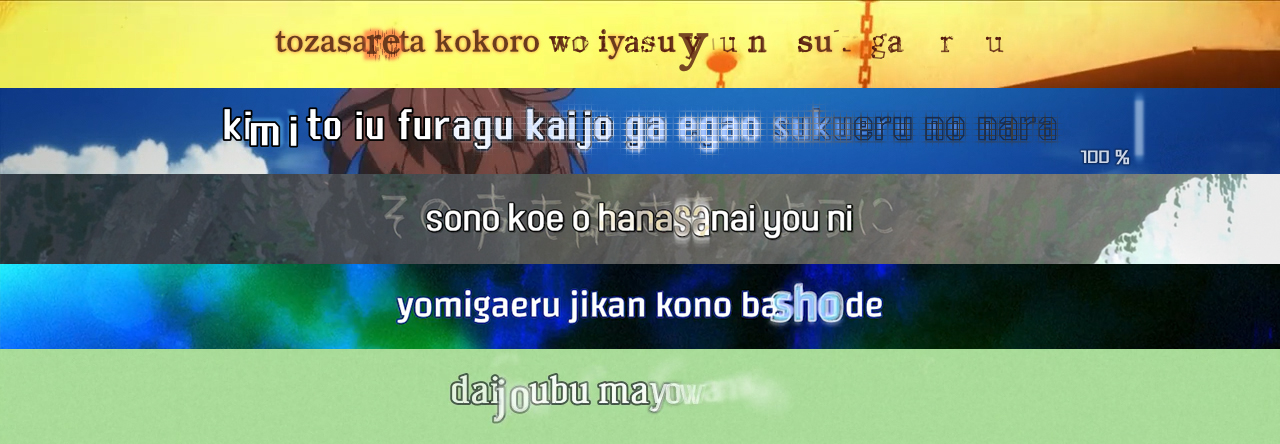
An easy way to create KFX (Karaoke Effects) and complex typesetting using the ASS format (Advanced Substation Alpha).
Powered by Python3, PyonFX aims to offer stability, efficiency, and ease of use to anyone who wants to create something more visually complex within ASS.



Documentation
You can find the full documentation of PyonFX, as well as a quick-start guide and examples, on Read The Docs.
Contributing
If you want to contribute to PyonFX, please make sure to review the contribution guidelines.
This project makes use of GitHub issues for tracking requests and bugs only, so please don't use issues for general questions and discussion.
License
This project is licensed under the LGPL v3.0 License — see the LICENSE file for further details.
Acknowledgments
- Youka for the original main functions ideas for NyuFX;
- McWhite for the original functions ideas of his library for NyuFX;
- moi15moi for creating VideoTimestamps and contributing significant improvements to the frame processing utilities;
- Siplas for helping me out in the realization of the current logo for PyonFX;
- Preacer for the name suggestion.
1 maintainer

Metadata
1 maintainer
Release files for pyonfx 0.11.0
For a detailed explanation of source distributions (sdists) and built distributions (wheels), please see the package formats documentation.
Source distribution (sdist)
| File | Size | Uploaded | |
|---|---|---|---|
| pyonfx-0.11.0.tar.gz | 88.2 kB | Details |
Built distribution (wheel)
| File | Interpreter | ABI | Platform | Reset |
|---|---|---|---|---|
| pyonfx-0.11.0-py3-none-any.whl | Python 3 | none | any | Details |
Total release size: 154.2 kB
Release files / pyonfx-0.11.0.tar.gz
| Download URL | pyonfx-0.11.0.tar.gz |
|---|---|
| Size | 88.2 kB |
| Tags | Source |
|
SHA-256 checksum How to use checksums |
3b412debcbf6954c3ce46a65ea5d7a6a39cb86bff47d75d600fb1fbb2d61bc19
|
|
BLAKE2b-256 checksum How to use checksums |
7eec1d0af1f5c87b15a7879899d48f963d8247322997108f39bcfa0231db3692
|
| Upload date | |
|
Uploaded using Trusted Publishing? What is trusted publishing? |
Yes |
| Uploaded via |
twine/6.1.0 CPython/3.12.9
|
Provenance
Provenance describes where a file came from. On PyPI, provenance is shared via attestations, which provide a verifiable record of the build or publishing details. View details, limitations and caveats.


PyPI Publish Attestation
PyPI verified that this artifact, at this checksum, originated from the publisher listed below.
Signed by GitHub Actions, verified by PyPI on Jul 19, 2025.
Transparency logRelease files / pyonfx-0.11.0-py3-none-any.whl
| Download URL | pyonfx-0.11.0-py3-none-any.whl |
|---|---|
| Size | 65.9 kB |
| Tags | Python 3 |
|
SHA-256 checksum How to use checksums |
310ea0df92ef5a8b2d011a3350e5bfb46b0f2164d2b292cab09854677b6ddf31
|
|
BLAKE2b-256 checksum How to use checksums |
9c7817b8caaea6256410522e95f33d4cc5a8daede4fb28bbb902053e8d198c80
|
| Upload date | |
|
Uploaded using Trusted Publishing? What is trusted publishing? |
Yes |
| Uploaded via |
twine/6.1.0 CPython/3.12.9
|
Provenance
Provenance describes where a file came from. On PyPI, provenance is shared via attestations, which provide a verifiable record of the build or publishing details. View details, limitations and caveats.
PyPI Publish Attestation
PyPI verified that this artifact, at this checksum, originated from the publisher listed below.
Signed by GitHub Actions, verified by PyPI on Jul 19, 2025.
Transparency log













