

pyOpenRiverCam








pyorc, short for "pyOpenRiverCam" is a fully Open Source library for performing image-based river flow analysis. It is the underlying library for computations on the fully open software stack OpenRiverCam. pyorc can only be successful if the underlying methods are made available openly for all. Currently, we use LSPIV as our central velocimetry method, powered by FF-PIV. See https://github.com/localdevices/ffpiv. We wish to extend this to Space-Time Image Velocimetry (STIV) for conditions that are less favourable for LSPIV using open libraries or extensions to this code.
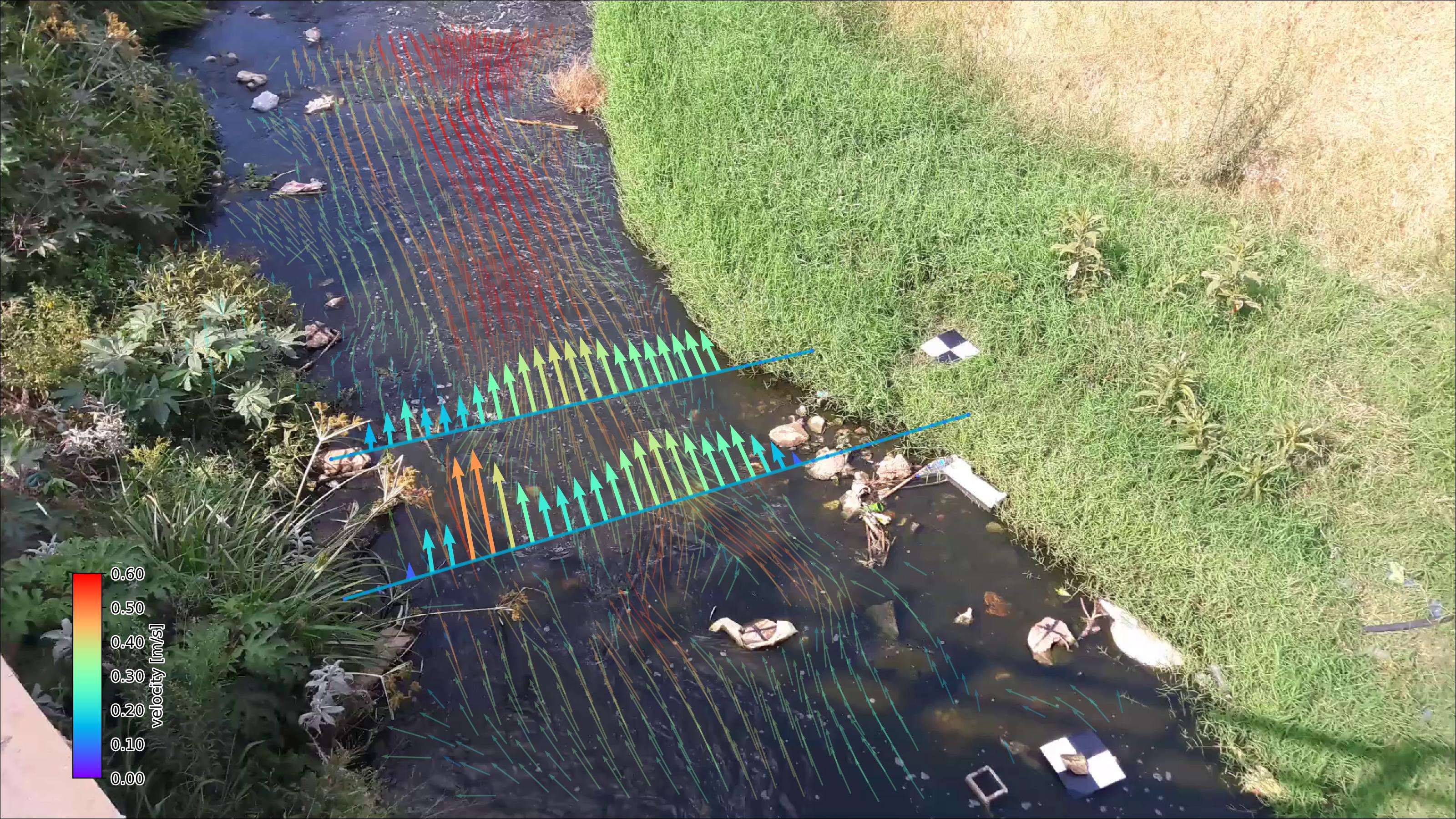
Current capabilities are:
- Reading of frames and reprojection to surface
- Velocimetry estimation at user-defined resolution
- Discharge estimation over provided cross-section
- Plotting of velocimetry results and cross-section flows in camera, geographical and orthoprojected perspectives.
We use the well-known xarray data models and computation pipelines (with dask) throughout the entire library to guarantee an easy interoperability with other tools and methods, and allow for lazy computing.
We are seeking funding for the following frequently requested functionalities:
- Exports to augmented reality videos
- Implementation of additional processing algorithms (STIV)
- Improved nighttime / poor weather conditions processing through learning approaches
If you wish to fund this or other work on features, please contact us at info@rainbowsensing.com.
Installation
You need a python environment. We recommend using the Miniforge project. Download the latest miniforge installer from https://github.com/conda-forge/miniforge and follow the installation instructions before continuing installing pyorc.
virtual environment
To get started with pyorc, we recommend to set up a python virtual environment. This ensures that installed libraries pyorc will not conflict with other libraries or library versions which you may need for other projects.
Setting up a virtual environment can be done with:
python -m venv pyorc_env
this creates a new folder pyorc_env on your disk which contains your virtual environment.
After activating the environment, any package you install will be installed in this environment only.
Activating in Unix/Linux is done as follows:
source pyorc_env/bin/activate
In Windows, the activation script is in a different folder. Type the following to activate the environment.
pyorc_env\Scripts\activate
Installation for direct use
If you simply want to add pyorc to an existing python installation or virtual environment, then follow these instructions.
First activate the environment you want pyorc to be installed in (if you don't care about virtual environments, then simply skip this step). See the above sub-section for information. You can simply install pyorc with all its dependencies as follows:
pip install pyopenrivercam[extra]
The [extra] section ensures that also geographical plotting is supported, which we recommend especially for the
set up of a camera configuration with RTK-GPS measured control points.
Upgrading from pypi with pip
Did you read about a new version and you want to upgrade? Simply activate your virtual environment, type
pip install --upgrade pyopenrivercam[extra]
and then enjoy the latest features.
installation with mamba package manager
If you use mamba as a package manager, then the steps are the same, except for the installation step, which is:
mamba install pyopenrivercam
The version installed may not have the latest underlying libraries and therefore may be slower than the latest PyPi
version. We therefore recommend using pip for installation (see above).
Installation from latest code base
To install pyorc from scratch in a new virtual environment from the code base, go through these steps. Logical cases when you wish to install from the code base are when you wish to have the very latest non-released version.
First, clone the code with git and move into the cloned folder.
git clone https://github.com/localdevices/pyorc.git
cd pyorc
Set up a virtual environment with all dependencies as follows:
conda env create -f envs/pyorc-dev.yml
conda activate pyorc-dev
then install pyorc from the code base as follows:
pip install .
note: pyorc is now installed in a virtual environment called
pyorc-dev. This means that if you wish to run python with pyorc. You need to always first activate this environment before running python (or jupyter). This is done with the following command:
conda activate pyorc-dev
Installation from latest code base as developer
Clone the repository with ssh and move into the cloned folder.
git clone git@github.com:localdevices/pyorc.git
cd pyorc
Setup a virtual developers environment and install the package as follows:
conda env create -f envs/pyorc-dev.yml
conda activate pyorc-dev
pip install -e .
Make sure you install pre-commit hooks so that code is properly linted before pushing.
pip install pre-commit
pre-commit install
Using pyorc
To use pyorc, you can use the API for processing. We also have a command-line interface. Please read our full documentation for further explanation, API description and command-line interfacing.
Acknowledgement
The first development of pyorc has been supported by the World Meteorological Organisation - HydroHub.
License
pyorc is licensed under AGPL Version 3 (see LICENSE file).
pyorc uses the following important libraries and software with said licenses. We do not actively update version numbers in the README. The last update was made on 2026-05-21.
| Package | Version | License |
|---|---|---|
| ffpiv | 0.2.1 | AGPLv3 |
| numpy | >=2.0.0 | BSD License |
| opencv2 | 4.13.0 | MIT License |
| matplotlib | >3.10.0 | Python Software Foundation License |
| geopandas | >=1.0.0 | BSD License |
| pandas | >3.0.0 | BSD License |
| xarray | >2026 | Apache 2.0 |
Project organisation
.
├── CHANGELOG.md        <- Version-based changelog documentation
├── README.md           <- This file
├── LICENSE             <- License file containing AGPLv3.0 license terms
├── TRADEMARK.md        <- Trademark guidelines
├── pyproject.toml      <- setup pipeline compatible with pip
├── environment.yml     <- YML-file for setting up a conda environment with dependencies
├── docs                <- Sphinx documentation source code
    ├── ...             <- Sphinx source code files
├── examples            <- Jupyter notebooks with examples how to use the API
    ├── ...             <- individual notebooks and folder with example data files
├── pyorc               <- pyorc library
    ├── ...             <- pyorc functions and API files
├── tests               <- pytest suite
    ├── ...             <- pytest functions on API level
1 maintainer

Metadata
1 maintainer
Release files for pyopenrivercam 0.9.10
For a detailed explanation of source distributions (sdists) and built distributions (wheels), please see the package formats documentation.
Source distribution (sdist)
| File | Size | Uploaded | |
|---|---|---|---|
| pyopenrivercam-0.9.10.tar.gz | 144.8 kB | Details |
Built distribution (wheel)
| File | Interpreter | ABI | Platform | Reset |
|---|---|---|---|---|
| pyopenrivercam-0.9.10-py3-none-any.whl | Python 3 | none | any | Details |
Total release size: 298.4 kB
Release files / pyopenrivercam-0.9.10.tar.gz
| Download URL | pyopenrivercam-0.9.10.tar.gz |
|---|---|
| Size | 144.8 kB |
| Tags | Source |
|
SHA-256 checksum How to use checksums |
f07a62be838ab8408482ff7baaa8cd86958d0468b6853c18f4573250f8044b7a
|
|
BLAKE2b-256 checksum How to use checksums |
7fb85e9cb4c90a497d62684210ce5cd6e60054e0d88c5eb649e93de66ed4e7ab
|
| Upload date | |
|
Uploaded using Trusted Publishing? What is trusted publishing? |
No |
| Uploaded via |
twine/7.0.0 CPython/3.13.14
|
Release files / pyopenrivercam-0.9.10-py3-none-any.whl
| Download URL | pyopenrivercam-0.9.10-py3-none-any.whl |
|---|---|
| Size | 153.7 kB |
| Tags | Python 3 |
|
SHA-256 checksum How to use checksums |
271f5939c6e9993d46467456aaaf041901df2e2a0dcde96c3e90addd472a9f44
|
|
BLAKE2b-256 checksum How to use checksums |
c41d823a155c295e63d17484756dc0a8c8b13d2617cc606643de8a1f02ea9718
|
| Upload date | |
|
Uploaded using Trusted Publishing? What is trusted publishing? |
No |
| Uploaded via |
twine/7.0.0 CPython/3.13.14
|














