
pyoverload II
[TOC]
Introduction
pyoverload is a package affiliated to project PyCAMIA. It is a powerful overloading tool to enable function overloading for Python v3.6+. See the following example for a brief insight.
>>> from pyoverload import overload
>>> @overload
... def func(x: int):
...     print("func1", x)
...
>>> @overload
... def func(x: str):
...     print("func2", x)
...
>>> func(1)
func1 1
>>> func("1")
func2 1
The most important features of pyoverload are:
- Support of
Jediauto-completion by keyword decorator@overload. Thanks to the type-checking logic designed for@typing.overload, one can get hints of all implementations of a function in all main-stream Python IDEs. - Overloading with a more
C-styledfashion (which is user-friendly for programmers familiar withC/JAVAlanguages). Unlike@typing.overload,@overloaddistributes the arguments to the function with a suitable set of annotations. - Support of all kinds of functions, including functions, methods, class methods, and static methods. One simple decorator for all functional objects.
- Support of multiple annotations, including
None(or blank) for no type constraint, a string to identity the class name without importing, built-in types, and all types defined in packagestypingandpyoverload.typing. - Support of extended types. Using
from pyoverload.typing import *(or simplyfrom pyoverload import *), one can gain access to extended features of built-in types such as array or dictionary representationsint[3]ordict[str:union(int, str)], extended built-in type-determining objects such ascallableor useful auxiliary types such asnull(the type of None) orscalar(python numbers or tensor objects of 0-dimensional size, etc.). - Profound error message listing all available usages and the errors that occurred.
- Type checking directly by
@typehintdecorator.
Installation
This package can be installed by pip install pyoverload, moving the source code to the directory of python libraries (the source code can be downloaded on github or PyPI), or installing the wheel file by pip.
pip install pyoverload
New In pyoverload II
Disadvantages In pyoverload I
The package pyoverload was first uploaded in the year 2021 with feasible features but also the following flaws.
- Overloading functions takes time: The previous version of
pyoverloadused savage strategies like accessing the function stack and brutally changing the environmental variables or hijacking the screen output of the system functionhelpto performoverload, which dramatically slowed down the speed of overloading. - Verbose ways of usages: The previous version of
pyoverloadprovided multiple usages including using the previous function overload as the decorator for new overload registration (registering fashion: similar tofunctools.singledispatch), using a decorator taking a list of functions as arguments to combine them into a single function (collector fashion). These usages were alternative designs under Python grammar, which had no advantage in speed, code readability, and auto-completion. - Complicated type notations: The previous version of
pyoverloadprovided an independent system of type notations. This system includes capitalized types and operations creating extendable types and so on. The notations were complicated and one cannot use built-in functionsisinstanceorissubclassto check the types.
Modification In pyoverload II
To solve the problems mentioned above, we propose to you pyoverload II with the following modifications,
- Accelerated the overloading process by 10+ times. The improved algorithm has accelerated the overloading time from 0.2 mili-second to 0.01 mili-second. However, one should still avoid using
@overloadfor too frequently called functions. - Removed the verbose ways of usage. We simplified the multiple usages into one conventional usage.
- Overrode most of the built-in types. We overrode the built-in types in
typehintso that the types can be used in a simpler and clearer way as shown in the section Usages below. These overrides should not be affecting the functions of the built-in types, thus feel free to use them.
How to Migrate Programs Using pyoverload I Into pyoverload II?
How to keep it running at a minimal cost of revision?
-
If registering or collector fashion of
pyoverload Iwere used, use,from pyoverload.old_version_files_deprecated.override import overload
to retrieve the previous
@overload.Otherwise, you may not change the import of
overloadas using the new@overloadwould be recommended, which can be imported by,from pyoverload import overload
-
If a default overload was defined using postfix
__default__or__0__, place it to the last defined implementation. -
If
pyoverload Ispecific types (e.g. Array, Iterable, Scalar, Type, etc.) were used, one should additionally import the types by,from pyoverload.old_version_files_deprecated.typehint import *
Otherwise, there's no need to change your code for annotations if only built-in types were used.
-
If
@paramsinpyoverload Iwas used, it is recommended to simply change the import line into,from pyoverload import typehint as params
Alternatively, one can also retrieve the previous
@paramsusing,from pyoverload.old_version_files_deprecated.typehint import params
Remember to place this line of import after
"from pyoverload.typhint import *", as one needs to override the variableparams.
How to adjust the codes to the best-recommended status?
-
Use the latest import by,
from pyoverload import overload, typehint
from pyoverload.typings import *
or simply,
from pyoverload import *
-
Use the latest overload system, which includes the sole usage of
@overload: adding the decorator to all implementations, and using@typehintinstead of@paramsfor type-check of a single function. -
Use the latest types for annotations, which do not include capitalized types.
Using the lower-cased type name for all previous capitalized types should be legal except for:
classandlambdawere reserved in Python script, thus one should usetype,class_,orclass_typeto replaceClassandlambda_orlambda_funcforLambda.IntScalarandFloatScalarwere replaced with basic types:intandfloatas they check tensor inputs as well. Usebuiltins.intorint_if one needs strict pythonint.
-
Optional: One may consider using
tag({})instead of a string to specify a type checked with string containment,union({}, {}, ...)instead of a tuple to specify a union of types,avoid({})instead of previous '~' operator to specify a complementation of the given type, andinstance_satisfies({})instead of a function to judge whether the value is acceptable.Moreover, one can use
subclass_satisfies({})with a sole argument of a function that judges whether the value's type is acceptable.All the above operators were available in
pyoverload.typings.
Usages
@overload
One can use @overload before each of the function overloads to build an overloaded function. When the function is called, the inputs will be handed out to the suitable implementation.
Unlike typing.overload, the declaration and implementation do not need to be separated when using @overload. One can directly implement the function overload believing that the input arguments have passed the type-checking and follow the annotations. This saves the user from getting headaches in writing the implementation function from efforts in distinguishing the usages and asserting the types of arguments.
The types of the input arguments are specified by the annotations (type hints) available in python3.6+. All built-in types or types defined in built-in packages types and typing can be added after the colon and used as annotations. One can also use a string, a tuple of types, or types from pyoverload.typings (see section typings for details).
In order to save running time, @overload will not check the usage declarations to judge whether all the declarations contradict each other, thus it tests the usages in the order of definition and runs as the first defined implementation that allows the incoming arguments.
The following code block shows an example use of @overload, with five implementations for four different input types and the other inputs.
>>> from pyoverload import *
>>>
>>> @overload
... def func(x: int):
... 	print("func1", x)
...
>>> @overload
... def func(x: str):
... 	print("func2", x)
...
>>> @overload
... def func(x: int[4]):
... 	print("func3", x)
...
>>> @overload
... def func(x: 'numpy.ndarray'):
... 	print("func4", x)
...
>>> @overload
... def func(x):
... 	print("func5", x)
...
>>> import numpy as np
>>> func(1)
func1 1
>>> func("1")
func2 1
>>> func([1,2,3,4])
func3 [1, 2, 3, 4]
>>> func(np.array([1,2,3,4]))
func4 [1 2 3 4]
>>> func(1.)
func5 1.0
Though the names of implementations are recommended to be the same function name as in C-styled languages for clarity, different names for different implementations enable the user to call one implementation directly by a specific name, which can also show a clearer logic and accelerate the process. The following part explains the naming rules for the implementations.
The first function overloaded by decorator @overload determines the basic name of the overloaded function. Due to the compatibility with pyoverload I, when the function name ends with '__default__' or '__0__', the two postfixes will be omitted (e.g. def __init__default__() will be regarded as a function with name '__init' instead of '__init__', should use __init____default__() for initializing method instead. This may cause confusion, hence please try to avoid using function names with these two postfixes). We call the final function name (without the two postfixes) the basic name of the overloaded function.
Names for other implementations can be (1) the basic name; (2) a single underline '_' if the overloads are defined in a row; or (3) the basic name followed by postfixes in formats '__{sth.}', '__{sth.}__', or '_{sth.}_'. Note that, if the basic name ends with underline(s), one should use still add more underline(s) as in postfixes, e.g. 'requires_grad___this' (with three underlines before 'this') is a valid overload name for 'requires_grad_' while 'requires_grad__that' (with two underlines before 'that') is not. One can only reduce the underlines when the number of wrapping underlines is the same as the number of underlines at the end of the base name. In the following, we listed a few examples. Please note the number of underlines.
- Base name
'function'can be overloaded with'function','_','function__create','function__default__','function_simple_','function__phrase_tag','function__do_not_end_phrase_tag_with_one_underline__', etc. - Base name
'__init__'can be overloaded with'__init__','_','__init____default','__init____more__','__init___tuple_','__init__simplified__','__init__phrase_tag__', etc. - First function name
'_private_func__default__'can be overloaded with'_private_func','_','_private_func__postfix','_private_func__more__','_private_func_noinput_', etc. - First function name
'__init__default__'does not represent the initial function. It has the base name of'__init'which can only be overloaded with'__init','_','__init__int','__init__list__','__init_default_', etc.
Note that single underline is still valid in postfixes when using formats '__{sth.}', '__{sth.}__'.
Using this @overload will enable the Jedi language server to obtain the overloaded function usage.
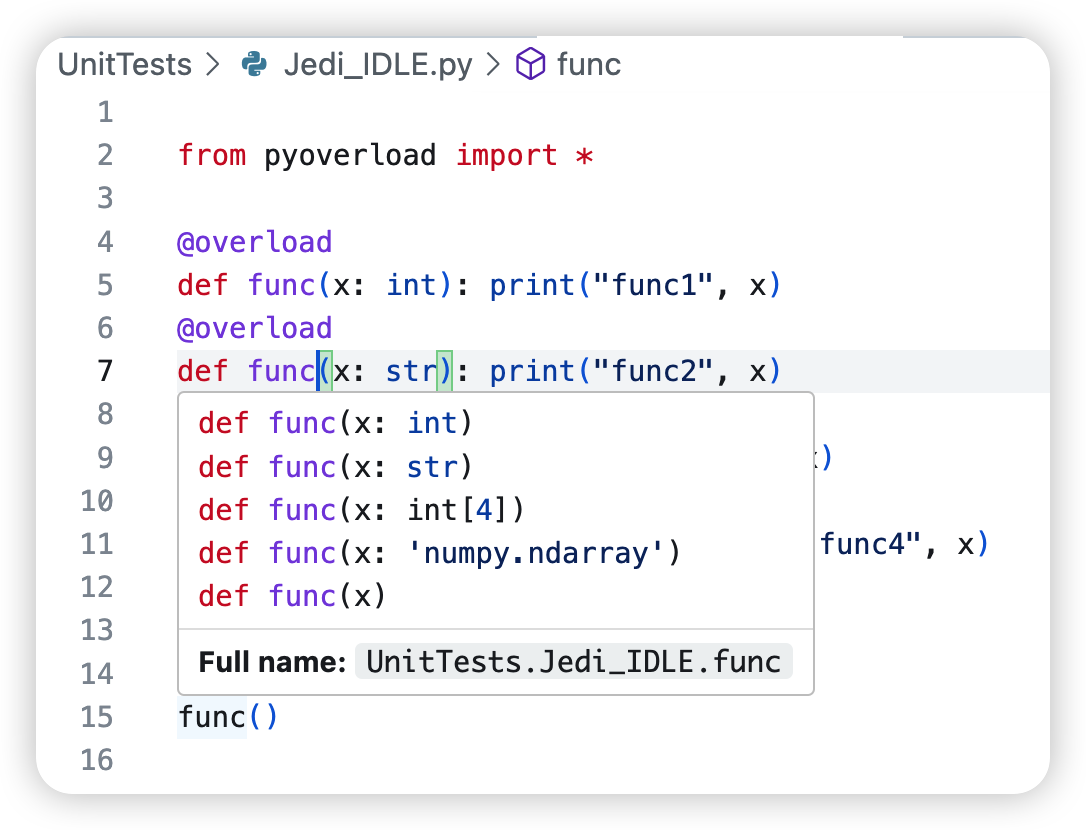
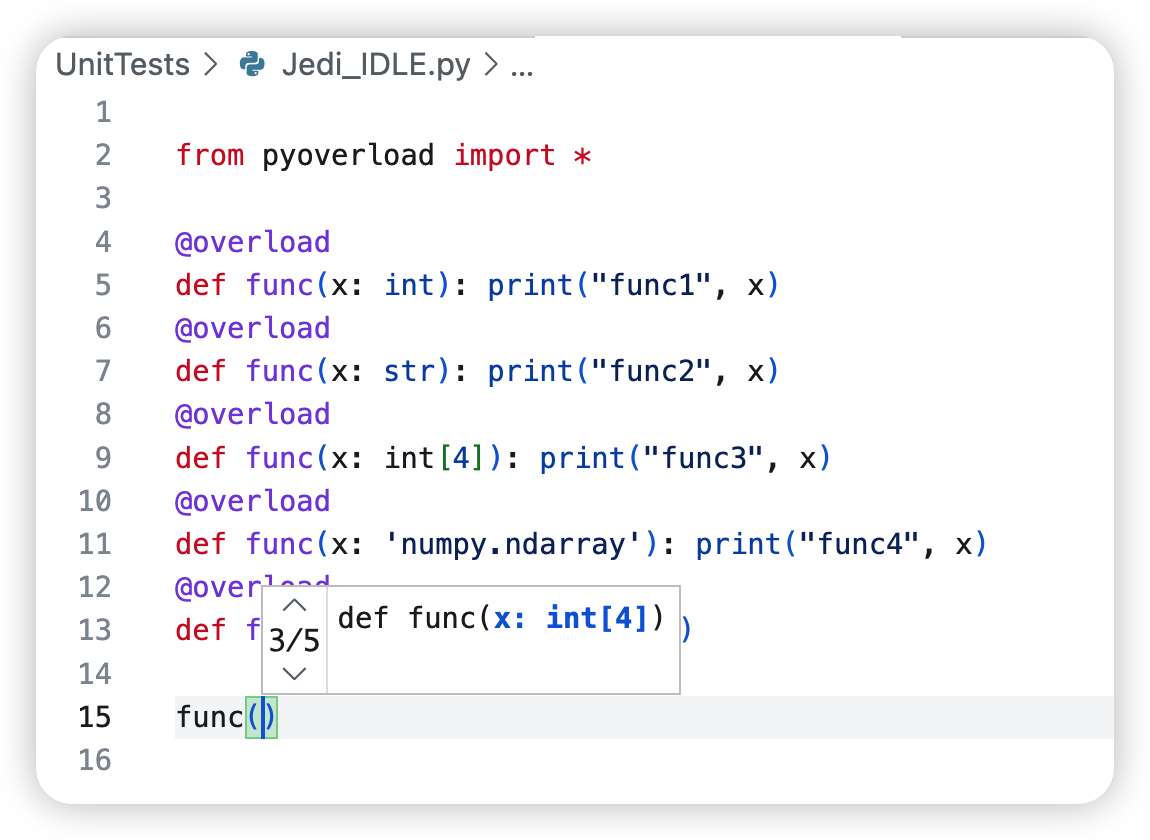
One can still use the typing.overload-styled codes but this means that the user still has to write an independent implementation function without @overload and is not different from not importing pyoverload.
@typehint
Package pyoverload provides the possibility of making the annotations actually take effect: decorating a function by @typehint will enable it to reject arguments with wrong types by triggering TypeHintError.
Needless to say, decorator @overload will add a @typehint type checker for functions without @typehint automatically, hence decorating a function with @overload can also ensure the annotation types are checked.
>>> from pyoverload import typehint
>>> @typehint
... def func(a: int, b, /, c: callable, d:int =2, *e: int, bad=3, **f) -> str:
...     x = 1
...     return repr(c(a, len(b)))
...
>>> func(1, 2, 3, 4)
Traceback (most recent call last):
    [...omitted...]
pyoverload.typehint.TypeHintError: func() needs argument 'c' of type check_instance_by_[callable], but got 3 of type int
Using @typehint decorator before a function with annotations will raise TypeHintError if the input arguments are wrong.
Other usages of @typehint include:
(1) @typehint with keyword arguments:
>>> @typehint(*, check_return=False, check_annot_only=False)
Decorator typehint can be used along with two arguments, check_return=False means the annotation for the return value (e.g. 'str' in def f() -> str:) is omitted, check_annot_only=False means run the function after type-checking.
(2) @typehint can be used as type hints in old versions of Python, it is done by placing the type hints as input arguments just like what we do in function calls. Use '__return__' to identify the type of return value.
>>> from pyoverload import typehint
>>> @typehint(None, int, str, __return__=int)
... def func(self, a, b):
...     print(a, b)
...
>>> func(None, '', 1)
Traceback (most recent call last):
    [...omitted...]
pyoverload.typehint.TypeHintError: func() needs argument 'a' of type int, but got '' of type str
Annotations
legal annotations
The annotations accept the following types:
-
typeobjects, i.e. class objects. This includes built-in types such asint,list, etc.; types fromtypingortypespackages such asIterable, etc.; types defined inpyoverload.typingsand types defined by users. -
functionobjects returning a bool for an instance. This includes oldpyoverload.Typeobjects now inpyoverload.old_version_files_deprecated.typehintor built-in functions such ascallable. One can define one of them individually and make this a type object byinstance_satisfies(func).P.S. If one has a function that takes the input of a
type, useclass_satisfies(func)instead. -
strobjects. One can use the full name (with or without the module name) to identify a type when it is not imported. Usetag(str)to make it atypeobject and accelerate the program.P.S. Note that if one needs str to make notes as follows, please use
note(str)instead, string objects will be regarded as type specifiers.def pow(arg1: "numpy.array", arg2: float) -> note("the power of a matrix"): ...
-
listobject. This is only available for the'*'variable argument: see the following example,def size3d(*sizes: [int, int, int]): ... def rgba(*args: [int, int, int, float]): ...
The above annotation constrains the argument
sizesto be a list of 3 integers andargsto be 3 integers for RGB and a floating point for apparency.The following example shows the two ways of using ellipsis:
- the first function will test the types of the first and last argument inputs;
- the second will test all the inputs making sure each of the arguments is an array except the last one.
Note that all ellipsis can represent empty tuples hence please use
(array, array[...], int)for "one or more arrays".def concat(*arrays: [array, ..., int]): ... def concat(*arrays: [array[...], int]): ...
Using
typefor the'*'argument will constrain all values with the same type. -
dictobject. This is only available for the'**'variable keyword argument: see the following example,def rgba(**kwargs: dict(r=int, R=int, g=int, G=int, b=int, B=int, a=float, A=float)): ...
It is recommended to use the construction function
dictto generate the dict annotation to avoid frequently using quote signs. The items in this dict object can be massive as long as it covers the tests you want. Technically, the values of this dictionary representing types accept all the objects mentioned in this list as well.Using
typefor the'**'argument will constrain all values with the same type. -
Nonerepresenting no constraint for the argument, it is the same as not giving the annotation but useful in the list of types notation or such. -
tupleobjects with all the elements of types above, indicating a union of all types.
pyoverload.typings
All the types in typings include,
- overrode built-in objects:
type(orclass_,class_type),object,bool,int,float,complex,property,classmethod,staticmethod,str,bytearray,bytes,memoryview,map,filter, and iterable objectslist,tuple,dict,set,reversed,frozenset,zip,enumerate. One can use them just as built-in objects do. - extended scalar object types:
long,double,rational,real,number,scalar,null. Among these,short,long,double,rational,real,numberare aliases ofint,int,float,float(rational: currentlyfloatbut may be changed into a brand newtypein future versions),(int, float), and(rational, int, float, complex)respectively. The scalar type represents the scalars of tensor packages andnullis the type ofNone. - extended functional types:
callable,functional,lambda_(orlambda_func),method,function,builtin_function_or_method,method_descriptor,method_wrapper,generator_function. Among these, the functioncallablecan also be used as atypeforisinstance,functionalis all non-class callable items (which can also be called directly), andgenerator_functionis functions usingyield. The rest of the objects are built-in objects that were not directly provided for users and are now available (lambda type is renamed aslambda_funcas the wordlambdais reserved in Python for lambda function creation). - extended iterable types:
array,iterable,sequencewherearrayincludes the tensor objects fornumpyortorch, etc.iterableis all objects iterable with itself being able to be called directly as a judging function.sequenceis an iterable object with length (i.e.typing.Sized), includinglist,tuple, etc. - extended generator types:
range,generator,zip,enumerate. One can use subscript to constraint their length, or element type, but this is not recommended as it will go through the whole generator. In addition, some generators that can not be deep-copied can not be accessed without altering the generator itself, hence it is recommended to cast them into a list if it is necessary to constrain the size or element type. - type
dtypefor tensor objects. One can usedtype(torch.int),dtype('int32')ordtype(int)to generate dtypes, which are subclasses ofdtype. - extended types obtained by type creators (namely meta classes):
class_satisfies(ortype_satisfies),instance_satisfiescreates types by functions;notecreates a skip-checking type with notes;tagcreates a type using type name;avoid,intersection(orintersect,insct),unionperforms logical operations on type sets (operators'~','&','|'are more recommended here as their aliases).ArrayTypecreates iterable types with a given element type and size.
For all of the built-in types, only super and the error types were not overrode.
type operations
One can use the following expressions to identify more complicated types. Most of the operations in pyoverload I are still functioning, except for the extendable argument with '+' (which is officially deprecated) and the element-type-specifier with '@' (which is replaced with more direct ways: list[[int, ...]] or dict[str:int]).
- Not operation:
'~'. Use the invert operators before a type to change it to complement. e.g.~intmeans non-integer types. - And operation:
'&'or'*'. Use the intersect operators among types to express their common subclass. e.g.int & scalarmeansintdtypeobjects;float[...] * array * scalarmeans float tensor scalar objects. - Or operation:
'|'or'+'. Use the uniting operators among types to express their union. This is equivalent to the tuple expression. e.g.real = int | floatis the type for bothintorfloatobjects. - Except operation:
'/'or'-'. Use the excluding operators between two types to - Array operation:
'int[10]'. For non-iterable objects (including those static arrays with non-changeable elements such asstr,bytearray,bytes,memoryview,map, andfilter), using subscript behind results in a type meaning an iterable with elements of the previous type. e.g.int[10]means an iterable of int with length 10. - Subscript operation:
'list[int, 10]'. For iterable objects, one can add the element type and size together in the subscript to identify the detailed structure. All the below expressions are valid.'list[int]': alistofints.'list[10]': alistof length10.'list[int, 10]'or'list[int][10]': alistof10ints.'list[(int, float),][10]': alistof10elements of typeintorfloat(Note: add an additional comma if no size is given).'list[3][list[2]]': a nestedlistwith3items, each alistof length2, namely a3x2list.'list[[int, str]]': alistof2elements with the first element anintand the second astr.'list[[int, float, ..., str]]': alistwith the first two elements anintand afloatand with the last element astr. This also supports all the usages of ellipsis, including the'*[...]'representation, please see [the list annotation ](#legal annotations) for more details.'dict[str, int, 10]': adictof10elements withstrkeys andintvalues.'dict[str:int, 10]'or'dict[str:int][10]': the same as above.'range[str][10]': arangeof length10and elements of typestr(though it represents an empty set as elements in a range object would definitely beint).'zip[str, int, int][-1]': azipof arbitrary size and a three-element tuple for each item, which the typesstr,int, andintrespectively.'array[torch.Tensor, torch.int, 20, 40, 11]'or'array[torch.Tensor:torch.int][20][40][11]': an array of typetorch.Tensor, withdtypetorch.int, and size(20, 40, 11).'dtype(int)[20, ..., 11]': an array of dtypeints, and of the first dimension size20and size for the last dimension11. One can also use the ellipsis notation forshape. Consequently,'[...]'means arbitrary size.'real[...][...]': a 2D real matrix. Note that (1) multiple ellipses are only allowed in one-dimension-a-bracket representation with each representing a dimension with arbitrary size (which is equivalent to'-1') and (2) a single'[...]'representation is reserved for arbitrary size with any number of dimensions, use'[-1]'instead.'dtype(torch.float32)': a scalartorch.Tensorobject (ofdtypetorch.float32and sizetuple()).
- Compound operation:
'list<<int>>[10]'. It is aC-styledexpression which is equivalent to the subscriptions above except that the element type and size must be given together. e.g.list<<int>>[10] = list[int][10]ordict<<(str, int)>>[] = dict[str:int]. - Length operation:
len(list[10, 20]) = 200. The built-in method'len'can obtain the size of iterative types.-1is returned for unspecific size.
pyoverload.dtypes
pyoverload provides aliases for dtypes as well. Use the following import to find them,
from pyoverload.dtypes import *
All available dtypes in numpy are available here, with those that didn't name after bits used followed by an '_', i.e. use short_ for short integers and int16 without '_' for 16-bit integers.
The names of major data types, i.e. 'bool_', 'int_', 'float_', 'complex_', represent all the relevant datatypes. This is different from that in PyTorch (where 'int' represents 'int32', etc.).
Docstring
pyoverload also provides all implementations as well as the docstring defined in the first implementation in the docstring of the overloaded function.
crop_as:__register__[...omitted...]
    @overload registered function at: 'batorch.tensorfunc.crop_as', with the following usages:
        crop_as(x: array, y: tuple, center: tuple, fill: number= 0, *) -> array
        crop_as(x: array, y: array, center: tuple, fill: number= 0) -> array
        crop_as(x: array, y: [tuple | array], fill: number= 0, *) -> array
        crop_as(x: array, *y: int) -> array

        crop an array `x` as the shape given by `y`.

        Args:
            x (array): The data to crop (or pad if the target shape is larger).
                Note that only the space dimensions of the array are
                cropped/padded by default.
            y (array or tuple): The target shape in tuple or another array
            	to provide the target shape.
            center (tuple, optional): The center of the target box. Defaults
            	to the center of x's shape.
                Note: Do calculate the center w.r.t. input `x` if one is
                expanding the tensor, as `x`'s center coordinates in y-space
                is different from `y`'s center coordinates in x-space (which is correct).
            fill (number, optional): The number to fill for paddings. Defaults to 0.
Errors
OverloadError
When an overloaded function receives arguments that are not suitable for all implementations, an OverloadError will be raised to tell you all the valid implementations as well as their error messages.
>>> from pyoverload import overload
>>> @overload
... def func(x: int):
...     print("func1", x)
...
>>> @overload
... def func(x: str):
...     print("func2", x)
...
>>> func(1.)
Traceback (most recent call last):
    [...omitted...]
pyoverload.overload.OverloadError: No func() matches arguments 1.0. All available usages are:
func(x: int): [TypeHintError] func() needs argument 'x' of type int, but got 1.0 of type float
func(x: str): [TypeHintError] func() needs argument 'x' of type str, but got 1.0 of type float
In the above example, the function is available for all two Implementations but none of them takes the float 1..
TypeHintError
This error is raised when the input arguments do not satisfy the type hint.
HintTypeError
This error is raised as an alias of TypeError thrown during type hint checking.
Suggestions
- The
overloadtakes extra time for delivering the arguments, hence using it for functions requiring fast speed or frequent calls is not recommended. - Do use
@typehintfor functions not overloaded but need typehint constraints instead of using@overloadwithout actually having multiple implementations. This is because@typehintis still faster.
Acknowledgment
@Yuncheng Zhou: Developer
2 maintainers


Metadata
2 maintainers
Release files for pyoverload 2.0.3
For a detailed explanation of source distributions (sdists) and built distributions (wheels), please see the package formats documentation.
Source distribution (sdist)
| File | Size | Uploaded | |
|---|---|---|---|
| pyoverload-2.0.3.tar.gz | 394.8 kB | Details |
Built distribution (wheel)
| File | Interpreter | ABI | Platform | Reset |
|---|---|---|---|---|
| pyoverload-2.0.3-py3-none-any.whl | Python 3 | none | any | Details |
Total release size: 794.8 kB
Release files / pyoverload-2.0.3.tar.gz
| Download URL | pyoverload-2.0.3.tar.gz |
|---|---|
| Size | 394.8 kB |
| Tags | Source |
|
SHA-256 checksum How to use checksums |
0be05b189696b57b358566d5cf2a7148a611a0173c6b493c206ce2a25b1c3b5c
|
|
BLAKE2b-256 checksum How to use checksums |
7f08a4b9bf91a82065395bf576d73f7c71a5c812472994c2a3ec886dede0df35
|
| Upload date | |
|
Uploaded using Trusted Publishing? What is trusted publishing? |
No |
| Uploaded via |
twine/5.0.0 CPython/3.11.4
|
Release files / pyoverload-2.0.3-py3-none-any.whl
| Download URL | pyoverload-2.0.3-py3-none-any.whl |
|---|---|
| Size | 399.9 kB |
| Tags | Python 3 |
|
SHA-256 checksum How to use checksums |
a7b420f7ad8f037d3d73513b8e27691c97722cc5e518c8b492d49084e8bbc85d
|
|
BLAKE2b-256 checksum How to use checksums |
529f35761bccaf2711982d6b37b603d3f496ee1dfc26da0ec91288b74c34e082
|
| Upload date | |
|
Uploaded using Trusted Publishing? What is trusted publishing? |
No |
| Uploaded via |
twine/5.0.0 CPython/3.11.4
|














