
pyparsing-highlighting
Syntax highlighting with pyparsing, supporting both HTML output and prompt_toolkit–style terminal output. The PPHighlighter class can also be used as a lexer for syntax highlighting as you type in prompt_toolkit. It is compatible with existing Pygments styles.
The main benefit of pyparsing-highlighting over Pygments is that pyparsing parse expressions are both more powerful and easier to understand than Pygments lexers. pyparsing implements parsing expression grammars using parser combinators, which means that higher level parse expressions are built up in Python code out of lower level parse expressions in a straightforward to construct, readable, modular, well-structured, and easily maintainable way.
See the official pyparsing documentation or my unofficial (epydoc) documentation; read the pyparsing-highlighting documentation on readthedocs.
Requirements
Python 3.5+
Note that PyPy, a JIT compiler implementation of Python, is often able to achieve around 5x the performance of CPython, the reference Python implementation.
prompt_toolkit 2.0+
Pygments (optional; needed to use Pygments styles)
Installation
pip3 install -U pyparsing-highlightingOr, after cloning the repository on GitHub:
python3 setup.py install(or, with PyPy):
pypy3 setup.py installExamples
The following code demonstrates the use of PPHighlighter:
from pp_highlighting import PPHighlighter
from prompt_toolkit.styles import Style
import pyparsing as pp
from pyparsing import pyparsing_common as ppc

def parser_factory(styler):
    a = styler('class:int', ppc.integer)
    return pp.delimitedList(a)

pph = PPHighlighter(parser_factory)
style = Style([('int', '#528f50')])
pph.print('1, 2, 3', style=style)
This prints out the following to the terminal:
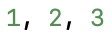
The following code generates HTML:
pph.highlight_html('1, 2, 3')The output is:
<pre class="highlight"><span class="int">1</span>, <span class="int">2</span>, <span class="int">3</span></pre>There is also a lower-level API—pph.highlight('1, 2, 3') returns the following:
FormattedText([('class:int', '1'), ('', ', '), ('class:int', '2'), ('', ', '), ('class:int', '3')])
A FormattedText instance can be passed to prompt_toolkit.print_formatted_text(), along with a Style mapping the class names to colors, for display on the terminal. See the prompt_toolkit formatted text documentation and formatted text API documentation.
PPHighlighter can also be passed to a prompt_toolkit.PromptSession as the lexer argument, which will perform syntax highlighting as you type. For examples of this, see examples/calc.py, examples/json_pph.py, examples/repr.py, and examples/sexp.py. The examples can be run by (from the project root directory):
python3 -m examples.calc
python3 -m examples.json_pph
python3 -m examples.repr
python3 -m examples.sexp1 maintainer

Metadata
1 maintainer
Release files for pyparsing-highlighting 0.2.8
For a detailed explanation of source distributions (sdists) and built distributions (wheels), please see the package formats documentation.
Source distribution (sdist)
| File | Size | Uploaded | |
|---|---|---|---|
| pyparsing-highlighting-0.2.8.tar.gz | 6.6 MB | Details |
Built distribution (wheel)
| File | Interpreter | ABI | Platform | Reset |
|---|---|---|---|---|
| pyparsing_highlighting-0.2.8-py3-none-any.whl | Python 3 | none | any | Details |
Total release size: 6.6 MB
Release files / pyparsing-highlighting-0.2.8.tar.gz
| Download URL | pyparsing-highlighting-0.2.8.tar.gz |
|---|---|
| Size | 6.6 MB |
| Tags | Source |
|
SHA-256 checksum How to use checksums |
cfd8e05f27c10fa878fbac202116b005e5f77367c2a55aef17eead732c63cd5f
|
|
BLAKE2b-256 checksum How to use checksums |
b3bf1c1350201ec40809a0663c607397476214fe156facf57e4838af58f84b6d
|
| Upload date | |
|
Uploaded using Trusted Publishing? What is trusted publishing? |
No |
| Uploaded via |
twine/1.13.0 pkginfo/1.5.0.1 requests/2.22.0 setuptools/41.0.1 requests-toolbelt/0.9.1 tqdm/4.32.1 CPython/3.7.3
|
Release files / pyparsing_highlighting-0.2.8-py3-none-any.whl
| Download URL | pyparsing_highlighting-0.2.8-py3-none-any.whl |
|---|---|
| Size | 8.9 kB |
| Tags | Python 3 |
|
SHA-256 checksum How to use checksums |
e181e62468d1e2d48016230b695b252ab37d74ba9bd7d846260da7a43da14ff2
|
|
BLAKE2b-256 checksum How to use checksums |
e479f9eeb5a0700473ac5d74922484993a806fd11b0eb06084c99e7e1b16dcfa
|
| Upload date | |
|
Uploaded using Trusted Publishing? What is trusted publishing? |
No |
| Uploaded via |
twine/1.13.0 pkginfo/1.5.0.1 requests/2.22.0 setuptools/41.0.1 requests-toolbelt/0.9.1 tqdm/4.32.1 CPython/3.7.3
|














