
A command line tool for compressing PDF files

Project description
pdfc – PDF Compressor for the Command Line
A command-line tool for compressing and optimising PDF files using configurable rasterization, colour mode, sharpening and contrast settings.



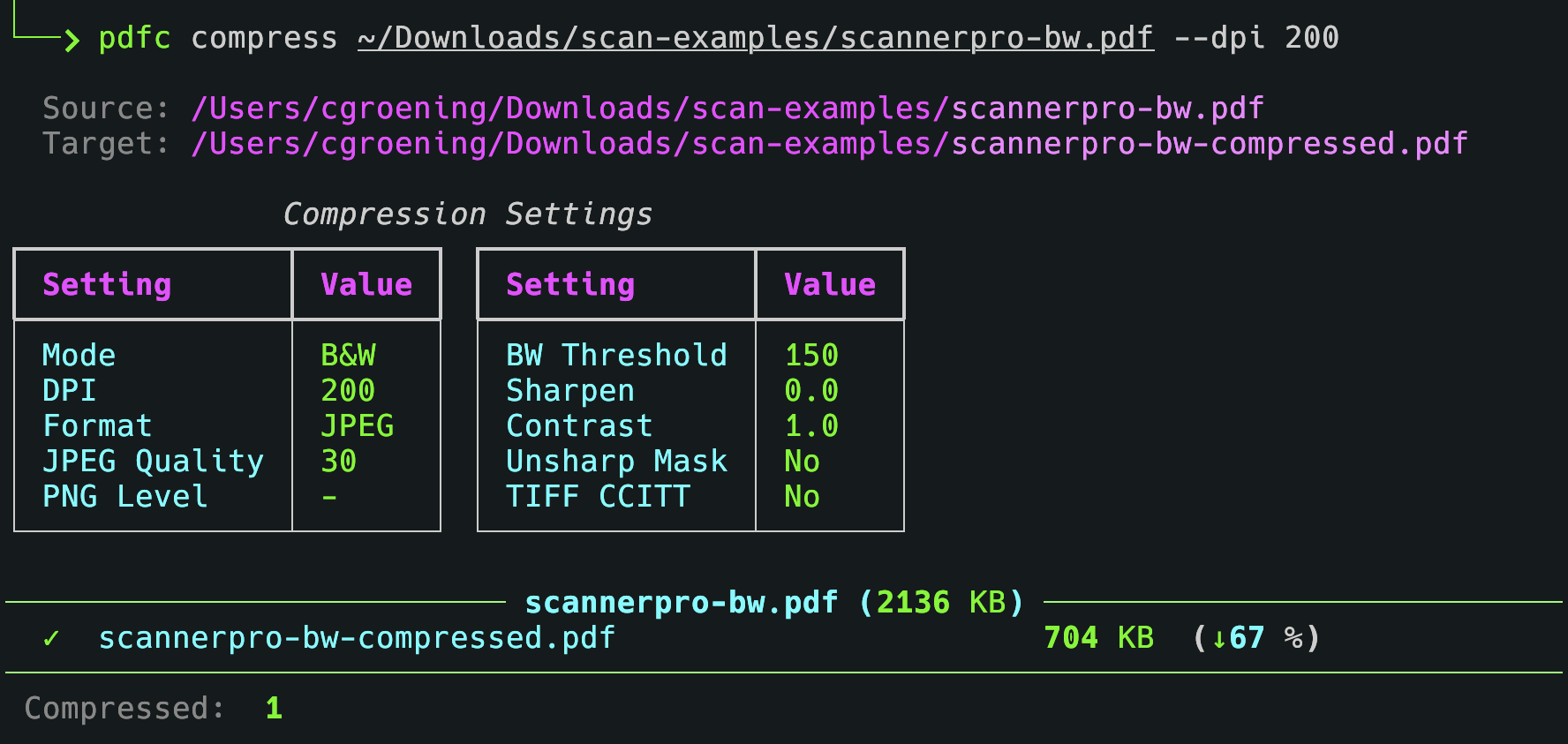
Compressing a PDF file:
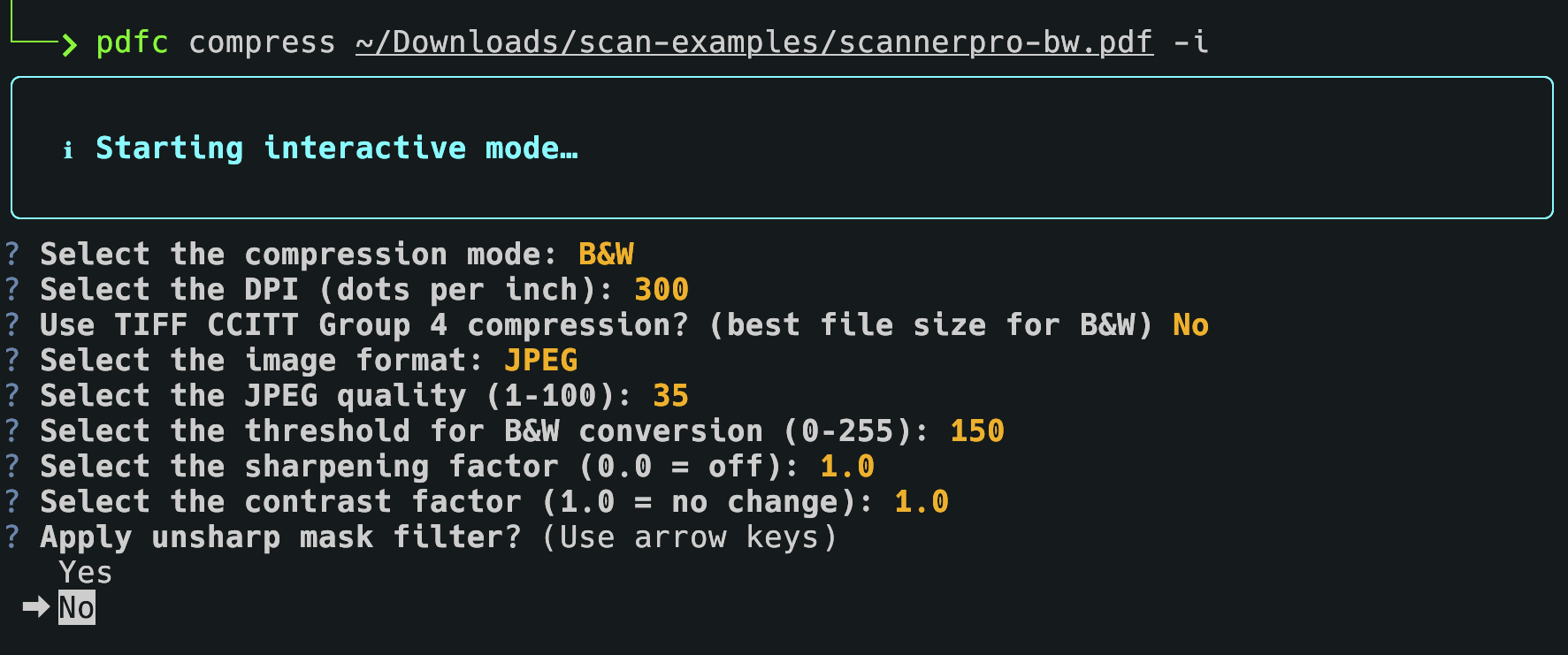
Interactive mode:
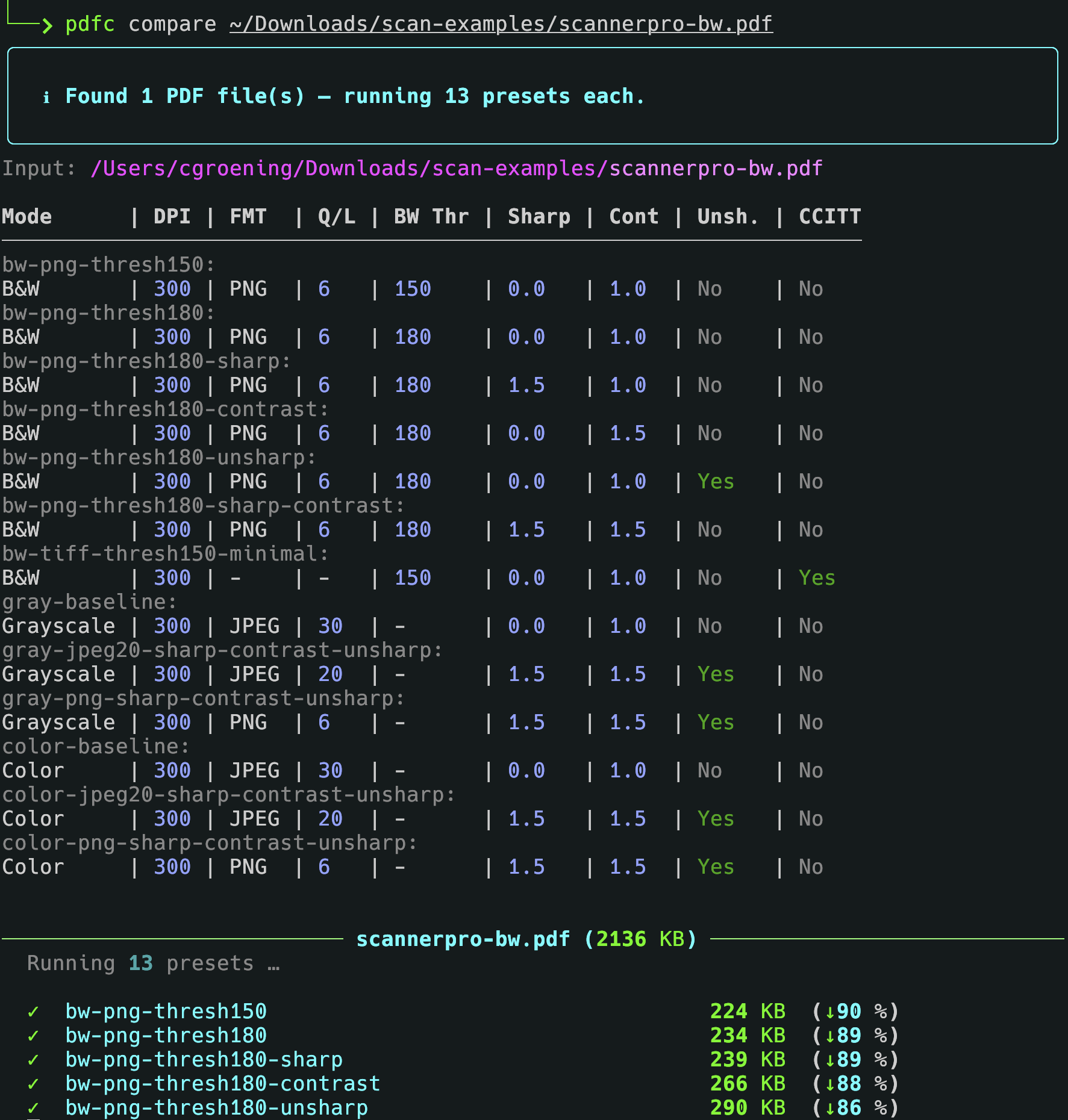
Comparing compression presets:
Requirements
- Python 3.11+
- Poppler (for
pdf2image)- macOS:
brew install poppler - Ubuntu/Debian:
sudo apt install poppler-utils
- macOS:
Installation
pip install .
For development (includes pytest, coverage):
pip install ".[dev]"
Commands
compress – Compress one or more PDF files
pdfc compress [OPTIONS] INPUT_PATH [OUTPUT_PATH]
| Argument / Option | Short | Description |
|---|---|---|
--interactive |
-i |
Collect all settings interactively via prompts |
--verbose |
-v |
Verbose output |
--mode |
-m |
Colour mode: color, gray or bw |
--dpi |
-d |
Resolution for rasterization in dots per inch (default: 300) |
--jpeg-quality |
-q |
JPEG quality 1–100 (default: 30). Mutually exclusive with --png-compression-level |
--png-compression-level |
-p |
PNG compression level 0–9 (default: 6). Mutually exclusive with --jpeg-quality |
--threshold |
-t |
B&W threshold 0–255 (default: 150). Only used in bw mode |
--sharpen |
-s |
Sharpening factor 0.0–3.0 (default: 0.0 = off) |
--contrast |
-c |
Contrast factor 0.0–3.0 (default: 1.0 = no change) |
--unsharp-mask |
-u |
Apply PIL UnsharpMask filter |
--tiff-ccitt |
-T |
Use TIFF CCITT Group 4 as intermediate format (bw mode only) |
--no-skip |
Process all files, including files ending with -compressed.pdf (which are skipped by default when input is a directory) |
|
INPUT_PATH |
PDF file or directory of PDF files to compress | |
OUTPUT_PATH |
Output file (single-file mode only). Defaults to <input>-compressed.pdf |
Examples:
# Compress a single file to B&W at 300 DPI
pdfc compress input.pdf -m bw -d 300

# Compress with a custom output path
pdfc compress input.pdf output.pdf -m gray -d 200 -q 50

# Compress all PDFs in a folder using defaults (skips *-compressed.pdf files)
pdfc compress /path/to/folder

# Compress all PDFs in a folder, including already compressed files
pdfc compress /path/to/folder --no-skip

# Choose settings interactively
pdfc compress input.pdf -i
compare – Compare compression configurations side by side
Runs all presets defined in ~/.config/pdfc/presets.yaml against one or more
PDF files and writes the results into a subdirectory named after each input file.
Fields:
| Field name | Type | Range | Default | Description |
|---|---|---|---|---|
name |
string |
[a-zA-Z0-9_-]+ |
- |
Required. Used as the output file name. |
mode |
string |
color, gray or bw |
bw |
Color space of the output: Black & white (1-bit after threshold conversion), Grayscale (8-bit) or Color (RGB, 24-bit) |
dpi |
int |
> 0 |
300 |
Resolution for rasterization. Strongly affects both quality and file size. |
threshold |
int |
0-255 |
150 |
Threshold for B&W conversion. Pixels above the value → white, below → black. Higher value = more white = smaller file. |
jpeg_quality |
int |
1-100 |
30 |
JPEG quality. Lower values = smaller file, lower image quality. Enables JPEG mode. Cannot be combined with png_compression. |
png_compression |
int |
0-9 |
7 |
PNG compression level. PNG compression level. Higher values lead to smaller files and longer processing times. Enables PNG mode. Cannot be combined with jpeg_quality. |
sharpen |
float |
0.0-3.0 |
1.0 |
Sharpening filter (PIL ImageEnhance.Sharpness). 0.0 → off, 1.0 → no change, >1.0 → sharper. |
contrast |
float |
0.0-3.0 |
1.0 |
Contrast filter (PIL ImageEnhance.Contrast). 1.0 → no change, >1.0 → more contrast. |
unsharp_mask |
bool |
true/false |
false |
PIL UnsharpMask filter (radius=2, percent=150, threshold=3). Sharpens edges before conversion. |
tiff_ccitt |
bool |
true/false |
false |
Use TIFF CCITT Group 4 intermediate format |
pdfc compare [OPTIONS] INPUT_PATH
| Option | Short | Description |
|---|---|---|
--dpi |
-d |
Resolution for rasterization (default: 300) |
--verbose |
-v |
Verbose output |
Examples:
# Compare all presets for a single file
pdfc compare input.pdf

# Compare all presets for all PDFs in a folder at 200 DPI
pdfc compare /path/to/folder --dpi 200
Output is written to a subdirectory next to the input file:
input.pdf
input/
  preset-name-1.pdf
  preset-name-2.pdf
  ...
Presets file
The compare command reads presets from ~/.config/pdfc/presets.yaml.
Each preset defines a named compression configuration.
Example:
presets:
  - name: bw-300
    mode: bw
    dpi: 300
    threshold: 150
    sharpen: 1.5
    contrast: 1.5

  - name: gray-150
    mode: gray
    dpi: 150
    jpeg_quality: 40

  - name: color-200
    mode: color
    dpi: 200
    jpeg_quality: 60
    sharpen: 1.3
    contrast: 1.3
See example-presets.yaml for more presets to try.
Available preset fields:
| Field | Type | Description |
|---|---|---|
name |
string | Required. Used as the output file name |
mode |
string | color, gray or bw |
dpi |
int | Resolution for rasterization |
threshold |
int | B&W threshold 0–255 |
jpeg_quality |
int | JPEG quality 1–100 |
png_compression |
int | PNG compression level 0–9 |
sharpen |
float | Sharpening factor 0.0–3.0 |
contrast |
float | Contrast factor 0.0–3.0 |
unsharp_mask |
bool | Apply PIL UnsharpMask filter |
tiff_ccitt |
bool | Use TIFF CCITT Group 4 intermediate format |
Compression modes
| Mode | Description |
|---|---|
color |
Keeps full colour. Best for photos and colour diagrams |
gray |
Converts to greyscale. Good balance of size and readability |
bw |
Converts to black & white. Smallest file size, best for text-only scans |
Parameter reference
Sharpen (-s / --sharpen)
Range: 0.0 to 3.0 (float)
| Value | Effect | Use case |
|---|---|---|
| 0.0 | No sharpening (off) | Default |
| 0.5 | Slight blur | Noise reduction |
| 1.0 | Original (no change) | Baseline |
| 1.2–1.5 | Light sharpening | Recommended for clean documents |
| 1.5–2.0 | Medium sharpening | Good for text |
| 2.0–2.5 | Strong sharpening | For blurry scans |
| 2.5–3.0 | Very strong sharpening | Risk of artefacts |
| >3.0 | Extreme (not allowed) | Too much; artefacts likely |
Visual effect:
sharpen = 0.5:  T e x t   (blurry)
sharpen = 1.0:  Text      (original)
sharpen = 1.5:  Text      (crisper)
sharpen = 2.0:  Text      (very sharp)
sharpen = 3.0:  Text      (over-sharpened, halo artefacts)
Too much sharpening (> 3.0):
- Halos around letters (white/black fringes)
- Noise amplification (grainy look)
- Edge artefacts
- Unnatural appearance
Contrast (-c / --contrast)
Range: 0.0 to 3.0 (float)
| Value | Effect | Use case |
|---|---|---|
| 0.0 | Flat grey (no contrast) | Not useful |
| 0.5 | Reduced contrast | Softer images |
| 1.0 | Original (no change) | Baseline |
| 1.2–1.5 | Slightly increased contrast | Recommended for clean documents |
| 1.5–2.0 | Medium contrast | Good for text, clear separation |
| 2.0–2.5 | Strong contrast | For faded documents |
| 2.5–3.0 | Very strong contrast | Risk of detail loss |
| >3.0 | Extreme (not allowed) | Near binary; details lost |
Visual effect:
contrast = 0.5:  Text  (washed out, grey)
contrast = 1.0:  Text  (original)
contrast = 1.5:  Text  (crisper, more defined)
contrast = 2.0:  Text  (very clear, strong separation)
contrast = 3.0:  Text  (near binary)
Too much contrast (> 3.0):
- Detail loss (everything becomes black or white)
- No more grey tones
- Hard edges without transitions
- Information loss
Interaction between contrast and threshold
Contrast is applied before the B&W threshold. A higher contrast value effectively makes the threshold more aggressive, since pixel values are pushed further apart before the cut-off is applied.
| Scenario | contrast | threshold | Pixel at 140 | Pixel at 160 |
|---|---|---|---|---|
| Low contrast | 1.0 | 150 | stays ~140 → black | stays ~160 → white |
| High contrast | 2.0 | 150 | pushed to ~100 → black | pushed to ~200 → white |
Rule of thumb: increase contrast only as much as needed; combine with the threshold to control where the black/white boundary falls.
Recommended combinations
| Document type | sharpen | contrast | Notes |
|---|---|---|---|
| Clean, digital documents | 1.3 | 1.3 | Subtle improvement, no risk |
| Standard scans | 1.5 | 1.5 | Best balance |
| Blurry or faded scans | 2.0 | 2.0 | Strong improvement, low artefact risk |
| Very poor scans | 2.5 | 2.5 | Maximum recommended |
| Last resort | 3.0 | 3.0 | Artefacts likely |
Recommended parameter ranges (summary)
| Parameter | Minimum | Recommended | Safe maximum | Risky maximum |
|---|---|---|---|---|
| Sharpen | 0.0 (off) | 1.3–2.0 | 2.5 | 3.0 |
| Contrast | 0.0 (grey) | 1.3–2.0 | 2.5 | 3.0 |
Planned features
v0.1 – Initial release
- Skip files with the suffix
-compressed.pdfto avoid re-processing already compressed files, unless flag--no-skipis set - Skip presets for color mode if input file is B&W or grayscale
- Improve/clean output messages when processing files and presets
v0.2 – Presets management
-
presets.yaml: Field to set one preset as default forcompresscommand, warn if missing or multiple defaults - Add
--presetoption tocompresscommand to specify a preset from the presets file, e.g.pdfc compress input.pdf --preset bw-300 - Add command
list-presetswhich lets the user interactively view, add, edit and delete presets in the presets file - Add command
presetwhich lets the user select a preset from the presets file and applies it to one or more PDF files
Release history Release notifications | RSS feed

Download files
Download the file for your platform. If you're not sure which to choose, learn more about installing packages.
Source Distribution
Built Distribution
Filter files by name, interpreter, ABI, and platform.
If you're not sure about the file name format, learn more about wheel file names.
Copy a direct link to the current filters
File details
Details for the file pypdfc-0.1.0.tar.gz.
File metadata
- Download URL: pypdfc-0.1.0.tar.gz
- Upload date:
- Size: 7.4 kB
- Tags: Source
- Uploaded using Trusted Publishing? No
- Uploaded via: uv/0.10.8 {"installer":{"name":"uv","version":"0.10.8","subcommand":["publish"]},"python":null,"implementation":{"name":null,"version":null},"distro":{"name":"macOS","version":null,"id":null,"libc":null},"system":{"name":null,"release":null},"cpu":null,"openssl_version":null,"setuptools_version":null,"rustc_version":null,"ci":null}
File hashes
| Algorithm | Hash digest | |
|---|---|---|
| SHA256 |
47dbe3d2c3c4fcb9d70cd1bace9318eac5f35d89e83e090404f2787123a32d3e
|
|
| MD5 |
c66ede6e6f6657534b4be30e2ddc9a24
|
|
| BLAKE2b-256 |
b58bcdb9fb026710cbaedaccc7561ec9cda76df43046aa1f983ad02deb03d3df
|
File details
Details for the file pypdfc-0.1.0-py3-none-any.whl.
File metadata
- Download URL: pypdfc-0.1.0-py3-none-any.whl
- Upload date:
- Size: 7.3 kB
- Tags: Python 3
- Uploaded using Trusted Publishing? No
- Uploaded via: uv/0.10.8 {"installer":{"name":"uv","version":"0.10.8","subcommand":["publish"]},"python":null,"implementation":{"name":null,"version":null},"distro":{"name":"macOS","version":null,"id":null,"libc":null},"system":{"name":null,"release":null},"cpu":null,"openssl_version":null,"setuptools_version":null,"rustc_version":null,"ci":null}
File hashes
| Algorithm | Hash digest | |
|---|---|---|
| SHA256 |
44f17247645ed9c4fd2c3e6c611b86070f65409fe3f1caef5a813cf3b5be1d81
|
|
| MD5 |
6395506c4d6d3783bf779c05718d42ba
|
|
| BLAKE2b-256 |
56b14fbfa871b9307e00fd2e9b6f0565b0679bae84826e5fec9174f2d97d3dad
|






