
An animated GIF recorder

Project description
Peek - Screen Recorder and Screenshot with Annotation
Cross platform screen recorder with an easy to use interface and annotation features written in Python and PySide6.
Inspired by Peek.
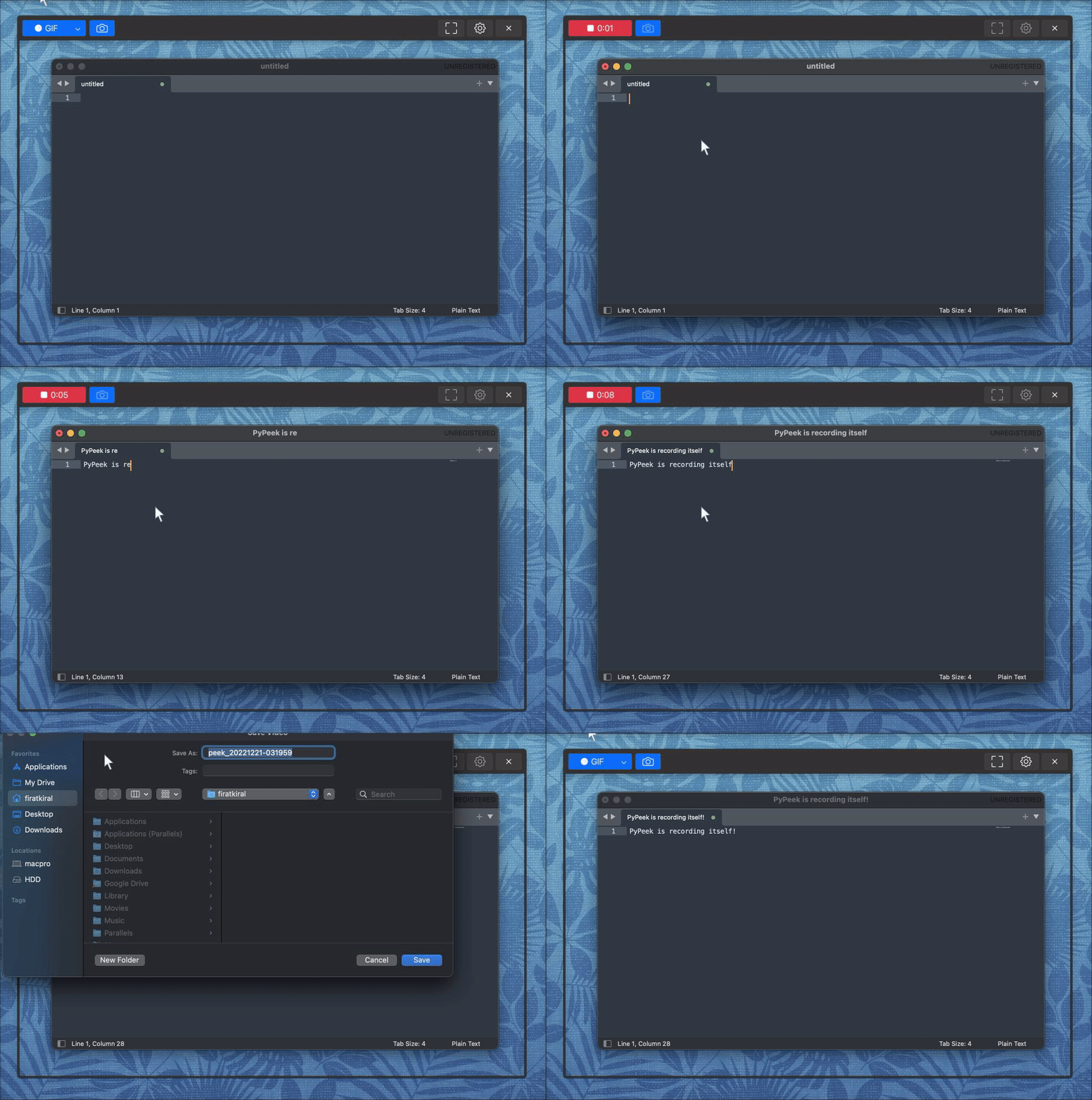
A developer, designer, or a student, you may need to record or capture your screen to create tutorials, report bugs, provide technical support or simply reflect on your own work and progress. And if you have different operating systems on your different machines, it would be great if you could use the same tool on all of them. That's why I created Peek.
Peek is a simple screen recorder that allows you to record your screen as gif or mp4, capture a screenshot as jpg, and annotate your recordings with drawing, text, arrows, and highlights.
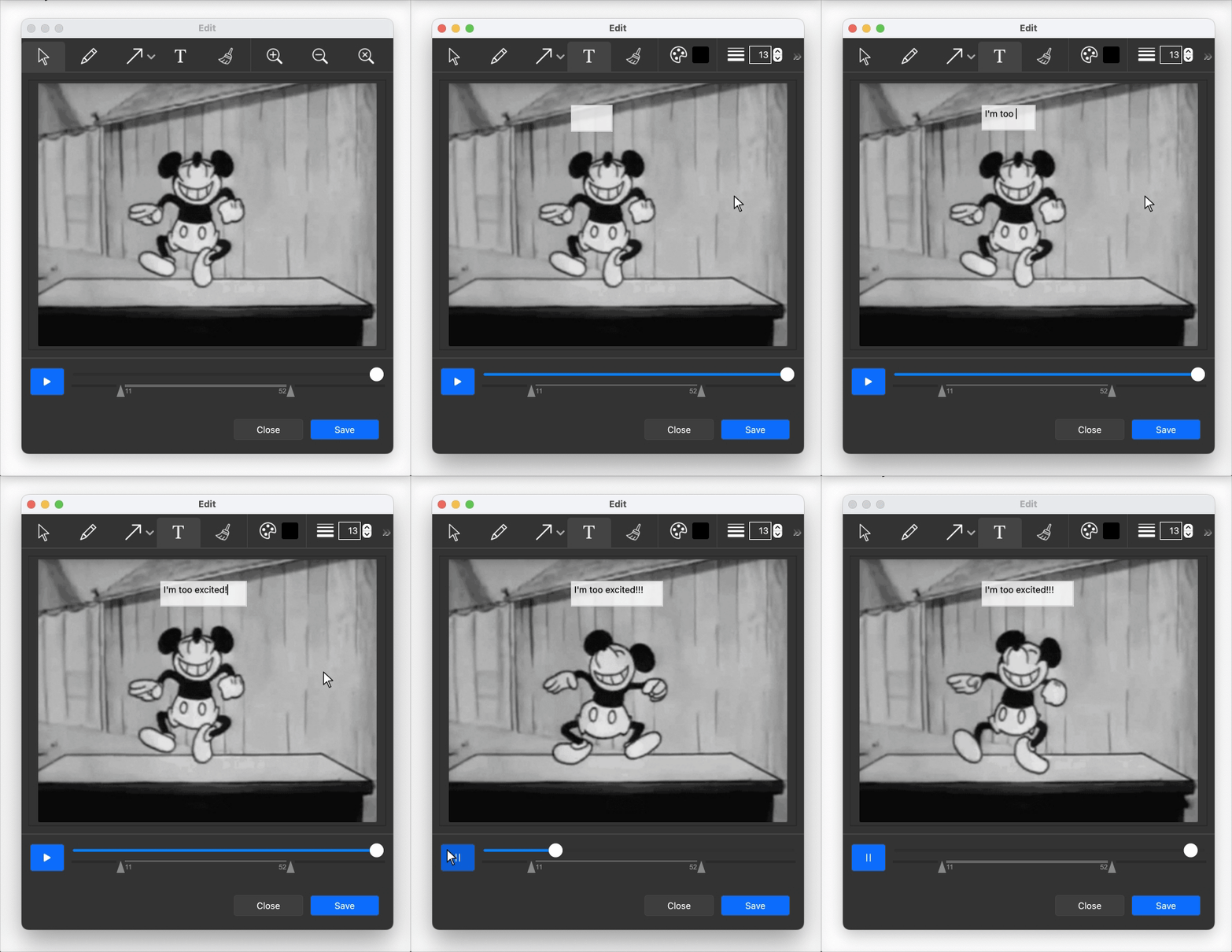
Annotation tool is very useful when you want to highlight a specific area or draw attention to a specific part of your recording. You can add text, arrows or shapes to your recording. Range slider allows you to trim your recording to a desired length. You can create a complete recording with annotation without leaving the app.
Features
- Record your screen as gif or mp4
- Capture a screenshot as jpg or png
- Record a selected area or the whole screen
- Annotation features like drawing, text, arrows, and highlights
- Delay recording start with a countdown
- Limit recording to a fixed time
Download The App:
Install in Python:
Requirements:
-
Python 3.9 or later
-
Ffmpeg [Optional], it will be downloaded if not found in system path.
-
Windows, MacOS, Linux: Debian based distros on Xorg, Classic or X11. No Wayland support yet. (see How to switch to Xorg)
Need help for Linux Wayland support. If you are interested, please create a pull request or open an issue.
Known Issues:
- Linux: "qt.qpa.plugin: Could not load the Qt platform plugin "xcb"...", install the following packages:
sudo apt install libxcb-*
- Linux: "ImportError: libdouble-conversion.so.3: cannot open shared object file: No such file or directory" error, install the following package:
sudo apt install libdouble-conversion3
Intallation:
pip install pypeek
Usage:
pypeek
Create a desktop shortcut:
Make sure you run the pypeek command at least once before creating a shortcut. On Linux it will create an app inside applications, on Windows and MacOS it will create a desktop shortcut.
pypeek --shortcut
Import as a module:
import pypeek

pypeek.show()
Run as a module:
python -m pypeek
Update:
pip install --upgrade pypeek
Uninstall:
pip uninstall pypeek
License
Peek Copyright © 2023
Peek is free software: you can redistribute it and/or modify it under the terms of the GNU General Public License as published by the Free Software Foundation, either version 3 of the License, or (at your option) any later version.
Peek is distributed in the hope that it will be useful, but WITHOUT ANY WARRANTY; without even the implied warranty of MERCHANTABILITY or FITNESS FOR A PARTICULAR PURPOSE. See the GNU General Public License for more details.
You should have received a copy of the GNU General Public License along with Peek. If not, see https://www.gnu.org/licenses/.
Release history Release notifications | RSS feed


Download files
Download the file for your platform. If you're not sure which to choose, learn more about installing packages.
Source Distribution
Built Distribution
Filter files by name, interpreter, ABI, and platform.
If you're not sure about the file name format, learn more about wheel file names.
Copy a direct link to the current filters
File details
Details for the file pypeek-2.10.4.tar.gz.
File metadata
- Download URL: pypeek-2.10.4.tar.gz
- Upload date:
- Size: 402.3 kB
- Tags: Source
- Uploaded using Trusted Publishing? No
- Uploaded via: twine/4.0.2 CPython/3.12.0
File hashes
| Algorithm | Hash digest | |
|---|---|---|
| SHA256 |
79c139e317ef86ebd1a3fb005b3e9046f53e1010e4409155fd69273dcf030d25
|
|
| MD5 |
8d7887c69c649c11accfa174881ac663
|
|
| BLAKE2b-256 |
0c9f27b94e6a69d97c5e9084d7037e43abbf5282fe835e34d1c19da20c65f2a1
|
File details
Details for the file pypeek-2.10.4-py3-none-any.whl.
File metadata
- Download URL: pypeek-2.10.4-py3-none-any.whl
- Upload date:
- Size: 413.7 kB
- Tags: Python 3
- Uploaded using Trusted Publishing? No
- Uploaded via: twine/4.0.2 CPython/3.12.0
File hashes
| Algorithm | Hash digest | |
|---|---|---|
| SHA256 |
82766feebfaad4192a4bd83afa53bad87e1021ae462c527eb1ee07e994ffbc1f
|
|
| MD5 |
ac14f7f71ae60f720106e1f49f91087a
|
|
| BLAKE2b-256 |
1f8d478f227cf649426ca5b56d013370e9fcebf4d0a49ecc71faa763af704e70
|






