
Pypeln

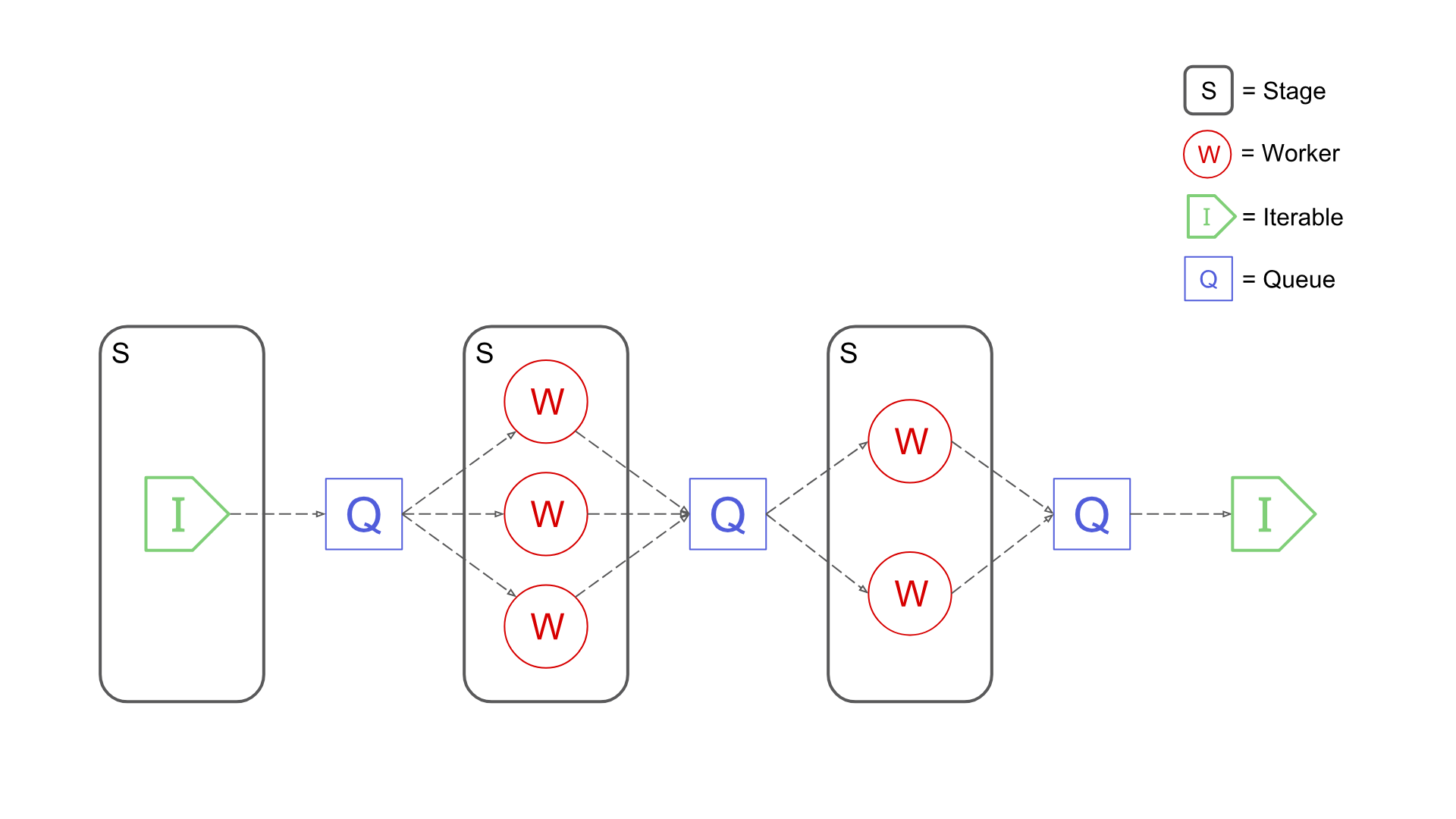
Pypeln (pronounced as "pypeline") is a simple yet powerful Python library for creating concurrent data pipelines.
Main Features
- Simple: Pypeln was designed to solve medium data tasks that require parallelism and concurrency where using frameworks like Spark or Dask feels exaggerated or unnatural.
- Easy-to-use: Pypeln exposes a familiar functional API compatible with regular Python code.
- Flexible: Pypeln enables you to build pipelines using Processes, Threads and asyncio.Tasks via the exact same API.
- Fine-grained Control: Pypeln allows you to have control over the memory and cpu resources used at each stage of your pipelines.
For more information take a look at the Documentation.
Installation
Install Pypeln using pip:
pip install pypeln
Basic Usage
With Pypeln you can easily create multi-stage data pipelines using 3 type of workers:
Processes
You can create a pipeline based on multiprocessing.Process workers by using the process module:
import pypeln as pl
import time
from random import random

def slow_add1(x):
    time.sleep(random()) # <= some slow computation
    return x + 1

def slow_gt3(x):
    time.sleep(random()) # <= some slow computation
    return x > 3

data = range(10) # [0, 1, 2, ..., 9]

stage = pl.process.map(slow_add1, data, workers=3, maxsize=4)
stage = pl.process.filter(slow_gt3, stage, workers=2)

data = list(stage) # e.g. [5, 6, 9, 4, 8, 10, 7]
At each stage the you can specify the numbers of workers. The maxsize parameter limits the maximum amount of elements that the stage can hold simultaneously.
Threads
You can create a pipeline based on threading.Thread workers by using the thread module:
import pypeln as pl
import time
from random import random

def slow_add1(x):
    time.sleep(random()) # <= some slow computation
    return x + 1

def slow_gt3(x):
    time.sleep(random()) # <= some slow computation
    return x > 3

data = range(10) # [0, 1, 2, ..., 9]

stage = pl.thread.map(slow_add1, data, workers=3, maxsize=4)
stage = pl.thread.filter(slow_gt3, stage, workers=2)

data = list(stage) # e.g. [5, 6, 9, 4, 8, 10, 7]
Here we have the exact same situation as in the previous case except that the worker are Threads.
Tasks
You can create a pipeline based on asyncio.Task workers by using the task module:
import pypeln as pl
import asyncio
from random import random

async def slow_add1(x):
    await asyncio.sleep(random()) # <= some slow computation
    return x + 1

async def slow_gt3(x):
    await asyncio.sleep(random()) # <= some slow computation
    return x > 3

data = range(10) # [0, 1, 2, ..., 9]

stage = pl.task.map(slow_add1, data, workers=3, maxsize=4)
stage = pl.task.filter(slow_gt3, stage, workers=2)

data = list(stage) # e.g. [5, 6, 9, 4, 8, 10, 7]
Conceptually similar but everything is running in a single thread and Task workers are created dynamically. If the code is running inside an async task can use await on the stage instead to avoid blocking:
import pypeln as pl
import asyncio
from random import random

async def slow_add1(x):
    await asyncio.sleep(random()) # <= some slow computation
    return x + 1

async def slow_gt3(x):
    await asyncio.sleep(random()) # <= some slow computation
    return x > 3


def main():
    data = range(10) # [0, 1, 2, ..., 9]

    stage = pl.task.map(slow_add1, data, workers=3, maxsize=4)
    stage = pl.task.filter(slow_gt3, stage, workers=2)

    data = await stage # e.g. [5, 6, 9, 4, 8, 10, 7]

asyncio.run(main())
Sync
The sync module implements all operations using synchronous generators. This module is useful for debugging or when you don't need to perform heavy CPU or IO tasks but still want to retain element order information that certain functions like pl.*.ordered rely on.
import pypeln as pl
import time
from random import random

def slow_add1(x):
    return x + 1

def slow_gt3(x):
    return x > 3

data = range(10) # [0, 1, 2, ..., 9]

stage = pl.sync.map(slow_add1, data, workers=3, maxsize=4)
stage = pl.sync.filter(slow_gt3, stage, workers=2)

data = list(stage) # [4, 5, 6, 7, 8, 9, 10]
Common arguments such as workers and maxsize are accepted by this module's functions for API compatibility purposes but are ignored.
Mixed Pipelines
You can create pipelines using different worker types such that each type is the best for its given task so you can get the maximum performance out of your code:
data = get_iterable()
data = pl.task.map(f1, data, workers=100)
data = pl.thread.flat_map(f2, data, workers=10)
data = filter(f3, data)
data = pl.process.map(f4, data, workers=5, maxsize=200)
Notice that here we even used a regular python filter, since stages are iterables Pypeln integrates smoothly with any python code, just be aware of how each stage behaves.
Pipe Operator
In the spirit of being a true pipeline library, Pypeln also lets you create your pipelines using the pipe | operator:
data = (
    range(10)
    | pl.process.map(slow_add1, workers=3, maxsize=4)
    | pl.process.filter(slow_gt3, workers=2)
    | list
)
Run Tests
A sample script is provided to run the tests in a container (either Docker or Podman is supported), to run tests:
$ bash scripts/run-tests.sh
This script can also receive a python version to check test against, i.e
$ bash scripts/run-tests.sh 3.7
Related Stuff
- Making an Unlimited Number of Requests with Python aiohttp + pypeln
- Process Pools
- Making 100 million requests with Python aiohttp
- Python multiprocessing Queue memory management
- joblib
- mpipe
Contributors
License
MIT
1 maintainer

Metadata
1 maintainer
Release files for pypeln 0.4.9
For a detailed explanation of source distributions (sdists) and built distributions (wheels), please see the package formats documentation.
Source distribution (sdist)
| File | Size | Uploaded | |
|---|---|---|---|
| pypeln-0.4.9.tar.gz | 53.7 kB | Details |
Built distribution (wheel)
| File | Interpreter | ABI | Platform | Reset |
|---|---|---|---|---|
| pypeln-0.4.9-py3-none-any.whl | Python 3 | none | any | Details |
Total release size: 159.0 kB
Release files / pypeln-0.4.9.tar.gz
| Download URL | pypeln-0.4.9.tar.gz |
|---|---|
| Size | 53.7 kB |
| Tags | Source |
|
SHA-256 checksum How to use checksums |
01c1acc1b2307895107980d3216288898cf94ebe328e4888b93dead654211da5
|
|
BLAKE2b-256 checksum How to use checksums |
da877e4929696a4cf29fede0756d38c5cc08395d91bd7feac8d6072edf0a1ecf
|
| Upload date | |
|
Uploaded using Trusted Publishing? What is trusted publishing? |
No |
| Uploaded via |
poetry/1.1.11 CPython/3.8.1 Linux/5.15.11-200.fc35.x86_64
|
Release files / pypeln-0.4.9-py3-none-any.whl
| Download URL | pypeln-0.4.9-py3-none-any.whl |
|---|---|
| Size | 105.3 kB |
| Tags | Python 3 |
|
SHA-256 checksum How to use checksums |
38d108419fcf8c6127a1fe4465978a98ea4017262dd3ab07185d5cfdae8bf780
|
|
BLAKE2b-256 checksum How to use checksums |
0d675ddbeb48d992413002412fe081b6d77a5580ed09ee5c987d31ea0dd7fe37
|
| Upload date | |
|
Uploaded using Trusted Publishing? What is trusted publishing? |
No |
| Uploaded via |
poetry/1.1.11 CPython/3.8.1 Linux/5.15.11-200.fc35.x86_64
|














