
pypi-changes




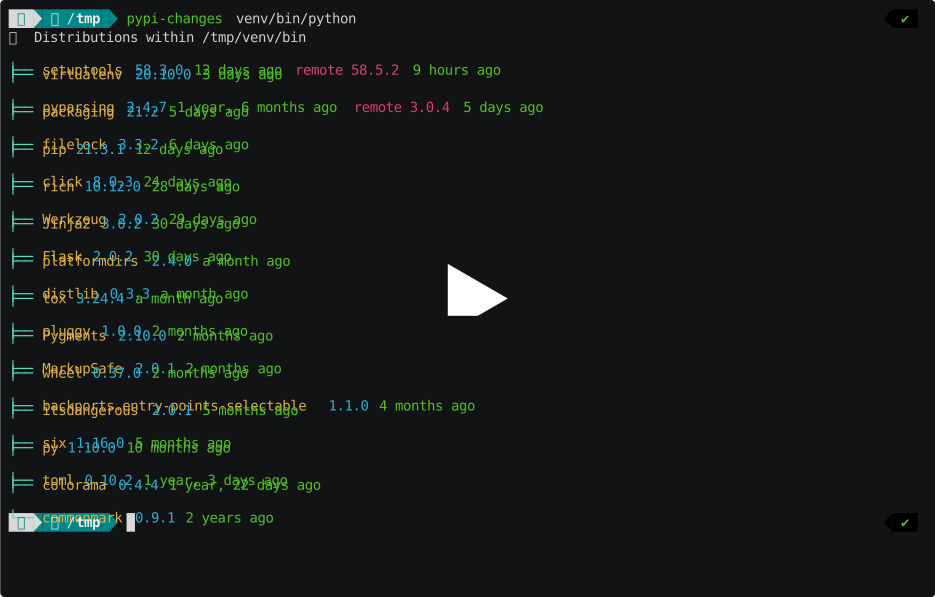
A CLI tool that inspects a Python interpreter's installed packages and compares them against the latest releases on PyPI. It shows which packages are outdated, how long ago each release was published, and highlights major version bumps so you can make informed upgrade decisions.
Getting started
Install from PyPI:
pip install pypi-changes
Run against the current Python interpreter:
pypi-changes
Or point it at a specific interpreter (useful for checking virtual environments):
pypi-changes /path/to/venv/bin/python
How-to guides
Check for outdated packages
Run pypi-changes without arguments to see a tree of all installed packages with their version status. Outdated
packages appear in red, with major version bumps in bold red:
$ pypi-changes
🐍 Distributions within /usr/bin/python
├── virtualenv 20.38.0 10 days remote 21.1.0 2 days
├── certifi 2026.1.4 2 months remote 2026.2.25 4 days
├── rich 14.3.3 9 days
├── packaging 26.0 a month
├── urllib3 1.26.20 1 year, 6 months remote 2.6.3 2 months
├── requests 2.32.5 6 months
├── pluggy 1.6.0 10 months
└── covdefaults 2.3.0 2 years
Generate a requirements file for upgrades
Use the requirements output format to produce a requirements.txt-compatible list of outdated packages pinned to
their latest versions:
$ pypi-changes --output requirements
virtualenv==21.1.0
certifi==2026.2.25
urllib3==2.6.3
wheel-filename==2.1.0
Pipe directly into pip install to upgrade:
pypi-changes --output requirements > upgrades.txt
pip install -r upgrades.txt
Get machine-readable output
Use JSON output for scripting or integration with other tools:
$ pypi-changes --output json
[
  {
    "name": "virtualenv",
    "version": "20.38.0",
    "up_to_date": false,
    "current": {
      "version": "20.38.0",
      "date": "2026-02-19T07:47:59.778389+00:00",
      "since": "10 days"
    },
    "latest": {
      "version": "21.1.0",
      "date": "2026-02-27T08:49:27.516392+00:00",
      "since": "2 days"
    }
  },
  {
    "name": "rich",
    "version": "14.3.3",
    "up_to_date": true,
    "current": {
      "version": "14.3.3",
      "date": "2026-02-19T17:23:13.732467+00:00",
      "since": "9 days"
    },
    "latest": {
      "version": "14.3.3",
      "date": "2026-02-19T17:23:13.732467+00:00",
      "since": "9 days"
    }
  }
]
Each entry includes name, version, up_to_date, and detailed current/latest release information with dates and
human-readable time deltas.
Sort packages alphabetically
By default, packages are sorted by release date (most recently updated first). To sort alphabetically:
pypi-changes --sort alphabetic
Speed up repeated runs with caching
Requests to PyPI are cached in a local SQLite database for 1 hour by default. To adjust the cache duration:
pypi-changes --cache-duration 7200  # cache for 2 hours
pypi-changes --cache-duration 0     # bypass cache entirely
pypi-changes --cache-duration -1    # cache forever
To change the cache file location:
pypi-changes --cache-path /tmp/pypi-cache.sqlite
Use with a private package index
Set the PIP_INDEX_URL environment variable to merge releases from a private index server (e.g. Artifactory) with PyPI
data:
PIP_INDEX_URL=https://my-artifactory.example.com/simple pypi-changes
Control request parallelism
PyPI release information is fetched in parallel. Adjust the number of concurrent requests with --jobs:
pypi-changes --jobs 20  # increase parallelism
pypi-changes --jobs 1   # sequential requests
Reference
Usage
pypi-changes [-h] [--jobs COUNT] [--cache-path PATH] [--cache-duration SEC]
             [--sort [{a,alphabetic,u,updated}]] [--output {tree,json,requirements}]
             [PYTHON_EXE]
Positional arguments
| Argument | Description |
|---|---|
PYTHON_EXE |
Python interpreter to inspect. Defaults to python found on $PATH. |
Options
| Flag | Default | Description |
|---|---|---|
--jobs, -j |
10 |
Maximum number of parallel requests when loading distribution information from PyPI. |
--cache-path, -c |
platform path | Path to the SQLite file used for caching HTTP requests. |
--cache-duration, -d |
3600 |
Seconds to cache requests. 0 bypasses the cache, -1 caches forever. |
--sort, -s |
updated |
Sort order: a/alphabetic or u/updated (most recent first). |
--output, -o |
tree |
Output format: tree, json, or requirements. |
Output formats
tree (default) -- a Rich-rendered tree showing each package with its installed version, time since release, and
remote version if outdated. Major version bumps appear in bold red; minor/patch bumps in red.
json -- a JSON array where each element contains:
name-- package nameversion-- installed versionup_to_date-- booleancurrent-- object withversion,date(ISO 8601), andsince(human-readable delta)latest-- object with the same fields for the newest stable release
requirements -- prints only outdated packages in name==version format, suitable for piping into
pip install -r.
Environment variables
| Variable | Description |
|---|---|
PIP_INDEX_URL |
When set to a non-PyPI URL, merges releases from that index server with PyPI release data. |
How it works
pypi-changes inspects the target Python interpreter's sys.path to discover all installed distributions (packages
with .dist-info or .egg-info directories). It then fetches each package's release history from the
PyPI JSON API in parallel, using a thread pool controlled by --jobs.
Releases are sorted by semantic version. The latest stable release (excluding dev and pre-releases) is selected for comparison against the installed version. When a release has no uploaded artifacts (common for some yanked or placeholder versions), a synthesized timestamp is generated internally for sorting purposes but is not displayed to the user.
HTTP responses are cached in a local SQLite database via requests-cache to avoid redundant network calls on repeated runs. Expired entries are cleaned up automatically on each invocation.
When PIP_INDEX_URL is set to a non-PyPI URL, pypi-changes also queries that index via the
Simple Repository API and merges any
versions not found on PyPI into the release list. This is useful for organizations hosting internal packages on private
registries.
1 maintainer

Download files
Download the file for your platform. If you're not sure which to choose, learn more about installing packages.
Source Distribution
Built Distribution
Filter files by name, interpreter, ABI, and platform.
If you're not sure about the file name format, learn more about wheel file names.
Copy a direct link to the current filters
File details
Details for the file pypi_changes-1.6.0.tar.gz.
File metadata
- Download URL: pypi_changes-1.6.0.tar.gz
- Upload date:
- Size: 137.8 kB
- Tags: Source
- Uploaded using Trusted Publishing? Yes
- Uploaded via:
twine/6.1.0 CPython/3.13.14
File hashes
| Algorithm | Hash digest | |
|---|---|---|
| SHA256 |
74bd4647a637a52457399616d33111bfaf6a3f515818b05bb7a812ab66db7847
|
|
| MD5 |
1d47e6ba5b641eaa856f6d22c59b4efd
|
|
| BLAKE2b-256 |
d46276166510580c86850fbb9b12dcef231778bf9e0bcacbce535074a0eaf8c2
|
Provenance
The following attestation bundles were made for pypi_changes-1.6.0.tar.gz:
Publisher:
release.yaml on gaborbernat/pypi-changes
-
Statement:
-
Statement type:
https://in-toto.io/Statement/v1 -
Predicate type:
https://docs.pypi.org/attestations/publish/v1 -
Subject name:
pypi_changes-1.6.0.tar.gz -
Subject digest:
74bd4647a637a52457399616d33111bfaf6a3f515818b05bb7a812ab66db7847 - Sigstore transparency entry: 2212125469
- Sigstore integration time:
-
Permalink:
gaborbernat/pypi-changes@ff02115a0c57976d6cc2a5bef36e3d8d91de67a5 -
Branch / Tag:
refs/tags/1.6.0 - Owner: https://github.com/gaborbernat
-
Access:
public
-
Token Issuer:
https://token.actions.githubusercontent.com -
Runner Environment:
github-hosted -
Publication workflow:
release.yaml@ff02115a0c57976d6cc2a5bef36e3d8d91de67a5 -
Trigger Event:
push
-
Statement type:
File details
Details for the file pypi_changes-1.6.0-py3-none-any.whl.
File metadata
- Download URL: pypi_changes-1.6.0-py3-none-any.whl
- Upload date:
- Size: 15.3 kB
- Tags: Python 3
- Uploaded using Trusted Publishing? Yes
- Uploaded via:
twine/6.1.0 CPython/3.13.14
File hashes
| Algorithm | Hash digest | |
|---|---|---|
| SHA256 |
2eb0c0ad83b684a8b74590ce52c5badd5f9c9268b5f9b67dcfc3938d77dd0448
|
|
| MD5 |
90c25c3f29641a31b70f067c5543ca3a
|
|
| BLAKE2b-256 |
ab92d3ea8a5dc7be781040e5f7978904245d1dafa399ba0e77b6d8f305fef826
|
Provenance
The following attestation bundles were made for pypi_changes-1.6.0-py3-none-any.whl:
Publisher:
release.yaml on gaborbernat/pypi-changes
-
Statement:
-
Statement type:
https://in-toto.io/Statement/v1 -
Predicate type:
https://docs.pypi.org/attestations/publish/v1 -
Subject name:
pypi_changes-1.6.0-py3-none-any.whl -
Subject digest:
2eb0c0ad83b684a8b74590ce52c5badd5f9c9268b5f9b67dcfc3938d77dd0448 - Sigstore transparency entry: 2212125487
- Sigstore integration time:
-
Permalink:
gaborbernat/pypi-changes@ff02115a0c57976d6cc2a5bef36e3d8d91de67a5 -
Branch / Tag:
refs/tags/1.6.0 - Owner: https://github.com/gaborbernat
-
Access:
public
-
Token Issuer:
https://token.actions.githubusercontent.com -
Runner Environment:
github-hosted -
Publication workflow:
release.yaml@ff02115a0c57976d6cc2a5bef36e3d8d91de67a5 -
Trigger Event:
push
-
Statement type:







