
pypi-cleanup-tui
A thin, visual skin over pypi-cleanup, which performs the actual deletion. Consider using:
- this TUI to cull per-version and visually: selecting by hand, with the survivors in view;
pypi-cleanupdirectly when cull rules are expressible and reusable (.*rc\d+, keep-newest, before-a-date), especially for automation across many packages.
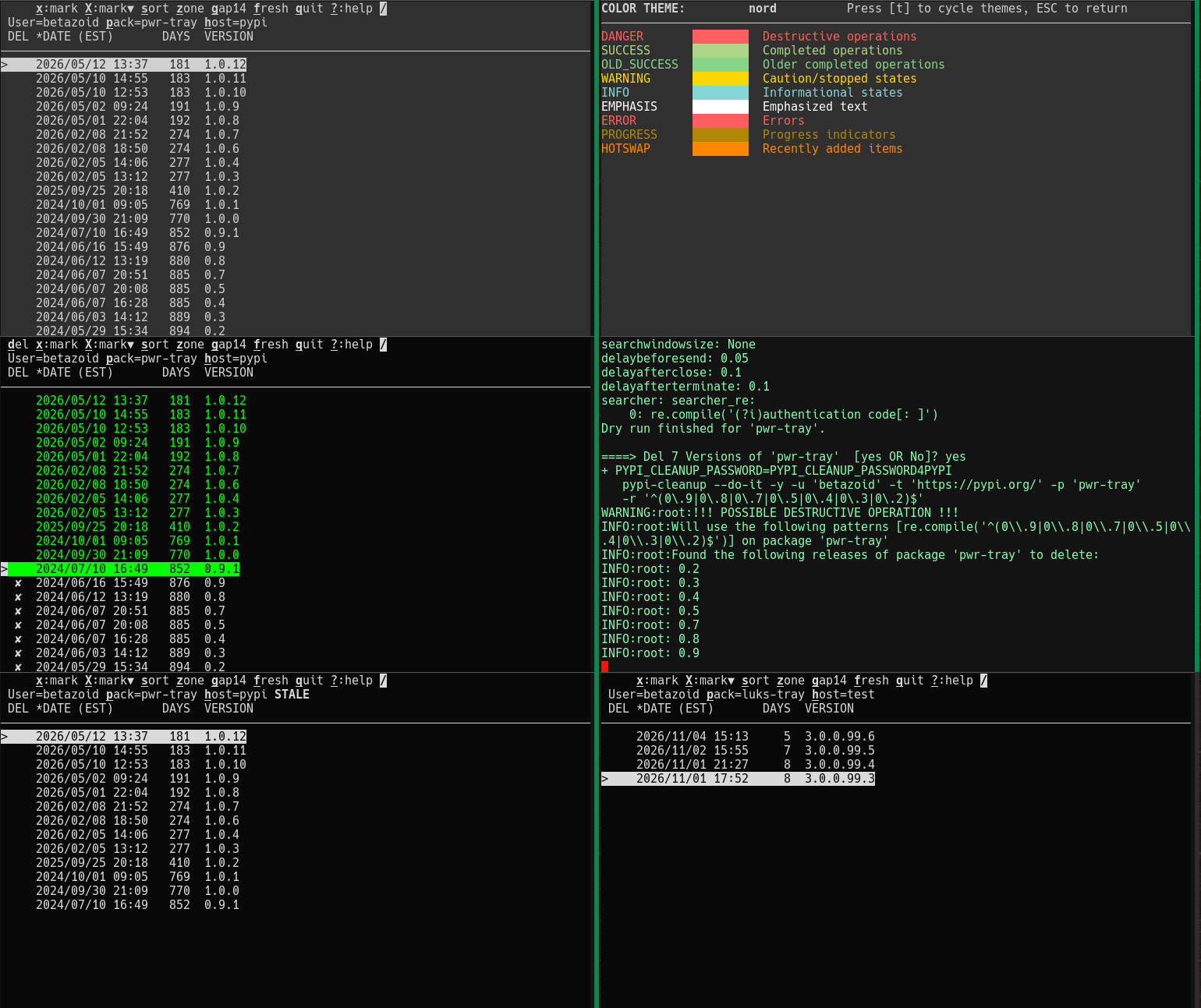
Features
- A package's whole history in one table, with upload date and age in calendar days, so a stale release is visible at a glance.
- Mark with
x/X, clear withu/U-- a selection you can see, with no pattern to get wrong. - A stability gap (
g) unmarks the releases a newer one superseded too soon: what stays is what people actually installed. - Search (
/) over the versions; while a pattern is in force, the marking keys touch only the visible rows. - Move between packages with
p/P, between indexes withh, sort withs, change the date zone withz. - Every deletion is a dry run first, with the command and its report shown before a second confirmation; a read-only run browses with no delete key.
Installation
pipx install -f pypi-cleanup-tui   # install or refresh; -f makes one command do both
pipx install -f pypi-cleanup       # the tool the TUI hands the deletion to
Note: pipx gives the TUI its own environment; the package needs Python 3.11 or newer. The TUI exposes only part of
pypi-cleanup; run that tool directly for anything it lacks, and a read-only run browses without it installed.
Usage
Command line
pypi-cleanup-tui --user alice pack1,pack2 pack3
The first name is the package the table opens; the rest is kept for p and for the next run. Package arguments are cumulative: a run puts its names in front of the remembered list and drops duplicates.
| Featured Option | Meaning |
|---|---|
-u, --user |
the PyPI account, kept for the cleanup step; remembered |
--totp-method |
how the authenticator code is supplied; explained below; remembered |
--totp-dump |
for troubleshooting, show the current authenticator codes for comparison; Ctrl-C exits |
-h, --help |
see every option and the remembered values |
Main screen
| Key | Action |
|---|---|
q |
quit |
? |
open the help screen; ESC returns to the screen that opened it |
/ |
open the incremental search; ENTER closes it, ESC restores the pattern |
T |
open the THEMES screen (also from the help screen); ESC returns to the screen that opened it |
t |
cycle the color theme (THEMES and help screens; mono turns color off) |
p |
show the next package in the list and reload |
P |
open the package list |
h |
switch between pypi.org and test.pypi.org and reload |
f |
refetch the package; marks stay, and STALE clears once the index catches up |
x |
mark the picked release for deletion, then step down |
X |
mark the picked release and every release below it, then step up (unmarked row only) |
u |
unmark the picked release, then step down |
U |
unmark the picked release and every release below it, then step up (marked row only) |
z |
switch the DATE column between UTC and the local time zone (also on the help screen) |
s |
change the sort order |
d |
leave the table, run a pypi-cleanup dry run, then the deletion after a second confirmation (the newest release is unmarked first when the whole history is marked) |
g |
apply the stability gap on the table; on the help screen, rotate the gap instead |
The second header line names the run: User=..., [p]ack=... and [h]ost=...; host is the index key, not a domain. A bold STALE [12m] follows host= while the table is behind the index: either the last refresh failed, or the index still lists a version this run deleted. The age is how long ago the fetch that produced that state was attempted. Once a package has loaded, a failed refresh keeps the old rows and marks and raises the usual alert; a package that never loaded explains the failure in the body instead.
Marked releases take ✘ in DEL and dim; the releases that will be kept stay in the success color. T lists the palettes; its mono entry turns color off.
The column titles are the third header line, with a * on the sorted column and the zone named in DATE. A key block that does not apply is blanked, so nothing to its right moves:
x:mark X:mark▼ sort zone gap30 fresh quit ?:help /     nothing marked, unmarked row
del unmark Unmark▼ sort zone gap30 fresh quit ?:help /     marked, pick on a marked row
R/O unmark Unmark▼ sort zone gap30 fresh quit ?:help /     read-only, d never offered
- An unmarked row offers
x/X; a marked row offersu/U. dleads once something is marked and no pattern is filtering; a read-only run showsR/Oinstead.frefetches the package: marks follow the versions the index still lists, andSTALEclears once a deletion is confirmed. A failed refresh leaves the old table and marks in place, markedSTALE.pypi-cleanupwill not remove every release, so a table with its whole history marked gives the newest release back first -- by upload time, not version number -- and says which version that was above the command. A package holding a single release answers with a shortCannot delete the last remaining version.box instead of leaving the table.
Search and the stability gap
/filters the version column with a case-insensitive regular expression;ENTERcloses it,ESCrestores the previous text, and a closed pattern limitsx,X,uandUto the visible rows. An empty or invalid pattern leaves the table unfiltered.- On the help screen
gpicks the stability gap; on the table it applies it, unmarking every marked release that a newer release superseded within the gap. Days are calendar days in the zonezshows, the newest release counts as stable, and the choice is remembered.
Package screen
P opens the package list, whose rows are also what p rotates through. Each row has one VERs/DELs pair per index, and the pair for the index the table is currently using comes first:
PACKAGES  x:remove ESC:open ?:help
          -- pypi --- -- test ---
  PACKAGE   VERs  DELs   VERs  DELs
✓ alpha        3     0      2     0
✓ beta         2     0      -     -
  gamma        -     -      -     -
- A host label line above the column titles spans each
VERs/DELspair. ✓means this run has loaded the package on either host; a host that has not loaded shows-in both of its columns.DELsis this run's delete count for that host.ESCopens the highlighted package in the table on the current host.xremoves the highlighted package from the TUI's list, not from the index.
Load states
The table remembers the complete state of each (package, host) pair during the run:
uninitialized: no fetch has completed for that pair.loaded: the last fetch succeeded, even if it found no releases.error: the pair has never loaded successfully. The body showsERROR [12s]in the hot-swap color, a blank line, and the wrapped error; a missing package is a singleNO PACKAGE [12s]line. No alert interrupts a first load.stale: the pair loaded in the past, but the last fetch failed or the index still lists a locally deleted version. The old table is kept and the header showsSTALE [12m].
The state markers update as time passes. Switching package or index saves the pair's rows, marks, hidden versions, state and timestamps, and restores them when the pair is revisited. A revisited pair is fetched immediately, except an error pair, which is retried only after 15 minutes unless f is pressed.
Running pypi-cleanup
A normal run first checks that pypi-cleanup, which performs the actual deletion, is installed, and stops with a hint when it is missing. A read-only run skips that check and shows R/O where del would be.
Pressing d leaves the table for the bare terminal, runs a --query-only dry run, then asks again before the --do-it deletion. Note that:
- Each question takes
yes,no, or a bareENTERfor the safe answer (yes to the dry run, no to the deletion). - The printed command is a description, not meant to be copied; a long version pattern is broken after its
|alternations. - When a scoped password supplies a value, a line above the command names the mapping, never the value.
- If you provide
$PYPI_CLEANUP_TOTP_SECRET, then--totp-methodchooses how this TUI assists providing the 6-digit code:expect(default) runspypi-cleanupunderpexpect; you answer prompts until the "Authentication code:" prompt where you pressCtrl+]for the TUI to answer.autoprovides the code w/o manual intervention; you must set$PYPI_CLEANUP_PASSWORD, too.printshows the code and its remaining lifetime above each run; you type it at the prompt (be quick or it may expire).offleaves answering entirely to you; same behavior as no$PYPI_CLEANUP_TOTP_SECRET.
A successful deletion hides the deleted versions and re-fetches the version list. If the fetched list has deleted versions (its CDN can lag), a bold STALE [12m] appears in the header until f finds a new version list credibly up-to-date. If that refetch fails, the locally deleted versions stay hidden and the table stays STALE. Switching package or host preserves each pair's state, so returning to it restores its marker rather than dropping it.
Hints for credentials (to reduce interactive prompts)
- Set
$PYPI_CLEANUP_USER4PYPIand$PYPI_CLEANUP_USER4TESTto override the run's user per index (only needed if the two user names differ).- Set
$PYPI_CLEANUP_PASSWORDto your account's login password to avoid thepypi-cleanuppassword prompt.
- If the pypi and test passwords differ, scope them by appending
4PYPIor4TESTto the names, and this TUI overrides$PYPI_CLEANUP_PASSWORDaccording to scope.- Set
$PYPI_CLEANUP_TOTP_SECRET(and/or its scoped forms) to let this TUI supply the 6-digit code per the--totp-method.
Options are remembered
Your package list, sort order, date zone, gap, theme, user, index and TOTP method persist in ~/.config/pypi-cleanup-tui/config.ini, so a bare pypi-cleanup-tui starts with your previous options. Read-only mode is never remembered.
pypi-cleanup-tui newpack   # newpack, then the stored names
pypi-cleanup-tui pack2     # an already stored name keeps its position
? lists the saved options and the file they came from.
Troubleshooting and Precautions
- Stale Version Lists: the TUI asks the index not to cache, but a proxy or corporate network can still serve old data for up to 15 minutes.
frefetches; after a deletion the header showsSTALE [12m]until the index stops listing the deleted versions. A failed refresh also leaves the old table markedSTALE, with the alert explaining the failure. - Authenticator/TOTP (Time-based One-time Password) Failures: if the TUI's codes are rejected, check the machine's clock is NTP-synced and compare the dumped codes with your authenticator app. If the times agree but the codes do not, recheck the secret.
- General Credential Failures: If
pypi-cleanupfails with an authentication or unrecognized device error (initially or later), log intopypi.organd/ortest.pypi.orgfrom a browser on this same machine and choose to remember the device for 30 days.
License
This project is licensed under the MIT License. See the LICENSE file for details.
1 maintainer

Metadata
1 maintainer
Release files for pypi-cleanup-tui 1.0.1
For a detailed explanation of source distributions (sdists) and built distributions (wheels), please see the package formats documentation.
Source distribution (sdist)
| File | Size | Uploaded | Provenance | Actions |
|---|---|---|---|---|
| pypi_cleanup_tui-1.0.1.tar.gz | 89.7 kB | Without provenance | Details for pypi_cleanup_tui-1.0.1.tar.gz |
Built distribution (wheel)
| File | Interpreter | ABI | Platform | Actions Reset |
|---|---|---|---|---|
| pypi_cleanup_tui-1.0.1-py3-none-any.whl | Python 3 | none | any | Details for pypi_cleanup_tui-1.0.1-py3-none-any.whl |
Total release size: 144.3 kB
Release files / pypi_cleanup_tui-1.0.1.tar.gz
| Download URL | pypi_cleanup_tui-1.0.1.tar.gz |
|---|---|
| Size | 89.7 kB |
| Tags | Source |
|
SHA-256 checksum How to use checksums |
fd5b3b4c8a0768ed74ffce46e0b7832545b5d792518431042f5cc7ca5f0a0d5b
|
|
BLAKE2b-256 checksum How to use checksums |
8f114fd950cf9aa27fc1fbbea3fea1faba37f971680dd85c863c5caeb049f250
|
| Upload date | |
|
Uploaded using Trusted Publishing? What is trusted publishing? |
No |
| Uploaded via |
twine/7.0.0 CPython/3.13.5
|
Release files / pypi_cleanup_tui-1.0.1-py3-none-any.whl
| Download URL | pypi_cleanup_tui-1.0.1-py3-none-any.whl |
|---|---|
| Size | 54.5 kB |
| Tags | Python 3 |
|
SHA-256 checksum How to use checksums |
919349942d7f21dc0cd8d164a77cc82f55d37c7e8cd906fbbf68af36eba8ba85
|
|
BLAKE2b-256 checksum How to use checksums |
c905f0ef262f3cd5371ce36e0d0d2f47f9c95ca007d523a70b5d9ab7bdc81ae7
|
| Upload date | |
|
Uploaded using Trusted Publishing? What is trusted publishing? |
No |
| Uploaded via |
twine/7.0.0 CPython/3.13.5
|
Security for pypi-cleanup-tui 1.0.1
Provenance
Provenance describes where a file came from. On PyPI, provenance is shared via attestations, which provide a verifiable record of the build or publishing details. View details, limitations and caveats.
No provenance found
None of the files in this release were uploaded with provenance metadata.
A note on package security
PyPI is a repository for distributing packages, not a service for auditing them. While third-party security researchers and our staff do their best to detect and remove malicious packages, PyPI cannot guarantee the quality, security or suitability of any given package.
To learn more about protecting yourself from malicious actors, visit our package security documentation.














