
PyPI Package Stats



A Python library and optional CLI tool for PyPI package stats and download analytics, built on the official pypistats API. Fetch daily, weekly, monthly, and 180-day downloads, Python version and OS breakdowns, package metadata, with smart disk caching.
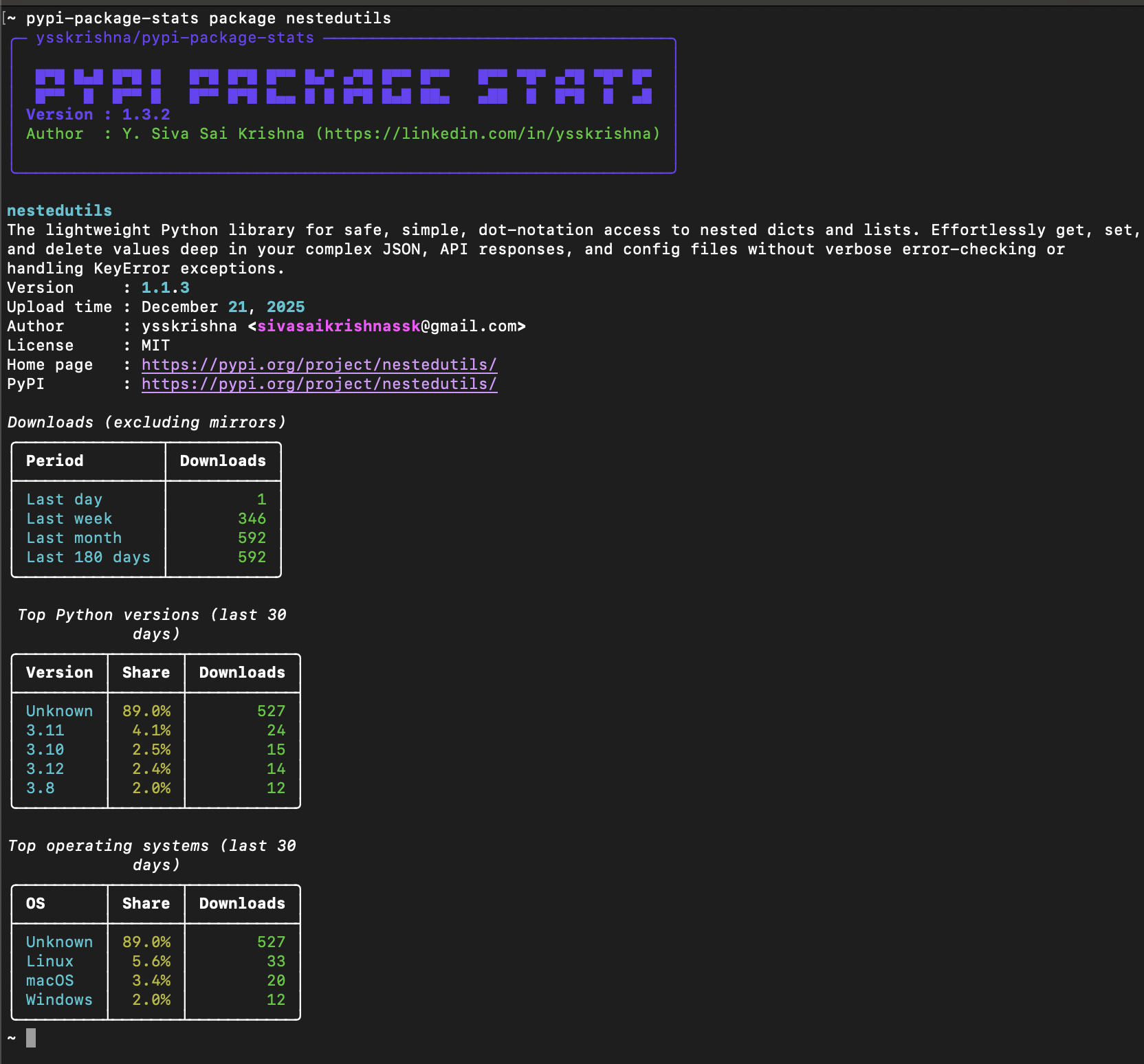
Features
- Package Metadata: Name, version, description, author, license, home page, and PyPI URL
- Download Statistics: Last day, week, month, and 180-day download counts
- Python Version Breakdown: Top 5 Python versions with download percentages (last 30 days)
- Operating System Distribution: Top 4 operating systems with download percentages (last 30 days)
- Dual Interface: Use as a CLI tool or import as a Python library
- Flexible Output for CLI: Human-friendly Rich tables or machine-readable JSON
- Python API: Clean, type-safe API with structured data models
- Smart Disk Caching: Persistent disk cache with configurable TTL (default: 1 hour)
- Cache Management: Inspect cache usage or clear cached responses programmatically or via CLI
Installation
Install the library (no CLI dependencies):
pip install pypi-package-stats
Install with CLI support:
pip install pypi-package-stats[cli]
Library Usage
from pypipackagestats import get_package_stats

# Get package statistics
stats = get_package_stats("requests")

# Access structured data
print(stats.package_info.name)        # "requests"
print(stats.downloads.last_month)     # 123456789

# Convert to dictionary (for JSON serialization)
data = stats.to_dict()
Advanced Options
from pypipackagestats import get_package_stats, clear_cache, get_cache_info

# Disable caching for fresh data
stats = get_package_stats("requests", no_cache=True)

# Custom cache TTL (5 minutes = 300 seconds)
stats = get_package_stats("django", cache_ttl=300)

# Clear all cached responses
clear_cache()

# Get cache statistics
cache_info = get_cache_info()
print(f"Cache size: {cache_info['size']} entries")
print(f"Cache directory: {cache_info['directory']}")
API Reference
Functions
| Function | Description |
|---|---|
get_package_stats(name, *, no_cache=False, cache_ttl=None) |
Fetch all statistics for a PyPI package. Returns a PackageStats object. |
clear_cache() |
Clear all cached API responses. |
get_cache_info() |
Return cache size and directory information. |
CLI Usage
Requires the
cliextra:pip install pypi-package-stats[cli]
| Command | What you get |
|---|---|
pypi-package-stats package <name> |
Main view (metadata + downloads) |
pypi-package-stats package <name> --json |
Machine-friendly JSON output |
pypi-package-stats package <name> --no-cache |
Bypass cache for this request |
pypi-package-stats package <name> --cache-ttl <seconds> |
Set custom cache TTL |
pypi-package-stats cache-clear |
Remove all cached responses |
pypi-package-stats cache-info |
Show cache statistics |
pypi-package-stats --help |
Show help message |
Example:
pypi-package-stats package nestedutils --json
Example JSON Output:
{
  "package": {
    "name": "nestedutils",
    "version": "1.1.7",
    "upload_time": "2026-01-25",
    "description": "The lightweight Python library for safe, simple, dot-notation access to nested dicts and lists. Effortlessly get, set, and delete values deep in your complex JSON, API responses, and config files without verbose error-checking or handling KeyError exceptions.",
    "author": "ysskrishna <sivasaikrishnassk@gmail.com>",
    "license": "MIT",
    "home_page": "https://pypi.org/project/nestedutils/",
    "pypi_url": "https://pypi.org/project/nestedutils/"
  },
  "downloads": {
    "last_day": 1,
    "last_week": 112,
    "last_month": 307,
    "last_180d": 1142
  },
  "python_versions": [
    {
      "version": "null",
      "downloads": 278,
      "percentage": 92.4
    },
    {
      "version": "3.10",
      "downloads": 8,
      "percentage": 2.7
    },
    {
      "version": "3.11",
      "downloads": 4,
      "percentage": 1.3
    },
    {
      "version": "3.12",
      "downloads": 4,
      "percentage": 1.3
    },
    {
      "version": "3.13",
      "downloads": 4,
      "percentage": 1.3
    }
  ],
  "operating_systems": [
    {
      "os": "null",
      "downloads": 278,
      "percentage": 92.4
    },
    {
      "os": "Linux",
      "downloads": 19,
      "percentage": 6.3
    },
    {
      "os": "Darwin",
      "downloads": 4,
      "percentage": 1.3
    }
  ]
}
For full CLI documentation, see the CLI Guide.
Data Source & Rate Limiting
This tool uses the pypistats API to fetch PyPI package statistics. The API enforces IP-based rate limits (for example, ~5 requests/sec and ~30 requests/min at the time of writing). These limits are set by pypistats.org and may change over time.
The built-in caching system helps minimize API calls and reduce the chance of hitting rate limits. If you encounter rate limit errors, wait a few seconds between requests if making multiple queries.
Limitations
- Python version and OS breakdowns are limited to the last 30 days
- Data availability depends on the pypistats service
- Data is usually 24-48 hours behind (pypistats limitation)
Use Cases
- Compare popularity of Python libraries
- Track adoption trends of your own packages
- Generate download statistics for reports or dashboards
- Automate analytics workflows using the library API or CLI JSON output
- Integrate PyPI stats into your Python applications
- Build custom dashboards and monitoring tools
Contributing
We welcome contributions! Please see our Contributing Guide for details.
Support
If you find this library helpful:
- ⭐ Star the repository
- 🐛 Report issues
- 🔀 Submit pull requests
- 💝 Sponsor on GitHub
License
MIT © Y. Siva Sai Krishna - see LICENSE for details.
Author's GitHub • Author's LinkedIn • Package documentation • Package on PyPI • Report Issues • Changelog • Release History •
1 maintainer

Metadata
1 maintainer
Release files for pypi-package-stats 1.5.3
For a detailed explanation of source distributions (sdists) and built distributions (wheels), please see the package formats documentation.
Source distribution (sdist)
| File | Size | Uploaded | |
|---|---|---|---|
| pypi_package_stats-1.5.3.tar.gz | 1.0 MB | Details |
Built distribution (wheel)
| File | Interpreter | ABI | Platform | Reset |
|---|---|---|---|---|
| pypi_package_stats-1.5.3-py3-none-any.whl | Python 3 | none | any | Details |
Total release size: 1.0 MB
Release files / pypi_package_stats-1.5.3.tar.gz
| Download URL | pypi_package_stats-1.5.3.tar.gz |
|---|---|
| Size | 1.0 MB |
| Tags | Source |
|
SHA-256 checksum How to use checksums |
edeedaa098de9927c3f87cfc91ec1f5f839721c7171767783014d9c7406f7be8
|
|
BLAKE2b-256 checksum How to use checksums |
4205cf01234b61bbab18e9a6dac407af218bfbbbf79908a57391c74cd2ad68be
|
| Upload date | |
|
Uploaded using Trusted Publishing? What is trusted publishing? |
Yes |
| Uploaded via |
uv/0.10.9 {"installer":{"name":"uv","version":"0.10.9","subcommand":["publish"]},"python":null,"implementation":{"name":null,"version":null},"distro":{"name":"Ubuntu","version":"24.04","id":"noble","libc":null},"system":{"name":null,"release":null},"cpu":null,"openssl_version":null,"setuptools_version":null,"rustc_version":null,"ci":true}
|
Release files / pypi_package_stats-1.5.3-py3-none-any.whl
| Download URL | pypi_package_stats-1.5.3-py3-none-any.whl |
|---|---|
| Size | 19.3 kB |
| Tags | Python 3 |
|
SHA-256 checksum How to use checksums |
32ea999df03eab4e746ac8f384fb649fb84a4d828497ce78dd043c6e8ac69b8b
|
|
BLAKE2b-256 checksum How to use checksums |
db67ae528d3d98a00b8fe1db1109351fd82a0320e6df75d0aa99a14e0ef0f68b
|
| Upload date | |
|
Uploaded using Trusted Publishing? What is trusted publishing? |
Yes |
| Uploaded via |
uv/0.10.9 {"installer":{"name":"uv","version":"0.10.9","subcommand":["publish"]},"python":null,"implementation":{"name":null,"version":null},"distro":{"name":"Ubuntu","version":"24.04","id":"noble","libc":null},"system":{"name":null,"release":null},"cpu":null,"openssl_version":null,"setuptools_version":null,"rustc_version":null,"ci":true}
|














