
pypillometry
Preprocessing, analysis and visualization of pupillometric and eye-tracking data in Python.






Documentation · Quickstart · Tutorials · API reference
pypillometry reads recordings from eye trackers (e.g., Eyelink EDF files), cleans them (blinks, artifacts, filtering), cuts them into event-related segments and plots the results. Pupil size and gaze position of one or both eyes are kept together in a single object, and every processing step is recorded in the object's history.
Installation
pip install pypillometry
pypillometry requires Python 3.11 or newer. See the installation guide for the development version and conda environments.
Quick example
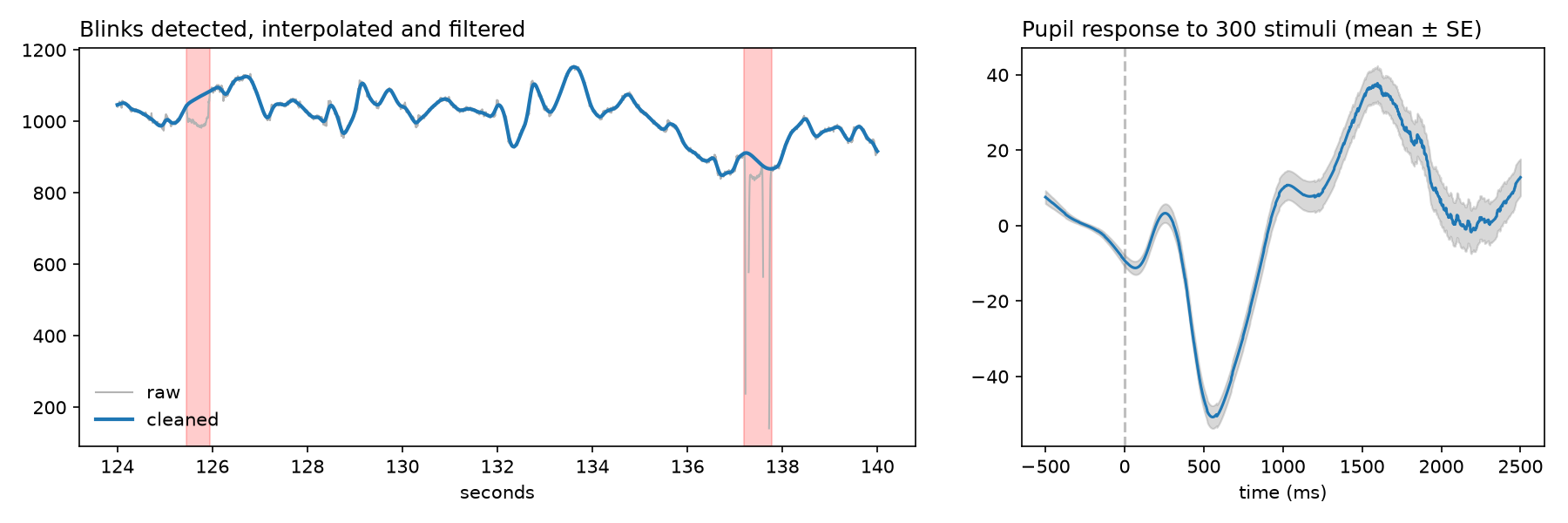
From raw data to an event-related pupil response, using one of the bundled example datasets:
import pypillometry as pp
from pypillometry import u

d = pp.get_example_data("rlmw_002")     # or: pp.EyeData.from_eyelink("recording.edf")
d = (d | pp.pupil.blinks_detect()       # detect and mask blinks
       | pp.pupil.blinks_interpolate()  # interpolate them
       | pp.pupil.lowpass_filter(cutoff=4))  # 4 Hz low-pass filter

# pupil response from 500 ms before to 2.5 s after each stimulus
epochs = d.get_epochs("S_", (-500, 2500) * u.ms)
erpd = d.get_segments(epochs, "left_pupil").pupil.baseline_correct((-500, 0))
erpd.pupil.plot()
The quickstart walks through this example step by step.
Features
- Reading data from Eyelink EDF and ASC files, saved pickle files, and whole studies from a local folder or OSF
- Binocular data: pupil size and gaze of both eyes in one object
- Blinks: detection, merging and interpolation (Mathôt, 2013)
- Filtering: low-pass filtering, smoothing, downsampling, scaling
- Events and intervals with flexible selection by label, function or time
- Event-related pupil dilation for single subjects and groups
- Units everywhere:
3 * u.min,"200 ms",60 * u.cm - Interactive viewer for long recordings, and command-line tools
- Modeling of tonic baseline and phasic pupil responses (Mittner & Groot, 2025)
Interactive viewer and command-line tools
pp.view(d) opens a fast, zoomable viewer for long recordings; pp.tweak()
lets you adjust preprocessing parameters while watching the result. The same
viewer is available from the command line:
pypilview recording.edf            # view an Eyelink file or a saved object
edf2pypil recording.edf            # convert EDF once, load much faster later
pypilinfo data/*.pkl               # print a summary of one or more files
pypil-upgrade -i data/             # convert files saved with older versions
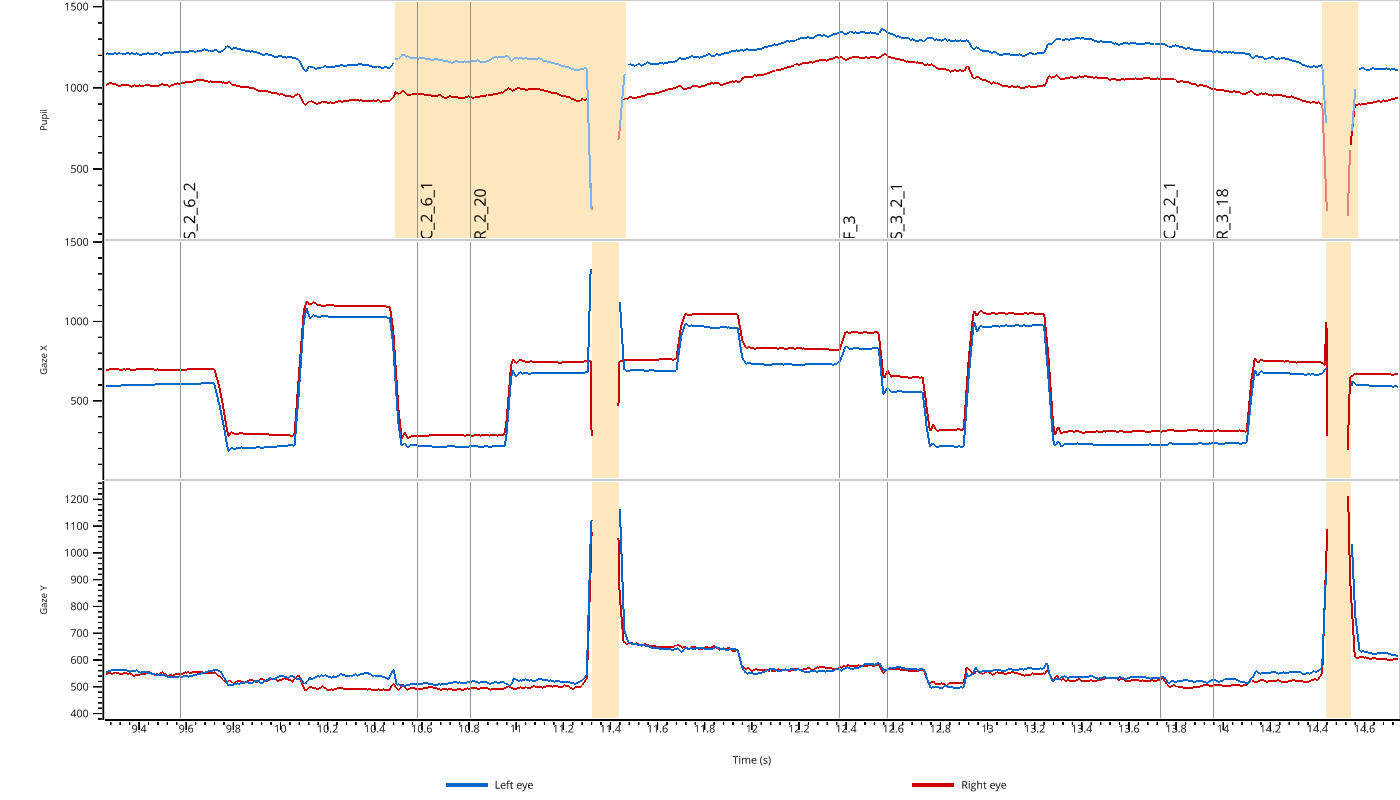
See interactive tools and command-line programs in the documentation.
Coming from version 1?
Version 2 is a major restructuring: it handles eye-tracking data in addition
to pupillometry, and more than one eye at a time. Scripts written for
version 1 need to be updated (see the
changelog).
Version 1 is still available on the
v1 branch, with its
documentation, and
can be installed with pip install "pypillometry<2".
Citing pypillometry
If you use pypillometry in your research, please cite
Mittner, M. (2020). pypillometry: A Python package for pupillometric analyses. Journal of Open Source Software, 5(51), 2348. https://doi.org/10.21105/joss.02348
If you use the estimation of tonic and phasic pupil components, please also cite
Mittner, M., & Groot, J. M. (2025). A novel method for modeling tonic and phasic pupil dynamics in humans. Behavior Research Methods, 57(9), 233. https://doi.org/10.3758/s13428-025-02755-7
Contributing
Bug reports and feature requests are welcome on the issue tracker. See the development guide for how to contribute code.
pypillometry is maintained by Matthias Mittner (matthias.mittner@uit.no) and released under the MIT license.
1 maintainer

Metadata
1 maintainer
Release files for pypillometry 2.2.3
For a detailed explanation of source distributions (sdists) and built distributions (wheels), please see the package formats documentation.
Source distribution (sdist)
| File | Size | Uploaded | Provenance | Actions |
|---|---|---|---|---|
| pypillometry-2.2.3.tar.gz | 3.0 MB | Without provenance | Details for pypillometry-2.2.3.tar.gz |
Built distribution (wheel)
| File | Interpreter | ABI | Platform | Actions Reset |
|---|---|---|---|---|
| pypillometry-2.2.3-py3-none-any.whl | Python 3 | none | any | Details for pypillometry-2.2.3-py3-none-any.whl |
Total release size: 3.6 MB
Release files / pypillometry-2.2.3.tar.gz
| Download URL | pypillometry-2.2.3.tar.gz |
|---|---|
| Size | 3.0 MB |
| Tags | Source |
|
SHA-256 checksum How to use checksums |
6a75159b9bd4cb267f39a622736127da5e2fd357845a84bb7ca76c936061c30d
|
|
BLAKE2b-256 checksum How to use checksums |
03f6b33f7900fa27ae23b8413e4584b54cdca715a0f74663742447bd1acf8d63
|
| Upload date | |
|
Uploaded using Trusted Publishing? What is trusted publishing? |
No |
| Uploaded via |
twine/7.0.0 CPython/3.13.18
|
Release files / pypillometry-2.2.3-py3-none-any.whl
| Download URL | pypillometry-2.2.3-py3-none-any.whl |
|---|---|
| Size | 662.5 kB |
| Tags | Python 3 |
|
SHA-256 checksum How to use checksums |
5420a628bce7bad06384ea5b58ab8415c6a576352d315a56d9ded289065e0516
|
|
BLAKE2b-256 checksum How to use checksums |
8a394207e705957830e3b7531c7798e8d08e2bfc314955c9a39ed4fcf7aff86b
|
| Upload date | |
|
Uploaded using Trusted Publishing? What is trusted publishing? |
No |
| Uploaded via |
twine/7.0.0 CPython/3.13.18
|
Security for pypillometry 2.2.3
Provenance
Provenance describes where a file came from. On PyPI, provenance is shared via attestations, which provide a verifiable record of the build or publishing details. View details, limitations and caveats.
No provenance found
None of the files in this release were uploaded with provenance metadata.
A note on package security
PyPI is a repository for distributing packages, not a service for auditing them. While third-party security researchers and our staff do their best to detect and remove malicious packages, PyPI cannot guarantee the quality, security or suitability of any given package.
To learn more about protecting yourself from malicious actors, visit our package security documentation.














